Nlog: Custom target with async attribute get incorrect timestamp and order of logs
NLog version: 4.6.5
Platform: WebApi 2.1 .net47
Current NLog config
<nlog xmlns="http://www.nlog-project.org/schemas/NLog.xsd" xmlns:xsi="http://www.w3.org/2001/XMLSchema-instance">
  <targets async="true">
      <target name="graylogt" xsi:type="GraylogHttp" facility="WebApi" graylogServer="http://graylog" graylogPort="12201">
        <parameter name="current_user" layout="${aspnet-user-identity}" />
        <parameter name="exception_type" layout="${exception:Type}" />
        <parameter name="request" layout="${aspnet-request-method} ${aspnet-request-url}" />
        <parameter name="site" layout="${iis-site-name} ${aspnet-appbasepath}" />
        <parameter name="request_body" layout="${onexception:${aspnet-request-posted-body}:when=level>=LogLevel.Error}" />
      </target>
    </targets>
    <rules>
     <logger name="*" minlevel="debug" writeTo="graylogt" />
    </rules>
  </nlog>
Hi, I use a https://github.com/dustinchilson/NLog.Targets.GraylogHttp for graylog.
In order to don't block the thread for logging I use an async attribute. But logs have incorrect timestamps and order(compare to sync mode). I can't use "sync" logs, because every log operation takes 0.2 sec.
- What is the current result?
Incorrect order and timestamp of logs
- What is the expected result?
Correct order and timestamps
 Kirya522
All 41 comments
Hi! Thanks for opening your first issue here! Please make sure to follow the issue template - so we could help you better!
![welcome[bot] picture](https://avatars.githubusercontent.com/in/4141?v=4&s=40) welcome[bot]
on 12 Aug 2019
welcome[bot]
on 12 Aug 2019
Hi,
Could you please test this with a logfile (file target)? Is there the same issue?
 304NotModified
on 12 Aug 2019
304NotModified
on 12 Aug 2019
I have tested file target before all the same, except in sync mode file is much faster than that target
Kirya522
on 12 Aug 2019
Please share your logger calls because wrong timestamp sounds unlikely
304NotModified
on 12 Aug 2019
@Kirya522 I think GraylogHttp is not guaranteed to send http-requests in-order. It only promises to throttle when http-exceptions occurs.
Could you try using NLog.GelfLayout ver. 0.4 and try this instead:
<nlog xmlns="http://www.nlog-project.org/schemas/NLog.xsd" xmlns:xsi="http://www.w3.org/2001/XMLSchema-instance">
  <extensions>
    <add assembly="NLog.Web" />
    <add assembly="NLog.Layouts.GelfLayout" />
  </extensions>
  <targets async="true">
      <target name="graylogt" xsi:type="network" address="http://graylog:12201">
        <layout xsi:type="GelfLayout" facility="WebApi">
          <field name="current_user" layout="${aspnet-user-identity}" />
          <field name="exception_type" layout="${exception:Type}" />
          <field name="request" layout="${aspnet-request-method} ${aspnet-request-url}" />
          <field name="site" layout="${iis-site-name} ${aspnet-appbasepath}" />
          <field name="request_body" layout="${onexception:${aspnet-request-posted-body}:when=level>=LogLevel.Error}" />
        </layout>
      </target>
  </targets>
  <rules>
     <logger name="*" minlevel="debug" writeTo="graylogt" />
  </rules>
</nlog>
Instead of using address="http:// then you could consider using address="tcp:// together with lineEnding="Null".
 snakefoot
on 12 Aug 2019
snakefoot
on 12 Aug 2019
I think
GraylogHttpis not guaranteed to send http-requests in-order
I think in-order is also not important, because every log item has a timestamp. And i'm pretty sure that timestamp is correct in NLog, so maybe not correct processed by the gelf target?
304NotModified
on 12 Aug 2019
I think in-order is also not important, because every log item has a timestamp
One can easily generate multiple logevents with the same timestamp, especially if not using AccurateUTC (And it is still possible even if doing so).
snakefoot
on 12 Aug 2019
Good one. We have also ${sequenceid}, but that's then also a work around?
304NotModified
on 12 Aug 2019
But this thing happens in file too, so target doesn't make sense. I am trying to get an example, it will be as soon as possible. The problem is in sync mode I have a timestamp of operation and in message I see operation took 0.5s and difference in timestamps(start to end) is all right(nearly 0.5s), in async strange things come, I don't change code, but end logs may come above start and timestamps of start and end are the same
Kirya522
on 13 Aug 2019
If you can make an example of logevents being reordered when writing to file. Then I will be happy to look at it.
But maybe the issue is the locations you are doing logging in the ASP..NET where the order of logging operations is not predictable.
Know very little about ASP.NET
snakefoot
on 13 Aug 2019
@snakefoot
my web-config now:
two targets: one in async and one in sync
<nlog xmlns="http://www.nlog-project.org/schemas/NLog.xsd" xmlns:xsi="http://www.w3.org/2001/XMLSchema-instance">
    <variable name="logDirectory" value="c:/logs/MyApp" />
    <targets async="true">
      <target name="performance" xsi:type="File" fileName="${logDirectory}/performance/performance.log"
layout="${longdate}
[${tmdlc:OperationId}]
${level:uppercase=true:padding=-5}
${tmdlc:Request}
${tmdlc:RequestBody}
${tmdlc:Logins:whenEmpty=${gdc:Logins}}
${message}"
archiveFileName="${logDirectory}/performance/archive/performance.${shortdate}.log" maxArchiveFiles="31"
archiveNumbering="Rolling"
archiveEvery="Day" />
      </target>
    </targets>
    <targets>
      <target name="logfile" xsi:type="File" fileName="${logDirectory}/info/info.log" />
    </targets>
    <rules>
      <logger name="performance" minlevel="Trace" writeTo="performance" />
      <logger name="*" minlevel="Info" writeTo="logfile" />
    </rules>
  </nlog>
tmldc - my renderer in no auth mode(nlog.web analog)
logger usage :
```c#
NLog.LogManager.GetLogger("performance").Info("foo");
Thread.Sleep(3);
NLog.LogManager.GetLogger("performance").Info("bar");
but actually in logs i get next thing: same time for both logs, and if i make the sleep more than 3 ms (up to 10 ms or higher in tests) time is the same async logs:

```log
2019-08-13 18:14:57.1634 [7b-4all] INFO  POST http://localhost/MyApp/Api/SomeApi {"op":23353,"vp":2579} sc\protopopenko foo
2019-08-13 18:14:57.1634 [7b-4all] INFO  POST http://localhost/MyApp/Api/SomeApi {"op":23353,"vp":2579} sc\protopopenko bar
And sync logs:
2019-08-13 18:14:57.1634|INFO|performance|foo
2019-08-13 18:14:57.1634|INFO|performance|bar
Timestamps are the same but sometimes logs come in incorrect order this is very strange
Kirya522
on 13 Aug 2019
the sleep more than 3 ms
FYI, the default Accuracy is 16ms. I would recommend to use AccurateUTC, see https://github.com/NLog/NLog/wiki/Time-Source
304NotModified
on 13 Aug 2019
I will check it, thx
Kirya522
on 13 Aug 2019
@Kirya522 Timestamps are the same but sometimes logs come in incorrect order this is very strange
If you can provide an example application that reproduces the issue with incorrect ordering of logevents when using file-target (async or sync), then I'm very interested.
snakefoot
on 13 Aug 2019
Instead of using
address="http://then you could consider usingaddress="tcp://together withlineEnding="Null".
I have tried tcp, but http sender only works in this target, I managed to create new tcp input but nothing changed
Kirya522
on 22 Aug 2019
Look at first comment about using NLog network target with GelfLayout.
I know GrayLogHttp does not support TCP
snakefoot
on 22 Aug 2019
@snakefoot You didn't understand, now i am using network target with NLog.GelfLayout ver. 0.4, but tcp doesn't work
Kirya522
on 22 Aug 2019
Have you setup your Graylog instance to use TCP? Are you using the right port? Have you checked NLog InternalLogger?
Does network target with http work?
snakefoot
on 22 Aug 2019
I added new TCP GELF input with new port(input is running). Http target works properly. Also I didn't forget to change protocol and port in web.config.
Kirya522
on 22 Aug 2019
Guess you have to check the NLog InternalLogger to investigate TCP. Sadly enough the NLog Network Target can also send out-of-order when using HTTP. See also #3546
snakefoot
on 22 Aug 2019
My graylog config
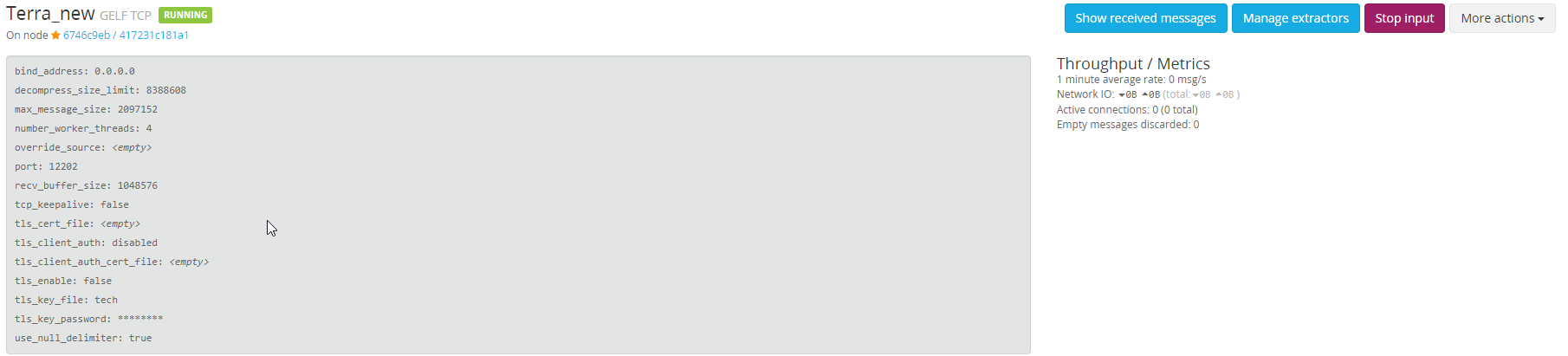
internal logging return this
Error NetworkTarget(Name=graylogt_wrapped): Error when sending. Exception :System.IO.IOException:
Error: ConnectionRefused
Kirya522
on 22 Aug 2019
Are you able to make a telnet connection to the port number on Graylog? (or use some other tool that can verify that firewall or other is not blocking)
Never used Graylog myself. So I'm a poor help in that area.
snakefoot
on 22 Aug 2019
Yeah change port to 12221, i think firewall on server. But now i am missing messages I have tried using different line endings from (none to crlf) and changed in graylog string endings, but i get only 1 message
Kirya522
on 22 Aug 2019
So TCP is now working. But you only get one log message over to Graylog? And you have disabled Http on Graylog (or moved it to different port than TCP uses)
Again not a super hero when it comes to diagnosing Graylog connection issues. Maybe another forum is better?
snakefoot
on 22 Aug 2019
Thx, U really helped me, but i disabled http target. And have only 1 msg from tcp)
Kirya522
on 22 Aug 2019
Can only advice you to find someone that knows more about using TCP on Graylog. And who can analyze why TCP communication fails.
snakefoot
on 22 Aug 2019
Could you try the setting: keepConnection="False" on the NLog Network Target?
If it works then it is not the most optimal solution, but it will send in order.
snakefoot
on 22 Aug 2019
Well, this thing works, but with many logs it can create multiple connections, so i will continue to look around
Kirya522
on 23 Aug 2019
What happens if you configure keepConnection="True" and lineEnding="Null" ?
snakefoot
on 23 Aug 2019
Oh i am stupid haven't seen that line ending doesn't work without newLine ="true" and now it works allright, thx u really helped me
Kirya522
on 23 Aug 2019
This problem can be closed because the main problem is that custom target doesn't have queue at all, so as a result races in http create problems
Kirya522
on 23 Aug 2019
Happy the problem has been resolved. Could you post your final nlog-config for others to witness?
snakefoot
on 23 Aug 2019
So my final nlog-config is
<nlog xmlns="http://www.nlog-project.org/schemas/NLog.xsd" xmlns:xsi="http://www.w3.org/2001/XMLSchema-instance">
    <time type="AccurateUTC" />
    <extensions>
      <add assembly="NLog.Web" />
      <add assembly="NLog.Layouts.GelfLayout" />
    </extensions>
    <targets async="true">
      <target name="graylogt" xsi:type="network" address="tcp://graylog:12200" newLine ="true" lineEnding="Null" >
        <layout xsi:type="GelfLayout" facility="WebApi">
          <field name="current_user" layout="${aspnet-user-identity}" />
          <field name="exception_type" layout="${exception:Type}" />
          <field name="request" layout="${aspnet-request-method} ${aspnet-request-url}" />
          <field name="site" layout="${iis-site-name} ${aspnet-appbasepath}" />
          <field name="request_body" layout="${onexception:${aspnet-request-posted-body}:when=level>=LogLevel.Error}" />
        </layout>
      </target>
    </targets>
    <rules>
        <logger name="*" minlevel="debug" writeTo="graylogt" />
    </rules>
  </nlog>
and here is my graylog input
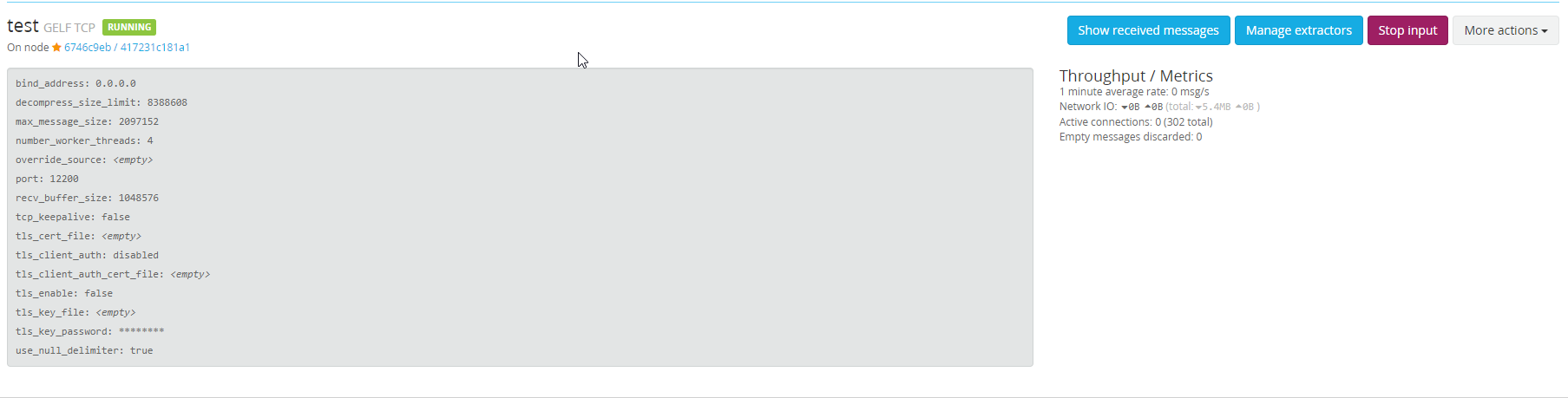
Kirya522
on 23 Aug 2019
Well i have tried this thing in prod and out of order happens again, graylog sorts default by timestamp, logs with the same time stamps sorts with ti,e of coming and the order isn't right. I have used sequenceId to show it. In text file everything is right and order is correct. Maybe there is the problem with queue in async mode?
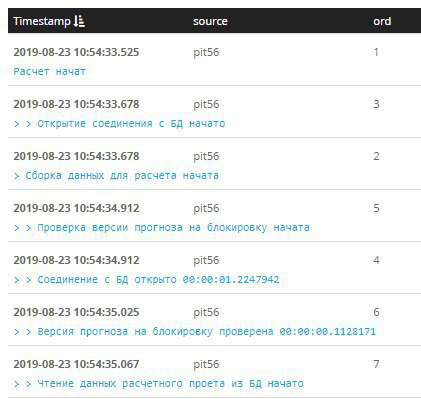
Kirya522
on 23 Aug 2019
Sorry it's gaylog bugs it sorts everything not by time of coming but by message so the easiest solution is to add sequenceId in message before everything, but now i am looking to change graylog web interface to graphana
Kirya522
on 23 Aug 2019
Sounds like this whole adventure was triggered by "graylog web interface" then.
But I'm very happy that you "volunteered" to test "NLog.Layouts.GelfLayout" with NLog Network-Target.
Will make an update to the documentation with your updated NLog.config example. So others can use graylog with minimum of friction.
Maybe I could make a small "fix" to "NLog.Layouts.GelfLayout" so the timestamp tries to be unique. And only when sending more than 10000 msgs/sec then it it will be out-of-order.
snakefoot
on 23 Aug 2019
Well in grafana interface logs is out of order too so I think that graylog save logs out of order in elastic with same timestamp.
So order of logs become unpredictable, logs sort not by time of coming from old to new and not by string compare of messages.
For example I sent logs with the same timestamp, but different messages, the first is 36 and the second is 37, and "second" comes first, that's very strange, I sent this message through graylog api via postman.
Kirya522
on 23 Aug 2019
Again if you are not sending 10000 msg/sec then I think it can be fixed in the "NLog.Layouts.GelfLayout" to ensure "unique" timestamps.
snakefoot
on 23 Aug 2019
Well, waiting for update)
Kirya522
on 23 Aug 2019
Created PR https://github.com/farzadpanahi/NLog.GelfLayout/pull/14 for you. Introduces a new setting FixDuplicateTimestamp (Default = False)
Can handle bursts of 9 unique timestamps within the same millisecond:
- If time-resolution is 16 millisecond, then it will support 500 msgs/sec. with unique timestamp.
- If time-resolution is 1 millisecond (AccurateUTC), then it will support 9000 msgs/sec with unique timestamp.
snakefoot
on 24 Aug 2019
NLog ver. 4.6.7 changes the Network Target so Http-requests are sent in-order by using a queue (Just like for TCP). See also #3546
snakefoot
on 31 Aug 2019
Related issues
 staufour
·
26Comments
staufour
·
26Comments
 nblumhardt
·
39Comments
nblumhardt
·
39Comments
 kappa7194
·
28Comments
kappa7194
·
28Comments
 tai-yi
·
31Comments
tai-yi
·
31Comments
 kshkrao3
·
25Comments
kshkrao3
·
25Comments
Most helpful comment
Created PR https://github.com/farzadpanahi/NLog.GelfLayout/pull/14 for you. Introduces a new setting
FixDuplicateTimestamp(Default =False)Can handle bursts of 9 unique timestamps within the same millisecond: