Nlog: Incorrect log path in single file publish
NLog version: (e.g. 4.6.6)
Platform: .NET Core 3 Preview6
Current NLog config (xml or C#, if relevant)
<?xml version="1.0" encoding="utf-8" ?>
<nlog xmlns="http://www.nlog-project.org/schemas/NLog.xsd"
      xmlns:xsi="http://www.w3.org/2001/XMLSchema-instance"
      autoReload="true"
      internalLogLevel="Warn" internalLogToConsole="true" internalLogToConsoleError="true">
  <targets>
    <target xsi:type="File" name="info" fileName="log\info-${shortdate}.log"
            layout="${longdate} [${level}]: ${logger}${newline} Message: ${message}${newline}" />
    <target xsi:type="File" name="war" fileName="log\war-${shortdate}.log"
            layout="${longdate} [${level}]: ${logger}${newline} Message: ${message}${newline}Exception: ${exception:format=tostring}${newline}" />
    <target xsi:type="Null" name="blackhole" />
  </targets>
  <rules>
    <logger name="Microsoft.AspNetCore.Hosting.Internal.WebHost*" minlevel="Info" maxLevel="Info" writeTo="info" />
    <logger name="*" minlevel="Info" maxLevel="Info" writeTo="info" />
    <!--Skip non-critical Microsoft logs and so log only own logs-->
    <!-- BlackHole without writeTo -->
    <logger name="*" minlevel="Warn" writeTo="war" />
    <logger name="Microsoft.*" minlevel="Trace" maxLevel="Info" writeTo="blackhole" final="true" />
  </rules>
</nlog>
.NetCore 3 Preview6 Console App published in single file model.
- Publish
dotnet publish -p:PublishSinlgefile=true -r win-x64 - Copy the exe file to another folder(include
nlog.config)
    /app-sandbox
        ConsoleApp.exe
        nlog.config
3. Run 'ConsoleApp.exe'
- What is the current result?
Log folder in %Temp%/.net/ConsoleApp/xxxxxxx.xxx/
What is the expected result?
/app-sandbox
  ConsoleApp.exe
  nlog.config
  log/
    infor-date.log
Are there any workarounds? yes
Write full path in thenlog.configCan you help us by writing an unit test?
 tai-yi
All 31 comments
Hi! Thanks for opening your first issue here! Please make sure to follow the issue template - so we could help you better!
![welcome[bot] picture](https://avatars.githubusercontent.com/in/4141?v=4&s=40) welcome[bot]
on 16 Jul 2019
welcome[bot]
on 16 Jul 2019
Hi!
Could you please test with ${basedir},
${basedir:processDir=true} and ${currentdir}?
Thanks in advance!
 304NotModified
on 16 Jul 2019
304NotModified
on 16 Jul 2019
@304NotModified thanks
${basedir:processDir=true} and ${currentdir} work well.
Another issue
If nlog.config both in %Temp%/.net/ConsoleApp/xxxxxxx.xxx/ (.netcore extract path) and the big exe file folder.
I have to change all nlog.config, but I loaded one nlog.config.
Code
``` C#
class Program
{
static void Main(string[] args)
{
var services = new ServiceCollection();
services.AddLogging(c => AddDefaultLogging(c));
var rootSp = services.BuildServiceProvider();
using var scope = rootSp.CreateScope();
var logger = scope.ServiceProvider.GetRequiredService
logger.LogInformation("hello, I'm info");
logger.LogWarning("hello, I'm warning");
        foreach (var file in Assembly.GetEntryAssembly().GetFiles())
        {
            Console.WriteLine(file.Name);
        }
        Console.WriteLine(Assembly.GetEntryAssembly().Location);
        Console.WriteLine(Assembly.GetCallingAssembly().CodeBase);
        Console.WriteLine(Assembly.GetEntryAssembly().CodeBase);
        Console.WriteLine(Assembly.GetExecutingAssembly().CodeBase);
        Console.WriteLine(Process.GetCurrentProcess().MainModule.FileName);
    }
    static ILoggingBuilder AddDefaultLogging(ILoggingBuilder loggingBuilder)
    {
        loggingBuilder.AddConsole();
        var nlogConfigPath = "nlog.config";
        if (!File.Exists(nlogConfigPath))
        {
            var extractPath = Path.Combine(Path.GetDirectoryName(Assembly.GetEntryAssembly().Location), "nlog.config");
            if (File.Exists(extractPath))
            {
                File.Copy(extractPath, nlogConfigPath);
            }
        }
        if (!File.Exists(nlogConfigPath))
        {
            Console.ForegroundColor = ConsoleColor.Yellow;
            Console.WriteLine("No 'nlog.config' found!");
            Console.ResetColor();
        }
        else
        {
            NLog.LogManager.LoadConfiguration(nlogConfigPath);
        }
        loggingBuilder.AddNLog();
        return loggingBuilder;
    }
}
}
csproj file

``` xml

<Project Sdk="Microsoft.NET.Sdk">
  <PropertyGroup>
    <OutputType>Exe</OutputType>
    <TargetFramework>netcoreapp3.0</TargetFramework>
    <RuntimeIdentifier>win-x64</RuntimeIdentifier>
    <PublishSingleFile>true</PublishSingleFile>
    <PublishTrimmed>true</PublishTrimmed>
  </PropertyGroup>
  <ItemGroup>
    <PackageReference Include="NLog" Version="4.6.6" />
    <PackageReference Include="NLog.Extensions.Logging" Version="1.5.2" />
    <PackageReference Include="Microsoft.Extensions.Logging.Console" Version="3.0.0-preview6.19304.6" />
  </ItemGroup>
  <ItemGroup>
    <None Update="nlog.config">
      <CopyToOutputDirectory>PreserveNewest</CopyToOutputDirectory>
    </None>
  </ItemGroup>
</Project>
If
nlog.configboth in%Temp%/.net/ConsoleApp/xxxxxxx.xxx/(.netcore extract path) and the big exe file folder.
I have to change all nlog.config, but I loaded one nlog.config.
don't fully understand this. Do you think both configs should be changed? NLog only loads one config. You could check the absolute path with the internal log.
What is the expected result?
/app-sandbox
ConsoleApp.exe
nlog.config
log/
infor-date.log
What is the absolute publish path? C:/temp?
304NotModified
on 16 Jul 2019
Below steps use the code above
- Publish single file.
- Copy single file to
C:\tmp\sandbox\ - Run it
- Modify
C:\tmp\sandbox\nlog.configlog path${currentdir}\log\${shortdate}.log - Check the log file path
The log still write into '%Temp%/.net/ConsoleApp/xxxxxxx.xxx/'.
If remove or make same change on the file %Temp%/.net/ConsoleApp/xxxxxxx.xxx/nlog.config, it works fine.
The big exe file includes all output resources( include nlog.config).
The big exe will extract all resources into %Temp%/.net/ConsoleApp/xxxxxxx.xxx/ on the first run.
You know, hiding 'nlog.config' and log file in %Temp%/.net/ConsoleApp/xxxxxxx.xxx/ is not good idea for the user, so I copy it to the working dir if not exists.
tai-yi
on 17 Jul 2019
Thanks for the steps.
I will try to test this soon. It's a bit more work then a simple code fix, so I hope I could find some time soon.
304NotModified
on 24 Jul 2019
Do you know if this only a .net core 3 issue? Currently only .net core 2 on my machine
304NotModified
on 24 Jul 2019
@304NotModified Sorry for late reply.
This line always return %temp%\ConsoleApp\xxxx.xxx\nlog.config
You can try with this code in Program->Main then publish sinlge file and run it
C#
var fileLoaderType = Type.GetType("NLog.Config.LoggingConfigurationFileLoader,NLog", true);
var method_getConfigFile = fileLoaderType.GetMethod("GetConfigFile", BindingFlags.Instance | BindingFlags.NonPublic);
var fileLoader = Activator.CreateInstance(fileLoaderType);
var fullPath = (string)method_getConfigFile.Invoke(fileLoader, new object[] { "nlog.config" });
Console.WriteLine(fullPath);
Abour NLog source code
I don't understand the comlex logic in GetDefaultCandidateConfigFilePaths, but GetConfigFile only take the first(under AssemblyPath)
https://github.com/NLog/NLog/blob/808874fbbe43b398326cd6e637199f4ff040a0ac/src/NLog/Config/LoggingConfigurationFileLoader.cs#L221-L227
https://github.com/NLog/NLog/blob/808874fbbe43b398326cd6e637199f4ff040a0ac/src/NLog/Config/LoggingConfigurationFileLoader.cs#L84-L93
tai-yi
on 27 Jul 2019
I think the issue is here that a PublishSingleFile application is unzipped in the temp directory for faster (sequenced) starts. See https://dotnetcoretutorials.com/2019/06/20/publishing-a-single-exe-file-in-net-core-3-0/
304NotModified
on 1 Aug 2019
See also https://github.com/dotnet/coreclr/issues/25623
It's a known issue. There might be a (new) API for this in the future (in .net)
Not sure if we could fix this in NLog currently without that API.
304NotModified
on 1 Aug 2019
I just created a brand new worker in .NET Core 3.0.0, added PublishSingleFile=true to it's csproj and used the following line in the worker creation:
_logger.LogWarning(Environment.CurrentDirectory);
This properly returns C:\Users\myuser\Desktop\dotnettest\bin\release\netcoreapp3.0\win-x86\publish instead of ..\temp\.net\dotnettest\...\
Using Path.Combine(Environment.CurrentDirectory, "nlog.config") to load the config, returns the proper directory. NLog, for some reason, still tries to read at ..\temp\.net\dotnettest\...\nlog.config
 Kirides
on 24 Sep 2019
Kirides
on 24 Sep 2019
Yes, this issue is not resolved yet. Work arounds are ${basedir:processDir=true} and ${currentdir}
304NotModified
on 24 Sep 2019
@Kirides Think you should create a new issue. You are reporting that NLog fails to find your NLog.config. When creating the new issue, then please include NLog internal logger output, where it scans for NLog.config.
This current issue is about AppDomain-BaseDirectory for FileTarget-ouput is different from expected. Where the workaround for that issue is to use ${basedir:processDir=true} (Until Microsoft fixes AppDomain-BaseDirectory).
 snakefoot
on 24 Sep 2019
snakefoot
on 24 Sep 2019
@Kirides & @tai-yi Please write to Microsoft that AppDomain.BaseDirectory should not point to temp-directory. Good places to write:
https://github.com/aspnet/AspNetCore/issues/12621
https://github.com/dotnet/core-setup/issues/7491
snakefoot
on 29 Sep 2019
@tai-yi & @Kirides Can you test the pre-release-packages here:
https://ci.appveyor.com/project/nlog/nlog/builds/28397880/artifacts
Comes from PR #3649. Have to use ${basedir:fixtempdir=true} instead of ${basedir}
snakefoot
on 26 Oct 2019
@snakefoot
I'm confused... , ${basedir:fixtempdir=true} instead of ${basedir} means update nlog.config -> filetarget-> filename?
Currently, I use below code in PublishSingleFile application.
C#
private static void AddNLog(ILoggingBuilder builder)
        {
            var config = new LoggingConfiguration();
            var fileTarget = new FileTarget("filelog")
            {
                FileName = @"${currentdir}\log\${shortdate}.log",
                Layout = "${longdate} [${level}] ${logger} ${message}${exception:format=ToString}"
            };
            config.AddTarget(fileTarget);
            config.AddRuleForAllLevels(fileTarget.Name);
            NLog.LogManager.Configuration = config;
            builder.AddNLog();
        }
tai-yi
on 26 Oct 2019
Yes try and replace ${currentdir} with. ${basedir:fixtempdir=true} will soon also make a similar fixtempdir property for ${currentdir}
snakefoot
on 26 Oct 2019
@snakefoot
Few steps:
- Update code
C# private static void AddNLog(ILoggingBuilder builder) { var config = new LoggingConfiguration(); var fileTarget = new FileTarget("filelog") { //FileName = @"${currentdir}\log\${shortdate}.log", FileName = @"${basedir:fixtempdir=true}\log-basedir\${shortdate}.log", Layout = "${longdate} [${level}] ${logger} ${message}${exception:format=ToString}" }; config.AddTarget(fileTarget); config.AddRuleForAllLevels(fileTarget.Name); NLog.LogManager.Configuration = config; builder.AddNLog(); } - publish to
bin/cli.exe - goto folder
test-resources - run command
..\bin\cli.exe
logs location as below.
📦workspace
┣ 📂test-resources
┃ ┗ 📜empty.txt
┣ 📂src
┃ ┗ 📂cli
┃ ┣ 📂lib1
┣ 📂 bin
┣ ┣ 📜cli.exe
┃ ┣ 📂 llog-basedir
┗ ┗ ┗ 📜2019-10-26.log
${basedir:fixtempdir=true} looks useful.
Right now, log stay in exe file location or working dir, it doesn't matter to me.
I just think log shouldn't stay in %temp%/,net/...
tai-yi
on 26 Oct 2019
So does the pre-release work better for you, or is it still broken?
snakefoot
on 26 Oct 2019
@snakefoot Yes, ${basedir:fixtempdir=true} is better than {currentdir}.
tai-yi
on 27 Oct 2019
NLog 5 will prioritize FileName.exe.nlog as first priority (instead of AppDomain.BaseDirectory\nlog.config).
Curious what path do you get for this call when application is published:
System.Reflection.Assembly.GetEntryAssembly()?.CodPath
Tested myself, and it also resolves into temp-directory. So we need to re-fix the auto-loading of nlog.config to ignore when entry-assembly has been unpacked to temp-directory. Had to implement special fix to handle that process-name is often the launcher dotnet.exe (Now it is the other way around).
snakefoot
on 27 Oct 2019
@tai-yi Have updated PR #3649 so it will prioritize the process-directory for consoleapp.exe.nlog when it detects that entry-assembly-directory resides in temp-folder (when auto-loading nlog-config)
So the new updated loading order is the following in NLog 4.6.8:
- AppDomainBaseDirectorynlog.config (Temp-folder)
- EntryAssemblyDirectorynlog.config (Temp-folder)
- ProcessDirectory\process-exe-nlog (Publish-folder)
- EntryAssemblyDirectory\process-exe-nlog (Temp-folder
When using filename process-exe-nlog then it will prioritize the publish-folder. If it doesn't find a nlog.config-file
snakefoot
on 27 Oct 2019
Updated pre-release nuget-package can be found here:
https://ci.appveyor.com/project/nlog/nlog/builds/28414122/artifacts
It allows you to override the nlog-config by placing a consoleapp.exe.nlog file in the publish-output-folder next to the consoleapp.exe. But if you have nlog.config then it will win, no matter what (until NLog 5.0)
snakefoot
on 27 Oct 2019
@tai-yi NLog ver. 4.6.8 has been released:
https://www.nuget.org/packages/NLog
You can now use ${basedir:fixtempdir=true}.
Also if you place a config-file with the naming MyConsoleApp.exe.nlog side-by-side your MyConsoleApp.exe then it should take priority (Will not take priority over NLog.config, that will be resolved with NLog 5.0)
snakefoot
on 4 Nov 2019
Sorry, but I'm unclear from this thread if there was ever an issue, or resolution, for the inability of NLog to find its config file for a single file publish.
I'm keeping nlog.config outside of the single file publish so it can be changed after deployment, if necessary. When the app is run it cannot find the config file.
Is this scenario unsupported? Are there any workarounds?
Thanks.
 MgSam
on 11 Feb 2020
MgSam
on 11 Feb 2020
Right now I think there is only support for loading the application specific config file from the process location. Ex. "Console App.exe.nlog" file.
snakefoot
on 12 Feb 2020
I'm seeing this same issue and can't seem to figure it out. I tried ${currentdir}
What files do I need to change for the single file publish to support Nlog?
I've tried adding:
myapp.exe.nlog.config file and it still can't find it.
I'm working directly out of my publish folder.
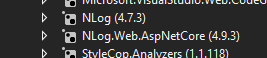
Here are the versions I have:
<?xml version="1.0" encoding="utf-8" ?>
<nlog xmlns="http://www.nlog-project.org/schemas/NLog.xsd"
      xmlns:xsi="http://www.w3.org/2001/XMLSchema-instance"
      autoReload="true"
      internalLogLevel="Info"
      internalLogFile="c:\temp\internal-nlog.txt">

  <!-- enable asp.net core layout renderers -->
  <extensions>
      <add assembly="NLog.Web.AspNetCore"/>
  </extensions>

  <!-- the targets to write to -->
  <targets>
      <!-- write logs to file  -->
      <target xsi:type="File" name="allfile" fileName="${basedir:fixtempdir=true}\nlog-all-${shortdate}.log"
              layout="${longdate}|${event-properties:item=EventId_Id}|${uppercase:${level}}|${logger}|${message} ${exception:format=tostring}" />

      <!-- another file log, only own logs. Uses some ASP.NET core renderers -->
      <target xsi:type="File" name="ownFile-web" fileName="${basedir:fixtempdir=true}\nlog-own-${shortdate}.log"
              layout="${longdate}|${event-properties:item=EventId_Id}|${uppercase:${level}}|${logger}|${message} ${exception:format=tostring}|url: ${aspnet-request-url}|action: ${aspnet-mvc-action}" />
  </targets>

  <!-- rules to map from logger name to target -->
  <rules>
      <!--All logs, including from Microsoft-->
      <logger name="*" minlevel="Trace" writeTo="allfile" />

      <!--Skip non-critical Microsoft logs and so log only own logs-->
      <logger name="Microsoft.*" maxlevel="Info" final="true" />
      <!-- BlackHole without writeTo -->
      <logger name="*" minlevel="Trace" writeTo="ownFile-web" />
  </rules>
</nlog>
FIXED:
I fixed it by doing this:
Added this code to the Main() call:
            var processPath = Path.GetDirectoryName(Process.GetCurrentProcess().MainModule.FileName);
            var nlogConfigPath = Path.Combine(processPath, "nlog.config");
            var logger = NLogBuilder.ConfigureNLog(nlogConfigPath).GetCurrentClassLogger();
THEN, I had to add my nlog.config file to:
C:Program Files\IIS Express\
So that my core web app could find it when working on my code in VS 2019.
My nlog.config does still point to:
`
    <!-- another file log, only own logs. Uses some ASP.NET core renderers -->
    <target xsi:type="File" name="ownFile-web" fileName="c:\temp\nlog-own-${shortdate}.log"
            layout="${longdate}|${event-properties:item=EventId_Id}|${uppercase:${level}}|${logger}|${message} ${exception:format=tostring}|url: ${aspnet-request-url}|action: ${aspnet-mvc-action}" />
</targets>
`
So here is my Program.cs file in my Asp.net Core 3.1 web app:
    /// <summary>
    /// Program
    /// </summary>
    public class Program
    {
        /// <summary>
        /// Defines the entry point of the application.
        /// </summary>
        /// <param name="args">The arguments.</param>
        public static void Main(string[] args)
        {
            var processPath = Path.GetDirectoryName(Process.GetCurrentProcess().MainModule.FileName);
            var nlogConfigPath = Path.Combine(processPath, "nlog.config");
            var logger = NLogBuilder.ConfigureNLog(nlogConfigPath).GetCurrentClassLogger();
            try
            {
                logger.Debug("init main");
                CreateHostBuilder(args).Build().Run();
            }
            catch (Exception exception)
            {
                // NLog: catch setup errors
                logger.Error(exception, "Stopped program because of exception");
                throw;
            }
            finally
            {
                // Ensure to flush and stop internal timers/threads before application-exit (Avoid segmentation fault on Linux)
                NLog.LogManager.Shutdown();
            }
        }

        /// <summary>
        /// Creates the host builder.
        /// </summary>
        /// <param name="args">The arguments.</param>
        /// <returns>IHostBuilder</returns>
        public static IHostBuilder CreateHostBuilder(string[] args) =>
               Host.CreateDefaultBuilder(args)
                  .ConfigureWebHostDefaults(webBuilder =>
                  {
                      webBuilder.UseStartup<Startup>();
                  })
                  .ConfigureLogging(logging =>
                  {
                      logging.ClearProviders();
                      logging.SetMinimumLevel(Microsoft.Extensions.Logging.LogLevel.Trace);
                  })
                  .UseNLog();  // NLog: Setup NLog for Dependency injection
    }
 ttaylor29
on 8 Aug 2020
ttaylor29
on 8 Aug 2020
@ttaylor29 Could you try this code, and attach the output from the InternalLogger?
        public static void Main(string[] args) {
            NLog.Common.InternalLogger.LogLevel = NLog.LogLevel.Debug;
            NLog.Common.InternalLogger.LogToConsole = true;
            NLog.Common.InternalLogger.LogFile = "C:\\Temp\\NLog.Internal.txt";
            Logger logger = LogManager.GetLogger("foo");
            logger.Info("Program started");
            LogManager.LoadConfiguration("NLog.config");   // Explicit load of NLog.config to capture InternalLogger-details
            CreateHostBuilder(args).Build().Run();
            LogManager.Shutdown();  // Remember to flush
        }
Curious what happens when doing "default" scanning.
snakefoot
on 8 Aug 2020
@snakefoot I'll try this tomorrow for you! Sorry I just now saw your response.
ttaylor29
on 9 Aug 2020
@snakefoot Attached is my file.
NLog.Internal.txt
This is what I used:
        public static void Main(string[] args)
        {
            NLog.Common.InternalLogger.LogLevel = NLog.LogLevel.Debug;
            NLog.Common.InternalLogger.LogToConsole = true;
            NLog.Common.InternalLogger.LogFile = "C:\\Temp\\NLog.Internal.txt";
            Logger logger = LogManager.GetLogger("foo");
            logger.Info("Program started");
            LogManager.LoadConfiguration("NLog.config");   // Explicit load of NLog.config to capture InternalLogger-details
            CreateHostBuilder(args).Build().Run();
            LogManager.Shutdown();  // Remember to flush
        }
@ttaylor29 Strange that you only get 2 lines of log-output from calling LogManager.LogConfiguration. Guess you have some other issues going on. Never mind then
snakefoot
on 9 Aug 2020
Related issues
 kshkrao3
·
25Comments
kshkrao3
·
25Comments
 Fresa
·
33Comments
Fresa
·
33Comments
 taion809
·
27Comments
304NotModified
·
44Comments
taion809
·
27Comments
304NotModified
·
44Comments
 stylpe
·
29Comments
stylpe
·
29Comments
Most helpful comment
Hi!
Could you please test with ${basedir},
${basedir:processDir=true} and ${currentdir}?
Thanks in advance!