Nlog: EventSource Error (Incorrect Function) during shutdown w/ debugger
NLog version: 4.6.0
Platform: .NET Core 2
Current NLog config
            var config = new LoggingConfiguration();
            var consoleTarget = new ColoredConsoleTarget();
            config.AddTarget("console", consoleTarget);
            config.LoggingRules.Add(new LoggingRule("*", LogLevel.Debug, consoleTarget));
            LogManager.Configuration = config;
            LogManager.GetCurrentClassLogger().Info("message");
- What is the current result?
Error messages printed to console - What is the expected result?
Not to print this. Did you checked the Internal log?
Yes, internal logging shows some messages before and after these messages when it's enabled.Please post full exception details (message, stacktrace, inner exceptions)
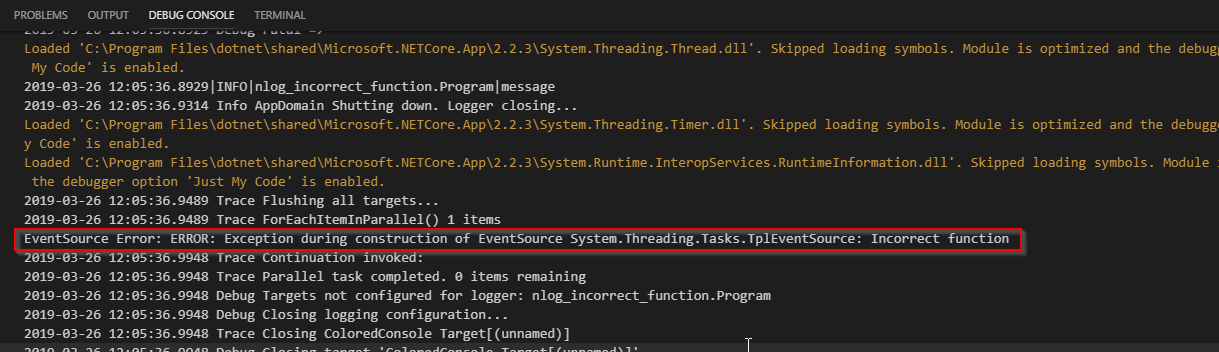
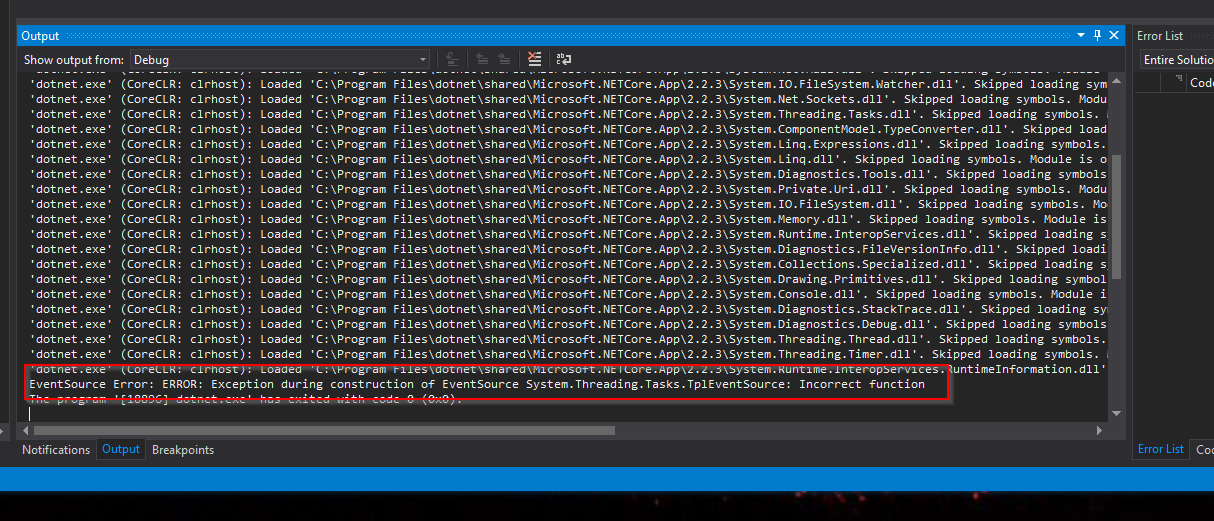
When run under the debugger in vscode, when the program exits it printsEventSource Error: ERROR: Exception during construction of EventSource System.Threading.Tasks.TplEventSource: Incorrect functionto the console. With https://github.com/aws/aws-logging-dotnet installed and configured about a dozen similar messages are printed.
Example without internal logging

Example with internal logging
Loaded 'C:\Program Files\dotnet\shared\Microsoft.NETCore.App\2.2.3\System.Diagnostics.Debug.dll'. Skipped loading symbols. Module is optimized and the debugger option 'Just My Code' is enabled.
2019-03-26 12:05:36.8890 Debug Targets for nlog_incorrect_function.Program by level:
2019-03-26 12:05:36.8929 Debug Trace =>
2019-03-26 12:05:36.8929 Debug Debug =>
2019-03-26 12:05:36.8929 Debug Info =>
2019-03-26 12:05:36.8929 Debug Warn =>
2019-03-26 12:05:36.8929 Debug Error =>
2019-03-26 12:05:36.8929 Debug Fatal =>
Loaded 'C:\Program Files\dotnet\shared\Microsoft.NETCore.App\2.2.3\System.Threading.Thread.dll'. Skipped loading symbols. Module is optimized and the debugger option 'Just My Code' is enabled.
2019-03-26 12:05:36.8929|INFO|nlog_incorrect_function.Program|message
2019-03-26 12:05:36.9314 Info AppDomain Shutting down. Logger closing...
Loaded 'C:\Program Files\dotnet\shared\Microsoft.NETCore.App\2.2.3\System.Threading.Timer.dll'. Skipped loading symbols. Module is optimized and the debugger option 'Just My Code' is enabled.
Loaded 'C:\Program Files\dotnet\shared\Microsoft.NETCore.App\2.2.3\System.Runtime.InteropServices.RuntimeInformation.dll'. Skipped loading symbols. Module is optimized and the debugger option 'Just My Code' is enabled.
2019-03-26 12:05:36.9489 Trace Flushing all targets...
2019-03-26 12:05:36.9489 Trace ForEachItemInParallel() 1 items
EventSource Error: ERROR: Exception during construction of EventSource System.Threading.Tasks.TplEventSource: Incorrect function
2019-03-26 12:05:36.9948 Trace Continuation invoked:
2019-03-26 12:05:36.9948 Trace Parallel task completed. 0 items remaining
2019-03-26 12:05:36.9948 Debug Targets not configured for logger: nlog_incorrect_function.Program
2019-03-26 12:05:36.9948 Debug Closing logging configuration...
2019-03-26 12:05:36.9948 Trace Closing ColoredConsole Target[(unnamed)]
2019-03-26 12:05:36.9948 Debug Closing target 'ColoredConsole Target[(unnamed)]'.
2019-03-26 12:05:36.9948 Debug Closed target 'ColoredConsole Target[(unnamed)]'.
2019-03-26 12:05:36.9948 Trace Closing '${longdate}|${level:uppercase=true}|${logger}|${message}'
Loaded 'C:\Program Files\dotnet\shared\Microsoft.NETCore.App\2.2.3\System.Memory.dll'. Skipped loading symbols. Module is optimized and the debugger option 'Just My Code' is enabled.
Loaded 'C:\Program Files\dotnet\shared\Microsoft.NETCore.App\2.2.3\System.Runtime.InteropServices.dll'. Skipped loading symbols. Module is optimized and the debugger option 'Just My Code' is enabled.
Loaded 'C:\Program Files\dotnet\shared\Microsoft.NETCore.App\2.2.3\System.Diagnostics.FileVersionInfo.dll'. Skipped loading symbols. Module is optimized and the debugger option 'Just My Code' is enabled.
Loaded 'C:\Program Files\dotnet\shared\Microsoft.NETCore.App\2.2.3\System.Collections.Specialized.dll'. Skipped loading symbols. Module is optimized and the debugger option 'Just My Code' is enabled.
2019-03-26 12:05:36.9995 Trace Closing Layout Renderer: ${longdate}
2019-03-26 12:05:36.9995 Trace Closing Layout Renderer: ${literal}
2019-03-26 12:05:36.9995 Trace Closing Layout Renderer: ${uppercase}
2019-03-26 12:05:36.9995 Trace Closing SimpleLayout=Layout Renderer: ${level}
2019-03-26 12:05:36.9995 Trace Closing Layout Renderer: ${level}
2019-03-26 12:05:36.9995 Trace Closing Layout Renderer: ${literal}
2019-03-26 12:05:36.9995 Trace Closing Layout Renderer: ${logger}
2019-03-26 12:05:36.9995 Trace Closing Layout Renderer: ${literal}
2019-03-26 12:05:36.9995 Trace Closing Layout Renderer: ${message}
2019-03-26 12:05:36.9995 Debug Finished closing logging configuration.
2019-03-26 12:05:36.9995 Info Logger has been shut down.
The program '[23188] nlog-incorrect-function.dll' has exited with code 0 (0x0).
- Are there any workarounds? yes/no
It only appears to happen under the debugger - Is there a version in which it did work?
not sure. - Can you help us by writing an unit test?
Not sure since it only happens when a debugger is attached,
 dwarburt
All 10 comments
I'm not that skilled with Visual Studio Code and NetCore2.
But I'm guessing that the error messages comes from failing to setup Microsoft ETW source on your local machine. The creation of the EventSource System.Threading.Tasks.TplEventSource is triggered by the parallel flush automatically performed by NLog at shutdown.
Microsoft ETW is used for tracking allocations, tasks, performance of the application. I'm guessing there is an issue with your Visual Studio Code installation or something with permissions.
 snakefoot
on 26 Mar 2019
snakefoot
on 26 Mar 2019
@snakefoot do you mean to say that it's not reproducible? I've not seen this in any other project and I've been using the same development environment for about nine months.
dwarburt
on 28 Mar 2019
What would like the NLog project to do about your debugger in Visual Studio Code not being able to setup ETW EventSource for monitoring DotNet Tasks?
Sent from my Sony Xperia
---- David Warburton wrote ----
@snakefoothttps://github.com/snakefoot do you mean to say that it's not reproducible? I've not seen this in any other project and I've been using the same development environment for about nine months.
—
You are receiving this because you were mentioned.
Reply to this email directly, view it on GitHubhttps://github.com/NLog/NLog/issues/3200#issuecomment-477631730, or mute the threadhttps://github.com/notifications/unsubscribe-auth/AK-fnB2qv2TtSJOAb86i7KWlBU5hzdxVks5vbNh6gaJpZM4cL22w.
snakefoot
on 28 Mar 2019
Not sure, I'm just trying to understand what's happening. Why does NLog cause this but nothing else? Maybe I can answer that question myself, I'll look into it.
dwarburt
on 28 Mar 2019
For what it's worth, I just tried it on a different computer and got the same result.
EDIT: I've also reproduced it in Visual Studio 2017
dwarburt
on 28 Mar 2019
Well, I can tell you it happens on line https://github.com/NLog/NLog/blob/dev/src/NLog/Common/AsyncHelpers.cs#L59. The message is printed immediately when that line executes (not during execution of the Action within). A similar call in the Main method of my program doesn't have the same result, so I think it must be because the application is shutting down.
Here's the callstack at the time the message is printed:
>   NLog.dll!NLog.Common.AsyncHelpers.StartAsyncTask(System.Action<object> action, object state) Line 59    C#
    NLog.dll!NLog.Common.AsyncHelpers.ForEachItemInParallel<NLog.Targets.Target>(System.Collections.Generic.IEnumerable<NLog.Targets.Target> values, NLog.Common.AsyncContinuation asyncContinuation, NLog.Common.AsynchronousAction<NLog.Targets.Target> action) Line 230  C#
    NLog.dll!NLog.Config.LoggingConfiguration.FlushAllTargets(NLog.Common.AsyncContinuation asyncContinuation) Line 703 C#
    NLog.dll!NLog.LogFactory.CloseOldConfig(System.TimeSpan flushTimeout, NLog.Config.LoggingConfiguration oldConfig) Line 798  C#
    NLog.dll!NLog.LogFactory.Close(System.TimeSpan flushTimeout) Line 775   C#
    NLog.dll!NLog.LogFactory.OnStopLogging(object sender, System.EventArgs args) Line 1190  C#
    NLog.dll!NLog.LogFactory.OnLoggerShutdown(object sender, System.EventArgs args) Line 1163   C#
    NLog.dll!NLog.Internal.Fakeables.AppDomainWrapper.OnProcessExit(object sender, System.EventArgs eventArgs) Line 229 C#
I guess the issue needs to be reported to MS because even this simple test program causes it:
using System;
using System.Threading;

namespace ConsoleApp1
{
    class Program
    {
        static void Main(string[] args)
        {
            Console.WriteLine("Hello World!");
            AppDomain.CurrentDomain.ProcessExit += CurrentDomain_ProcessExit;
        }

        private static void CurrentDomain_ProcessExit(object sender, EventArgs e)
        {
            System.Threading.Tasks.Task.Factory.StartNew((objt) => { }, null, CancellationToken.None, System.Threading.Tasks.TaskCreationOptions.None, System.Threading.Tasks.TaskScheduler.Default);
        }
    }
}
I guess a workaround would be to LogManager.Shutdown() before Main-function exits:
c#
        static void Main(string[] args)
        {
            var config = new LoggingConfiguration();
            var consoleTarget = new ColoredConsoleTarget();
            config.AddTarget("console", consoleTarget);
            config.LoggingRules.Add(new LoggingRule("*", LogLevel.Debug, consoleTarget));
            LogManager.Configuration = config;
            LogManager.GetCurrentClassLogger().Info("message");
            LogManager.Shutdown();   // Important thing
        }
snakefoot
on 28 Mar 2019
@dwarburt Could you test if NLog 4.6.1 removes the warning https://www.nuget.org/packages/NLog/4.6.1 ?
snakefoot
on 30 Mar 2019
Yes, looks like it's cleared up in this commit: https://github.com/NLog/NLog/commit/dd748b6179c3f48cc053bbd6b7936f1b8e161ae2 now by avoiding Task.Factory.StartNew
dwarburt
on 3 Apr 2019
@dwarburt Happy to hear that my shot in the dark removed the unwanted noise.
snakefoot
on 3 Apr 2019
Related issues
 imanushin
·
3Comments
imanushin
·
3Comments
 ErcinDedeoglu
·
3Comments
ErcinDedeoglu
·
3Comments
 geedsen
·
3Comments
geedsen
·
3Comments
 npandrei
·
3Comments
npandrei
·
3Comments
 smeegoan
·
3Comments
smeegoan
·
3Comments
Most helpful comment
Yes, looks like it's cleared up in this commit: https://github.com/NLog/NLog/commit/dd748b6179c3f48cc053bbd6b7936f1b8e161ae2 now by avoiding
Task.Factory.StartNew