Nlog: Appsettings layout render not work in .NET Core 2.2 and IIS in process hosting
Hello,
we get exception when we run NLog in .NET Core 2.2 and inprocess hosting in IIS.
Exception:
Error Error parsing layout appsettings will be ignored. Exception: System.Reflection.TargetInvocationException: Exception has been thrown by the target of an invocation. ---> System.IO.FileNotFoundException: The configuration file 'appsettings.json' was not found and is not optional. The physical path is 'c:\windows\system32\inetsrv\appsettings.json'.
NLog version: 4.5.11
NLog.Web.AspNetCore version: 4.7.1
Platform: .NET Core 2.2
Current NLog config (xml or C#, if relevant)
<nlog>
  <targets>
        <target xsi:type="Mail" name="Errors"
                subject="Unhandled Error"
                body="Timestamp: ${longdate:universalTime=true}${newline}Message: ${message}${newline}${appsettings:name=aplicationName}"
                to="..."
                from="..."
                smtpServer=".."
                smtpPort="25"/>
  </targets>
</nlog>
- What is the current result?
Target is completly ignored - What is the expected result?
Target works - Are there any workarounds? yes/no
Yes, host app out of IIS process, or set values directly in nlog.config
 McMlok
All 21 comments
Full Stack:
2019-02-01 09:42:02.1408 Error Error parsing layout appsettings will be ignored. Exception:
System.Reflection.TargetInvocationException: Exception has been thrown by the target of an invocation. ---> System.IO.FileNotFoundException: The configuration file 'appsettings.json' was not found and is not optional. The physical path is 'c:\windows\system32\inetsrv\appsettings.json'.
at Microsoft.Extensions.Configuration.FileConfigurationProvider.Load(Boolean reload)
at Microsoft.Extensions.Configuration.FileConfigurationProvider.Load()
at Microsoft.Extensions.Configuration.ConfigurationRoot..ctor(IList`1 providers)
at Microsoft.Extensions.Configuration.ConfigurationBuilder.Build()
at NLog.Appsettings.Standard.AppSettingsLayoutRenderer..ctor()
--- End of inner exception stack trace ---
at System.RuntimeTypeHandle.CreateInstance(RuntimeType type, Boolean publicOnly, Boolean wrapExceptions, Boolean& canBeCached, RuntimeMethodHandleInternal& ctor)
at System.RuntimeType.CreateInstanceSlow(Boolean publicOnly, Boolean wrapExceptions, Boolean skipCheckThis, Boolean fillCache)
at System.Activator.CreateInstance(Type type, Boolean nonPublic, Boolean wrapExceptions)
at NLog.Internal.FactoryHelper.CreateInstance(Type t)
at NLog.Config.Factory`2.TryCreateInstance(String itemName, TBaseType& result)
at NLog.Config.LayoutRendererFactory.TryCreateInstance(String itemName, LayoutRenderer& result)
at NLog.Config.Factory`2.CreateInstance(String name)
at NLog.Layouts.LayoutParser.GetLayoutRenderer(ConfigurationItemFactory configurationItemFactory, String name)
Issue you might have with custom layout-renders should probably be reported to the correct owner:
https://github.com/linmasaki/NLog.Appsettings.Standard
But I can recommend that you stop using ${appsettings}, but instead upgrade to NLog.Web.AspNetCore ver. 4.8.0 and use the ${configsetting}:
https://github.com/NLog/NLog/wiki/ConfigSetting-Layout-Renderer
 snakefoot
on 1 Feb 2019
snakefoot
on 1 Feb 2019
@snakefoot I tried to use ${configsetting} with the right version of packages, but it doesn't work. Instead of log files in the correct place, files were created in the project folder.
appsettings.json
{
"Path": "C:\\logs",
}
nlog.config
<target name="fileLog" xsi:type="File"
fileName="${configsetting:name=Path}${shortdate}.log"
encoding="utf-8"
layout="[${longdate}][${machinename}][${level}] ${message} ${exception}" />
 Oskar987
on 13 Feb 2019
Oskar987
on 13 Feb 2019
How do you register the loaded IConfiguration? Do you call UseNLog or call AddNLog with IConfiguration parameter?
snakefoot
on 13 Feb 2019
In program.cs:
```c#
public static void Main(string[] args)
{
var logger = NLogBuilder.ConfigureNLog("nlog.config").GetCurrentClassLogger();
```c#
public static IWebHostBuilder BuildWebHost(string[] args) =>
WebHost.CreateDefaultBuilder(args)
.UseStartup<Startup>()
.UseUrls("-----------")
.ConfigureLogging(logging =>
{
logging.ClearProviders();
logging.SetMinimumLevel(LogLevel.Trace);
}).UseNLog();
How do you register the loaded IConfiguration? Do you call UseNLog or call AddNLog with IConfiguration parameter?
Can you provide a link with an example of how to call UseNLog with IConfiguration parameter?
Oskar987
on 14 Feb 2019
```c#
var config = new ConfigurationBuilder()
.SetBasePath(System.IO.Directory.GetCurrentDirectory())
.AddJsonFile("appsettings.json", optional: true, reloadOnChange: true)
.Build();
// configure Logging with NLog
services.AddLogging(loggingBuilder =>
{
loggingBuilder.ClearProviders();
loggingBuilder.SetMinimumLevel(Microsoft.Extensions.Logging.LogLevel.Trace);
loggingBuilder.AddNLog(config);
});
```
 304NotModified
on 14 Feb 2019
304NotModified
on 14 Feb 2019
it doesn't help me((
```c#
var builder = new ConfigurationBuilder()
.SetBasePath(env.ContentRootPath)
.AddJsonFile("appsettings.json", optional: false, reloadOnChange: true)
.AddJsonFile($"appsettings.{env.EnvironmentName}.json", optional: true)
.AddEnvironmentVariables();
Configuration = builder.Build();
```c#
services.AddLogging(loggingBuilder =>
{
loggingBuilder.ClearProviders();
loggingBuilder.SetMinimumLevel(Microsoft.Extensions.Logging.LogLevel.Trace);
loggingBuilder.AddNLog(Configuration);
});`
It is only AddNLog that requires the parameter. UseNLog expects that WebHost.CreateDefaultBuilder has loaded the IConfiguration so it is available. Guess you have to debug the code and ensure the lookups done by UseNLog are successful.
snakefoot
on 14 Feb 2019
Try to enable the NLog InternalLogger and see if there are warnings or errors while loading the configuration.
snakefoot
on 14 Feb 2019
Think some fixes are needed in the helper methods for NLog.Web.AspNetCore so they also register the config-items in NLog.Extension.Logging.dll
snakefoot
on 14 Feb 2019
I tested this locally in IIS express, and it works for me. @Oskar987 could you please try the same code example in IIS express? And maybe after that in IIS.
update you need probably some config/package changes. This will show the full set-up, but see also next post.
- branch "configsetting-test" (https://github.com/NLog/NLog.Web/tree/configsetting-test) (https://github.com/NLog/NLog.Web/commit/cebb003a43866b5a4598e0d4a7daa5e2eea58d05)
- project ASP.NET Core 2 - VS2017
nlog.config
<?xml version="1.0" encoding="utf-8" ?> <nlog xmlns="http://www.nlog-project.org/schemas/NLog.xsd" xmlns:xsi="http://www.w3.org/2001/XMLSchema-instance" autoReload="true" throwConfigExceptions="true" internalLogLevel="info" internalLogFile="c:\temp\internal-nlog-AspNetCore2.txt"> <extensions> <add assembly="NLog.Extensions.Logging"/> </extensions> <!-- the targets to write to --> <targets> <!-- write logs to file --> <target xsi:type="File" name="allfile" fileName="c:\temp\mode-${configsetting:mode}.log" layout="${longdate}|${event-properties:item=EventId_Id:whenEmpty=0}|${uppercase:${level}}|${logger}|${message} ${exception:format=tostring}" /> </targets> <!-- rules to map from logger name to target --> <rules> <!--All logs, including from Microsoft--> <logger name="*" minlevel="Trace" writeTo="allfile" /> </rules> </nlog>appsettings.config
{ "Logging": { "IncludeScopes": false, "LogLevel": { "Default": "Trace", "Microsoft": "Information" } }, "mode": "test" }program.cs
```c#
using System;
using Microsoft.AspNetCore;
using Microsoft.AspNetCore.Hosting;
using Microsoft.Extensions.Configuration;
using Microsoft.Extensions.Logging;
using NLog.Web;namespace NLog.Web.AspNetCore2.Example
{
public static class Program
{
public static void Main(string[] args)
{
var logger = NLog.Web.NLogBuilder.ConfigureNLog("nlog.config").GetCurrentClassLogger();
try
{
logger.Debug("init main");
BuildWebHost(args).Build().Run();
}
catch (Exception exception)
{
//NLog: catch setup errors
logger.Error(exception, "Stopped program because of exception");
throw;
}
finally
{
// Ensure to flush and stop internal timers/threads before application-exit (Avoid segmentation fault on Linux)
NLog.LogManager.Shutdown();
}
}public static IWebHostBuilder BuildWebHost(string[] args) => WebHost.CreateDefaultBuilder(args) .UseStartup<Startup>() .ConfigureLogging(logging => { logging.ClearProviders(); logging.SetMinimumLevel(Microsoft.Extensions.Logging.LogLevel.Trace); }) .UseNLog(); // NLog: Setup NLog for Dependency injection }}
packages: (csproj) ```xml <ItemGroup> <PackageReference Include="Microsoft.AspNetCore.App" /> <PackageReference Include="NLog.Extensions.Logging" Version="1.4.0" /> <PackageReference Include="NLog.Web.AspNetCore" Version="4.8.0" /> <PackageReference Include="NLog" Version="4.5.11" /> </ItemGroup>
files:
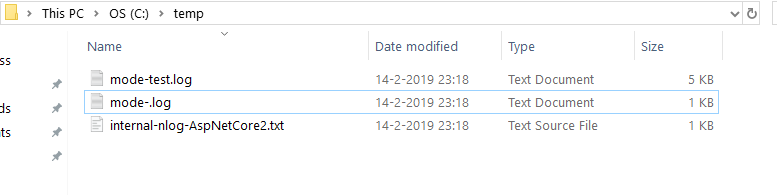
it makes in the very first start "mode-.log" but after that everything get logged in "mode-test.log"
304NotModified
on 14 Feb 2019
OK I think I found the problem
- for some reasons VS 2017 won't always (but sometimes it does) update my nlog.config in bin folder (e.g. bin\Debug\netcoreapp2.2), so be warned.
you need this:
1: in nlog.config
<extensions>
    <add assembly="NLog.Extensions.Logging"/>
</extensions>
2: and for some reason you also need to install the "NLog.Extensions.Logging" package directly:
<PackageReference Include="NLog.Extensions.Logging" Version="1.4.0" />Not sure why the latter is needed... (it's the same version as the dependency of NLog.Web.AspNetCore Version 4.8.0
so total:
<ItemGroup>
    <PackageReference Include="Microsoft.AspNetCore.App" />
    <PackageReference Include="NLog.Extensions.Logging" Version="1.4.0" />
    <PackageReference Include="NLog.Web.AspNetCore" Version="4.8.0" />
    <PackageReference Include="NLog" Version="4.5.11" />
</ItemGroup>
304NotModified
on 14 Feb 2019
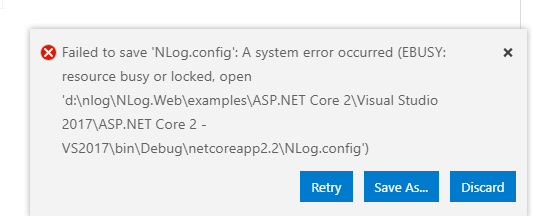
- for some reasons VS 2017 won't always (but sometimes it does) update my nlog.config in bin folder (e.g. bin\Debug\netcoreapp2.2), so be warned.
that's maybe this:
304NotModified
on 15 Feb 2019
Created #3129 to improve user-experience for NLog 4.6
snakefoot
on 19 Feb 2019
@304NotModified
Your solution does not work correctly for me because your statement:
it makes in the very first start "mode-.log" but after that everything get logged in "mode-test.log"
is causing issues for me.
When you execute this code:
``` c#
var logger = NLog.Web.NLogBuilder.ConfigureNLog("nlog.config").GetCurrentClassLogger();
All targets present in the nlog.config file are initialized, so in my case the `AzureTableStorage` (from `NLog.Extensions.AzureTables`) gets initialized with connectionString value **${configsetting:AzureTableStorageOptions.ConnectionString}** which fails because it's not valid.

Only after when this code runs:
``` c#
var builder = new ConfigurationBuilder()
    .SetBasePath(env.ContentRootPath)
    .AddJsonFile("appsettings.json", optional: false, reloadOnChange: true)
    .AddJsonFile($"appsettings.{env.EnvironmentName}.json", optional: true)
    .AddEnvironmentVariables();

Configuration = builder.Build();

// https://github.com/NLog/NLog/wiki/ConfigSetting-Layout-Renderer
ConfigSettingLayoutRenderer.DefaultConfiguration = Configuration;
everthing is initialized correctly.
My complete nlog.config as reference:
<?xml version="1.0"?>
<nlog xmlns="http://www.nlog-project.org/schemas/NLog.xsd"
      xmlns:xsi="http://www.w3.org/2001/XMLSchema-instance" internalLogFile="logs/nlog.txt" internalLogLevel="Warn" autoReload="true" throwConfigExceptions="true" throwExceptions="true">

  <extensions>
    <add assembly="NLog.Extensions.Logging"/>
    <add assembly="NLog.Web.AspNetCore"/>
    <add assembly="NLog.Extensions.AzureTables" />
  </extensions>

  <targets>
    <target type="AzureTableStorage"
            name="AzureTable"
            machineName="DataReceiver"
            tableName="QboxLogging"
            correlationId="${aspnet-TraceIdentifier}"
            connectionString="${configsetting:AzureTableStorageOptions.ConnectionString}"
            layout="${longdate:universalTime=true} | ${level} | ${logger} | ${message} | ${exception:format=tostring:innerFormat=tostring:maxInnerExceptionLevel=10}"
    />
    <target name="Console"
            xsi:type="ColoredConsole"
            layout="${longdate:universalTime=true} | ${level} | ${logger} | ${aspnet-TraceIdentifier} | ${message} | ${exception:format=tostring:innerFormat=tostring:maxInnerExceptionLevel=10}"
    />
    <target name="File"
            xsi:type="File"
            fileName="logs/${shortdate}.log"
            layout="${longdate:universalTime=true} | ${level} | ${logger} | ${aspnet-TraceIdentifier} | ${message} | ${exception:format=tostring:innerFormat=tostring:maxInnerExceptionLevel=10}"
    />
  </targets>
  <rules>
    <logger name="*" minlevel="Info" writeTo="AzureTable" />
    <logger name="*" minlevel="Debug" writeTo="File" />
    <logger name="*" minlevel="Debug" writeTo="Console" />
  </rules>
</nlog>
 StefH
on 6 Mar 2019
StefH
on 6 Mar 2019
@StefH Thank you for pointing out the clunky way of handling appsettings together with NLog.config. Created https://github.com/NLog/NLog.Extensions.Logging/issues/265 about improving this.
snakefoot
on 11 Mar 2019
@StefH Have now made some progress with NLog 4.7 so one can do this with NLog.Web.AspNetCore in NetCore3:
var logger = NLog.LogManager.Setup().LoadNLogConfigFromAppSettings().LogFactory.GetCurrentClassLogger();
It will load AppSettings.json, configure ${configsetting} and also pre-register the NLog-config-types from NLog.Web.AspNetCore-assembly.
Proof-of-concept made here https://github.com/NLog/NLog.Web/pull/540
snakefoot
on 31 Mar 2020
Thanks for your work, however my application is still using .NET Core 2.1 (https://github.com/StefH/QboxNext/tree/master/src-server/QboxNext.Server.DataReceiver) and I don't have the time yet to modify the application.
Also I'm using a custom version from NLog.Extensions.AzureStorage, so I also have to double check that one.
StefH
on 31 Mar 2020
@StefH I was hoping to get some input on the proof-on-concept-API. Not so much on the testing.
This how you would do it on NetCore2 (and also possible on NetCore3):
c#
var builder = new ConfigurationBuilder()
                .SetBasePath(basePath ?? Directory.GetCurrentDirectory())
                .AddJsonFile("appsettings.json", optional: false, reloadOnChange: true)
                .AddJsonFile($"appsettings.{environment}.json", optional: true)
                .AddEnvironmentVariables();
var config = builder.Build();
var logger = NLog.LogManager.Setup().LoadNLogConfigFromSection(config).LogFactory.GetCurrentClassLogger();
snakefoot
on 31 Mar 2020
NLog.Web.AspNetCore ver 4.9.3 has been released, and now you can do this:
var logger = NLog.LogManager.Setup().LoadConfigurationFromAppSettings().GetCurrentClassLogger();
That replaces the old style:
var logger = NLog.Web.NLogBuilder.ConfigureNLog("nlog.config").GetCurrentClassLogger();
snakefoot
on 8 Aug 2020
Related issues
 nblumhardt
·
39Comments
nblumhardt
·
39Comments
 majumajid
·
31Comments
majumajid
·
31Comments
 taion809
·
27Comments
taion809
·
27Comments
 qaqz111
·
25Comments
304NotModified
·
36Comments
qaqz111
·
25Comments
304NotModified
·
36Comments
Most helpful comment
OK I think I found the problem
you need this:
1: in nlog.config
2: and for some reason you also need to install the "NLog.Extensions.Logging" package directly:
Not sure why the latter is needed... (it's the same version as the dependency of NLog.Web.AspNetCore Version 4.8.0
so total: