Nlog: Installing NLog.Config and NLog.Schema in a .NET Core project in Visual Studio 15.7.x and/or NuGet 4.7.x does not copy the files in the project root
Update: The issue seems to be tied to the version of Visual Studio and/or NuGet too, see below.
How to reproduce the problem
Add the NLog, NLog.Config and NLog.Schema packages to a .NET Core 2.1 Console Application project.
Expected behaviour
The XML and XSD files from NLog.Config and NLog.Schema are copied in the project root.
Actual behaviour
The files are not copied to the project root, instead they are somehow "virtually linked" there (there's no "link" at file system level) from the NuGet packages cache directories.
Why this is a problem
- The content of the files are shared between all projects using the packages: if I modify the XML in project A, project B will see the same changes since the physical file is the same.
- If the XML and the XSD are not besides each other, IntelliSense will not pick up the schema and won't provide any autocompletion.
The first problem is especially nasty since it affects every projects that is using the packages, and there's absolutely no warning about it.
Related issues
2461, #2686, #2757
Maybe related to https://docs.microsoft.com/en-us/nuget/reference/migrate-packages-config-to-package-reference#package-compatibility-issues as suggested in #2757.
Platforms
- Visual Studio: Microsoft Visual Studio Professional 2017 Version 15.7.5
- ReSharper: JetBrains ReSharper Ultimate 2018.1.3 Build 112.0.20180626.160528
- Framework: .NET Core 2.1
- Target framework: netcoreapp2.1
- Project type: Console application
- Project SDK: Microsoft.NET.Sdk
Packages versions
- NLog: 4.5.7
- NLog.Config: 4.5.7
- NLog.Schema: 4.5.7
Screenshots
Installing the packages adds "virtual files":

The files are "linked" from the NuGet packages cache:

The packages have been added through PackageReference:

The files are not copied in the project root:
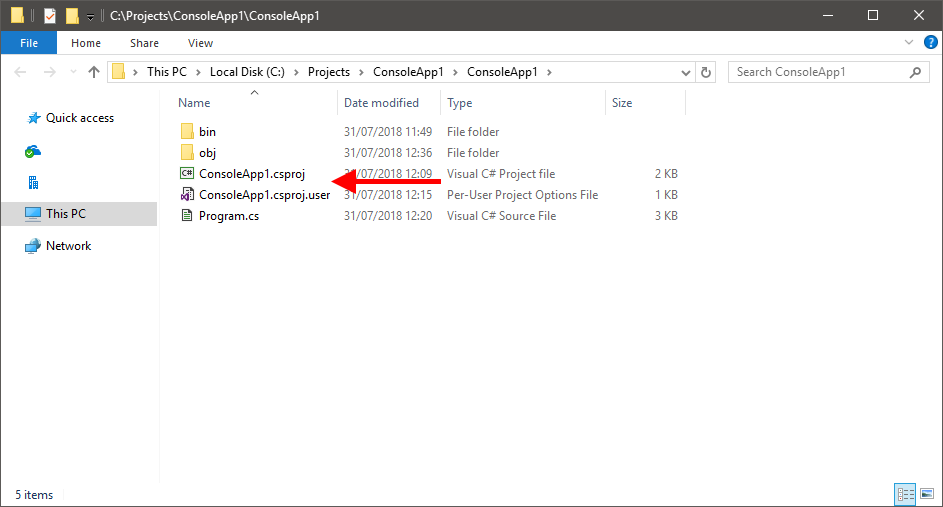
IntelliSense will not pick up the XSD schema, and the XML file is shared between every project:

(The XML file in the screenshot has not been yet modified _in this project_, yet its content is not the default one but the modified one from another project.)
 kappa7194
All 28 comments
Hi, having the same issue with dotnet core 2.1 project (NLog.Schema 4.5.7, tested same issue with 4.5.6 too).
 alasvant
on 31 Jul 2018
alasvant
on 31 Jul 2018
Thanks for the info.
Unfortunately, I had no time to check this.
Does anyone has an idea what needs to be changed in the nuspec to get this working?
 304NotModified
on 1 Aug 2018
304NotModified
on 1 Aug 2018
@304NotModified did some googling and it seems that this is not a NLog nuspec issue but the new way how packagereferences work. Simply put, you can't copy files anymore to project.
There are plenty of "issues" about this but I think this is a good one to follow in case something changes as the last posters have the exactly same issue not being able to copy XSD file for intellisense: https://github.com/NuGet/Home/issues/4942
This one suggests to use init.ps1 to copy the file to project: https://github.com/NuGet/Home/issues/4803#issuecomment-290206781
And this one says copy it manually: https://github.com/NuGet/Home/issues/4954#issuecomment-337321237
alasvant
on 2 Aug 2018
That's what I feared.
I don't know how much the init.ps1 solution is viable:
if installed using Visual Studio init.ps1 will be executed. [...] The script will also run when opening the solution if the nuget powershell console is open. If someone manually edits the csproj outside of Visual Studio and restores then it will not run
-- emgarten, 2017-03-29
it's certainly better than nothing, but it can lead to users complaining that "it's not working" if they're not installing the packages "by the book". Maybe a warning can be added to the package description and the wiki?
The MSBuild .target option is unfeasible since it works only at build time and we need the files at design time.
So...
all packages relying on install.ps1 are broken "by design" [...] with no meaningful way to upgrade... [...] We are essentially put in a situation where there is no way forward, and the Nuget team is taking a stance "it is not supported, sucks to be you". That's just not good enough.
-- RussKie, 2018-05-18
kappa7194
on 2 Aug 2018
We've added the "contentFiles" for that a while ago.
Don't know why that isn't working anymore.
To summarize the history in NLog:
- we used install.ps1 before
- we moved to "contentFiles" because init.ps1 was legacy
- we moved install.ps1 back (so having both), to support the older clients.
maybe we should re-order the stuff in <files>
304NotModified
on 2 Aug 2018
Don't know why that isn't working anymore.
Because it never worked: the <contentFiles /> directive yields exactly the problem we're describing here, the content files are not copied in the project's directory, they're merely linked.
In emgarten's words:
With project.json/PackageReference packages can float which allows them to change from restore to restore without an explicit install/uninstall action being performed. For this reason the contentFiles folder is immutable and cannot carry a state like the packages.config content folder.
(Whatever that means, I still haven't found out what "floating" means.)
By the way, the init.ps1 script is not deprecated, it only has the downside of working only in specific cases (see above). The deprecated (and no longer working) scripts are install.ps1 and uninstall.ps1. Using init.ps1 is the "recommended" way by Microsoft to do this.
kappa7194
on 2 Aug 2018
i was confused by init.ps1 and install.ps1.
update https://github.com/NLog/NLog/issues/2823#issuecomment-409865151
Because it never worked
I personally tested it in .NET Core 2. It worked. So i'm confused now
304NotModified
on 2 Aug 2018
I personally tested it in .NET Core 2. It worked. So i'm confused now
The problem is caused by the installation method used: the packages.config method works, the PackageReference method doesn't. This should be governed by Visual Studio and/or NuGet, not the .NET Framework / Core version of the project (I'll update the title of the issue to reflect these new findings); it depends on how you tested it: if you use the packages.config even with .NET Core 2.x it will work.
To demonstrate this, I tried to install the following NLog.Config packages on the following .NET Core projects:
| | .NET | | |
-- | -- | -- | -- | -- | --
| | 2.1 | 2.0 | 1.1 | 1.0
NLog | 4.5.7 | FAIL | FAIL | FAIL | FAIL
| 4.5.6 | FAIL | FAIL | FAIL | FAIL
| 4.5.5 | FAIL | FAIL | FAIL | FAIL
| 4.5.4 | FAIL | FAIL | FAIL | FAIL
| 4.5.3 | FAIL | FAIL | FAIL | FAIL
| 4.5.2 | FAIL | FAIL | FAIL | FAIL
| 4.5.1 | FAIL | FAIL | FAIL | FAIL
| 4.5.0 | FAIL | FAIL | FAIL | FAIL
As you can see no combination worked, even the one that previously did.
I don't know if it's Visual Studio's or NuGet's fault, they're not exactly clear with their release notes, but I _think_ that using PackageReference for new project has been introduced in one of the minor updates of Visual Studio 15.7 or NuGet 4.7.
The problem is I don't have any mean to test this out besides firing up a virtual machine and installing the old versions of VS which would be... slightly time consuming, it possible at all (their site only has the latest version available to download).
Also, while performing the tests, I noticed another possible issue: in the Tutorial wiki page there's this bit:
NLog can be downloaded from NuGet.
Just install NLog.Config package and this will install also NLog and NLog.Schema packages - this will result in a starter config and intellisense.
Use the GUI or the following command in the Package Manager Console:
Install-Package NLog.Config
That's it, you can now compile and run your application and it will be able to use NLog.
_At the moment_, .NET Framework (not .NET Core) projects still use the packages.config mode so this still work; however the user can manually perform an upgrade to the PackageReference and then... it stops working there too.
Works out of the box:

However if the user has upgraded the project, it doesn't:
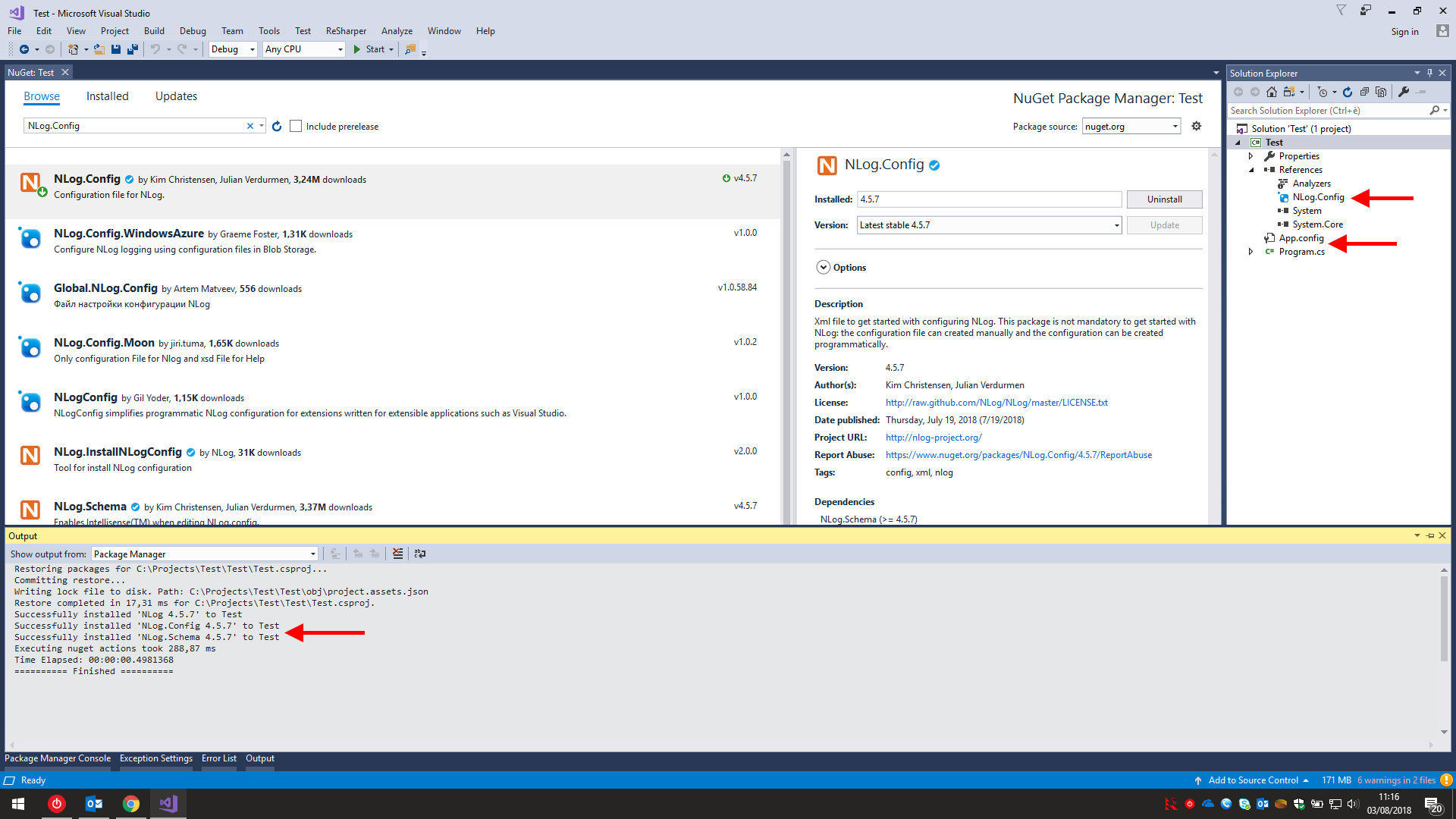
Here no file at all is added to the project, even the linked ones.
Also, if someone using .NET Core follows this tutorial (I know there's one dedicated to .NET Core but, y'know, users be users) it's messy too:

kappa7194
on 3 Aug 2018
thanks for checking this. Is it clear what needs to be changed?
304NotModified
on 17 Aug 2018
From what I've read around - mainly what has already been linked in this thread - you simply no longer can do this.
The new version simply does not allow a package creator to add a per-project physical file to a project when a package is installed, only to add a symlink to a single unique instance of a file located in the NuGet package cache directory, and Microsoft won't do anything about this because it's working as intended.
This means that the NLog.Config package has become useless for users using the new version, since the same physical file will be shared between all the projects where the package is installed and every change will be seen by every project.
The NLog.Schema _may_ still has some use, because since a user _shouldn't_ ever modify the XSD having a single instance _shouldn't_ cause any problem. However, I noticed that when the package gets installed due to a dependency (e.g. by installing NLog.Config) the XSD file is _not_ linked, it gets linked only when the package is installed directly. I have no idea why this happens and what can be done to fix it, my NuGet skill are limited.
kappa7194
on 20 Aug 2018
@304NotModified Instead of using the ìnstall.ps1-hack, then use the targets-hack. See example here:
https://github.com/SaganMarketing/NuGetContentFiles/tree/master/TestParent/TestParent
- TestParent.csproj
- Build\TestParent.targets
 snakefoot
on 20 Aug 2018
snakefoot
on 20 Aug 2018
@304NotModified Instead of using the ìnstall.ps1-hack, then use the targets-hack. See example here:
If someone could "hack" a PR for this, that would be really great 💯
304NotModified
on 20 Aug 2018
Not using NLog.config, so I will pass that chance :)
snakefoot
on 21 Aug 2018
This might be a good inspiration for making the missing targets-file:
snakefoot
on 13 Sep 2018
This might be a good inspiration for making the missing targets-file:
Neither this nor the previous suggestion will work. These solutions are for copying files at _build_ time, however both the XML and the XSD are needed at _design_ time, because the user must be able to edit the configuration file _before_ building/deploying the application. Having a blank configuration file copied to the output directory is useless.
And what we need, unless something changes in the future, is no longer possible in the new NuGet package architecture.
kappa7194
on 14 Sep 2018
Can't we just close this and agree that things have changed and this can't be done anymore. The workaround is to get the XSD file somewhere and manually copy it to the desired location.
alasvant
on 14 Sep 2018
I am experiencing the behavior that @kappa7194 describes while using NLog.Config v4.5.10 with PackageReference in an ASP.Net WebAPI v2.x project (not .Net Core)... In that case the blank NLog.config is copied to the bin folder of my project, overriding my own NLog.config.
This looks like only a "cosmetic" issue as:
- during debug, this is in fact the NLog.config file at the root of my project which is being used, not the one in
binfolder. - My
NLog.configis only overridden during debug session. While publishing, it is still my ownNLog.configfile which is being packaged, not the blank one.
Not sure it is a good idea to keep the contentFiles in current NuGet package if it does not fit the behavior you were looking for...
 ggirard07
on 11 Oct 2018
ggirard07
on 11 Oct 2018
You can get the XSD file to be available (not editable) at design time by also sending it to buildcrosstargeting as well as build folder. That makes it get seen by the VS design time build. I've used it and it was used by the sourcelink project see this commit
 mungojam
on 12 Oct 2018
mungojam
on 12 Oct 2018
I used an external directory like Logs to place my NLog.config file and then load it from Main class.
It worked for me. Hope this helps somebody else, too.
using Microsoft.AspNetCore;
using Microsoft.AspNetCore.Hosting;
using Microsoft.Extensions.Logging;
using NLog.Web;
using System;

namespace Mars.API
{
    public class Program
    {
        public static void Main(string[] args)
        {
            // Default value for logsDir
            NLog.GlobalDiagnosticsContext.Set("logsDir", @"C:\logs");
            var logger = NLogBuilder.ConfigureNLog(@"Logs\NLog.config").GetCurrentClassLogger();

            try
            {
                logger.Debug("Init Main");
                BuildWebHost(args).Run();
            }
            catch (Exception ex)
            {
                logger.Error(ex, "Program failed to start because an exception has occured");
                throw;
            }
        }

        public static IWebHost BuildWebHost(string[] args) =>
            WebHost.CreateDefaultBuilder(args)
                .UseStartup<Startup>()
                .ConfigureLogging(logging =>
                {
                    logging.ClearProviders();
                    logging.SetMinimumLevel(Microsoft.Extensions.Logging.LogLevel.Trace);
                })
                .UseNLog()
                .Build();
    }
}
 corneliu-serediuc
on 19 Dec 2018
corneliu-serediuc
on 19 Dec 2018
@304NotModified Do you need a hand fixing this, or are you in the process of fixing this already? :)
 taori
on 30 Dec 2018
taori
on 30 Dec 2018
The new version simply does not allow a package creator to add a per-project physical file to a project when a package is installed, only to add a symlink to a single unique instance of a file located in the NuGet package cache directory, and Microsoft won't do anything about this because it's working as intended.
This means that the NLog.Config package has become useless for users using the new version, since the same physical file will be shared between all the projects where the package is installed and every change will be seen by every project.
That answers my question i guess. meh.
taori
on 30 Dec 2018
@304NotModified Do you need a hand fixing this, or are you in the process of fixing this already? :)
Maybe we could try https://github.com/NLog/NLog/issues/2823#issuecomment-414401703, but I haven't found time for that.
304NotModified
on 30 Dec 2018
@304NotModified That sounds potentially dangerous if it does not provide versioned files and would allow invalid options for the xsd. What about injecting inline contents from ps1 itself?.
taori
on 30 Dec 2018
@304NotModified That sounds potentially dangerous if it does not provide versioned files and would allow invalid options for the xsd. What about injecting inline contents from ps1 itself?.
Not sure if that's a problem, we could version the XSD files (just like now they are version in the nuget package)
But inline could also work, maybe even better!
304NotModified
on 5 Jan 2019
@304NotModified
Seems to me that with #4322 it's been decided to drop support for this NLog.config nuget package altogether.
(or am I misinterpreting ?)
On the nuget page:
https://www.nuget.org/packages/NLog.Config/
It still says
Note: Unfortunately this package won't work well when using
Advised to:
- download manually: https://raw.githubusercontent.com/NLog/NLog/dev/src/NuGet/NLog.Config/content/NLog.config
- set "Copy To Output Directory" to "Copy if newer"
But the link is now broken, naturally.
I would have suggested to link to a tagged version instead:
https://raw.githubusercontent.com/NLog/NLog/v4.7.9/src/NuGet/NLog.Config/content/NLog.config
but I guess it's kind of moot.
Cheers
 ttran-ipkg
on 30 Mar 2021
ttran-ipkg
on 30 Mar 2021
Yes the package will be removed with nlog 5
Thanks for reporting the dead link!
304NotModified
on 30 Mar 2021
Thank you for reporting this. Will try and restore the link, so it will stay alive a little longer (until being deleted by accident again)
snakefoot
on 30 Mar 2021
Dead link has been restored with #4392 (And also created #4393 to fix future master-builds until NLog v5 is ready)
snakefoot
on 4 Apr 2021
Related issues
 Fresa
·
33Comments
Fresa
·
33Comments
 taion809
·
27Comments
taion809
·
27Comments
 Cook-code
·
27Comments
Cook-code
·
27Comments
 Hussein-Dahir
·
24Comments
304NotModified
·
44Comments
Hussein-Dahir
·
24Comments
304NotModified
·
44Comments
Most helpful comment
The problem is caused by the installation method used: the
packages.configmethod works, thePackageReferencemethod doesn't. This should be governed by Visual Studio and/or NuGet, not the .NET Framework / Core version of the project (I'll update the title of the issue to reflect these new findings); it depends on how you tested it: if you use thepackages.configeven with .NET Core 2.x it will work.To demonstrate this, I tried to install the following NLog.Config packages on the following .NET Core projects:
| | .NET | | |
-- | -- | -- | -- | -- | --
| | 2.1 | 2.0 | 1.1 | 1.0
NLog | 4.5.7 | FAIL | FAIL | FAIL | FAIL
| 4.5.6 | FAIL | FAIL | FAIL | FAIL
| 4.5.5 | FAIL | FAIL | FAIL | FAIL
| 4.5.4 | FAIL | FAIL | FAIL | FAIL
| 4.5.3 | FAIL | FAIL | FAIL | FAIL
| 4.5.2 | FAIL | FAIL | FAIL | FAIL
| 4.5.1 | FAIL | FAIL | FAIL | FAIL
| 4.5.0 | FAIL | FAIL | FAIL | FAIL
As you can see no combination worked, even the one that previously did.
I don't know if it's Visual Studio's or NuGet's fault, they're not exactly clear with their release notes, but I _think_ that using
PackageReferencefor new project has been introduced in one of the minor updates of Visual Studio 15.7 or NuGet 4.7.The problem is I don't have any mean to test this out besides firing up a virtual machine and installing the old versions of VS which would be... slightly time consuming, it possible at all (their site only has the latest version available to download).
Also, while performing the tests, I noticed another possible issue: in the Tutorial wiki page there's this bit:
_At the moment_, .NET Framework (not .NET Core) projects still use the
packages.configmode so this still work; however the user can manually perform an upgrade to thePackageReferenceand then... it stops working there too.Works out of the box:
However if the user has upgraded the project, it doesn't:
Here no file at all is added to the project, even the linked ones.
Also, if someone using .NET Core follows this tutorial (I know there's one dedicated to .NET Core but, y'know, users be users) it's messy too: