Nlog: Wrong filetarget archive date, yes once again :(
NLog version: 4.5.4 and 4.5.6 tested
Platform: .Net 4.7.2
Current NLog config (xml)
    <target xsi:type="File" name="f"
            fileName="${basedir}/logs/log.txt"
            encoding="utf-8"
            concurrentWrites ="false"
            keepFileOpen="true"
            openFileCacheTimeout="30"
            layout="${time} ${uppercase:${level}} [${logger:shortName=false}]: ${message} ${exception:format=tostring}"
            maxArchiveFiles = "31"
            archiveFileName="${basedir}/logs/log.{#}.txt"
            archiveNumbering="Date"
            archiveEvery="Day"
            archiveDateFormat="yyyy-MM-dd"
            >
    </target>
Today is 2018-06-27.
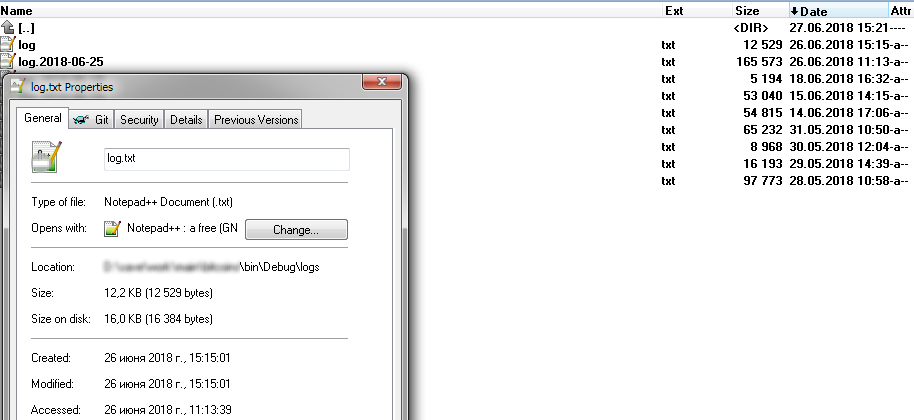
- What is the current result?
log.2018-06-27.txt What is the expected result?
log.2018-06-26.txtDid you checked the Internal log?
2018-06-27 15:23:29.2310 Debug FileTarget(Name=f): Process file '...\bin\Debug\/logs/log.txt' on startup
2018-06-27 15:23:29.2620 Trace FileTarget(Name=f): Archive attempt for file '...\bin\Debug\/logs/log.txt'
2018-06-27 15:23:29.2620 Debug FileTarget(Name=f): Do archive file: '...\bin\Debug\/logs/log.txt'
2018-06-27 15:23:29.2620 Trace FileTarget(Name=f): Archive pattern '...\bin\Debug\/logs/log.{#}.txt'
2018-06-27 15:23:29.2770 Trace FileTarget(Name=f): Calculating archive date. File-LastModifiedUtc: 06/27/2018 12:23:29; Previous LogEvent-TimeStamp: 01/01/0001 00:00:00
2018-06-27 15:23:29.2770 Trace FileTarget(Name=f): Using last write time
2018-06-27 15:23:29.2770 Info FileTarget(Name=f): Archiving ...\bin\Debug\logs\log.txt to ...\bin\Debug\logs\log.2018-06-27.txt
2018-06-27 15:23:29.2770 Debug FileTarget(Name=f): Move file from '...\bin\Debug\logs\log.txt' to '...\bin\Debug\logs\log.2018-06-27.txt'
Dunno where it takes 06/27/2018 12:23:29.
So, I think #2736 didn't fully solved this :( It's 100% reproducible if you change all 3 date attribute to yesterday.
- Is there a version in which it did work?
Yes, in 4.4
 kirsan31
All 11 comments
@kirsan31 Cannot reproduce your case, when changing File-Times. Think you need to create a unit test (or test application) where you startup with the following:
                File.SetCreationTime("c:/logs/log.txt", DateTime.UtcNow.AddDays(-1));
                File.SetLastWriteTime("c:/logs/log.txt", DateTime.UtcNow.AddDays(-1));
                File.SetLastAccessTimeUtc("c:/logs/log.txt", DateTime.UtcNow.AddDays(-1));
Are you using any special timesource. Ex. <time type="AccurateUTC" /> ?
 snakefoot
on 27 Jun 2018
snakefoot
on 27 Jun 2018
@snakefoot
Argggggggg. I am really sorry. My mistake, - first call to nlog is _newline_ layout (to print new line), And of course it change time to now. Dunno how it works with 4.4 (did it work?).
kirsan31
on 27 Jun 2018
@kirsan31 Not sure I understood your setup. But writing something to an old file, will archive the file using LastWriteTime before actually writing the message. So if writing a newline (using NLog Logger) to an existing old file, then it will first archive and then write newline (to a newly created file).
snakefoot
on 27 Jun 2018
@snakefoot yea. I need to write an empty line to the log when app starts, to achieve this I used additional filetarget:
    <target xsi:type="File" name="nl"
        fileName="${basedir}/logs/log.txt"
        encoding="utf-8"
        concurrentWrites ="false"
        layout = ""
            >
    </target>
and it's have no archiving setup - my bad :( It's very old style, now I plan switch to LayoutWithHeaderAndFooter...
When I removed call to _nl_ all work well. But if file log.2018-06-26.txt already exist, there another problem - after start we will see:
log.2018-06-26.txt _- old log + appended text from log.txt_
log.2018-06-27.txt _- first line of new log_
log.txt _- other lines of new log_
and need to be:
log.2018-06-26.txt _- old log + appended text from log.txt_
log.txt _- new log_
I will open new issue with details tomorrow...
kirsan31
on 28 Jun 2018
@kirsan31 Sounds strange that you can have multiple files to the same day, when only doing archive-operation daily. Having multiple targets to the same file?
snakefoot
on 28 Jun 2018
@kirsan31 Think the reason why NLog 4 worked before was that it always used the cached LastWrite-Timestamp for archive (When keepFileOpen="true")
But lots of issues with archive have been seen when holding the file-handle open and doing archive (Especially when ConcurrentWrites = true). Now NLog 4.5 closes all filehandles and looks at the LastWrite-timestamp of the File on disk (will see changes from other file-writers)
snakefoot
on 28 Jun 2018
@snakefoot
Think the reason why NLog 4 worked before was that it always used the cached LastWrite-Timestamp for archive (When keepFileOpen="true")
It's seems like the truth, but now it's work as intended.
Sounds strange that you can have multiple files to the same day, when only doing archive-operation daily. Having multiple targets to the same file?
Yes, if everything is ok, it's impossible in my scenario. But I see in internal log, that nlog trying to correctly process this situation, but failed :( Maybe this can lead to bugs in other scenarios?
Today is 2018-06-28, in log dir before startup:
log.2018-06-27.txt
log.txt - file date is 2018-06-27
after startup:
log.2018-06-27.txt - old log + appended text from log.txt
log.2018-06-28.txt - first line of new log
log.txt - other lines of new log
nlog-internal.log (strange things between dash lines):
2018-06-28 09:57:20.7913 Info Configuration initialized.
2018-06-28 09:57:20.7913 Info NLog, Version=4.0.0.0, Culture=neutral, PublicKeyToken=5120e14c03d0593c. File version: 4.5.6.7874. Product version: 4.5.6.
2018-06-28 09:57:20.7913 Debug Targets for BitCoins.Program by level:
2018-06-28 09:57:20.7913 Debug Trace => f
2018-06-28 09:57:20.8083 Debug Debug => f
2018-06-28 09:57:20.8083 Debug Info => f
2018-06-28 09:57:20.8083 Debug Warn => f
2018-06-28 09:57:20.8083 Debug Error => f
2018-06-28 09:57:20.8213 Debug Fatal => f
2018-06-28 09:57:20.8453 Debug FileTarget(Name=f): Process file '...\bin\Debug\/logs/log.txt' on startup
2018-06-28 09:57:20.8713 Trace FileTarget(Name=f): Archive attempt for file '...\bin\Debug\/logs/log.txt'
2018-06-28 09:57:20.8713 Debug FileTarget(Name=f): Do archive file: '...\bin\Debug\/logs/log.txt'
2018-06-28 09:57:20.8713 Trace FileTarget(Name=f): Archive pattern '...\bin\Debug\/logs/log.{#}.txt'
2018-06-28 09:57:20.8863 Trace FileTarget(Name=f): Calculating archive date. File-LastModifiedUtc: 06/27/2018 06:57:18; Previous LogEvent-TimeStamp: 01/01/0001 00:00:00
2018-06-28 09:57:20.8863 Trace FileTarget(Name=f): Using last write time
2018-06-28 09:57:20.8863 Info FileTarget(Name=f): Archiving ...\bin\Debug\logs\log.txt to ...\bin\Debug\logs\log.2018-06-27.txt
2018-06-28 09:57:20.8993 Info FileTarget(Name=f): Already exists, append to ...\bin\Debug\logs\log.2018-06-27.txt
2018-06-28 09:57:20.8993 Debug input hasn't a UTF8 BOM
2018-06-28 09:57:21.0093 Debug FileTarget(Name=f): Process file '...\bin\Debug\/logs/log.txt' on startup
2018-06-28 09:57:21.0093 Debug Creating file appender: ...\bin\Debug\/logs/log.txt
2018-06-28 09:57:21.0093 Trace Opening ...\bin\Debug\/logs/log.txt with allowFileSharedWriting=False
2018-06-28 09:57:21.0273 Debug Watching path '...\bin\Debug\logs' filter 'log.txt' for changes.
--------------------------------------------------------------------------------------------------------------------------------------------------------------------------
2018-06-28 09:57:21.0273 Trace FileTarget(Name=f): Archive attempt for file '...\bin\Debug\/logs/log.txt'
2018-06-28 09:57:21.0273 Debug FileAppender Closing Invalidate - ...\bin\Debug\/logs/log.txt
2018-06-28 09:57:21.0423 Debug Stopping file watching for path '...\bin\Debug\logs' filter 'log.txt'
2018-06-28 09:57:21.0423 Trace Closing '...\bin\Debug\/logs/log.txt'
2018-06-28 09:57:21.0423 Debug FileTarget(Name=f): Do archive file: '...\bin\Debug\/logs/log.txt'
2018-06-28 09:57:21.0573 Trace FileTarget(Name=f): Archive pattern '...\bin\Debug\/logs/log.{#}.txt'
2018-06-28 09:57:21.0573 Trace FileTarget(Name=f): Calculating archive date. File-LastModifiedUtc: 06/28/2018 06:57:21; Previous LogEvent-TimeStamp: 06/28/2018 09:57:20
2018-06-28 09:57:21.0573 Trace FileTarget(Name=f): Using last write time
2018-06-28 09:57:21.0713 Trace FileTarget(Name=f): FinalizeFile '...\bin\Debug\/logs/log.txt, isArchiving: True'
2018-06-28 09:57:21.0713 Info FileTarget(Name=f): Archiving ...\bin\Debug\logs\log.txt to ...\bin\Debug\logs\log.2018-06-28.txt
2018-06-28 09:57:21.0713 Debug FileTarget(Name=f): Move file from '...\bin\Debug\logs\log.txt' to '...\bin\Debug\logs\log.2018-06-28.txt'
--------------------------------------------------------------------------------------------------------------------------------------------------------------------------
2018-06-28 09:57:21.0713 Debug FileTarget(Name=f): Process file '...\bin\Debug\/logs/log.txt' on startup
2018-06-28 09:57:21.0883 Debug Creating file appender: ...\bin\Debug\/logs/log.txt
2018-06-28 09:57:21.0883 Trace Opening ...\bin\Debug\/logs/log.txt with allowFileSharedWriting=False
2018-06-28 09:57:21.0883 Debug Watching path '...\bin\Debug\logs' filter 'log.txt' for changes
Do you think I need to create new issue for this, or it's not so important?
kirsan31
on 28 Jun 2018
@kirsan31 It is a bug. The problem are these lines (truncates the file instead of deleting it)
This causes the log-file to keep its creation-time, which means it must be archived (again on next LogEvent). But because the last-write-time becomes today (because of the logevent after the first archive), then the next archive-operation generates a filename for today, instead of yesterday.
snakefoot
on 28 Jun 2018
@snakefoot Yea got it.
Do you need any more actions from my side?
kirsan31
on 28 Jun 2018
@kirsan31 Do you need any more actions from my side?
No I just need to figure how to fix it :)
snakefoot
on 28 Jun 2018
@kirsan31 Have now added a bonus commit to #2776 that fixes the issue together with a unit-test that reproduces your case.
snakefoot
on 28 Jun 2018
Related issues
 linmasaki
·
3Comments
linmasaki
·
3Comments
 BobSeu
·
3Comments
BobSeu
·
3Comments
 npandrei
·
3Comments
npandrei
·
3Comments
 carkov1990
·
3Comments
carkov1990
·
3Comments
 sszost
·
3Comments
sszost
·
3Comments