Type (choose one):
- Bug
NLog version: 4.5.3
Platform: .NET 4.5.1 (VS 2015)
Current NLog config:
<nlog xmlns="http://www.nlog-project.org/schemas/NLog.xsd"
      xmlns:xsi="http://www.w3.org/2001/XMLSchema-instance"
      xsi:schemaLocation="http://www.nlog-project.org/schemas/NLog.xsd NLog.xsd"
      autoReload="true"
      throwExceptions="false"
      internalLogLevel="Off" internalLogFile="c:\temp\nlog-internal.log">

  <targets async="true">
    <target name="file" xsi:type="File"
            layout="${longdate} ${level:uppercase=true:padding=-5} ${machine-name} ${callsite}  ${message}  ${exception:format=tostring}"
            fileName="${basedir}/Logs/today.log"
            archiveFileName="${basedir}/Logs/previous-{#}.log"
            archiveEvery="Day"
            archiveNumbering="Rolling"
            maxArchiveFiles="30"
            concurrentWrites="true"
            keepFileOpen="false"
            encoding="iso-8859-2" />
    <target name="console" xsi:type="ColoredConsole" layout="${longdate} ${level:uppercase=true:padding=-5} ${message}" />
  </targets>
  <rules>
    <logger name="*" minlevel="Trace" writeTo="file" />
    <logger name="*" minlevel="Info" writeTo="console" />
  </rules>
</nlog>
In case of a BUG:
What is the current result?
I created a brand new .NET 4.5.1. console project and installed the NLog.Config package, which pulled in the NLog and NLog.Schema dependencies. TheNLog.ConfigCopy to Output Directory is set toDo not copy. Since it's not defaulted to copy on build, NLog never logs anything because the config file isn't there at runtime.What is the expected result?
I would expect that Copy to Output Directory is set toCopy alwayslike it used to be.Did you checked the Internal log?
This is a package install issue.Are there any workarounds? yes/no
Manually set the property to copy always.Is there a version in which it did work?
I don't know the exact version, but it used to work correctly before 4.5 was released. If I upgrade the packages it's fine.
 c0shea
All 18 comments
are you using the NLog.Config nuget package?
 304NotModified
on 1 May 2018
304NotModified
on 1 May 2018
the nuspec in the package shows:
<?xml version="1.0" encoding="utf-8"?>
<package xmlns="http://schemas.microsoft.com/packaging/2013/05/nuspec.xsd">
  <metadata>
    <id>NLog.Config</id>
    <version>4.5.3</version>
    <title>NLog Configuration</title>
    <authors>Kim Christensen, Julian Verdurmen</authors>
    <owners>Kim Christenen, Julian Verdurmen</owners>
    <requireLicenseAcceptance>false</requireLicenseAcceptance>
    <licenseUrl>http://raw.github.com/NLog/NLog/master/LICENSE.txt</licenseUrl>
    <projectUrl>http://nlog-project.org/</projectUrl>
    <iconUrl>http://nlog-project.org/NConfig.png</iconUrl>
    <description>Xml file to get started with configuring NLog. This package is not mandatory to get started with NLog: the configuration file can created manually and the configuration can be created programmatically.</description>
    <summary>Configuration file for NLog.</summary>
    <releaseNotes>NLog 4.5.3</releaseNotes>
    <language>en-US</language>
    <tags>nlog, xml, config</tags>
    <dependencies>
      <dependency id="NLog" version="4.5.3" />
      <dependency id="NLog.Schema" version="4.5.3" />
    </dependencies>
    <contentFiles>
      <files include="**/*.*" buildAction="None" copyToOutput="true" flatten="true" />
    </contentFiles>
  </metadata>
</package>
Looks good to me.
Specs here: https://docs.microsoft.com/en-us/nuget/reference/nuspec
304NotModified
on 1 May 2018
what's the version of nuget in VS2015 for you?
304NotModified
on 1 May 2018
I reproduced it with a brand new solution and project with a fresh install of NLog.Config.
I'm using VS Enterprise 2015 14.0.25431.01 Update 3 with NuGet 3.4.4.
c0shea
on 1 May 2018
Do you know if it does/doens't work in VS2017 (for you)?
304NotModified
on 2 May 2018
I could reproduce your issue with VS2017 (15.6.5), nuget 4.6.0 on your project
it does work on a new asp.net core website

304NotModified
on 2 May 2018
the same issue is there for a new MVC 5 application (.net 4.5.2)

304NotModified
on 2 May 2018
funny, 4.4.13 does work on MVC 5:

304NotModified
on 2 May 2018
@c0shea could you test with NLog.Config 4.4.13?
304NotModified
on 2 May 2018
304NotModified
on 2 May 2018
reported here: https://github.com/NuGet/Home/issues/6894
304NotModified
on 2 May 2018
@304NotModified Thanks for all your efforts on this. I tried with VS 2015 using NLog.Config 4.4.13 and it works and sets it to Copy always.
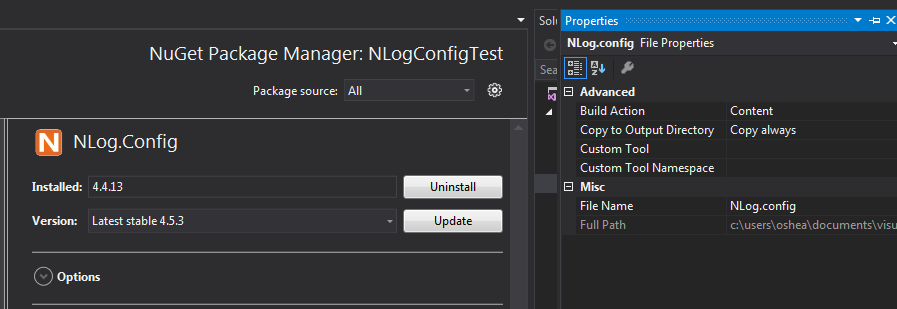
Using VS 2017 and NLog.Config 4.5.3 I was able to reproduce like you

c0shea
on 2 May 2018
Thanks! I think I found the issue, install.ps1 was still needed.
PR: #2687
I hope it works in the build chain on appveyor.
304NotModified
on 2 May 2018
@c0shea you please confirm it's fixed with this package?
https://ci.appveyor.com/api/buildjobs/x6wdcg1i88vw140q/artifacts/artifacts%2FNLog.Config.4.5.3.nupkg
thanks in advance!
304NotModified
on 2 May 2018
@304NotModified Thanks Julian! It's fixed with that package. It set NLog.config to Copy if newer and I verified it did, in fact, copy the file to my bin directory on build.
c0shea
on 3 May 2018
OK thanks for reporting, testing & confirming!, this will be included in NLog 4.5.4
304NotModified
on 3 May 2018
Sweet, thanks!
c0shea
on 4 May 2018
@c0shea NLog 4.5.4 has been released, that fixes the issue: https://www.nuget.org/packages/NLog/
 snakefoot
on 6 May 2018
snakefoot
on 6 May 2018
Related issues
 npandrei
·
3Comments
npandrei
·
3Comments
 carkov1990
·
3Comments
carkov1990
·
3Comments
 BobSeu
·
3Comments
BobSeu
·
3Comments
 smeegoan
·
3Comments
smeegoan
·
3Comments
 ErcinDedeoglu
·
3Comments
ErcinDedeoglu
·
3Comments
Most helpful comment
@c0shea NLog 4.5.4 has been released, that fixes the issue: https://www.nuget.org/packages/NLog/