Describe the bug
Mathematica fails to start with a Qt error.
To Reproduce
$ nix run nixpkgs.mathematica -c Mathematica
Qt issued a fatal error: This application failed to start because no Qt platform plugin could be initialized. Reinstalling the application may fix this problem.

Available platform plugins are: linuxfb, minimal, offscreen, vnc, xcb.


Qt tried to load plugins from:
/nix/store/skrn8xh6bs5ismnvcybg8di2cxxi7iw3-mathematica-12.1.1/libexec/Mathematica/SystemFiles/Libraries/Linux-x86-64/Qt/plugins
/nix/store/skrn8xh6bs5ismnvcybg8di2cxxi7iw3-mathematica-12.1.1/libexec/Mathematica/SystemFiles/FrontEnd/Binaries/Linux-x86-64

Mathematica was installed in /nix/store/skrn8xh6bs5ismnvcybg8di2cxxi7iw3-mathematica-12.1.1/libexec/Mathematica
/nix/store/skrn8xh6bs5ismnvcybg8di2cxxi7iw3-mathematica-12.1.1/bin/Mathematica: line 139: 23864 Aborted                 (core dumped) "${MathematicaFE}" ${MESA_FLAG} -topDirectory "${TopDirectory}" "$@"
Expected behavior
Mathematica starts.
Screenshots
If applicable, add screenshots to help explain your problem.
Additional context
Add any other context about the problem here.
Notify maintainers
Metadata
 - system: `"x86_64-linux"`
 - host os: `Linux 5.8.14, NixOS, 20.09beta1057.0b8799ecaaf (Nightingale)`
 - multi-user?: `yes`
 - sandbox: `yes`
 - version: `nix-env (Nix) 2.3.7`
 - channels(root): `"nixos-20.09beta1057.0b8799ecaaf, nixpkgs-20.09beta1057.0b8799ecaaf"`
 - channels(ben): `"nixpkgs-20.09beta1083.51aaa3fa1b6, nixpkgs-20_03-20.03.3122.ff6fda61600, nixpkgs-unstable-21.03pre246624.cfed29bfcb2, nixos-18.09-18.09.2574.a7e559a5504"`
 - nixpkgs: `/home/ben/.nix-defexpr/channels/nixpkgs`
Maintainer information:
# a list of nixpkgs attributes affected by the problem
attribute:
# a list of nixos modules affected by the problem
module:
 bgamari
All 17 comments
Cc @herberteuler
bgamari
on 17 Oct 2020
LD_DEBUG=libs Mathematica suggests that it's looking for libQt5XcbQpa.so:
24279: find library=libQt5XcbQpa.so.5 [0]; searching
24279: search path=/nix/store/9sfmwj09ij65qnc8dgv8h56gf12b60nn-zlib-1.2.11/lib:/nix/store/vran8acwir59772hj4vscr7zribvp7l5-gcc-9.3.0-lib/lib (RUNPATH from file /nix/store/skrn8xh6bs5ismnvcybg8di2cxxi7iw3-mathematica-12.1.1/libexec/Mathematica/SystemFiles/FrontEnd/Binaries/Linux-x86-64/Mathematica)
This object is present at /nix/store/qmjjvsygp3hcbwrw559fv3fh9idgmqns-mathematica-11.3.0/libexec/Mathematica/SystemFiles/Components/WSMCore/SystemModeler/SystemFiles/Libraries/Linux-x86-64/libQt5XcbQpa.so.5. However, adding this directory to LD_LIBRARY_PATH then reveals further trouble:
$ LD_LIBRARY_PATH=/nix/store/qmjjvsygp3hcbwrw559fv3fh9idgmqns-mathematica-11.3.0/libexec/Mathematica/SystemFiles/Components/WSMCore/SystemModeler/SystemFiles/Libraries/Linux-x86-64:$LD_LIBRARY_PATH Mathematica
/nix/store/skrn8xh6bs5ismnvcybg8di2cxxi7iw3-mathematica-12.1.1/libexec/Mathematica/SystemFiles/FrontEnd/Binaries/Linux-x86-64/Mathematica: error while loading shared libraries: libgthread-2.0.so.0: cannot open shared object file: No such file or directory
libgthread.so is also included in the installation; adding this directory:
$ LD_LIBRARY_PATH=/nix/store/qmjjvsygp3hcbwrw559fv3fh9idgmqns-mathematica-11.3.0/libexec/Mathematica/SystemFiles/Components/WSMCore/SystemModeler/SystemFiles/Libraries/Linux-x86-64:/nix/store/skrn8xh6bs5ismnvcybg8di2cxxi7iw3-mathematica-12.1.1/libexec/Mathematica/SystemFiles/Links/MIMETools/LibraryResources/Linux-x86-64:$LD_LIBRARY_PATH Mathematica
/nix/store/skrn8xh6bs5ismnvcybg8di2cxxi7iw3-mathematica-12.1.1/libexec/Mathematica/SystemFiles/FrontEnd/Binaries/Linux-x86-64/Mathematica: /nix/store/qmjjvsygp3hcbwrw559fv3fh9idgmqns-mathematica-11.3.0/libexec/Mathematica/SystemFiles/Components/WSMCore/SystemModeler/SystemFiles/Libraries/Linux-x86-64/libQt5Core.so.5: version `Qt_5.11' not found (required by /nix/store/skrn8xh6bs5ismnvcybg8di2cxxi7iw3-mathematica-12.1.1/libexec/Mathematica/SystemFiles/FrontEnd/Binaries/Linux-x86-64/Mathematica)
/nix/store/skrn8xh6bs5ismnvcybg8di2cxxi7iw3-mathematica-12.1.1/libexec/Mathematica/SystemFiles/FrontEnd/Binaries/Linux-x86-64/Mathematica: /nix/store/qmjjvsygp3hcbwrw559fv3fh9idgmqns-mathematica-11.3.0/libexec/Mathematica/SystemFiles/Components/WSMCore/SystemModeler/SystemFiles/Libraries/Linux-x86-64/libQt5Core.so.5: version `Qt_5.11' not found (required by /nix/store/skrn8xh6bs5ismnvcybg8di2cxxi7iw3-mathematica-12.1.1/libexec/Mathematica/SystemFiles/FrontEnd/Binaries/Linux-x86-64/../../../Libraries/Linux-x86-64/Qt/lib/libQt5DBus.so.5)
It does appear that the derivation is doing some amount of patchelfing although it's undocumented so it's quite unclear precisely what package references are patched and why.
bgamari
on 17 Oct 2020
I can replicate this - I don't understand why #100056 worked when I tested it whereas now it does not and calling Mathematica using USE_WOLFRAM_LD_LIBRARY_PATH=1 mathematica appears to work. Anyone have suggestions?
 Wulfsta
on 18 Oct 2020
Wulfsta
on 18 Oct 2020
In fact, it appears my nixpkgs/mathematica branch does work when executing mathematica in a nix-shell with the package included. I checked env and USE_WOLFRAM_LD_LIBRARY_PATH doesn't appear to be set, so I'm at a loss as to why this is happening. To my understanding, the executable should still be wrapped, and doing
$ nix-shell -I nixpkgs=../nixpkgs -p mathematica
from a clone of this and then
[nix-shell: ... ]$ mathematica
successfully executes the software. Whereas just doing
$ nix-shell -p mathematica
and
[nix-shell: ... ]$ mathematica
fails with the same Qt error. I have also checked to make sure #100056 is included in the channel.
Wulfsta
on 18 Oct 2020
Would that suggest that other parts of the nixokgs changed? Changes/upgrades in other libraries may cause issue.
 LEXUGE
on 18 Oct 2020
LEXUGE
on 18 Oct 2020
Would that suggest that other parts of the nixokgs changed? Changes/upgrades in other libraries may cause issue.
It doesn't appear that makeWrapper has changed at least.
Wulfsta
on 18 Oct 2020
How about other libraries like Qt? Is Mathematica using vendor libraries or those from nixpkgs?
LEXUGE
on 18 Oct 2020
It appears that the Qt version mismatch was due to the fact that I was adding the wrong library directory to LD_LIBRARY_PATH; Mathematica apparently ships with two distinct versions of qt.
Things may be getting a bit farther with:
$ LD_LIBRARY_PATH=/nix/store/qmjjvsygp3hcbwrw559fv3fh9idgmqns-mathematica-11.3.0/libexec/Mathematica/SystemFiles/Libraries/Linux-x86-64:/nix/store/skrn8xh6bs5ismnvcybg8di2cxxi7iw3-mathematica-12.1.1/libexec/Mathematica/SystemFiles/Links/MIMETools/LibraryResources/Linux-x86-64:$LD_LIBRARY_PATH nix run nixpkgs.mathematica -c Mathematica
/nix/store/skrn8xh6bs5ismnvcybg8di2cxxi7iw3-mathematica-12.1.1/libexec/Mathematica/SystemFiles/FrontEnd/Binaries/Linux-x86-64/Mathematica: symbol lookup error: /nix/store/fhqsi8l4q0q46vzsp6k4w4bxx3b9ypm9-fontconfig-2.13.92-lib/lib/libfontconfig.so.1: undefined symbol: FT_Done_MM_Var
This appears to be due to https://bugzilla.redhat.com/show_bug.cgi?id=1645237.
bgamari
on 18 Oct 2020
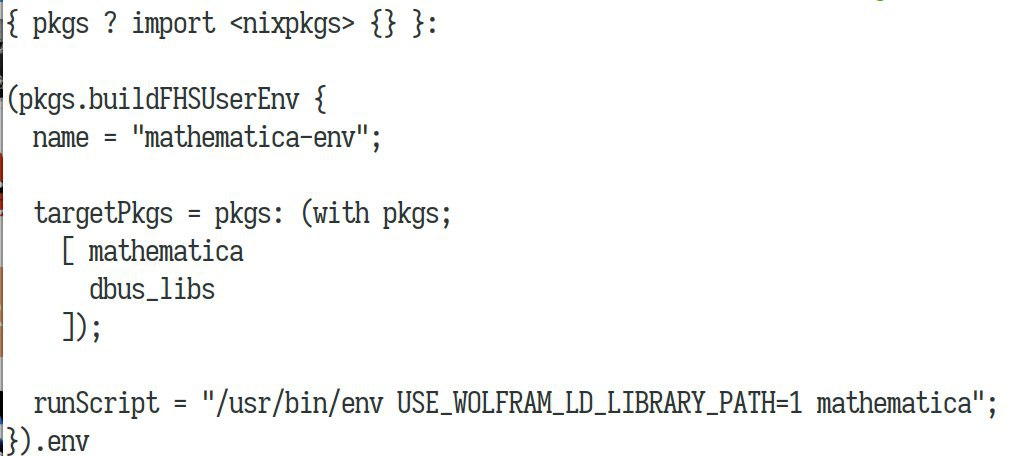
One of our group member suggests FHS Env is working for him. Despite being dirty, it works.
LEXUGE
on 18 Oct 2020
Does this help?
export USE_WOLFRAM_LD_LIBRARY_PATH=1
export QT_XCB_GL_INTEGRATION=none
mathematica
 hmenke
on 18 Oct 2020
hmenke
on 18 Oct 2020
Does this help?
export USE_WOLFRAM_LD_LIBRARY_PATH=1 export QT_XCB_GL_INTEGRATION=none mathematica
Indeed Mathematica starts as expected with these. In fact, it looks like USE_WOLFRAM_LD_LIBRARY_PATH alone is sufficient.
bgamari
on 18 Oct 2020
This is what's confusing me, the wrapProgram call in the derivation _should_ be executing the software from inside an environment with USE_WOLFRAM_LD_LIBRARY_PATH=1.
Wulfsta
on 18 Oct 2020
I think I know what's happening here; #100056 didn't trigger a rebuild of the derivation. I assume anyone having this issue has a derivation in the nix store that is not up to date with the current packaging. You will have to remove Mathematica from your system (remove from your config, rebuild, and do a # nix-collect-garbage -d, etc) and reinstall. This fixed the issue for me.
Wulfsta
on 18 Oct 2020
@wulfsta, I don't see how that is possible. That PR touches installPhase which most certainly contributes to the input hash.
bgamari
on 19 Oct 2020
@bgamari I don't have an exact explanation for this, but if readlink -f $(which mathematica) is not a bash script that sets that environment variable prior to executing .mathematica-wrapped then it's not up to date.
Edit: If anyone experiencing this can confirm that I'm correct then it would be worth tracking down why this is the case. Otherwise I'm back to being at a loss as to what's going on and can also no longer reproduce the issue.
Wulfsta
on 19 Oct 2020
Interesting. Well, indeed Mathematica in my case is not such a shell script:
$ cat $(readlink -f $(which mathematica))
#!/nix/store/2jysm3dfsgby5sw5jgj43qjrb5v79ms9-bash-4.4-p23/bin/sh
export QT_XKB_CONFIG_ROOT="/nix/store/bgmq0wr9jwim83hh5yndj8c82wvj67mz-xkeyboard-config-2.27/share/X11/xkb"
export LD_LIBRARY_PATH=/nix/store/9sfmwj09ij65qnc8dgv8h56gf12b60nn-zlib-1.2.11/lib:/nix/store/vran8acwir59772hj4vscr7zribvp7l5-gcc-9.3.0-lib/lib:/nix/store/ds88kjj0ivviba20wbjib77zk2k68yy1-libssh2-1.9.0/lib:${LD_LIBRARY_PATH}
#
# Mathematica 12.1 Front End command file
# Copyright 1988-2020 Wolfram Research, Inc.
...
Sorry for the delay.
I just tried the installation from the master branch, and it was different from your case:
$ cat $(readlink -f $(which mathematica))
#! /nix/store/k8p54jg8ipvnfz435mayf5bnqhw4qqap-bash-4.4-p23/bin/bash -e
export USE_WOLFRAM_LD_LIBRARY_PATH='1'
exec -a "$0" "/nix/store/cgplcwr4vk3icyhq7h2hn5n2ry5qwrv6-mathematica-12.1.1/bin/.mathematica-wrapped"  "$@"
There was another issue that opencv2 was marked as broken on master, so I created another patch.
 herberteuler
on 21 Oct 2020
herberteuler
on 21 Oct 2020
Related issues
 teto
·
3Comments
teto
·
3Comments
 ob7
·
3Comments
ob7
·
3Comments
 spacekitteh
·
3Comments
spacekitteh
·
3Comments
 sid-kap
·
3Comments
sid-kap
·
3Comments
 vaibhavsagar
·
3Comments
vaibhavsagar
·
3Comments
Most helpful comment
Sorry for the delay.
I just tried the installation from the master branch, and it was different from your case:
There was another issue that
opencv2was marked as broken on master, so I created another patch.