Nixpkgs: Package request: timeshift (System restore tool for Linux)
Project description
_System restore tool for Linux_
This program takes snapshots for the root directory periodically or when told to using either rsync or btrfs, and allow the user restore them if need be. It is capable to do cross-distribution restore, or
to work from a live CD/USB.
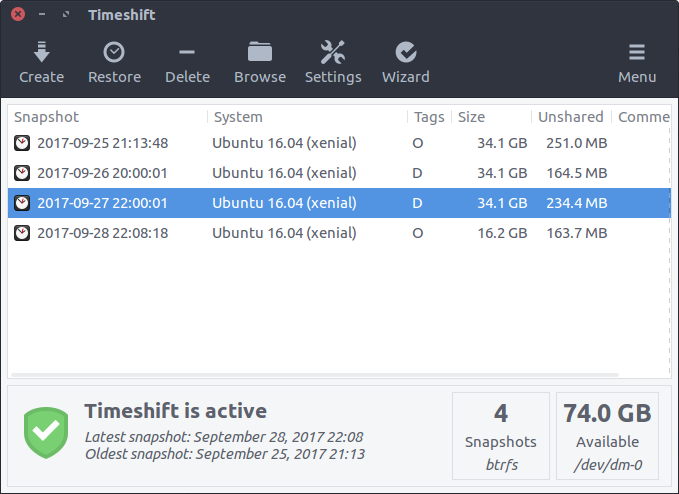
Not sure if snapshots are important for NixOS, but it saves the day when you need to restore _another distribution_ to the previous state inside NixOS, or if you are using nix package manager on other distributions.
Metadata
- homepage URL: https://github.com/teejee2008/timeshift
- source URL: https://github.com/teejee2008/timeshift
- license: gpl3
- platforms: linux
 ShamrockLee
All 5 comments
Not sure if snapshots are important for NixOS
from their readme:
It is designed to protect only system files and settings. User files such as documents, pictures and music are excluded.
that is not really usefull since nixos already allows rollbacks
 davidak
on 2 Jun 2020
davidak
on 2 Jun 2020
It could be useful with Nix on non-NixOS Linux but you might as well use the native package manager to install Timeshift in that case.
Being able to offline timeshift non-NixOS distros from your NixOS installation seems like the most sensible use-case.
 Atemu
on 3 Jun 2020
Atemu
on 3 Jun 2020
Being able to offline timeshift non-NixOS distros from your NixOS installation seems like the most sensible use-case.
Actually, my original motivation is to rescue my Debian Testing in the laptop.
It crashed after the system partition was filled up suddenly (probably by the inflating system logs).
I have a working NixOS installation in a USB stick (it is one of the very distros that can be installed onto a removable storage device, making it boot able elsewhere and not affecting the local boot loader at the same time.), and it seems to be a good idea to rescue it from the USB stick.
It's probably a bit user-specific. :sweat_smile:
BTW, what is the Nixy way to deal with the trouble if something similar (something fills up the disk space suddenly) happen to a NixOS installation?
Thanks you very much for answering, and for this wonderful distro!
ShamrockLee
on 4 Jun 2020
BTW, what is the Nixy way to deal with the trouble if something similar (something fills up the disk space suddenly) happen to a NixOS installation?
Delete older generations, run garbage collection and optimise the store. Preferably in that order.
Atemu
on 4 Jun 2020
Oh and getting rid of stray gcroots can also help a ton. I had one that kept an old 19.09 system closure around for months.
Atemu
on 4 Jun 2020
Related issues
 teto
·
3Comments
teto
·
3Comments
 yawnt
·
3Comments
yawnt
·
3Comments
 grahamc
·
3Comments
grahamc
·
3Comments
 edolstra
·
3Comments
edolstra
·
3Comments
 langston-barrett
·
3Comments
langston-barrett
·
3Comments
Most helpful comment
from their readme:
that is not really usefull since nixos already allows rollbacks