Nixpkgs: Unable to adjust laptop monitor brightness with plasma 5.16
Describe the bug
After the move to plasma 5.16, I am no longer able to adjust the laptop monitor brightness which was fine before on plasma 5.15.
Neither using the shortcut key (Fn-F11/12 on a Lenovo Yoga 2 Pro), nor using the "Battery and Brightness" icon in the system tray.
There used to be a slider under "Battery and Brightness" which could be used in addition to the hotkeys but it is simply missing.
Metadata
- system:
"x86_64-linux" - host os:
Linux 5.2.13, NixOS, 19.09.git.3b071913413M (Loris) - multi-user?:
yes - sandbox:
yes - version:
nix-env (Nix) 2.3 - channels(root):
"" - channels(peter):
"home-manager" - nixpkgs:
/home/peter/src/active/nixpkgs_unstable
Cc: @ttuegel @dtzWill @bkchr
 peterhoeg
All 30 comments
I'll see what I can figure out over the weekend - I just wanted to get the issue up here in case others have the same problem.
peterhoeg
on 20 Sep 2019
Comment is for likes: "Everything works on my laptop":
 Anton-Latukha
on 21 Sep 2019
Anton-Latukha
on 21 Sep 2019
What video drivers/setup you have?
Anton-Latukha
on 21 Sep 2019
do you have udev rule in place?
I am using i3 and what worked for me is on Lenovo Thinkpad p53
  #  environment.systemPackages = with pkgs; [ xorg.xbacklight ];
    services.udev = {
        extraRules = ''
          ACTION=="add", SUBSYSTEM=="backlight", RUN+="${pkgs.coreutils}/bin/chgrp video %S%p/brightness", RUN+="${pkgs.coreutils}  /bin/chmod g+w %S%p/brightness"
        '';
    };
 mudrii
on 21 Sep 2019
mudrii
on 21 Sep 2019
What video drivers/setup you have?
It's onboard intel graphics but that shouldn't change anything - it used to work with plasma 5.15
do you have udev rule in place?
This should not be necessary. KDE should handle it.
peterhoeg
on 21 Sep 2019
@peterhoeg thanks for the issue. I just realized that it also does not works for me. Did you had any luck on finding a solution?
 bkchr
on 23 Sep 2019
bkchr
on 23 Sep 2019
Same here. Dell Latitude 5490, Intel UHD Graphics 620. It works with GNOME but not with KDE (5.16). It previously worked fine, stopped working a few days ago when I switched from 19.03 to nixos-unstable. All people with this laptop experience the same issue. I was actually waiting for someone to come up with the issue since I thought it might be affecting only that precise laptop type. I've even tried to fallback to stable kernel (was using latest).
Metadata:
- system:
"x86_64-linux" - host os:
Linux 4.19.74, NixOS, 20.03pre193781.d484f2b7fc0 (Markhor) - multi-user?:
yes - sandbox:
yes - version:
nix-env (Nix) 2.3 - channels(root):
"nixos-20.03pre193781.d484f2b7fc0" - channels(nh):
"unstable-19.09pre182429.98e3b90b6c8" - channels(b1000101):
"unstable-19.09pre192418.e19054ab3cd" - nixpkgs:
/nix/var/nix/profiles/per-user/root/channels/nixos
 1000101
on 23 Sep 2019
1000101
on 23 Sep 2019
Is brightness sliders present in "Settings -> Power Management -> Energy saving"?
Anton-Latukha
on 23 Sep 2019
No, only for keyboard backlight.
bkchr
on 23 Sep 2019
Is brightness sliders present in "Settings -> Power Management -> Energy saving"?
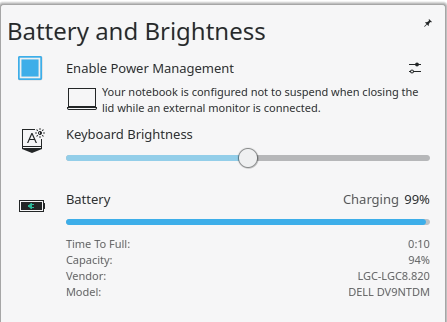
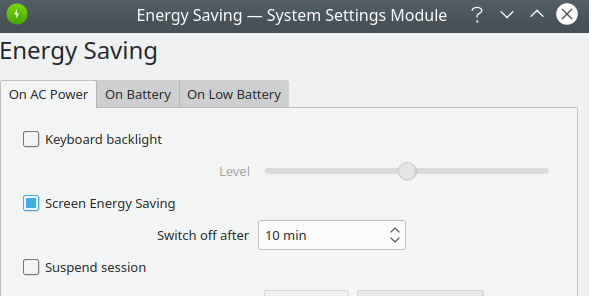
1000101
on 23 Sep 2019
I see there is external monitor seems connected. At least - there is definitely setup for it. Maybe it is related to that, it should be relayted to some kind of a hardware state.
I used to debug X11 Desktop issues, by looking into jounalctl -b, jounalctl -f logs, maybe filtering by syslog message severity levels -p 0...7, filter by -g X, -g xsession -g powerdevil.
...
Well. I found a cause. It is an upstream issue:
https://bugs.kde.org/show_bug.cgi?id=398890
And also there CLI workaround command provided.
Somebody - mark it upstream and discussion should happen in that old bug tracker.
Anton-Latukha
on 23 Sep 2019
This is the relevant upstream issue: https://bugs.kde.org/show_bug.cgi?id=410044
peterhoeg
on 25 Sep 2019
I experience the same issue on a Thinkpad T480.
 Mounium
on 6 Oct 2019
Mounium
on 6 Oct 2019
Doesn't seem to be hardware related.
peterhoeg
on 7 Oct 2019
Has there been any progress? It seems like nobody from the kde org ever replied to that report.
1000101
on 7 Oct 2019
KDE Bug tracked for me is very broken system, and you only can hope that the devs automatically somehow untie the bug tracker difficulties back to gather information. It is hard to see and follow and find where to post a bug properly, and you post in a narrow subsystem group, that can be not monitored.
They have Phabricator, where everyone active leaves, and opened GitLab recently - you probably can gather all relevant date, and open discussion on Phabicator, or reopen and do clean issue in relevant project on GitLab https://invent.kde.org, and it would be the first bug report to see there.
Anton-Latukha
on 7 Oct 2019
Also, there is a lot of options:
hardware.brightnessctl.enable
---
Enable brightnessctl in userspace. This will allow brightness control from users in the video group.


services.illum.enable
---
Enable illum, a daemon for controlling screen brightness with brightness buttons.


hardware.acpilight.enable
---
Enable acpilight. This will allow brightness control via xbacklight from users in the video group
I just use:
services.redshift.brightness.day/night
myself.
BTW, the most simple cause. Are your users are in the video group?
Anton-Latukha
on 7 Oct 2019
The issue isn't that it is not possible to adjust brightness as normal users. The issues is that plasma 5.15 used to be able to do it out of the box whereas with 5.16 that is no longer the case.
peterhoeg
on 7 Oct 2019
They unifying the UI right now.
Thee issue is that on some system it shows the settings (I and many users have everything working).
If internal system was changed, like Plasma or NixOS inside migrated to new code or brightness management system, and there new system requires some permissions, before enabling/displaying the feature.
It is or setup, or the rights management issue. Why the belonging to video group can not be the cause for example? I had a lot, a lot of such things before.
Anton-Latukha
on 7 Oct 2019
I just observed that when I press the increase brightness button, I see the Plasma popup like 30 seconds later :woman_shrugging:
bkchr
on 7 Oct 2019
Like, _mudrii_ just above:
ACTION=="add", SUBSYSTEM=="backlight", RUN+="${pkgs.coreutils}/bin/chgrp video %S%p/brightness", RUN+="${pkgs.coreutils} /bin/chmod g+w %S%p/brightness"
I mean, that he has chgrp video.
Anton-Latukha
on 7 Oct 2019
@bkchr That very can be a standard 30s timeout of waiting on some not working (or not reachable, like because of the lack of rights) system to respond. Then timeout goes off, and it goes into else case, and you have some else possibility through another system component. I am just high-level guessing using probability here of course.
Anton-Latukha
on 7 Oct 2019
For me it works again, but I don't know what changed :woman_shrugging:
bkchr
on 26 Oct 2019
Same for me, it now works without the illum but I'm not sure when it changed.
1000101
on 29 Oct 2019
I observed recently that related bug reports in KDE bug tracker were closed, probably there was a fix.
Anton-Latukha
on 29 Oct 2019
My display brightness slider is back now on latest unstable but it has no effect when I slide it around. Does it actually work for you guys?
peterhoeg
on 30 Oct 2019
Yes, it works just fine (both hw keys and sw slider).
1000101
on 30 Oct 2019
It works here again as well
Mounium
on 31 Oct 2019
Turns out that the ideapad_laptop module created a 2nd brightness device in addition to intel_backlight. Moving the slider made ideapad/brightness change which meant that the actual brightness didn't change. The fix:
boot.blacklistedKernelModules = [ "ideapad_laptop" ];
This ideally should resolve into https://github.com/NixOS/nixos-hardware.
Anton-Latukha
on 13 Nov 2019
Related issues
 tomberek
·
3Comments
tomberek
·
3Comments
 ayyess
·
3Comments
ayyess
·
3Comments
 matthiasbeyer
·
3Comments
matthiasbeyer
·
3Comments
 ghost
·
3Comments
ghost
·
3Comments
 teto
·
3Comments
teto
·
3Comments
Most helpful comment
I see there is external monitor seems connected. At least - there is definitely setup for it. Maybe it is related to that, it should be relayted to some kind of a hardware state.
I used to debug X11 Desktop issues, by looking into
jounalctl -b,jounalctl -flogs, maybe filtering by syslog message severity levels-p 0...7, filter by-g X,-g xsession-g powerdevil....
Well. I found a cause. It is an upstream issue:
https://bugs.kde.org/show_bug.cgi?id=398890
And also there CLI workaround command provided.
Somebody - mark it
upstreamand discussion should happen in that old bug tracker.