Nixpkgs: Steam doesn't run ("libGL error: failed to load driver: swrast")
> steam
cp: cannot create regular file '/home/chris/.local/share/Steam/bootstrap.tar.xz': Permission denied
Running Steam on nixos 17.03.git.32d6569b62 64-bit
STEAM_RUNTIME has been set by the user to: /steamrt
Installing breakpad exception handler for appid(steam)/version(1493162727)
libGL error: unable to load driver: swrast_dri.so
libGL error: failed to load driver: swrast
NixOS 17.03
Hardware:
- Intel NUC NUC6i7KYK
- Intel Iris Pro Graphics 580
 chris-martin
All 14 comments
Did you enable the 32-bit OpenGL option as documented in the manual?
 lheckemann
on 22 May 2017
lheckemann
on 22 May 2017
Yes - This is my config https://github.com/chris-martin/home/blob/a08b6c1683719e23c1ee27b295b07b852a950afe/nix/os/cubby.nix
chris-martin
on 23 May 2017
This looks pretty wrong to me, could you check the permissions on .local/share/Steam?
cp: cannot create regular file '/home/chris/.local/share/Steam/bootstrap.tar.xz': Permission denied
I also don't think it should be using the swrast driver at all... But no idea if the two issues are related.
lheckemann
on 23 May 2017
.local/share/Steam is 0700, but Steam/bootstrap.tar.xz is 0444
chris-martin
on 23 May 2017
Steam has been spitting this permission line for me as long as I can remember, without experiencing any actual problems.
 vcunat
on 23 May 2017
vcunat
on 23 May 2017
I think trying swrast is typically a symptom of driver problems. SW rasterization is often not feasible in (3D) games anyway.
vcunat
on 23 May 2017
BTW, steam seems fine on my micro-desktop with i7-6700T on NixOS-17.03. (I don't run everything on the same nixpkgs commit.)
vcunat
on 23 May 2017
environment.systemPackages = with pkgs; [ (steam.override { newStdcpp = true; }) ];
With the above line it's working fine with mesa drivers.
 qrvaelet
on 26 Aug 2017
qrvaelet
on 26 Aug 2017
@qrvaelet Thank you, that workaround is working!
chris-martin
on 27 Aug 2017
Hi there, just wanted to state that I have had the same issue with Steam on my Lenovo Thinkpad X240 with an Intel integrated gpu, but do not see this issue on my desktop which uses the proprietary Nvidia drivers.
The workaround stated above makes steam run perfectly on my laptop
 MP2E
on 27 Aug 2017
MP2E
on 27 Aug 2017
Add one more to the list of people for whom @qrvaelet's suggestion worked like a charm after a reboot; I was getting a "Pins potentially out-of-date, rebuilding..." message followed by some "read only filesystem" errors as Steam tried to modify a Nix store path. This is on an XPS 13 2-in-1 i5-7Y54.
 polendri
on 5 Sep 2017
polendri
on 5 Sep 2017
I have no idea whether this is a related issue, but might as well mention it, I guess. With the newStdcpp = true; workaround applied to get Steam to launch, this is what happens when I then try to launch Civ VI:
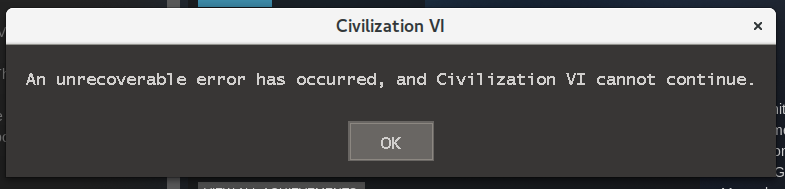
An unrecoverable error has occurred, and Civilization VI cannot continue.
chris-martin
on 6 Sep 2017
If someone could test and review #29180 -- particularly if you're using a dedicated setup, that would be grand.
 srhb
on 10 Sep 2017
srhb
on 10 Sep 2017
was merged.
 Mic92
on 13 Sep 2017
Mic92
on 13 Sep 2017
Related issues
 ghost
·
3Comments
ghost
·
3Comments
 lverns
·
3Comments
lverns
·
3Comments
 rzetterberg
·
3Comments
chris-martin
·
3Comments
rzetterberg
·
3Comments
chris-martin
·
3Comments
 tomberek
·
3Comments
tomberek
·
3Comments
Most helpful comment
environment.systemPackages = with pkgs; [ (steam.override { newStdcpp = true; }) ];With the above line it's working fine with mesa drivers.