Nivo: Wrong values displayed on y-axis (line chart)
Dear nivo team,
first thanks for the nice chart-library. Im currently trying to implement a line-chart in React JS in my frontend. I want to display some data (CAN messages).
The problem now is that the values get displayed completely wrong. Some of them are missing completely, some are displayed (e.g. 8. Hex-Byte) with values much too high (should be between 38 and 8, but get displayed with values over 400). I want to have a value range on the y-axis of the chart ranging from 0 to 256.
Values for the 8. Hex-Byte:
data: (13) […]\
0: Object { x: "Message 1", y: 23 }\
1: Object { x: "Message 2", y: 38 }\
2: Object { x: "Message 3", y: 34 }\
3: Object { x: "Message 4", y: 4 }\
4: Object { x: "Message 5", y: 4 }\
5: Object { x: "Message 6", y: 8 }\
6. Object { x: "Message 7", y: 38 }\
7: Object { x: "Message 8", y: 8 }\
8: Object { x: "Message 9", y: 23 }\
9: Object { x: "Message 10", y: 8 }\
10: Object { x: "Message 11", y: 8 }\
11: Object { x: "Message 12", y: 8 }\
12: Object { x: "Message 13", y: 8 }\
For clarification the data array for the line-chart looks like this:
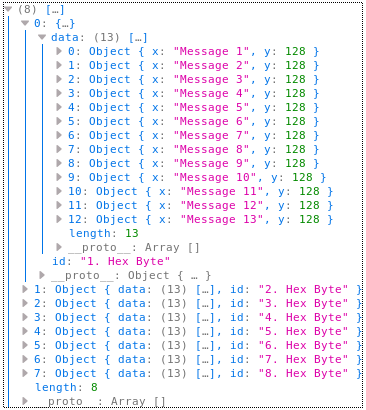
--> as you can see there are 13 values for every line in the chart (should be 13 lines)
I used the code from the docs for the line-chart (https://nivo.rocks/line/).
The displayed line-chart looks like this:
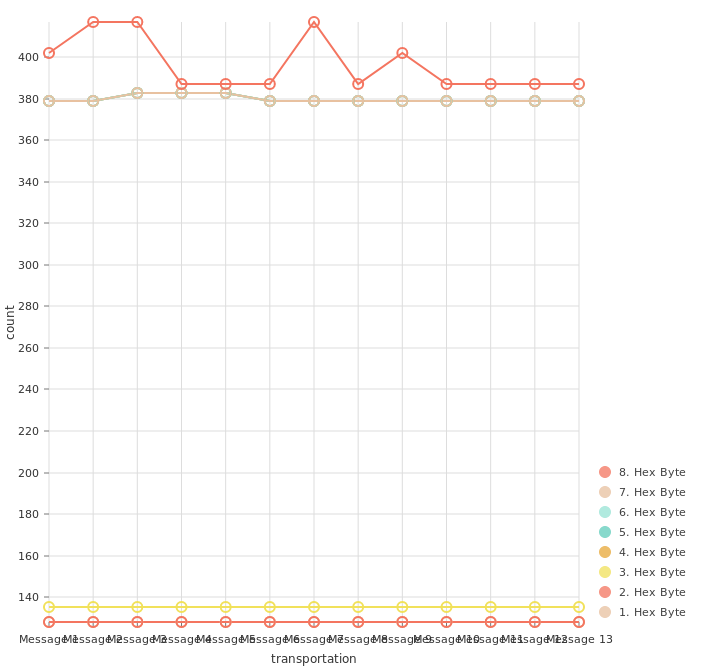
Maybe you could give me a hint what I am doing wrong and how I can fix the chart :) would be really great. Thank you very much in advance.
 psycr0w13
All 6 comments
stacked: false
 rrdlpl
on 20 May 2019
rrdlpl
on 20 May 2019
Hi @psycr0w13, please provide a running example on codesandbox as asked in the issue template. Thank you
 plouc
on 20 May 2019
plouc
on 20 May 2019
@rrdlpl Thank you so much :) thats it!!!
@plouc Thanks also to you, next time Ill provide a running example!
psycr0w13
on 20 May 2019
@psycr0w13 was there any other solution to this? Stacked false doesn't work for me. I have the same issue but am having trouble getting a code sandbox.
 ymenase
on 11 May 2020
ymenase
on 11 May 2020
@rrdlpl thanks! Worked for me too. Do you know why this solves the issue?
 cristiprg
on 30 Jul 2020
cristiprg
on 30 Jul 2020
@rrdlpl thanks! Worked for me too. Do you know why this solves the issue?
I don't use this library anymore. I guess the default behaviour is to stack the values. 🤷♂️
rrdlpl
on 30 Jul 2020
Related issues
 stahlmanDesign
·
3Comments
stahlmanDesign
·
3Comments
 Buvaneshkumar7
·
3Comments
Buvaneshkumar7
·
3Comments
 gcloeval
·
3Comments
gcloeval
·
3Comments
 vagnervst
·
4Comments
vagnervst
·
4Comments
 dubzzz
·
3Comments
dubzzz
·
3Comments
Most helpful comment
stacked: false