Nimble: Compiling fails in Xcode 9 / Swift 4 / Nimble 7.0.2
What did you do?
Compile Nimble in Xcode 9 9A235
What did you expect to happen?
It Compiles
What actually happened instead?
It gives me the compilation error:
CwlPreconditionTesting/CwlPreconditionTesting/CwlCatchBadInstruction.swift:82:11: Overlapping accesses to 'self', but modification requires exclusive access; consider copying to a local variable
Environment
List the software versions you're using:
- Quick: 1.1.0
- Nimble: 7.0.2
- Xcode Version: 9.0 (9A235)
- Swift Version: 4.0
Please also mention which package manager you used and its version. Delete the
other package managers in this list:
- Cocoapods: 1.3.1
Project that demonstrates the issue
 Blackjacx
All 7 comments
CI builds are passing and I can't reproduce it locally. Could you try a clean build or removing ~/Library/Developer/Xcode/DerivedData?
 ikesyo
on 28 Sep 2017
ikesyo
on 28 Sep 2017
I've already cleaned everything. The CI builds of 4 of my projects are not passing and show the same errors:
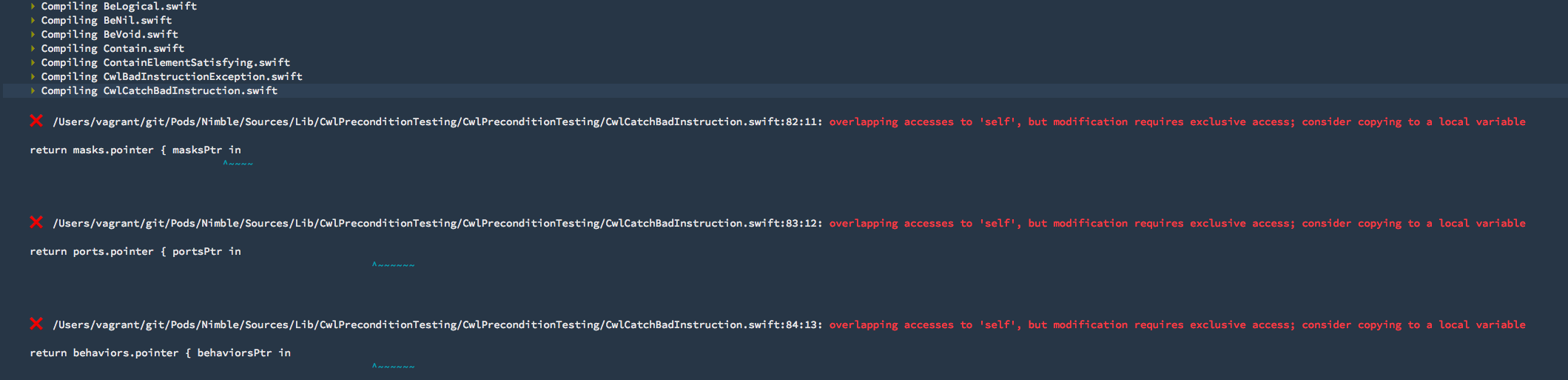
The error message overlapping accesses to 'self', but modification requires exclusive access; consider copying to a local variable is a Swift 4 warning that is enabled in Xcode 9 by default.
You can try to compile the following projects:
- https://github.com/Blackjacx/SHSearchBar - scheme
SHSearchBar - https://github.com/Blackjacx/SHDateFormatter - scheme
SHDateFormatter - https://github.com/Blackjacx/Source - scheme
Source
EDIT:
I found out that this happens when I build my framework target with the Thread Sanitizer enabled. When I switch it off I can build without errors locally. My CI machine still delivers me that error. Maybe it uses this thread sanitizer despite I disabled it in my scheme settings...
I only found this issue of another project with an related failure: https://github.com/algolia/algoliasearch-client-swift/issues/388
Blackjacx
on 28 Sep 2017
OK fixed this issue for me by disabling thread sanitizer... But it is still an issue for people with thread sanitizer enabled.
You can
- clone the project https://github.com/Blackjacx/SHSearchBar
- enable thread sanitizer for run and test phase
- build SHSearchBar scheme
to reproduce the failure.
Blackjacx
on 28 Sep 2017
Thanks for the investigation @Blackjacx! That's really helpful.
ikesyo
on 29 Sep 2017
I like the project and use it a lot :-)
Blackjacx
on 29 Sep 2017
I have this issue and I don't have Thread Sanitizer enable on Xcode 9.2
/Users/jmacko/pj/iOS-app/Pods/Target Support Files/Nimble/Nimble-umbrella.h:13:9: note: in file included from /Users/jmacko/pj/iOS-app/Pods/Target Support Files/Nimble/Nimble-umbrella.h:13:
#import "Nimble.h"
        ^
/Users/jmacko/pj/iOS-app/Pods/Nimble/Sources/Nimble/Nimble.h:9:13: error: 'CwlPreconditionTesting.h' file not found
    #import "CwlPreconditionTesting.h"
            ^
<unknown>:0: error: could not build Objective-C module 'Nimble'

Testing failed:
    'CwlPreconditionTesting.h' file not found
    Could not build Objective-C module 'Nimble'
** TEST FAILED **
 mackoj
on 11 Dec 2017
mackoj
on 11 Dec 2017
pod deintegrate
pod install
Work for me just now.
 saragiotto
on 15 Mar 2018
saragiotto
on 15 Mar 2018
Related issues
ikesyo
·
4Comments
 delebedev
·
4Comments
delebedev
·
4Comments
 zachlucas
·
5Comments
zachlucas
·
5Comments
 kdawgwilk
·
4Comments
kdawgwilk
·
4Comments
 RonanMcH
·
7Comments
RonanMcH
·
7Comments
Most helpful comment
pod deintegrate
pod install
Work for me just now.