Nim: Can not print chinese words on windows command line
code:
echo("你好,世界!")
output:
浣犲ソ锛屼笘鐣岋紒
(out put is unreadble words)
windows 10,
nim-0.18.0
 xland
xland
All 26 comments
Followed this? https://stackoverflow.com/a/388500/492186
 dom96
on 30 Mar 2018
dom96
on 30 Mar 2018
Why go-lang/rust-lang do not need to do this manually?
xland
on 1 Apr 2018
Good question. Perhaps they run this command in the background? or maybe they perform some other trick? If you could find out that would be great :)
dom96
on 1 Apr 2018
Sorry,I can not find out the reason.
I think it has something to do with the code file's encoding.
ANSI or utf-8
xland
on 1 Apr 2018
it works correctly on linux. Note that on windows, batch (.bat) files has the same problem, try to echo your string in an utf-8 encoded .bat, it will behave the same. To get it to reasonably work, maybe you need to save your .nim file in little endian utf16 without BOM, I think that's the format windows expect. The console can be switched to accept utf8 but it's not supported and very buggy, not recommended at all.
 lightness1024
on 2 Apr 2018
lightness1024
on 2 Apr 2018
@lightness1024 no, no, no! You SHOULDN'T save .nim files in any other encoding than UTF-8!
 Yardanico
on 2 Apr 2018
Yardanico
on 2 Apr 2018
This is a big problem for Chinese,Japanese,Korean users.
xland
on 3 Apr 2018
@xland
Try this:
proc getACP(): uint {.stdcall, dynlib: "kernel32", importc: "GetACP".}

proc getConsoleCP(): uint {.stdcall, dynlib: "kernel32", importc: "GetConsoleCP".}
proc setConsoleCP(cp: uint): int32 {.stdcall, dynlib: "kernel32", importc: "SetConsoleCP".}

proc getConsoleOutputCP(): uint {.stdcall, dynlib: "kernel32", importc: "GetConsoleOutputCP".}
proc setConsoleOutputCP(cp: uint): int32 {.stdcall, dynlib: "kernel32", importc: "SetConsoleOutputCP".}


var
  acp = getACP()

# or try:
# acp = 65001
  ccp = getConsoleCP()
  cocp = getConsoleOutputCP()

setConsoleCP(acp)
setConsoleOutputCP(acp)

echo("你好,世界!")

setConsoleCP(ccp)
setConsoleOutputCP(cocp)
I didn't test in Windows.
 data-man
on 3 Apr 2018
data-man
on 3 Apr 2018
instead of hacking the user's bash session as we established it was dangerous already, it would be better to convert the encodings of the string. if .nim must stay as utf8, then just do something along the likes of:
import encodings
echo(convert("你好,世界!", destEncoding= getCurrentEncoding(), srcEncoding="utf-8"))
wrap it for convenience since it's going to have to be used a lot:
import encodings, strutils

proc utfEcho*(output: varargs[string, `$`]) =
  echo(convert(join(output), destEncoding= getCurrentEncoding(), srcEncoding="utf-8"))

when isMainModule:
  utfEcho("你好", ",", "世界!")
@lightness1024 I generally agree with you, but it shouldn't be called "utfEcho" because it's windows console's problem that it doesn't have unicode by default (and echo can easily print unicode).
Yardanico
on 4 Apr 2018
@Yardanico I admit that I couldn't find a good name. I stuttered on the name but you've got to get on with your life at some point, so I picked whatever was short enough. what name would be good for that ?
localeEcho ? convertEcho ? acpEcho ?
lightness1024
on 4 Apr 2018
- CMD.exe
test of utfEcho
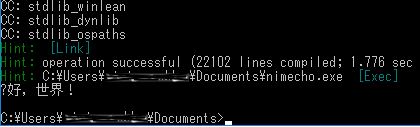
I'm getting this on my japanese windows. Which is to be expected, 你 is purely chinese and must not exist in JIS.
@xland on your chinese machine it will probably work OK.
If I use chcp 65001 the output (of simple echo) is completely blank (a newline).
And finally, If I use utfEcho on a chcp console, I get:
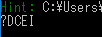
Raw echo, on default console prints 菴螂ス・御ク也阜・
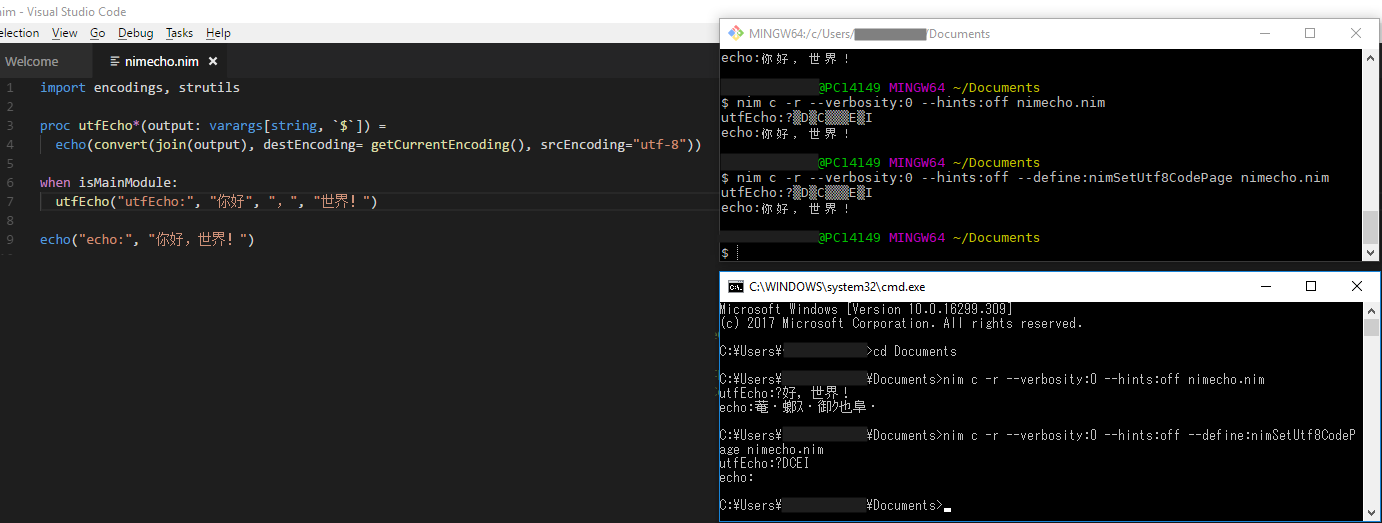
- git shell (mintty 2.6.2)
And, "git bash" after changing Options->Text->character set->Utf-8
utfEcho ?▒D▒C▒▒▒E▒I
echo 你好,世界!
So it's clear, there is only one correct way. get a utf-8 capable console, and do everything in utf-8.
The second class choice is to use utfEcho only in the case of a "code page" console, and make sure to echo only stuff that this code page can handle.
 siliconvoodoo
on 5 Apr 2018
siliconvoodoo
on 5 Apr 2018
@data-man I tried your code, after adding some discard to get it to build, it outputs the exact same garbage than "raw echo, default console" case above.
siliconvoodoo
on 5 Apr 2018
This is supposed to be supported via --define:nimSetUtf8CodePage during compilation. Sadly, it doesn't work and I don't know why. On my Windows 10 machine I cannot get it to produce correct output, maybe my fonts don't support it? Strange.
 Araq
on 5 Apr 2018
Araq
on 5 Apr 2018
I just tried, and using --define:nimSetUtf8CodePage behaves exactly the same as the chcp 65001 case above, which if people read stackoverflow would be aware is a bad thing to do.
siliconvoodoo
on 5 Apr 2018
siliconvoodoo
on 5 Apr 2018
Last idea, I'm coming back on my original suggestion, windows is made to work in some kind of 1993 version of UCS16. Using code pages (ACP stuff) is not ideal, and results in the limitation we observe here with 你 not being displayable on my JIS locale. Convert should provide a way to convert to UCS16, I'll try.
EDIT:
Ok so the result of using destEncoding="utf-16" which results in a call to multiByteToWideChar from utf8 to what I thought cmd would excpect, didn't work. It's even arguably worse.

That's with the default locale
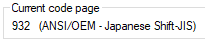
If I let nim set it to utf8 using the command line switch, or chcp it's broken too anyway.
(powershell behaves the same)
So conclusion is again as stated first: either use mintty (or another respectable terminal), or use utfEcho in conjunction with only characters that are compatible with the locale.
leads for better consoles : https://stackoverflow.com/questions/60950/is-there-a-better-windows-console-window
EDIT2:
Actually that's not the end of it, because it appears that the 你 character is displayable after all, even on JIS. It must be a Nim peculiarity (bug?) then.
I've saved a text containing chinese and japanese in Unicode (utf16-le) in notepad, and one in utf8.
This would confirm @xland 's claim that Rust can do it.
Here in JIS cmd:
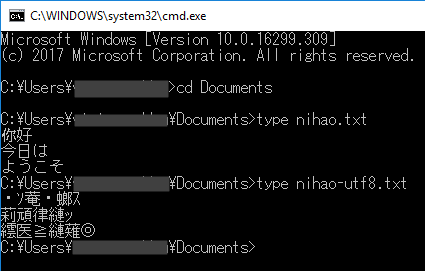
and here in chcp 65001 cmd:
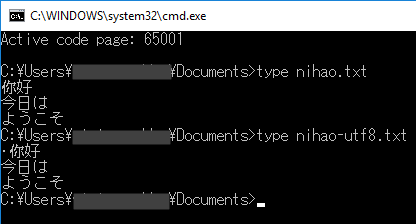
siliconvoodoo
on 5 Apr 2018
Thank you for your thorough investigation @siliconvoodoo :)
Now how do we fix this bug?
dom96
on 5 Apr 2018
Thank you all.
I am on my QingMing holiday.
I'll try your suggestions a few days later.
xland
on 6 Apr 2018
how about this issue's progressing
xland
on 15 Aug 2018
Nobody knows how to fix it...
Araq
on 15 Aug 2018
How about this issue's progressing?
This is a big problem for Chinese,Japanese,Korean users.
xland
on 26 Oct 2018
This is indeed annoying. Go, LLVM and Python all use WriteConsoleW for writing to the windows console.
 mjoud
on 27 Oct 2018
mjoud
on 27 Oct 2018
Then we should do the same. Please PR and test it well :)
dom96
on 27 Oct 2018
Aha, that's what to use, interesting. :-)
Araq
on 29 Oct 2018
This has been fixed afaict.
Araq
on 1 Jul 2019
Related issues
 Tronic
·
3Comments
Tronic
·
3Comments
 timotheecour
·
3Comments
timotheecour
·
3Comments
 liquid600pgm
·
3Comments
liquid600pgm
·
3Comments
 zaxebo1
·
4Comments
zaxebo1
·
4Comments
 alaviss
·
3Comments
alaviss
·
3Comments
Most helpful comment
This is a big problem for Chinese,Japanese,Korean users.