Nightwatch: Connection Refused Is Selenium Server Started? unknown error
Pretty common by the looks of it, but i can run my e2e tests locally, but then when i create a stage test in gitlab ci my test fail. Interestingly the reported error is "unknown".
here is the output
node test/e2e/runner.js "--verbose"

> Starting dev server...

Starting to optimize CSS...
Processing static/css/app.b2ce8a75dcfca5585473920c18c275ba.css...
Processed static/css/app.b2ce8a75dcfca5585473920c18c275ba.css, before: 147174, after: 114086, ratio: 77.52%
> Listening at http://localhost:8181

Starting selenium server... started - PID:  4041

[Test] Test Suite
=====================

Running:  should render login screen
INFO Request: POST /wd/hub/session
 - data:  {"desiredCapabilities":{"browserName":"chrome","javascriptEnabled":true,"acceptSslCerts":true,"platform":"ANY","chromeOptions":{"args":["--no-sandbox"]},"name":"Test"}}
 - headers:  {"Content-Type":"application/json; charset=utf-8","Content-Length":168}
ERROR Response 500 POST /wd/hub/session (21065ms) { state: 'unknown error',
  sessionId: null,
  hCode: 1999615733,
  value:
   { localizedMessage: null,
     cause: null,
     suppressed: [],
     message: null,
     hCode: 1271337743,
     class: 'java.util.concurrent.TimeoutException',
     screen: null },
  class: 'org.openqa.selenium.remote.Response',
  status: 13 }

Error retrieving a new session from the selenium server

Connection refused! Is selenium server started?
{ state: 'unknown error',
  sessionId: null,
  hCode: 1999615733,
  value:
   { localizedMessage: null,
     cause: null,
     suppressed: [],
     message: null,
     hCode: 1271337743,
     class: 'java.util.concurrent.TimeoutException',
     screen: null },
  class: 'org.openqa.selenium.remote.Response',
  status: 13 }
If it helps im using the vuecli webpack template and its all unchanged, except for adding a html reporter and some chrome options in the default to diagnose the issue.
Im using the docker image node:latest and have installed openjdk-8-jre with backports like so:
jessie-backports openjdk-8-jre-headless ca-certificates-java openjdk-8-jre chromium
Ive also run through the port 8181 incase 8080 was in use (result is the same).
like i said this all works perfectly on my machine but on a ci server im getting a 500 error trying to access a session and the error returned is 'unknown error' with no real helpful information other than the class which is java.util.concurrent.TimeoutException which could suggest a timeout?
the docker node:latest image is debian with node 8.2.1 and npm 5.3.1 but i think these may not be the issue.
 leemason
All 6 comments
If it helps this is my nightwatch conf file
require('babel-register')
var config = require('../../config'),
path = require('path'),
HtmlReporter = require('nightwatch-html-reporter'),
reporter = new HtmlReporter({
openBrowser: false,
reportsDirectory: path.join(__dirname, 'reports'),
relativeScreenshots: true,
themeName: 'compact',
reportFilename: 'index.html'
})
// http://nightwatchjs.org/gettingstarted#settings-file
module.exports = {
src_folders: ['test/e2e/specs'],
output_folder: 'test/e2e/reports',
custom_assertions_path: ['test/e2e/custom-assertions'],
selenium: {
start_process: true,
server_path: require('selenium-server').path,
host: '127.0.0.1',
port: 4444,
cli_args: {
'webdriver.chrome.driver': require('chromedriver').path
}
},
test_settings: {
default: {
selenium_port: 4444,
selenium_host: 'localhost',
silent: true,
globals: {
reporter: reporter.fn,
devServerURL: 'http://localhost:' + (process.env.PORT || config.dev.port)
},
desiredCapabilities: {
browserName: 'chrome',
javascriptEnabled: true,
acceptSslCerts: true,
"chromeOptions" : {
"args" : ["--no-sandbox"]
}
}
},
chrome: {
desiredCapabilities: {
browserName: 'chrome',
javascriptEnabled: true,
acceptSslCerts: true
}
},
firefox: {
desiredCapabilities: {
browserName: 'firefox',
javascriptEnabled: true,
acceptSslCerts: true
}
}
}
}
Have you run this successfully before? Or is this the first time you are trying to configure the test suite run outside your localhost?
I had same sort of an issue on Travis CI, but I fixed it by installing Chrome and running Xvfb in the VM. Might be the same issue, you should try installing Chrome and Xvfb and running them in the Docker image. E.g. solution that apparently works in Circle CI docker, so should work where ever;
https://discuss.circleci.com/t/installing-chrome-inside-of-your-docker-container/9067
My travis configuration that fixed my issue is;
  before_install:
    - export CHROME_BIN=/usr/bin/google-chrome
    - export DISPLAY=:99.0
    - sh -e /etc/init.d/xvfb start
    - sudo apt-get update
    - sudo apt-get install -y libappindicator1 fonts-liberation
    - wget https://dl.google.com/linux/direct/google-chrome-stable_current_amd64.deb
    - sudo dpkg -i google-chrome*.deb
 Rikusor
on 8 Aug 2017
Rikusor
on 8 Aug 2017
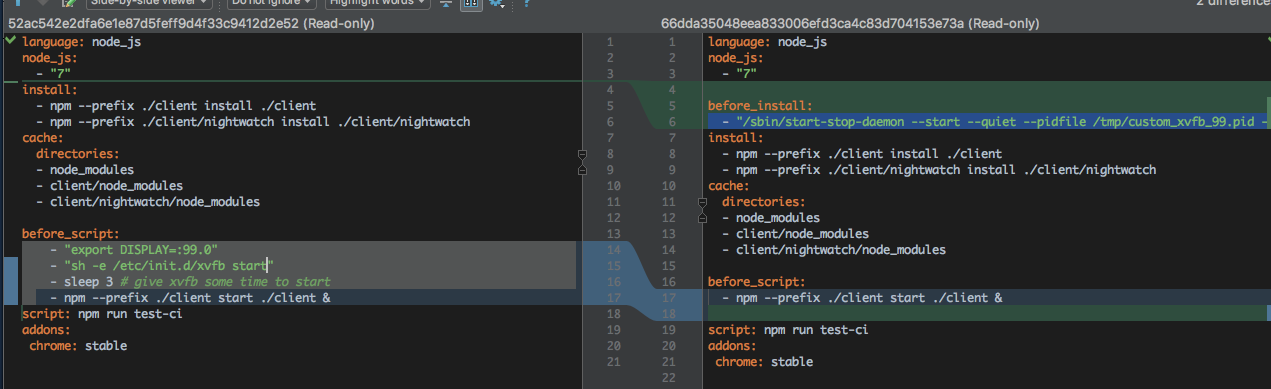
I have an xvfb issue, selenium server starts with the one on the left but fails if I try set a custom screen size: any ideas?
 quantuminformation
on 1 Dec 2017
quantuminformation
on 1 Dec 2017
Hi,
This atleast works for me, running with custom screen size;
/sbin/start-stop-daemon --start --quiet --pidfile /tmp/custom_xvfb_99.pid --make-pidfile --background --exec /usr/bin/Xvfb -- :99 -ac -screen 0 1024x980x24+32
And in addition to that I have configured in the nightwatch.conf.js
  test_settings: {
      ...
      desiredCapabilities: {
        browserName: 'chrome'
      }
    },
    chrome: {
      desiredCapabilities: {
        "args": [
          "window-size=1024,800"
        ],
        browserName: 'chrome',
        javascriptEnabled: true
      }
    }
  }
Can you paste the error you get?
Rikusor
on 4 Dec 2017
We have just ran into similar issue on travis, inspiration for a travis config came from http://sm4.github.io/2017/02/07/Vue-Nightwatch-e2e-tests-on-Travis-CI-in-Chrome/
We ended up doing following in .travis.yml
sudo: required
dist: trusty
language: node_js
addons:
  apt:
    sources:
      - google-chrome
    packages:
      - google-chrome-stable
before_install:
  - export CHROME_BIN=chromium-browser
  - export DISPLAY=:99.0
  - sh -e /etc/init.d/xvfb start
  - npm i -g npm@5
install:
  - npm install
script:
  - node test/e2e/runner.js
Runner came with template:
process.env.NODE_ENV = 'testing'
var server = require('../../dev-server.js')
server.ready.then(() => {
  var opts = process.argv.slice(2)
  if (opts.indexOf('--config') === -1) {
    opts = opts.concat(['--config', 'test/e2e/nightwatch.conf.js'])
  }
  if (opts.indexOf('--env') === -1) {
    opts = opts.concat(['--env', 'chrome'])
  }
  var spawn = require('cross-spawn')
  var runner = spawn('./node_modules/.bin/nightwatch', opts, { stdio: 'inherit' })
  runner.on('exit', function (code) {
    server.close()
    process.exit(code)
  })
  runner.on('error', function (err) {
    server.close()
    throw err
  })
})
nightwatch.conf.js was from template as well:
require('babel-register')
var config = require('../../config')
module.exports = {
  src_folders: ['test/e2e/specs'],
  output_folder: 'test/e2e/reports',
  custom_assertions_path: ['test/e2e/custom-assertions'],
  selenium: {
    start_process: true,
    server_path: require('selenium-server').path,
    host: '127.0.0.1',
    port: 4444,
    cli_args: {
      'webdriver.chrome.driver': require('chromedriver').path
    }
  },
  test_settings: {
    default: {
      selenium_port: 4444,
      selenium_host: 'localhost',
      silent: true,
      globals: {
        devServerURL: 'http://localhost:' + (process.env.PORT || config.dev.port)
      }
    },
   chrome: {
      desiredCapabilities: {
        browserName: 'chrome',
        javascriptEnabled: true,
        acceptSslCerts: true
      }
    },
    firefox: {
      desiredCapabilities: {
        browserName: 'firefox',
        javascriptEnabled: true,
        acceptSslCerts: true
      }
    }
  }
}
 ivarprudnikov
on 16 Jan 2018
ivarprudnikov
on 16 Jan 2018
This issue has been automatically marked as stale because it has not had any recent activity.
If possible, please retry using the latest Nightwatch version and update the issue with any relevant details. If no further activity occurs, it will be closed. Thank you for your contribution.
![stale[bot] picture](https://avatars.githubusercontent.com/in/1724?v=4&s=40) stale[bot]
on 14 Nov 2018
stale[bot]
on 14 Nov 2018
Related issues
 lukasbach
·
53Comments
lukasbach
·
53Comments
 OKNoah
·
29Comments
OKNoah
·
29Comments
 mam-p
·
22Comments
mam-p
·
22Comments
 jesusreal
·
26Comments
jesusreal
·
26Comments
 amarpatel
·
41Comments
amarpatel
·
41Comments
Most helpful comment
Have you run this successfully before? Or is this the first time you are trying to configure the test suite run outside your localhost?
I had same sort of an issue on Travis CI, but I fixed it by installing Chrome and running Xvfb in the VM. Might be the same issue, you should try installing Chrome and Xvfb and running them in the Docker image. E.g. solution that apparently works in Circle CI docker, so should work where ever;
https://discuss.circleci.com/t/installing-chrome-inside-of-your-docker-container/9067
My travis configuration that fixed my issue is;