Nightwatch: Parallel workers not running all tests and/or failing
Greetings,
A co-worker has created a POC (https://github.com/dieguito151/nightwatch-parallel) that demonstrates an issue that is currently hitting us. We are unable to run our tests consistently when they are spawned in parallel, meaning when we set nightwatch.conf.js per the below:
...
test_workers: {
  enabled: true,
  workers: 'auto',
},
...
When running the tests you will notice one of the tests will be skipped and/or at least one will fail. When running al tests synchronously (enabled: false) they all complete successfully.
Is here something we should correct in that POC? Thanks in advance!
- Nightwatch version:
^0.9.14 - NodeJS:
v7.9.0 - ChromeDriver on MacOS Sierra
 cortezcristian
All 20 comments
@cortezcristian
Have you tried specifying the exact number of workers/adding parallel_process_delay setting to your configuration ? I've been using parallel execution in nightwatch for some time, and have noticed the issue with spawning more then 10 processes simultaneously - some of them may fail, while they always pass when disabling workers.
 aamorozov
on 5 Jul 2017
aamorozov
on 5 Jul 2017
hey we are also facing this issue. Whenever we go for parallel running couple of editing test cases are getting failed while if we run in sequential mode all tests are running fine. We have used default configuration like above one.
Is parallel running tricky things?
 gauravrajput44
on 5 Jul 2017
gauravrajput44
on 5 Jul 2017
It's worth removing the logic from the global before and after hooks and seeing if you can get it working putting the logic elsewhere. Encountered a few issues with that using parallel workers.
 promo-gpsw
on 6 Jul 2017
promo-gpsw
on 6 Jul 2017
I wonder if nightwatch is ES6 compatible, especially when running in parallel. Noticed different behaviors after replacing all const with vars (currently trying to migrate everything to ES5 just in case). My other concern if this is prepared for new SPAs, that use virtual dom (i've found the suite waiting for events on elements that have been reused or that are not there anymore).
cortezcristian
on 7 Jul 2017
@cortezcristian
You can compile your code in main configuration file using babel and use all es6 features(not finalized features may require additional babel modules, but you can still use them after adding those to your project). I've used it with parallel running for a few months and haven't had any issues specific to new syntax. The things that may affect parallel running are noted above.
@promo-gpsw gives a good point as well
aamorozov
on 7 Jul 2017
So far I tried adding the parallel_process_delay flag and commenting the before, beforeEach and after hooks with no luck, plus passing this to ES5. Any thoughts? @promo-gpsw can you give more details about where did you put the hooks logic? lmk
cortezcristian
on 10 Jul 2017
Are those tests that fail always the same ? If so, have you tried looking at them to see, maybe there is an issue specific to the failing test. Also, you can use before/after hooks in each test, as well as try avoiding it for debugging purpose and just start/close the browser(if using with selenium) or the driver(if running against chrome/ff standalone) within the actual test flow.
aamorozov
on 10 Jul 2017
I tried several things, parallel configuration is not working for me. I was creating a script that allow running a cluster and start nightwatch processes in parallel, running the tests with different configurations and ports and retrying tests on failure. Our test suite is really complicated and does many other operations before running each case, anyways.
While working on reordering the logs and researching a selenium override configuration issue about workers; found a new piece of technology that follows the same principle of my humble cluster program. It looks like the people from Walmart had recently released a project called Magellan (more info here http://testarmada.io). Find out a boilerplate project released on January this year (@TestArmada /boilerplate-nightwatch surprisingly only 35 stars). As it seems very promising I played with it during the weekend. So I switched to something similar to this boilerplate:
I was able to re-use most of my code. And now it's working really good, just configured it and seems very stable.

Achieved the following
1. Every test case runs in a separate worker
2. Every test case retry in case of failure (max 3 times)
3. The suite runs in parallel
This is an interesting related article in case you wan to read it Why End-to-End testing sucks
(and why it doesn’t have to).
- https://medium.com/@geek_dave/zombies-and-soup-e346f0c8064f
cortezcristian
on 11 Jul 2017
I can confirm that this is a thing. Here's my test output:
OK. 122  total assertions passed. (2m 54s)
Exited with code 1
I have around 150 assertions in total, the remaining ones are not getting executed when I run in parallel mode.
 karthikiyengar
on 6 Aug 2017
karthikiyengar
on 6 Aug 2017
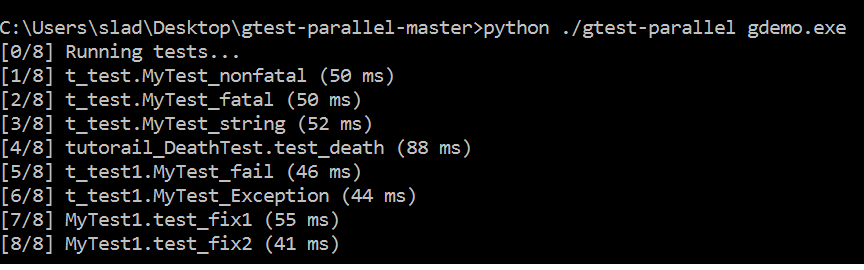
i am using gtest parallel for running by gtest in parallel...
What i found is all my test cases show "pass" even when some fail(checked in visual studio).
besides the time required for parallel run of test is much large then what i found while running them serailly
i have attached the output below
The first attached contain output of gtest-parallel while second is the output of visual studio .The output is of the same file....

 ladsaylee
on 16 Aug 2017
ladsaylee
on 16 Aug 2017
I can confirm this issue, but in my case using Firefox 47.0
{
  "src_folders": [
    "nightwatch/tests"
  ],
  "output_folder": "nightwatch/reports",
  "selenium": {
    "start_process": true,
    "server_path":  "node_modules/selenium-standalone/.selenium/selenium-server/3.4.0-server.jar",
    "log_path": "",
    "port": 4444,
    "cli_args": {
      "webdriver.gecko.driver": "node_modules/selenium-standalone/.selenium/geckodriver/0.17.0-x64-geckodriver",
      "webdriver.chrome.driver": "node_modules/selenium-standalone/.selenium/chromedriver/2.31-x64-chromedriver"
    }
  },
  "test_settings": {
    "default": {
      "launch_url": "http://localhost",
      "selenium_port": 4444,
      "selenium_host": "localhost",
      "silent": true,
      "screenshots": {
        "enabled": true,
        "path": "nightwatch/screenshots"
      },
      "desiredCapabilities": {
        "browserName": "chrome",
        "javascriptEnabled": true
      },
      "globals": {
        "waitForConditionTimeout": 10000
      }
    },
    "firefox": {
      "desiredCapabilities": {
        "marionette": true,
        "browserName": "firefox",
        "javascriptEnabled": true
      }
    }
  },
  "test_workers": {
    "enabled": true,
    "workers": "auto"
  }
}
 StephanBijzitter
on 28 Aug 2017
StephanBijzitter
on 28 Aug 2017
One thing I am not seeing in the configurations posted is live_output: true in the Nightwatch.conf.js if you receive a failure running in parallel the error output without that enabled will be next to impossible to debug and pinpoint issues. I definitely recommend enabling that after receiving an error code 1 with parallel workers so you can see the actual error due to the nature of how nightwatch handles globals by running it against each process its very possible to have errors with parallel workers enabled where running them individually produced no errors.
promo-gpsw
on 7 Sep 2017
I have this issue too. I added the live_output: true to my nightwatch.conf.js, and I found the reason. (Thank @promo-gpsw)
The global before hook runs on every worker. If I started dev server with same port on this hook, it would get the error: listen EADDRINUSE :::8080 and tests would not run.
FYI
 jaceju
on 20 Sep 2017
jaceju
on 20 Sep 2017
^That can't be the only reason, because I don't have use any befores and have the same result: tests not running or not working. I'll also test around a bit with live_output and see what happens in my case.
StephanBijzitter
on 20 Sep 2017
Does anyone have a solution?
I'm running 15 tests all together, 3 of them would halt, 1 failed, others are okay.
It all passes when running sequentially
And why this issue is closed?
@aamorozov
Does it work for you? Could you tell me how I should add parallel_process_delay? And should I specify one worker per CPU core?
 ZehuaZhang
on 24 Jan 2018
ZehuaZhang
on 24 Jan 2018
I managed to constantly reproduce the issue here: https://github.com/zastavnitskiy/nightwatch-bugreport
If you test setup contains throws an error, it's not handled when running tests in parallel.
 zastavnitskiy
on 4 Apr 2018
zastavnitskiy
on 4 Apr 2018
I have the same issue than @jaceju. What do we have to do?
 f-jost
on 27 Apr 2018
f-jost
on 27 Apr 2018
I'm having the same issue, I had to change my config to run my tests in series.
nightwatch version: 0.9.21
nightwatch config:
globals_path: "config/globals.js",
  src_folders: ["tests"],
  selenium: {
    "start_process": true,
    "port": 4444,
    "server_path": "./bin/selenium.jar",
    "cli_args": {
      "webdriver.chrome.driver": "./bin/chromedriver"
    }
  },
  test_settings: {
    default: {
      desiredCapabilities: {
        "browserName": "chrome",
        "chromeOptions": {
          "args": ["window-size=1440,1000"]
        }
      }
    }
  }
 animista01
on 8 May 2018
animista01
on 8 May 2018
@beatfactor looks like we can close this one, fixed in v1.0.11
 aberonni
on 18 Sep 2018
aberonni
on 18 Sep 2018
@beatfactor could my issue (commented in #1936) be related to this? Is it possible this was reintroduced in 1.0.19?
 eponymz
on 6 Jun 2019
eponymz
on 6 Jun 2019
Related issues
 OKNoah
·
29Comments
OKNoah
·
29Comments
 mbusta305
·
25Comments
mbusta305
·
25Comments
 subuta
·
26Comments
subuta
·
26Comments
 amarpatel
·
41Comments
amarpatel
·
41Comments
 qooban
·
31Comments
qooban
·
31Comments
Most helpful comment
One thing I am not seeing in the configurations posted is live_output: true in the Nightwatch.conf.js if you receive a failure running in parallel the error output without that enabled will be next to impossible to debug and pinpoint issues. I definitely recommend enabling that after receiving an error code 1 with parallel workers so you can see the actual error due to the nature of how nightwatch handles globals by running it against each process its very possible to have errors with parallel workers enabled where running them individually produced no errors.