Nighttab: `ctrl alt a` not working to add bookmarks.
Other shortcuts like ctrl alt d working for dark and light background.
ctrl alt m and ctrl alt e works.
Can't we specify custom shortcuts for different extension actions?
 aasutossh
All 17 comments
On that note, why don't we add + sign at the end of bookmark list, or after Bookmark List header name.
aasutossh
on 7 May 2020
What Browser? Ctrl + Alt + A works on Firefox 77.
I'm pretty sure Kombie/zombieFox uses Chrome? and thus the hotkey should work on Chrome too.
What other extensions do you have? This might also caused by conflicting extensions using the same hotkey for things.
 Excigma
on 7 May 2020
Excigma
on 7 May 2020
Confirming what @Excigma said. The keyboard shortcuts are working as intended in my tests.
@aasutossh can you confirm you do not have any other extensions using the ctrl+alt+a shortcut?
Can't we specify custom shortcuts for different extension actions?
I'm not aware of any way to do this.
 zombieFox
on 7 May 2020
zombieFox
on 7 May 2020
Sorry people.
I am using Firefox Developer Edition 76.0b8 (64-bit).
I don't get any feedback when I press ctrl alt a, so I can't confirm.
Custom extension shortcuts are on extension page (_Manage Extension Shortcuts_).
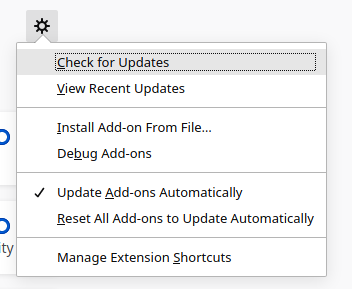
aasutossh
on 7 May 2020
nightTab does not use shortcuts at the browser level (register shortcuts via the manifest.json), only within the webpage itself. Do you see any other shortcuts on the Manage Extension Shortcuts page using ctrl+alt+a?
I downloaded and installed the latest Firefox Developer Edition (77.0b2 (64-bit), MacOS 10.15.4). All the keybaord shortcuts are working as expect in nightTab as far as I can see on a clean install.
Can you try updating to the latest Firefox Developer Edition?
zombieFox
on 7 May 2020
I am using Manjaro KDE (based on Arch), I should have latest version of FF but didn't. Let me update and confirm.
Also, there were none extensions using ctrl alt a.
Edit: The repo doesn't have FF 77 till now. Maybe it will work after update.
aasutossh
on 7 May 2020
On that note, why don't we add + sign at the end of bookmark list, or after Bookmark List header name.
This is a design decsion, I want to keep the bookmark area clear of controls. The same reason the edit, move, delete bookmark controls are hidden.
zombieFox
on 7 May 2020
Just updated firefox to 77.0b3 (64-bit), still ctrl alt a doesn't work.
aasutossh
on 12 May 2020
Nuts. Was hoping that would resolve the issue. I've been unable to recreate the issue as you desdcribe.
If the other keyboard shortcuts are working in nightTab then it does indeed sound like something else is using ctrl+alt+a and taking precedence.
zombieFox
on 13 May 2020
Might be a bit of an ask, but try disabling all your extensions, or alternatively make a new Firefox profile with only nightTab installed.
It might also be an external program that is causing this?
Excigma
on 14 May 2020
I created a new profile, installed nighttab, still ctrl alt a not working.
It might also be an external program that is causing this?
Then, I remembered that KDE has billions of shortcuts pre-defined, so I go in KDE settings > Shortcuts > Global shortcuts > Change any shortcut to ctrl alt a then it shows that the keybind is bind to a kWin setting called Activate Window Demanding Attention, so I disabled it. And now it's working.
I should have done this before even posting the issue. Sorry for giving you trouble.
aasutossh
on 15 May 2020
BTW, we gotta have shortcut for Find Bookmarks or Search Google. Ability to change the search engine. I didn't want to open a new issue.
aasutossh
on 15 May 2020
Ability to change the search engine
These controls can be found under the settings menu > header > search > search engine
gotta have shortcut for Find Bookmarks or Search Google.
What do you mean shortcut? Right now the search bar can do the above.
zombieFox
on 15 May 2020
What do you mean shortcut? Right now the search bar can do the above.
Exactly. Why do you have the redundant search bar then?
aasutossh
on 17 May 2020
Not sure I follow. The search bar in nightTab is optional and can be disabled from the settings menu. If shown, typing in it allows you to find bookmarks added to nightTab or search Google with the enter key.
zombieFox
on 17 May 2020
I'll just disable the search bar then, more space. Thank you for great work.
aasutossh
on 17 May 2020
No problem. 🙂
zombieFox
on 17 May 2020
Related issues
 amitchaudhari9121
·
5Comments
amitchaudhari9121
·
5Comments
 ronmurphy
·
5Comments
ronmurphy
·
5Comments
 rezpower
·
3Comments
rezpower
·
3Comments
 matfantinel
·
3Comments
matfantinel
·
3Comments
 Q-out
·
3Comments
Q-out
·
3Comments
Most helpful comment
I am using Manjaro KDE (based on Arch), I should have latest version of FF but didn't. Let me update and confirm.
Also, there were none extensions using
ctrl alt a.Edit: The repo doesn't have FF 77 till now. Maybe it will work after update.