Nicehashminer: Temp and mining info not showing for multi GPU's
I have been mining with 7 ATI cards prior to 3.0.0.4 and everything worked fine under ver 1.9.2.21. I removed the cards to clean the fans and install 3.0.0.4. I reinstalled one card at a time to re-benchmark for ver 3.0.0.4. i started with only 1 card RX570 and everything worked fine and i could see the temp and mining info for that card. When i installed a second card all my mining and temp info went away. I added 5 more cards and still no temp or mining info for each card. All my cards are RX570/RX470. I use the Blockchain Beta driver from AMD/ATI. All the cards are mining, it just wont show the temp info for each card.
 manicmisfit
All 28 comments
I am having the same issue with 2 rigs.
It will show the stats if I only have 4 cards but when I add card #5 all the stats disappears
*Octominer riseless motherboard
*windows 10 64
*Rx580 8gb
*Latest Amd driver 20.1.3
*NiceHash miner. 3.0.0.5
Thank you guysin advance for your time and commitment.
 rick1jamesB
on 17 Feb 2020
rick1jamesB
on 17 Feb 2020
Hi guys,
I have 4 Rigs with the same configuration (6 RX580 8Gb) and the temp and rpm are null.
When you have time please fix this.
thank you for all your work !
 cneagoe1973
on 22 Feb 2020
cneagoe1973
on 22 Feb 2020
Hi guys,
I have 4 Rigs with the same configuration (6 RX580 8Gb) and the temp and rpm are null.
When you have time please fix this.
thank you for all your work !
What kind of motherboard do you have?
rick1jamesB
on 22 Feb 2020
I have been mining with 7 ATI cards prior to 3.0.0.4 and everything worked fine under ver 1.9.2.21. I removed the cards to clean the fans and install 3.0.0.4. I reinstalled one card at a time to re-benchmark for ver 3.0.0.4. i started with only 1 card RX570 and everything worked fine and i could see the temp and mining info for that card. When i installed a second card all my mining and temp info went away. I added 5 more cards and still no temp or mining info for each card. All my cards are RX570/RX470. I use the Blockchain Beta driver from AMD/ATI. All the cards are mining, it just wont show the temp info for each card.
What kind of motherboard do you have?
rick1jamesB
on 22 Feb 2020
RIG 1 :
Gigabyte Z370 HD3P-CF Bios F7 04/03/2018
RIG 2:
Gigabyt H110-D3A-CF Bios F25d 03/09/2018
RIG 3 :
ASRock H81 Pro BTC R2.0 Bios P1.20 07/22/2014
RIG 4 :
ASRock H81 Pro BTC R2.0 Bios P1.20 07/22/2014
cneagoe1973
on 22 Feb 2020
ASUS B250 Mining Expert. Running Windows 10 Enterprise. Not sure of the BIOS ver or date. I'm not at the Rig location right now.
manicmisfit
on 24 Feb 2020
@manicmisfit I have that bord as well and I have 1660ti on it with no issues.
As far as the bios that bord can update from the bios. Easy.
rick1jamesB
on 24 Feb 2020
I asked you guys about the motherboard because I was thinking it was the issue but from the look of things it's not a MOBO issue 😕
rick1jamesB
on 24 Feb 2020
@manicmisfit & @cneagoe1973 were you guys able to find a solution? I am thinking about trying another miner just to see if this will help
rick1jamesB
on 10 Mar 2020
I'm having same issue with 3xAMD RADEON VII on ASRock H110 Pro BTC+.
NiceHashMiner v3.0.0.6
When I installed first card it did showed, but after I installed second card, there was no TEMP, no LOAD, no RPM display.
It does mining fine tho.
 brandadaniel
on 24 Mar 2020
brandadaniel
on 24 Mar 2020
Same issue, 3 XFX GTR RX580's, 1 XFX GTS RX580 and 2 Sapphire Nitro+ RX580's. Motherboard is a ASRock BTC+ H110 Pro.
Temps and hashrate were showing with 4 GPU's, now nothing with all 6 finally added in.
NiceHashMiner v3.0.0.7. and .6
 m3scott
on 3 Apr 2020
m3scott
on 3 Apr 2020
Anyone figure out how to fix this?
rick1jamesB
on 24 Apr 2020
I am having same problem - it reports temp for Nvidia cards on mixed rig, but my two AMD Radeon VII cards do not report temp
 ppriorfl
on 6 Jun 2020
ppriorfl
on 6 Jun 2020
Same issue:
- ASUS B250 Mining Expert
- 7 XFX RX580
Already disabled integrated graphics in BIOS.
All settings display properly in AMD app, but no settings display in NHM.
Mining works perfectly fine, but it would be nice to see temp and fan in mobile app.
 prototypic
on 6 Jun 2020
prototypic
on 6 Jun 2020
Big issue same same.
5x Radeon VII with ASUS B250. No ability to disable onboard, but set primary graphics to one of the cards - still no resolution.
 ddm-j
on 19 Jun 2020
ddm-j
on 19 Jun 2020
Hi everyone
We made some changes and created a test build with fix
Please check it out and report if this fixes your problem
https://github.com/nicehash/NiceHashMiner/releases/download/3.0.2.0/nhm_windows_3.0.2.0_amd_adl_odn.zip
Have a nice mining!
 luc1an24
on 22 Jun 2020
luc1an24
on 22 Jun 2020
Going to test this in a few
rick1jamesB
on 22 Jun 2020
Hi everyone
We made some changes and created a test build with fix
Please check it out and report if this fixes your problem
https://github.com/nicehash/NiceHashMiner/releases/download/3.0.2.0/nhm_windows_3.0.2.0_amd_adl_odn.zip
Have a nice mining!
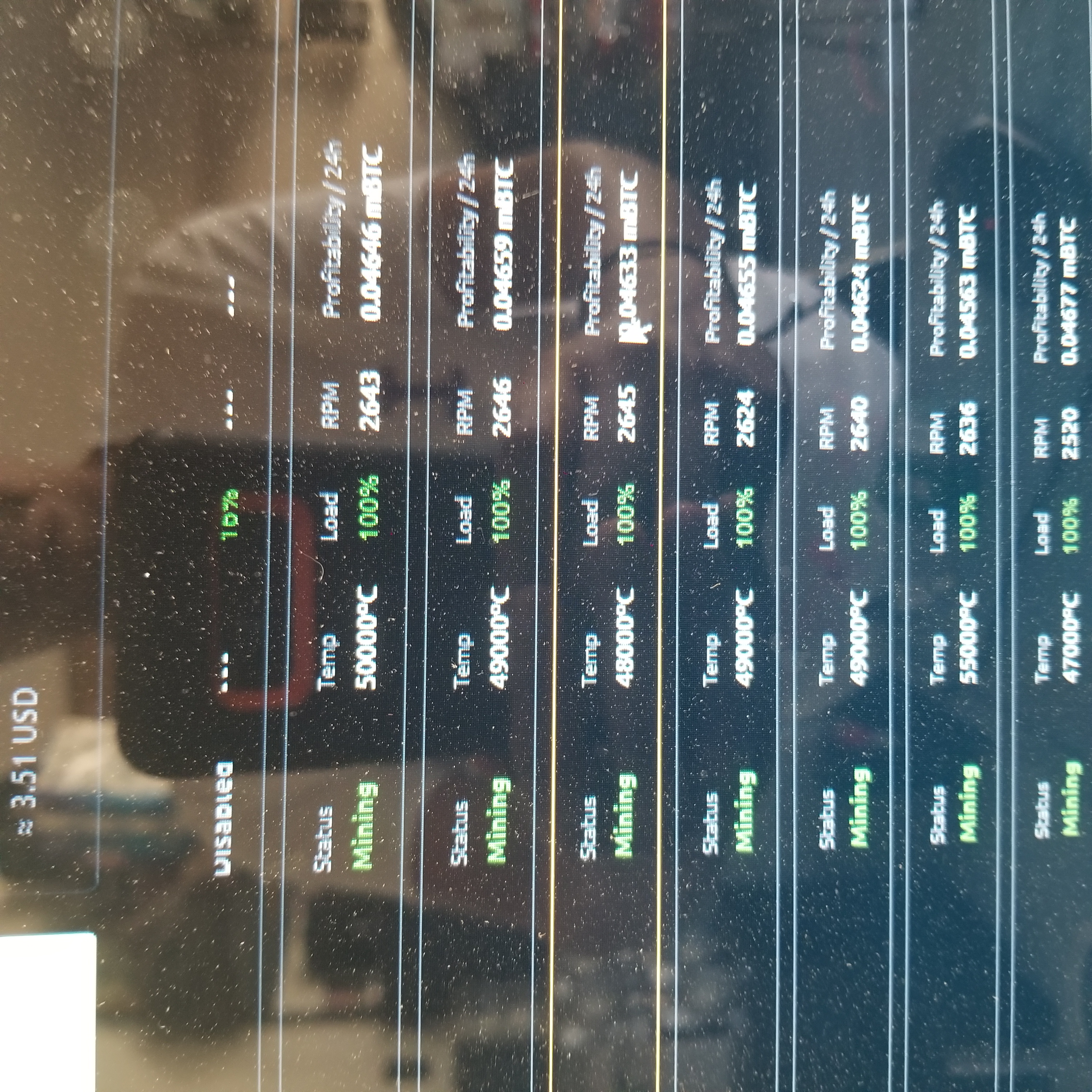
Hi this in fact works all my 8 cards(temp/Rpm /lode) are showing up in the miner and the web interface.
However the temp is showing up in the 1000s
Example:
GPU 1 Temp 60000c
GPU 2 Temp 58000c
GPU 3 Temp 58000c
Going to restart this and see if that will fix it
No that didn't help fix the problem..
Hey its a lot better than not having the information
Thank you guys
Here is a picture of what it looks like now

rick1jamesB
on 22 Jun 2020
@luc1an24 for me, 5x Radeon VII w/ ASUS B250, now instead of "--" where temp and load go there is 0degrees and 0% respectively.
ddm-j
on 22 Jun 2020
@luc1an24 for me, 5x Radeon VII w/ ASUS B250, now instead of "--" where temp and load go there is 0degrees and 0% respectively.
Did you try uninstalling the old miner and installing the one they gave us?
rick1jamesB
on 23 Jun 2020
@rick1jamesB Clean uninstall, download test build, unzip, run as admin --> Temp: 0, Load: 0%, RPM: --
However, nicehash does pick up the load on my CPU
ddm-j
on 23 Jun 2020
@rick1jamesB did this fix solve your problems in the long term? Maybe I just didn't uninstall properly?
@luc1an24 anything I can do to help find the issue?
ddm-j
on 4 Jul 2020
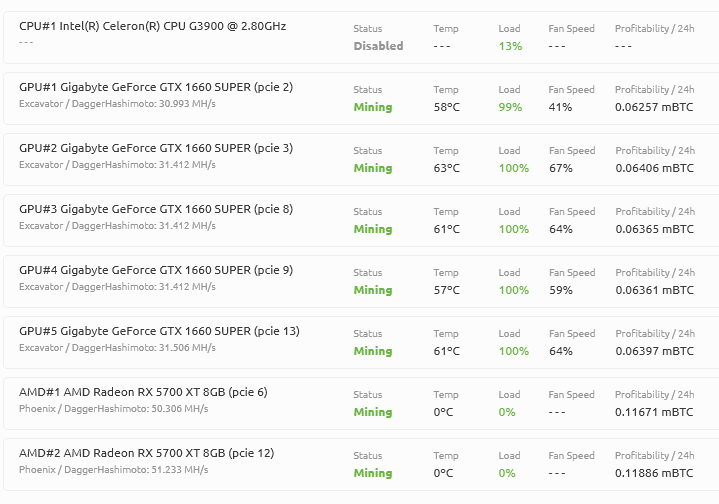
mobo tb250-btc
 nieXas
on 14 Feb 2021
nieXas
on 14 Feb 2021
I do have the same problem. Is there a possitiblity to read a Logfile for further information?

lolMiner displays the temperature:

 ewebdevelopment
on 26 Feb 2021
ewebdevelopment
on 26 Feb 2021
I can confirm this happens as well mixing RTX 3070 + RX 6800. The RX 6800 temperature temp/ load readings are not working
 jrodrigv
on 11 Mar 2021
jrodrigv
on 11 Mar 2021
I can confirm, no temperature and fan speed on my RX 6800

 illSaya
on 6 Apr 2021
illSaya
on 6 Apr 2021

I have the same problem. how do I fix it?
 mingcxb
on 12 May 2021
mingcxb
on 12 May 2021
@mingcxb This seems to be the issue with AMD drivers. We are aware of it. There is nothing you can do.
 Dohtar1337
on 12 May 2021
Dohtar1337
on 12 May 2021
Related issues
 jimmyhackers
·
5Comments
jimmyhackers
·
5Comments
 korisame
·
4Comments
korisame
·
4Comments
 Avalonis
·
4Comments
Avalonis
·
4Comments
 liranscu
·
5Comments
liranscu
·
5Comments
 gulo-gulo
·
5Comments
gulo-gulo
·
5Comments