Nicehashminer: 1.8.1.4 Pre-release
A pre-release for 1.8.1.4 is posted: https://github.com/nicehash/NiceHashMinerLegacy/releases/tag/1.8.1.4-Pre2
There are some pretty large changes to the miner speed getting, so testing that would be great! The methods for getting speed data now run asynchronously, so they should no longer block the UI from processing if there is an error in the miner API access (e.g. if an older version than expected is used for some miner)
EDIT for pre2:
There is an update to Claymore's CN miner for AMD, and a feature to run a script when CUDA device is lost
 DillonN
All 49 comments
Using 1.8.1.4 with Nvidia 1080 & 1070 on driver 385.69 - everything working as expected so far.
 bonifacio123
on 29 Sep 2017
bonifacio123
on 29 Sep 2017
"Advanced option to disable the cooldown checker, if it is causing problems"
I have seen these errors several times in the past, just curious what is this checker?
 lmlim
on 29 Sep 2017
lmlim
on 29 Sep 2017
Using the pre release now on one of my rig using mixed NVidia and AMD. Disabled cpu mining, DaggerLbry with two AMD cards hash rate fluctuating by 6 Mh/s (Actual 51 Mh/s but its constantly changing between 45 to 51 Mh/s). In earlier version 1.8.1.3 after disabling cpu mining it was constant at 51 Mh/s all the time. I will observe and revert back with more findings if any
 sriminer
on 29 Sep 2017
sriminer
on 29 Sep 2017
With regard to
Changes:
- Worker names can be up to 15 characters long
I confirm that Error message on line 63 in language file is modified across all available languages to allow for 15-character worker names but the language files packed with 1.8.1.4 Pre are not yet updated and a wrong worker name will still trigger old error message saying length is limited to 7 characters, thus people can wrongly presume the limit is still 7 chars.
 drkskwlkr
on 29 Sep 2017
drkskwlkr
on 29 Sep 2017
I can't even benchmark Xeon E5-2687W v2 using NHML 1.8.1.4, benchmark is terminated immediately (possibly because of 32 threads?). CPU is running fine with NHML 1.8.1.1, so it has something to do with the new XmrStackCPU version?
 ondro727
on 29 Sep 2017
ondro727
on 29 Sep 2017
XmrStackCPU is terminated immediately on my rig because it is identified as a high risk trojan Vagger!rfn by MS Security essentials. Claymore cryptonite miner is being idendified as VigramA medium threat against which you can choose your action.
 rakeesh
on 29 Sep 2017
rakeesh
on 29 Sep 2017
@drkskwlkr thanks for pointing out, I'll fix it in next update
@lmlim The cooldown checker is there to make sure miners don't "hang", and if they do, restart them. Basically if NHML is unable to collect speed data, or speed data reads 0, for a certain amount of time (a couple minutes), then NHML will restart the miner. You may see lines in the log such as "cooling up, time 10000ms). That is normal, since many miners may fail to give speed data for the first 30-60s. This option was included since some users are having more problems with the cooldown checker
@ondro727 could you check if xmr-stak-cpu was removed by antivirus?
@rakeesh see https://github.com/NiceHash/NiceHashMinerLegacy/wiki/Troubleshooting#nicehash-miner-legacy-or-included-miners-are-being-flagged-by-anti-virus
DillonN
on 30 Sep 2017
xmr-stak-cpu is present, no problem with antivirus as far as I can tell. It has some problem with certain CPUs (especially Xeons) to fully utilize them. I have two z820 workstations with dual Xeon E5-2643v2 (24 threads in total for each workstation) configured differently in BIOS and NHML 1.8.1.3 is running xmr-stak-cpu on them with 91% and 71% utilization (quite a difference). However with z810 workstation with dual Xeon E5-2687Wv2 (32 threads total), NHML 1.8.1.3 is not able to run benchmark at all. NHML 1.8.1.1 was able to do so and I am running it fine at the moment (although only with 62% CPU utilization, which is strange). When I use 1.8.1.3 and fill in benchmark data manually, I am able to start CPU mining, but it returns only appr. 50H/s (as if it doesn't see other cores/threads). That is why I suspect it has some problem with threads count in new version (I may be totally wrong of course).
ondro727
on 30 Sep 2017
Running this latest version for the past 13 hours with 8x AMD RX cards, all of which are on the latest version of their drivers.
I did have to whitelist the app in the windows security center, but all else is working.
 bmazz731
on 1 Oct 2017
bmazz731
on 1 Oct 2017
@ondro727 it does sound like the new xmr-stak may be having a problem with high threads. Can you try adjusting the "Less threads" option in the settings page for xmr-stak (where you entered the hashrate manually).
The less threads option is tricky, because you may intuitively think 0 would give the best performance (since all threads are assigned), however this is usually not the case. You can read a short description about this here:
Number of threads. You can configure them below. Cryptonight uses 2MB of memory, so the optimal setting here is the size of your L3 cache divided by 2. Intel mid-to-high end desktop processors have 2MB of L3 cache per physical core. Low end cpus can have 1.5 or 1 MB while Xeons can have 2, 2.5 or 3MB per core.
NHML takes a very long time to benchmark if you have a lot of threads, since it tests every value for less threads to find the optimal one. If your benchmark wasn't able to finish then it may have selected a very suboptimal value for you, you can try playing with it to see. For your E5-2687Wv2 it would look like an optimal value would be around 24 threads, or 8 "Less threads". You won't be getting 100% utilization, but if you raise it much higher than that your hashrate would likely decrease since xmr-stak is running out of cache
DillonN
on 2 Oct 2017
@DillonN Thanks for the explanation, it looks like it is definitely thread count problem (seem like >= 32). I tried using less threads option before, but I got it wrong (the other way around, assuming I am suggesting total threads count, not the number of threads to substract...). When setting "less threads" option and filling the benchmark data manually, the xmr-stak-cpu works fine (for E5-2687Wv2 the optimal setting was in fact 10, which gives the best hashrate). So for any other user experiencing this, just fill in the benchmark data and experiment with the thread count.
Other than that I have found no problem using 1.8.1.4 so far (5 different PCs using various Intel CPUs and NVidia cards).
ondro727
on 2 Oct 2017
There seems to be an issue with the NHML xmr-stak-cpu parser when generating the config_0.txt file. It's not honoring the settings found in config.txt. For example - I've set lower_power_mode and no_prefetch to true but the resulting config_0.txt are set to false which negatively affects the hash rate on my setup.
config.txt has:
"cpu_threads_conf" : [
    { "low_power_mode": true, "no_prefetch": true, "affine_to_cpu": 0 },
        { "low_power_mode": true, "no_prefetch": true, "affine_to_cpu": 2 },
    { "low_power_mode": true, "no_prefetch": true, "affine_to_cpu": 4 }
],
config_0.txt has:
"cpu_threads_conf": [
    {
      "low_power_mode": false,
      "no_prefetch": false,
      "affine_to_cpu": false
    }
  ],
Hi DilonN,
I'm always getting .NET error as below for my 2 rigs:
ee the end of this message for details on invoking
just-in-time (JIT) debugging instead of this dialog box.
*** Exception Text ***
System.InvalidOperationException: Collection was modified; enumeration operation may not execute.
at System.ThrowHelper.ThrowInvalidOperationException(ExceptionResource resource)
at System.Collections.Generic.Dictionary`2.ValueCollection.Enumerator.MoveNext()
at NiceHashMiner.Miners.MiningSession.
--- End of stack trace from previous location where exception was thrown ---
at System.Runtime.ExceptionServices.ExceptionDispatchInfo.Throw()
at System.Runtime.CompilerServices.TaskAwaiter.HandleNonSuccessAndDebuggerNotification(Task task)
at NiceHashMiner.Miners.MinersManager.
--- End of stack trace from previous location where exception was thrown ---
at System.Runtime.ExceptionServices.ExceptionDispatchInfo.Throw()
at System.Runtime.CompilerServices.TaskAwaiter.HandleNonSuccessAndDebuggerNotification(Task task)
at NiceHashMiner.Form_Main.
--- End of stack trace from previous location where exception was thrown ---
at System.Runtime.ExceptionServices.ExceptionDispatchInfo.Throw()
*** Loaded Assemblies ***
mscorlib
Assembly Version: 4.0.0.0
Win32 Version: 4.7.2110.0 built by: NET47REL1LAST
CodeBase: file:///C:/Windows/Microsoft.NET/Framework64/v4.0.30319/mscorlib.dll
NiceHashMinerLegacy
Assembly Version: 1.8.1.4
Win32 Version: 1.8.1.4
CodeBase: file:///F:/installer/Bitcoin/NHML-1.8.1.0/NiceHashMinerLegacy.exe
System.Windows.Forms
Assembly Version: 4.0.0.0
Win32 Version: 4.7.2110.0 built by: NET47REL1LAST
CodeBase: file:///C:/Windows/Microsoft.Net/assembly/GAC_MSIL/System.Windows.Forms/v4.0_4.0.0.0__b77a5c561934e089/System.Windows.Forms.dll
System
Assembly Version: 4.0.0.0
Win32 Version: 4.7.2110.0 built by: NET47REL1LAST
CodeBase: file:///C:/Windows/Microsoft.Net/assembly/GAC_MSIL/System/v4.0_4.0.0.0__b77a5c561934e089/System.dll
System.Drawing
Assembly Version: 4.0.0.0
Win32 Version: 4.7.2046.0 built by: NET47REL1
CodeBase: file:///C:/Windows/Microsoft.Net/assembly/GAC_MSIL/System.Drawing/v4.0_4.0.0.0__b03f5f7f11d50a3a/System.Drawing.dll
Newtonsoft.Json
Assembly Version: 10.0.0.0
Win32 Version: 10.0.3.21018
CodeBase: file:///F:/installer/Bitcoin/NHML-1.8.1.0/Newtonsoft.Json.DLL
System.Management
Assembly Version: 4.0.0.0
Win32 Version: 4.7.2102.0 built by: NET47REL1LAST
CodeBase: file:///C:/Windows/Microsoft.Net/assembly/GAC_MSIL/System.Management/v4.0_4.0.0.0__b03f5f7f11d50a3a/System.Management.dll
System.Core
Assembly Version: 4.0.0.0
Win32 Version: 4.7.2102.0 built by: NET47REL1LAST
CodeBase: file:///C:/Windows/Microsoft.Net/assembly/GAC_MSIL/System.Core/v4.0_4.0.0.0__b77a5c561934e089/System.Core.dll
System.Numerics
Assembly Version: 4.0.0.0
Win32 Version: 4.7.2046.0 built by: NET47REL1
CodeBase: file:///C:/Windows/Microsoft.Net/assembly/GAC_MSIL/System.Numerics/v4.0_4.0.0.0__b77a5c561934e089/System.Numerics.dll
System.Runtime.Serialization
Assembly Version: 4.0.0.0
Win32 Version: 4.7.2112.0 built by: NET47REL1LAST
CodeBase: file:///C:/Windows/Microsoft.Net/assembly/GAC_MSIL/System.Runtime.Serialization/v4.0_4.0.0.0__b77a5c561934e089/System.Runtime.Serialization.dll
System.Data
Assembly Version: 4.0.0.0
Win32 Version: 4.7.2102.0 built by: NET47REL1LAST
CodeBase: file:///C:/Windows/Microsoft.Net/assembly/GAC_64/System.Data/v4.0_4.0.0.0__b77a5c561934e089/System.Data.dll
System.Xml
Assembly Version: 4.0.0.0
Win32 Version: 4.7.2102.0 built by: NET47REL1LAST
CodeBase: file:///C:/Windows/Microsoft.Net/assembly/GAC_MSIL/System.Xml/v4.0_4.0.0.0__b77a5c561934e089/System.Xml.dll
log4net
Assembly Version: 1.2.15.0
Win32 Version: 1.2.15.0
CodeBase: file:///F:/installer/Bitcoin/NHML-1.8.1.0/log4net.DLL
System.Configuration
Assembly Version: 4.0.0.0
Win32 Version: 4.7.2046.0 built by: NET47REL1
CodeBase: file:///C:/Windows/Microsoft.Net/assembly/GAC_MSIL/System.Configuration/v4.0_4.0.0.0__b03f5f7f11d50a3a/System.Configuration.dll
MessageBoxManager
Assembly Version: 1.0.0.0
Win32 Version: 1.0.0.0
CodeBase: file:///F:/installer/Bitcoin/NHML-1.8.1.0/MessageBoxManager.DLL
PInvokeDelegateFactoryInternalAssembly
Assembly Version: 0.0.0.0
Win32 Version: 1.8.1.4
CodeBase: file:///F:/installer/Bitcoin/NHML-1.8.1.0/NiceHashMinerLegacy.exe
websocket-sharp
Assembly Version: 1.0.2.59611
Win32 Version: 1.0.2.59611
CodeBase: file:///F:/installer/Bitcoin/NHML-1.8.1.0/websocket-sharp.DLL
Microsoft.CSharp
Assembly Version: 4.0.0.0
Win32 Version: 4.7.2046.0
CodeBase: file:///C:/Windows/Microsoft.Net/assembly/GAC_MSIL/Microsoft.CSharp/v4.0_4.0.0.0__b03f5f7f11d50a3a/Microsoft.CSharp.dll
System.Dynamic
Assembly Version: 4.0.0.0
Win32 Version: 4.7.2046.0
CodeBase: file:///C:/Windows/Microsoft.Net/assembly/GAC_MSIL/System.Dynamic/v4.0_4.0.0.0__b03f5f7f11d50a3a/System.Dynamic.dll
Anonymously Hosted DynamicMethods Assembly
Assembly Version: 0.0.0.0
Win32 Version: 4.7.2110.0 built by: NET47REL1LAST
CodeBase: file:///C:/Windows/Microsoft.Net/assembly/GAC_64/mscorlib/v4.0_4.0.0.0__b77a5c561934e089/mscorlib.dll
*** JIT Debugging ***
To enable just-in-time (JIT) debugging, the .config file for this
application or computer (machine.config) must have the
jitDebugging value set in the system.windows.forms section.
The application must also be compiled with debugging
enabled.
For example:
When JIT debugging is enabled, any unhandled exception
will be sent to the JIT debugger registered on the computer
rather than be handled by this dialog box.
 miesdr
on 3 Oct 2017
miesdr
on 3 Oct 2017
There is a new pre-release out, https://github.com/nicehash/NiceHashMinerLegacy/releases/tag/1.8.1.4-Pre2
@bonifacio123 you currently cannot update the xmr-stak config while using it with NHML, may change in the future
@miesdr could you try with the new pre?
DillonN
on 3 Oct 2017
Benchmark doesn't work at all (and therefore, cannot mine)
Windows 10, Nvidia 1080TI X 2, Ryzen 7 1700, Nvidia drivers 385.69. both GPUs and CPU are detected. No error, just doesn't do anything.
Nicehash 2.0.1.1 works fine.
 komer83
on 3 Oct 2017
komer83
on 3 Oct 2017
Using 1.8.1.4 pre2 with Nvidia 1060 6gb on driver 385.41, is better when switching algo, not crashing like 1.8.1.4 pre1. (tested 24H without crashing)
 C1BERUS
on 4 Oct 2017
C1BERUS
on 4 Oct 2017
I have issue #396 on 1.8.1.4 pre 2 release. NVIDIA + AMD build
 utc99
on 4 Oct 2017
rakeesh
on 4 Oct 2017
utc99
on 4 Oct 2017
rakeesh
on 4 Oct 2017
@komer83 could you be more specific? How exactly does the benchmark not work? Can you attach your logs\log.txt file?
@utc99 it looks like may have to do with what @rakeesh posted, Claymore listed supported GPUs and the 7700 series (codename Cape Verde/Bonaire) isn't listed.
NHML is sending the correct index to Claymore CN miner, so I think in this case given the error it's safe to say the new version doesn't support 7700. He did say he's adding more support in a bit, if it takes too long I will look into a way of supporting older cards too. For now I will prevent it showing up in NHML for those cards, and you'll have to stick with 1.8.1.3 if you want to use it (the interface changed quite a bit in 10.0 version so you cannot copy it over to 1.8.1.4).
For others here's the listed GPU codenames Claymore said is supported (and I'll add their market names):
- Pitcairn - 7800s (except 7870XT), 8870, 265, 270, 370
- Tahiti - 7870XT, 7900s, 8900s, 280*,
- Hawaii - 290, 390
- Fiji - All Fury cards, Nano, and Pro Duo
- Tonga - 285, 380*
- Ellesmere - 470*, 480, 570, 580
- Baffin - 460, (probably 560*)
* means including variants (X version etc).
Essentially, it's all 7800 and up, all 8800 and up, all 265 and up, all 370 and up, all 460 and up, all 560 and up
DillonN
on 4 Oct 2017
@DillonN, was my mistake, problem solved.
komer83
on 7 Oct 2017
@DillonN XMRig just got updated. Will you be able to incorporate it into NHML?
Thanks in advance.
 Nicheuji
on 7 Oct 2017
Nicheuji
on 7 Oct 2017
I´ve Trouble with benchmarking Version 1.8.1.4 pre2. All my AMD Cards are showing wrong hashrates for cryptonight. Should have 700, shown 70. Or 700/210. When i´monitor the Hardware Monitor, during the Benchmark procedure, i can see, Card is turning on and off frequently, every 10sec, or so.
Switching back to Version 1.8.1.3, with old Claymore crxptonight, evrything works fine.
Regards,
Scandalrosi
 Paapo
on 9 Oct 2017
Paapo
on 9 Oct 2017
@Nicheuji thanks, there is some discussion on this on issue #398. Probably have an update for support within the next day or two
@Paapo could you give some info such as types of cards you're using or logs\log.txt file?
DillonN
on 11 Oct 2017
Sure.. Will send logs later.. I´m Using AMD Crimson 17.9.3, with 2 rigs. Both with 6 AMD Sapphire RX470 Radeon Nitro+. Cards are modded. In the meanwhile i copied over the config folder from the previous version. But when i start the miner, with cryptonight, they are running all slow.
Regards,
Paapo
Paapo
on 11 Oct 2017
What about an option so the window is not fixed in size. Would be nice to see all the algos in a proper list and not having to scroll through them.
Got an issue today when benching it crashing my rig. If the above was an option I can see things better and fault find better.
 Pjalchemist
on 11 Oct 2017
Pjalchemist
on 11 Oct 2017
+1 to the resizable windows (at least benchmark window). Also the possibility to sort algos would be welcomed (especially for expected daily profitability).
ondro727
on 11 Oct 2017
Didn’t think of the option to sort the algo.
Highest to lowest on the rate/return be good.
Pjalchemist
on 11 Oct 2017
hi, i using both v2 and legacy miner.
i am here to discuss my AMD with legacy miner.
everthing stay same, but one problem is AMD (RX 470 8GB) would crash after some time mining, but the problem is, after crash my legacy miner settings will reset and everthing gone! so need to settings everthing including benchmark (unable to make everything auto start mining after crash). i tried with this version and 1.8.1.3 no luck.
 solomining
on 12 Oct 2017
solomining
on 12 Oct 2017
The up/down, up/down of the reported miner speed continues for the GPU. In comparison to 1.8.1.2, my GPU was hashing at 250H/s with xmr and the GPU was crushing ~24MH/s. The client is also being tagged as a virus by windows defender.
 doverosx
on 12 Oct 2017
doverosx
on 12 Oct 2017
1.8.1.4 Pre-release 3
The Worker names can be up to 15 characters long still doesn't work, for example
Pete Server 1.8.1.4 P3
Pete Server
NH 1.8.1.4
Pjalchemist
on 13 Oct 2017
@Pjalchemist there cannot be spaces in worker names
DillonN
on 13 Oct 2017
@DillonN
Okay I will give it a try.
However it’s crashing when benching. GPU is RX570 4GB. 6 in the rig, only benching the one. Offers me 13 benchmarks. Crashed on the 10th.
Pjalchemist
on 13 Oct 2017
@Pjalchemist which algorithm/miner is the one it is crashing on? Do you mean the whole NHML is crashing or that the benchmark terminates?
DillonN
on 13 Oct 2017
@DillonN the NH application during benchmark crashes, then my rig freezes. Rig is fully stable on later versions.
Really the window needs to be bigger so you can see whats what better.
Name works, PeteServer18142. Would be good to allow 20 characters and spaces.
Monday I will open the rig up, I shall pull all the card and leave only one in the master X16 slot and test it again. Gutted as means more down time
Pjalchemist
on 13 Oct 2017
Does XMRig need Supplemental parameters ? (or support it ?). On XMR-Stack-CPU, I usually get 500-580H/s on my O/C Ryzen 7 1700 @ 3.64Ghz. With the XMRig, i get 475-505H/s.
On Stack, I have the enable_ht=true parameters, does XMRig also need that ?
Also, XMRig support CryptoNight-Lite support for AEON, is this possible to add ?? :D @DillonN
 pducharme
on 14 Oct 2017
pducharme
on 14 Oct 2017
Hello DillonN
I want to report an issue with the pre2 release.
When cpu miner is active my AMD cards which are part of mixed cards with Nvidia 1070's are fluctuating in hash rate wildly from 8 to 13 to 28 to 38 and 52. I disabled cpu mining and it seems to be hovering between 42 to 53 Mh but its not stable completely but better than cpu mining enabled.
sriminer
on 14 Oct 2017
1.8.1.4 pre3 comes with xmrig miner. When i benchmark for this miner on Dual CPU Intel Xeon X5670 the benchmark display 330 to 420 hashes per cpu. When i start mining Nicehash Legacy displays 70 to 120 hashes per cpu. I am guessing that has to do with hyperthreading and/or dual CPU. When i set the launch paramater for xmrig -t on each CPU to something like 5 or 6 i get much higher hash rates around 200 to 240 hashes per cpu.
All tests with Windows, locked pages available. I guess xmrig benchmark needs some more work.
I also noticed the Nicehash hashrates are quite a bit lower than what xmrig displays in the miner window. In general the xmrig hashes seem to change quite a bit, i have seen 170 to 240 hashes, while xmr-stak-cpu is always around 220 hashes per CPU.
 Doso777
on 14 Oct 2017
Doso777
on 14 Oct 2017
@Pjalchemist resizable benchmark window will be in a future update
@pducharme you can see some extra parameters for Xmrig on the Wiki. In general hyperthreading won't help since the ideal thread count is
@sriminer you can lower the intensity of CPU mining, by lowering the thread count. It's probable that high CPU utilization is not leaving enough for your GPU miner programs
@Doso777 I haven't yet put in support for xmrig to only mine on one CPU if you have multiple, which probably explains your high benchmarks since NHML is seeing the total speed for each CPU bench. Yes it does seem the hashrates for xmrig are a bit more unstable than xmr-stak, they fluctuate a lot more. I can make it so the NHML displays the 60s average for hashrates which is probably a more useful metric to be showing
DillonN
on 17 Oct 2017
@DillonN
When is that likely to be.
Pjalchemist
on 17 Oct 2017
Average display output for everything would be a great idea. Everything
with latest tagged release is good on the back end from what I can see.
On Oct 17, 2017 2:32 PM, "Dillon Newell" notifications@github.com wrote:
@Pjalchemist https://github.com/pjalchemist resizable benchmark window
will be in a future update@pducharme https://github.com/pducharme you can see some extra
parameters for Xmrig on the Wiki
https://github.com/nicehash/NiceHashMinerLegacy/wiki/Algorithm-ExtraLaunchParameters#xmrig.
In general hyperthreading won't help since the ideal thread count is /2
which is the core count for most CPUs. You can manually tweak the thread
count with a parameter there though. CryptoNight-lite is a different
algorithm correct? That would probably mean NiceHash does not support it@sriminer https://github.com/sriminer you can lower the intensity of
CPU mining, by lowering the thread count. It's probable that high CPU
utilization is not leaving enough for your GPU miner programs@Doso777 https://github.com/doso777 I haven't yet put in support for
xmrig to only mine on one CPU if you have multiple, which probably explains
your high benchmarks since NHML is seeing the total speed for each CPU
bench. Yes it does seem the hashrates for xmrig are a bit more unstable
than xmr-stak, they fluctuate a lot more. I can make it so the NHML
displays the 60s average for hashrates which is probably a more useful
metric to be showing—
You are receiving this because you commented.
Reply to this email directly, view it on GitHub
https://github.com/nicehash/NiceHashMinerLegacy/issues/376#issuecomment-337324416,
or mute the thread
https://github.com/notifications/unsubscribe-auth/AQw0gOKi0eiE-lTZOPy0fBX6ny7a_bdDks5stPGwgaJpZM4PoGoN
.
doverosx
on 18 Oct 2017
Thx for the xmrig miner integration. Works nicely for me.
 ChriscomIT
on 18 Oct 2017
ChriscomIT
on 18 Oct 2017
Tried it @ i7-2637M but neither XmrStackCPU nor Xmrig even started to benchmark - pls look at the log below. If I launch xmrig.exe from folder, it works fine (without nicehash settings ofc).
log.txt
 seanego
on 27 Oct 2017
seanego
on 27 Oct 2017
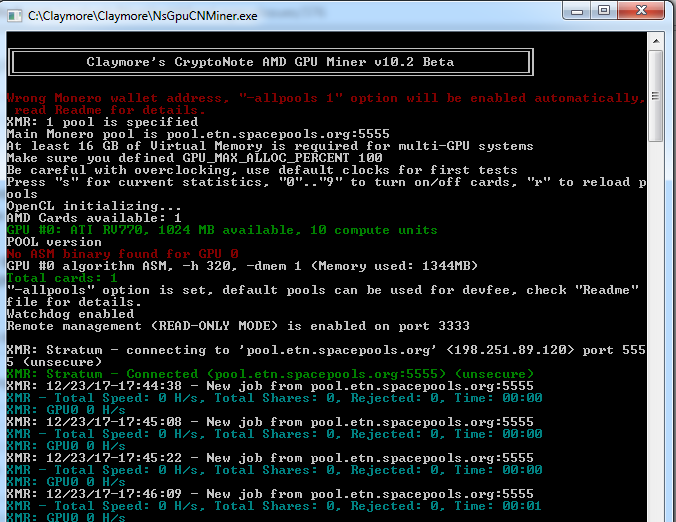
hi friends. Its there a solution for this issue at Claymores miner? It appear doesnt use the gpu , and keep showing 0 h/s. I,ve tried everything. But i reconize that Im new at this and could have made some step wrong. Please, help!
 elizeche
on 23 Dec 2017
elizeche
on 23 Dec 2017
@elizeche - I'm having the same exact issue. Following for potential solutions.
 LUA2018
on 24 Dec 2017
LUA2018
on 24 Dec 2017
Hello All, Any body has any idea how to overcome this NO ASM BINARY FOUND FOR GPU 0?
Thank you,
Hitesh
 hiteshsingh-agrawal
on 3 Jan 2018
hiteshsingh-agrawal
on 3 Jan 2018
@hiteshsingh-agrawal I have the same issue, could anyone please help?
 GroteGehaktBal
on 9 Jan 2018
GroteGehaktBal
on 9 Jan 2018
Any body following this?
hiteshsingh-agrawal
on 10 Jan 2018
I had the same problem but I rolled my driver back for the GPU to version 22.19.677.257 and it resolved the problem
 slingsby
on 12 Jan 2018
slingsby
on 12 Jan 2018
i have the same issue: NO ASM BINARY FOUND FOR GPU 0
Can someone help me please
 newtonisalive
on 17 Mar 2018
newtonisalive
on 17 Mar 2018
Related issues
 Kayfolom
·
3Comments
Kayfolom
·
3Comments
Kayfolom
·
3Comments
Kayfolom
·
3Comments
 Rama-Nujan
·
4Comments
Rama-Nujan
·
4Comments
 ghost
·
4Comments
ghost
·
4Comments
 LuckyGeniusss
·
4Comments
LuckyGeniusss
·
4Comments
Most helpful comment
+1 to the resizable windows (at least benchmark window). Also the possibility to sort algos would be welcomed (especially for expected daily profitability).