Ngx-quill: new line generates <p>
Hi.
My problem is that the WYSIWYG is currently "you don't get what you see" and here is the example
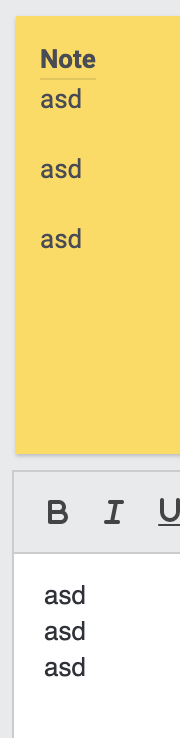
this is written in Angular 8 with the newest version of Quill editor.
Why is the new line a <p>?
<p> is styled by the browser by default:

Is this actually a bug or a feature? :P
Thank you.
 Neill83
All 8 comments
depends on your project.
you need to include quilljs css when you work with html-content,
because like you posted... not the quilljs css is used ;-).
So it is a bug in your usage :D.
quilljs only adds classes to the output html-tags, so if you do not include quilljs css in your page where you want to show the editor content your styling or the default browser styling will be applied - like margin-bottom of 1rem per p-tag.
It is possible to switch to inline styling with quilljs, but i do not recommend it:
https://quilljs.com/guides/how-to-customize-quill/#class-vs-inline
And in my demo:
https://killercodemonkey.github.io/ngx-quill-example/
you see (Format - HTML example). That it is possible to "wysiwyg" :-)
 KillerCodeMonkey
on 12 Feb 2020
KillerCodeMonkey
on 12 Feb 2020
Sorry that is not the solution because the text is displayed in another project... there is no quill css imported... and imo the <p> tag is not the correct way to get a line-break (</br>?)
Maybe just implement a button to make a paragraph :D
Neill83
on 12 Feb 2020
like i said.. i only provide this angular wrapper for quilljs.. and quilljs is working this way.
Or like i said use inline styling to store all styles inline in the html you store in your db. ;-)
KillerCodeMonkey
on 12 Feb 2020
Hey @KillerCodeMonkey
is this possible in some way?
https://codepen.io/quill/pen/VjgorV
the example is from here:
https://github.com/quilljs/quill/issues/861#issuecomment-239961806
Neill83
on 14 Feb 2020
sure i am doing it actually in my demo repo :D.
In general you can do it, like it is done with native quilljs.
KillerCodeMonkey
on 14 Feb 2020
dude this is not stack overflow and nobody can help you by looking on screenshots...
just check my demo repo.. it is working there.
KillerCodeMonkey
on 14 Feb 2020
bisschen netter kann man trotzdem sein ;)
Neill83
on 14 Feb 2020
das hat doch nix mit nett oder nicht nett zu tun ;-). War eine ganz normale Aussage :D
KillerCodeMonkey
on 14 Feb 2020
Related issues
 wupaz
·
25Comments
wupaz
·
25Comments
 ThomasOliver545
·
24Comments
ThomasOliver545
·
24Comments
 manandkumaar
·
26Comments
manandkumaar
·
26Comments
 zpydee
·
80Comments
zpydee
·
80Comments
 m41n
·
18Comments
m41n
·
18Comments