Ngx-quill: Custom font sizes problem
Hi,
I'm trying to add custom font sizes to the editor by using customOptions but somehow the editor doesn't show the proper labels and the inline style is not applied.
Here is my config (modules and customOptions) from the component.ts:
this.customOptions = [{
    import: 'attributors/style/size',
    whitelist: ['10', '16', '22', '36', '48', '72', '144']
}];

this.quillModules = {
    toolbar: [
        [{ 'size': [false, '10', '16', '22', '36', '48', '72', '144'] }],
        ['bold', 'italic', 'underline', 'strike'],
        [{ 'color': [] }, { 'background': [] }],
        [{ 'align': [false, 'center', 'right', 'justify'] }],
        [{ 'indent': '-1' }, { 'indent': '+1' }],
        [{ 'list': 'ordered' }, { 'list': 'bullet' }],
    ]
};
The view - component.html:
<quill-editor *ngIf="isInEditMode"
    [(ngModel)]="content"
    [modules]="quillModules"
    [customOptions]="customOptions"
    (onEditorCreated)="setFocus($event)">
</quill-editor>
How it is manifested:

What is generated (from the dev tools):
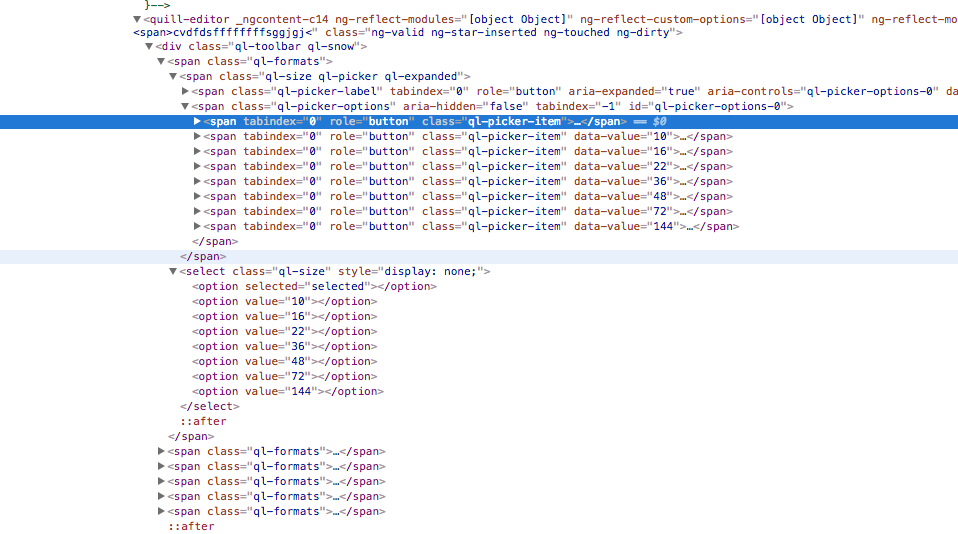
Can you take a look and possibly guide to right direction? Maybe I'm missing something.
Thank you.
 djfishe
All 6 comments
i think you need to create a custom toolbar with the correct labels and values or create the mandatory css-classes for each size:
https://stackoverflow.com/questions/38623716/how-to-add-custom-font-sizes-to-quilljs-editor
.ql-snow .ql-picker.ql-size .ql-picker-item[data-value="14px"]::before {
    content: 'Normal';
    font-size: 14px !important;
}

.ql-snow .ql-picker.ql-size .ql-picker-item[data-value="16px"]::before {
    content: 'Large';
    font-size: 16px !important;
}

.ql-snow .ql-picker.ql-size .ql-picker-item[data-value="18px"]::before {
    content: 'Huge';
    font-size: 18px !important;
}
 KillerCodeMonkey
on 17 May 2018
KillerCodeMonkey
on 17 May 2018
Yeah this works!
I would like to add that, in order to see the current selection in the dropdown, you need to add additional selectors, like this:
.ql-snow .ql-picker.ql-size .ql-picker-item[data-value="10px"]::before,
.ql-snow .ql-picker.ql-size .ql-picker-label.ql-active[data-value="10px"]::before {
    content: '10px';
}

.ql-snow .ql-picker.ql-size .ql-picker-item[data-value="16px"]::before,
.ql-snow .ql-picker.ql-size .ql-picker-label.ql-active[data-value="16px"]::before {
    content: '16px';
}

.ql-snow .ql-picker.ql-size .ql-picker-item[data-value="22px"]::before,
.ql-snow .ql-picker.ql-size .ql-picker-label.ql-active[data-value="22px"]::before {
    content: '22px';
}
Thank you!
djfishe
on 17 May 2018
I think this is the most useful answer.
https://github.com/quilljs/quill/issues/1208#issuecomment-303767338
 jc-wow
on 22 Sep 2020
jc-wow
on 22 Sep 2020
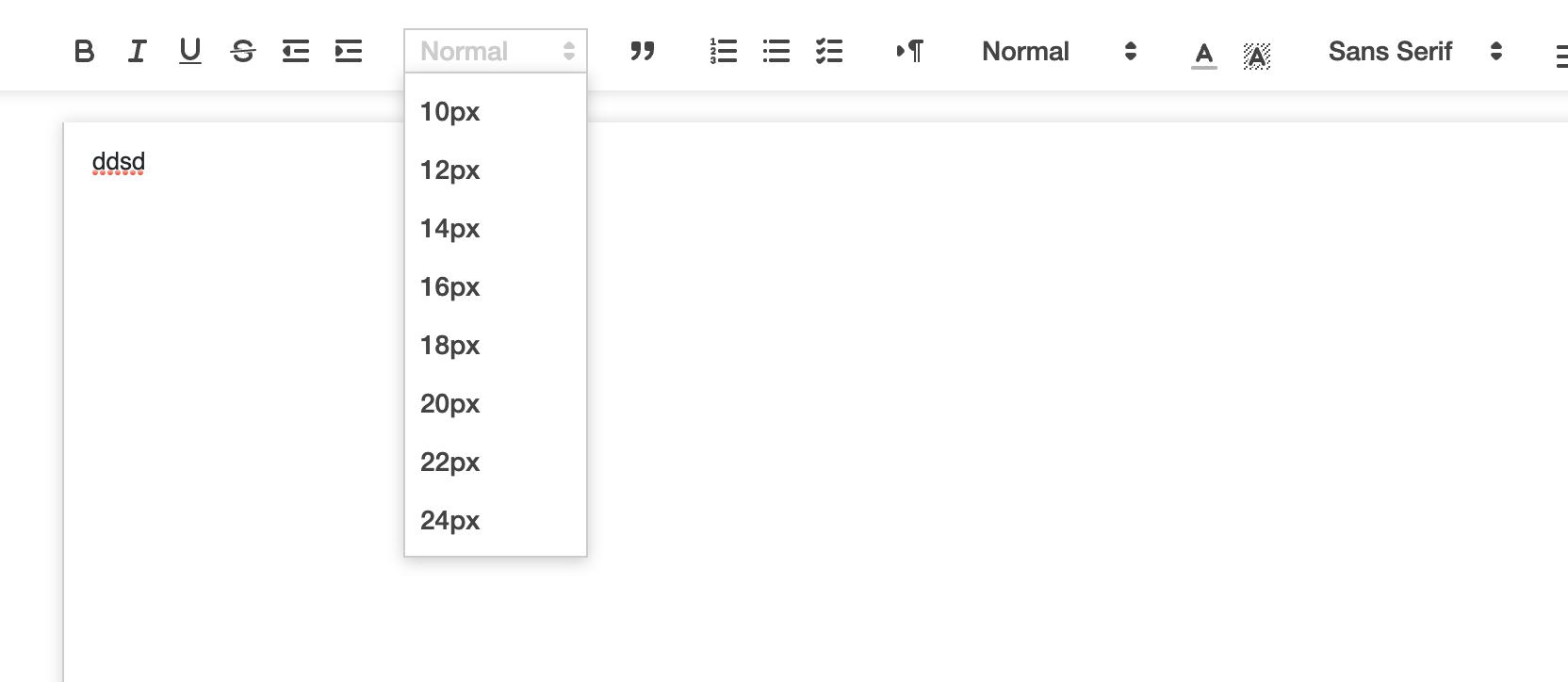
I'm using angular cli 11. The only CSS of the code is being changed, it's not reflecting on either editor or select.
 santosh2221994
on 21 Apr 2021
santosh2221994
on 21 Apr 2021
Maybe create a Stackblitz for your Problem?
Since everything is working in my Demo repo, i would guess The Problem is
in your Implementation.
Could you Check The content of the Editor, If the quilljs CSS classes are
Set when selecting a Format? Or maybe you have some Javascript Errors in
your js console...
But in General: Nobody can Help you by looking at a Screenshot ;-)
Am 21.04.2021 in 22:21, Santosh Kumar Gupta @.*>
schrieb:
I'm using angular cli 11. The only CSS of the code is being changed, it's
not reflecting on either editor or select.
[image: Screenshot 2021-04-22 at 1 49 58 AM]
https://user-images.githubusercontent.com/13116284/115615814-0f358480-a30d-11eb-8c52-224bf7b41b71.png
—
You are receiving this because you commented.
Reply to this email directly, view it on GitHub
https://github.com/KillerCodeMonkey/ngx-quill/issues/181#issuecomment-824332425,
or unsubscribe
https://github.com/notifications/unsubscribe-auth/AARI4YBVGLELB5J3J4FY2TLTJ4XUPANCNFSM4FAMS4UA
.
KillerCodeMonkey
on 21 Apr 2021
here's the stack blitz link. I think I'm missing some script
https://stackblitz.com/edit/ngx-quill-angular-font-size?file=src%2Fapp%2Fapp.component.html
santosh2221994
on 22 Apr 2021
Related issues
 craig-dae
·
57Comments
craig-dae
·
57Comments
 EventectiveNButler
·
21Comments
EventectiveNButler
·
21Comments
 junimohano
·
20Comments
junimohano
·
20Comments
 HvanTao
·
27Comments
HvanTao
·
27Comments
 KerickHowlett
·
38Comments
KerickHowlett
·
38Comments
Most helpful comment
i think you need to create a custom toolbar with the correct labels and values or create the mandatory css-classes for each size:
https://stackoverflow.com/questions/38623716/how-to-add-custom-font-sizes-to-quilljs-editor