Ngx-quill: How to add a custom dropdown to the quill toolbar?
I've been trying to add a custom dropdown in the toolbar without any luck so far.
There is a similar question here quilljs/quill#1817 but the proposed solution did not worked out for me (and it seems a bit strange).
I have already customized my toolbar with some custom buttons like this:
<quill-editor #editor [formControl]="body" (onEditorCreated)="onEditorCreated($event)">
  <div quill-editor-toolbar>

    <!-- Basic buttons -->
    <span class="ql-formats">
      <button class="ql-bold" [title]="'Bold'"></button>
      <button class="ql-italic" [title]="'Italic'"></button>
      <button class="ql-underline" [title]="'Underline'"></button>
      <button class="ql-strike" [title]="'Strike'"></button>
    </span>

    <!-- Size -->
    <span class="ql-formats">
      <select class="ql-size" [title]="'Size'">
        <option value="small"></option>
        <option selected></option>
        <option value="large"></option>
        <option value="huge"></option>
      </select>
    </span>

    <!-- Custom actions -->
    <span class="ql-formats">
      <button [title]="'Signature'" (click)="onAddSignature()">
        <mat-icon fontSet="fontawesome" fontIcon="fa-pencil"></mat-icon>
      </button>
      <button [title]="'Unsubscribe'" (click)="onAddUnsubscribeLink()">
        <mat-icon fontSet="fontawesome" fontIcon="fa-optin-monster"></mat-icon>
      </button>
    </span>

  </div>
</quill-editor>
But when I try to add a custom dropdown using the markup, the dropdown is shown without any options.
To provide a bit more context I am trying to achieve a line spacing solution similar to this: https://github.com/quilljs/quill/issues/197#issuecomment-306092948
 loremaps
All 11 comments
did you tried to use simple text instead of special icon-components?
 KillerCodeMonkey
on 19 Jan 2018
KillerCodeMonkey
on 19 Jan 2018
I am really sorry for the confusion. The above customization is my current one and buttons works just fine.
My issue is that I cannot add a custom dropdown with options. For example if I customize it like this...it does add a dropdown but without any options:
<quill-editor #editor [formControl]="body" (onEditorCreated)="onEditorCreated($event)">
  <div quill-editor-toolbar>

    <!-- Basic buttons -->
    <span class="ql-formats">
      <button class="ql-bold" [title]="'Bold'"></button>
      <button class="ql-italic" [title]="'Italic'"></button>
      <button class="ql-underline" [title]="'Underline'"></button>
      <button class="ql-strike" [title]="'Strike'"></button>
    </span>

    <!-- Size -->
    <!-- <span class="ql-formats">
      <select class="ql-size" [title]="'Size'">
        <option value="small"></option>
        <option selected></option>
        <option value="large"></option>
        <option value="huge"></option>
      </select>
    </span> -->

    <!-- Custom actions -->
    <span class="ql-formats">
      <button [title]="'Salutation'" (click)="onAddSalutation()">
        <mat-icon fontSet="fontawesome" fontIcon="fa-bullhorn"></mat-icon>
      </button>
      <button [title]="'Signature'" (click)="onAddSignature()">
        <mat-icon fontSet="fontawesome" fontIcon="fa-pencil"></mat-icon>
      </button>
      <button [title]="'Unsubscribe'" (click)="onAddUnsubscribeLink()">
        <mat-icon fontSet="fontawesome" fontIcon="fa-optin-monster"></mat-icon>
      </button>
    </span>

    <!-- THIS ADDS DROPDOWN BUT NO OPTIONS -->
    <span class="ql-formats">
      <select class="ql-lineheight" [title]="'Line Height'">
        <option selected></option>
        <option value="1.0">1.0</option>
        <option value="2.0">2.0</option>
      </select>
    </span>

  </div>
</quill-editor>
This is the dropdown I get:
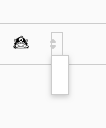
Does it make sense?
loremaps
on 20 Jan 2018
i think quill searchs for a format called "lineheight" and does not found it. So it does not know how to handle and render it.
So create your custom format and use Quill.register to register it to Quill.
Look into.
https://github.com/quilljs/quill/blob/a9f99fed7e1c34c1ce9851c33e90f85451cd57ef/quill.js
There the formats are imported and registered afterwards
Checkout exisitng formats, how to write them
KillerCodeMonkey
on 22 Jan 2018
It appears I was missing some CSS. Please check styles.css here
I still have a few issues with the default value, but hopefully I am on the right track now.
loremaps
on 22 Jan 2018
nice you got this one thing going for you :)
KillerCodeMonkey
on 25 Jan 2018
Hi @KillerCodeMonkey, do you probably also know how to create a select/custom dropdown, which is not based on the quill's snow theme? I am struggling creating my very own dropdown based on custom css. I thought you might know something about it :)
 natterstefan
on 20 Feb 2018
natterstefan
on 20 Feb 2018
never done it :D, sorry
But it should not that difficult, but i think you will need JS + CSS ;)
KillerCodeMonkey
on 20 Feb 2018
@KillerCodeMonkey thank you :) I figured it out and had to modify/apply custom css to apply my custom style.
natterstefan
on 21 Feb 2018
Hey @KillerCodeMonkey good work on Component, I am trying to add custom buttons (for e.g Button to insert a link) but no luck yet, Wondering if there is an example posted anywhere for it ?
Especially to get the instance of the editor (& cursor position) to insert custom text.
Appreciate your time & help,
Danke
 foo-baar
on 30 Nov 2018
foo-baar
on 30 Nov 2018
Just Look in the quilljs documentation there are some Guides for custom
formats and modules.
If this IS to triggy for you. Just use good old Javascript. Build a custom
toolbar with custom dropdown Elements (Check Out the readme or quill
toolbar doc) and add click listeners to Them and the Buttons.
To get latest or current selection You get the quill Editor instance with
the onEditorCreated Output or the selections and Ranges with the
onSelectionChanged Event. Once You have the Editor instance You can use it
in your custom eventlisteners and manipulate the content :).
I do Not have an example ready for that, but o am Sure there are similar
questions in the quilljs repository
Am Fr., 30. Nov. 2018, 16:42 hat Vishal notifications@github.com
geschrieben:
Hey @KillerCodeMonkey https://github.com/KillerCodeMonkey good work on
Component, I am trying to add custom buttons (for e.g Button to insert a
link) but no luck yet, Wondering if there is an example posted anywhere for
it ?
Especially to get the instance of the editor (& cursor position) to insert
custom text.Appreciate your time & help,
Danke—
You are receiving this because you were mentioned.
Reply to this email directly, view it on GitHub
https://github.com/KillerCodeMonkey/ngx-quill/issues/103#issuecomment-443240908,
or mute the thread
https://github.com/notifications/unsubscribe-auth/ACKOYPso3BZkiVnXBRq3PKP11njaboXwks5u0VHkgaJpZM4RiwmY
.
KillerCodeMonkey
on 30 Nov 2018
Thank for reply @KillerCodeMonkey yup I looked into https://codepen.io/anon/pen/rrzpGx wondering if the same will work in ng > 2.
I'll dig in further, Thanks anyways.
foo-baar
on 30 Nov 2018
Related issues
 zpydee
·
80Comments
zpydee
·
80Comments
 Yexan
·
22Comments
Yexan
·
22Comments
 KerickHowlett
·
38Comments
KerickHowlett
·
38Comments
 EventectiveNButler
·
21Comments
EventectiveNButler
·
21Comments
 matrium0
·
20Comments
matrium0
·
20Comments
Most helpful comment
It appears I was missing some CSS. Please check
styles.csshereI still have a few issues with the default value, but hopefully I am on the right track now.