Ngx-quill: Angular Universal Break
Hi, I'm using this library in my Angular Universal App, however once I add it, it breack the server after running my server it immediately stops with the following error:
/node_modules/quill/dist/quill.js:7450
var elem = document.createElement('div');
           ^

ReferenceError: document is not defined
 victorevox
All 99 comments
Yeah but this is part of quilljs and not ngx-quill ;). So this seems not to
be working with angular universal. Because it is creating a custom Dom node.
And document is only available in the browser.
 KillerCodeMonkey
on 4 Jan 2018
KillerCodeMonkey
on 4 Jan 2018
You could work around this by creating an empty mock of ngx-quill module - and during compilation replace the the real module with the empty mock for the server build.
ngx-quill empty mock could be:
import { Component, NgModule, Input, Output, EventEmitter } from '@angular/core';

export interface CustomOption {
    import: string;
    whitelist: Array<any>;
}

@Component({
    selector: 'quill-editor',
    template: ''
})
export class QuillEditorComponent {
    @Input() theme: string;
    @Input() modules: { [index: string]: Object };
    @Input() readOnly: boolean;
    @Input() placeholder: string;
    @Input() maxLength: number;
    @Input() minLength: number;
    @Input() required: boolean;
    @Input() formats: string[];
    @Input() style: any = {};
    @Input() strict: boolean = true;
    @Input() scrollingContainer: HTMLElement | string;
    @Input() bounds: HTMLElement | string;
    @Input() customOptions: CustomOption[] = [];

    @Output() onEditorCreated: EventEmitter<any> = new EventEmitter();
    @Output() onContentChanged: EventEmitter<any> = new EventEmitter();
    @Output() onSelectionChanged: EventEmitter<any> = new EventEmitter();
}

@NgModule({
    declarations: [
        QuillEditorComponent
    ],
    exports: [
        QuillEditorComponent
    ]
})

export class QuillModule {
}
I use Webpack - and during my server build, I replace the real module with the mock using _NormalModeReplaceMentPlugin_. I have a separate config for the server build:
const NormalModuleReplacementPlugin = require('webpack/lib/NormalModuleReplacementPlugin');

/**
 * This is a server config which is merged on top of common config
 */

module.exports = {
    ...bla bla other stuff...

    plugins: [
        new NormalModuleReplacementPlugin(
            /quill/,
           root('./Client/app/shared/servermocks/quillmodule.mock.ts')
          )
    ]
};
It works well - and I've done it with a few other libraries too.
 martinrene
on 19 Jan 2018
martinrene
on 19 Jan 2018
thanks for sharing!
KillerCodeMonkey
on 19 Jan 2018
Awesome, thanks!
victorevox
on 19 Jan 2018
@martinrene
Hi, your technique looks great, I hope to use it for ngx-quill and ag-grid
However when I run webpack --config webpack.server.config.js I get
```ERROR in ./node_modules/@angular/core/esm5/core.js
Module parse failed: Unexpected token (3:7)
You may need an appropriate loader to handle this file type.
| import { Component, NgModule, Input, Output, EventEmitter } from '@angular/core';
|
| export interface CustomOption {
| import: string;
| whitelist: Array
@ ./server.ts 12:13-37
It seems my webpack.server.config.js needs adjusting so that ts-loader compiles your quillmodule.mock.ts
My knowledge of webpack is very limited, I usually use the config supplied by Angular CLI
Any suggestions most welcome thank you
```javascript
const path = require('path');
const webpack = require('webpack');
const NormalModuleReplacementPlugin = require('webpack/lib/NormalModuleReplacementPlugin');
module.exports = {
entry: {server: './server.ts'},
resolve: {extensions: ['.js', '.ts']},
target: 'node',
// this makes sure we include node_modules and other 3rd party libraries
externals: [/(node_modules|main\..*\.js)/],
output: {
path: path.join(__dirname, 'dist'),
filename: '[name].js'
},
module: {
rules: [
{test: /\.ts$/, loader: 'ts-loader'}
]
},
plugins: [
// Temporary Fix for issue: https://github.com/angular/angular/issues/11580
// for "WARNING Critical dependency: the request of a dependency is an expression"
new webpack.ContextReplacementPlugin(
/(.+)?angular(\\|\/)core(.+)?/,
path.join(__dirname, 'src'), // location of your src
{} // a map of your routes
),
new webpack.ContextReplacementPlugin(
/(.+)?express(\\|\/)(.+)?/,
path.join(__dirname, 'src'),
{}
),
new NormalModuleReplacementPlugin(
/quill/,
path.join(__dirname, 'src/app/shared/servermocks/quillmodule.mock.ts')
)
]
}
 helix46
on 22 Feb 2018
helix46
on 22 Feb 2018
Hey @martinrene just wondering if you have an example of your mock working for ngx-quill? I am trying to get it working with universal and must have my webpack config different than what you have gotten to work. I added the NormalModuleReplacementPlugin piece to my main server.webpack.config.ts but you reference NormalModeReplaceMentPlugin as well, do you have two different webpack server config files? Thanks in advance!
 yharaskrik
on 4 Apr 2018
helix46
on 5 Apr 2018
yharaskrik
on 4 Apr 2018
helix46
on 5 Apr 2018
could anybody test the 3.1.0 with angular univeral?
KillerCodeMonkey
on 10 May 2018
Will test next week
helix46
on 11 May 2018
Still the error with version 3.1.0 using angular on v6
var elem = document.createElement('div');
ReferenceError: document is not defined
 ThePatzen
on 14 May 2018
ThePatzen
on 14 May 2018
Strange i Do Not Use Document directly and have a Check in the onInit
function, If it is Executed on Serverside Oo.
Any others hints?
David notifications@github.com schrieb am Mo., 14. Mai 2018, 16:09:
Still the error with version 3.1.0 using angular on v6
var elem = document.createElement('div');
ReferenceError: document is not defined—
You are receiving this because you modified the open/close state.
Reply to this email directly, view it on GitHub
https://github.com/KillerCodeMonkey/ngx-quill/issues/91#issuecomment-388830434,
or mute the thread
https://github.com/notifications/unsubscribe-auth/ACKOYALX5tyId7EkL6H9JquDTfGbzfXYks5tyZAsgaJpZM4RTeZO
.
KillerCodeMonkey
on 14 May 2018
@helix46 just tried running this locally by following the instructions in the readme (https://github.com/helix46/test-cli-quill) but got the following error, any ideas?
ERROR in ./node_modules/ngx-quill/fesm5/ngx-quill.js
Module not found: Error: Can't resolve 'quill' in '/Users/s/Documents/test-cli-quill/node_modules/ngx-quill/fesm5'
 sjsnider
on 2 Oct 2018
sjsnider
on 2 Oct 2018
Check the readme and other Closed issues. Quill is now peer Dependency of
ngx-quill so You have to install it on Your own.
Scott Snider notifications@github.com schrieb am Di., 2. Okt. 2018, 23:36:
@helix46 https://github.com/helix46 just tried running this locally by
following the instructions in the readme (
https://github.com/helix46/test-cli-quill) but got the following error,
any ideas?Module not found: Error: Can't resolve 'quill' in '/Users/s/Documents/test-cli-quill/node_modules/ngx-quill/fesm5'```
—
You are receiving this because you modified the open/close state.
Reply to this email directly, view it on GitHub
https://github.com/KillerCodeMonkey/ngx-quill/issues/91#issuecomment-426438980,
or mute the thread
https://github.com/notifications/unsubscribe-auth/ACKOYEGLyYAOLUxKXcOFff67HA5SbtDPks5ug9xRgaJpZM4RTeZO
.
KillerCodeMonkey
on 3 Oct 2018
You could work around this by creating an empty mock of ngx-quill module - and during compilation replace the the real module with the empty mock for the server build.
ngx-quill empty mock could be:
import { Component, NgModule, Input, Output, EventEmitter } from '@angular/core';

export interface CustomOption {
    import: string;
    whitelist: Array<any>;
}

@Component({
    selector: 'quill-editor',
    template: ''
})
export class QuillEditorComponent {
    @Input() theme: string;
    @Input() modules: { [index: string]: Object };
    @Input() readOnly: boolean;
    @Input() placeholder: string;
    @Input() maxLength: number;
    @Input() minLength: number;
    @Input() required: boolean;
    @Input() formats: string[];
    @Input() style: any = {};
    @Input() strict: boolean = true;
    @Input() scrollingContainer: HTMLElement | string;
    @Input() bounds: HTMLElement | string;
    @Input() customOptions: CustomOption[] = [];

    @Output() onEditorCreated: EventEmitter<any> = new EventEmitter();
    @Output() onContentChanged: EventEmitter<any> = new EventEmitter();
    @Output() onSelectionChanged: EventEmitter<any> = new EventEmitter();
}

@NgModule({
    declarations: [
        QuillEditorComponent
    ],
    exports: [
        QuillEditorComponent
    ]
})

export class QuillModule {
}
I use Webpack - and during my server build, I replace the real module with the mock using _NormalModeReplaceMentPlugin_. I have a separate config for the server build:
const NormalModuleReplacementPlugin = require('webpack/lib/NormalModuleReplacementPlugin');

/**
 * This is a server config which is merged on top of common config
 */

module.exports = {
    ...bla bla other stuff...

    plugins: [
        new NormalModuleReplacementPlugin(
            /quill/,
           root('./Client/app/shared/servermocks/quillmodule.mock.ts')
          )
    ]
};
It works well - and I've done it with a few other libraries too.
Thank you very much for your workaround.
However, I came across following error when trying to compile my project for server side rendering.
Quill.register('modules/imageResize', quill_image_resize_module__WEBPACK_IMPORTED_MODULE_7___default.a);
      ^

TypeError: Quill.register is not a function
at Module../src/app/administration/forms/article-form/article-form.component.ts (C:\my-projects\the-project\dist\server.js:134686:7)
And here is the part of code that is triggering this error:
article-form.component.ts
...
import * as QuillNamespace from 'quill';
const Quill: any = QuillNamespace;
import ImageResize from 'quill-image-resize-module';
Quill.register('modules/imageResize', ImageResize);
...
As you can see, I am trying to register the image-resize module into Quill. This part of code worked fine before I did this workaround. It is probably due to the replacements of modules that is done by NormalModuleReplacementPlugin that Quill module is missing this register function...
I would like to ask if you can please help me with this error?
 VukMNE
on 27 Nov 2019
VukMNE
on 27 Nov 2019
Sorry, can't help you there. I'm not using that code now
helix46
on 27 Nov 2019
@VukMNE I am getting the same error, did you resolve it?
 maddy2894
on 13 Dec 2019
maddy2894
on 13 Dec 2019
@maddy2894 Unfortunately I didn't resolve this. I just removed ImageResize module from quill...
VukMNE
on 13 Dec 2019
Quill is using the document directly. You should try to require and register your modules when the document is available.
checkout:
https://github.com/KillerCodeMonkey/ngx-quill/blob/master/src/quill-editor.component.ts#L210
When the angular hooks are running the ssr should be finished. and you can require dependencies (like a dynamic imports) and use them.
KillerCodeMonkey
on 13 Dec 2019
Strangely isPlatformBrowser is not stopping codes inside it to be executed during SSR.
maddy2894
on 13 Dec 2019
as my experiences ngx-quill is working in general. so if you are using plain ngx-quill without any module or additional imports. ssr should work.. isn't it?
KillerCodeMonkey
on 13 Dec 2019
I have the following additional import:
class ImageBlot extends Block {
static create(src) {
const node = super.create();
// node.setAttribute('alt', alt);
node.setAttribute('src', src);
return node;
}
static value(node) {
return node.getAttribute('src');
}
}
ImageBlot['blotName'] = 'image';
ImageBlot['tagName'] = 'img';
ImageBlot['className'] = 'temp-image-uploading';
Quill.register({ 'formats/imageBlot': ImageBlot });
And I get error for importing Block
maddy2894
on 13 Dec 2019
sure, because you are working with dom nodes and they are only existing in the browser. So just import or better require your ImageBlot when the platform is browser :)
KillerCodeMonkey
on 13 Dec 2019
I used https://github.com/KillerCodeMonkey/ngx-quill/issues/91#issuecomment-358903936 quill mock to eliminate document not defined error.
maddy2894
on 13 Dec 2019
Exactly, i tried it, but for some reason it still throws error even after placing the import in isPlatformBrowser condition.
maddy2894
on 13 Dec 2019
can you share a little bit more code?
KillerCodeMonkey
on 13 Dec 2019
constructor(`
    `@Inject(PLATFORM_ID) protected platformId: any`
`  ) {`
 `   if (isPlatformBrowser(this.platformId)) {`
     ` const Block = Quill.import('blots/block');`
`      class ImageBlot extends Block {`
   `   static create(src) {`
     `   const node = super.create();`
     `   // node.setAttribute('alt', alt);`
      `  node.setAttribute('src', src);`
    `    return node;`
  `    }`
  `    static value(node) {`
     `   return node.getAttribute('src');`
 `     }`
  `  }`
    `ImageBlot['blotName'] = 'image';`
   ` ImageBlot['tagName'] = 'img';`
   ` ImageBlot['className'] = 'temp-image-uploading';`
   ` Quill.register({ 'formats/imageBlot': ImageBlot });`
  `  }`
 ` }
Please excuse my indentation, Idk how to do it in GitHub. :(
maddy2894
on 13 Dec 2019
just use 3 backticks ` above and under your code ;-)
this.platformId should be only platformId i think.
because you are injecting it through the constructor, so there should be no this.
if you are using platformId somewhere else in your component then you will do this.platFormId
And you can not declare a class in a class ..
move
const Block = Quill.import('blots/block');`
`      class ImageBlot extends Block {`
   `   static create(src) {`
     `   const node = super.create();`
     `   // node.setAttribute('alt', alt);`
      `  node.setAttribute('src', src);`
    `    return node;`
  `    }`
  `    static value(node) {`
     `   return node.getAttribute('src');`
 `     }`
  `  }`
    `ImageBlot['blotName'] = 'image';`
   ` ImageBlot['tagName'] = 'img';`
   ` ImageBlot['className'] = 'temp-image-uploading';`
   ` Quill.register({ 'formats/imageBlot': ImageBlot });`
to another ts file.
And only require it in your
if (isPlatformBrowser(this.platformId)) { ... }
Block
KillerCodeMonkey
on 13 Dec 2019
So my updated constructor will be:
constructor(
    @Inject(PLATFORM_ID) protected platformId: any
  ) {
    if (isPlatformBrowser(platformId)) {
      import { ImageBlotBlock } from '../image-block'
    }
Thank you for the indentation tips. :)
maddy2894
on 13 Dec 2019
i would guess something like:
constructor(
    @Inject(PLATFORM_ID) protected platformId: any
  ) {
    if (isPlatformBrowser(platformId)) {
      require('../image-block')
    }
i never tried to do dynamic imports in TS :D.
But this you can try and google for or use stack overflow. ;-)
KillerCodeMonkey
on 13 Dec 2019
Thank you for your quick response, but removing this did not solve it. Error is still thrown. :(
maddy2894
on 13 Dec 2019
yeah but then you have to debug your code what is the platform id and what returns the isPlatformBrowser function and so on... daily developer stuff... business as usual :D
KillerCodeMonkey
on 13 Dec 2019
By using https://github.com/KillerCodeMonkey/ngx-quill/issues/91#issuecomment-358903936 to replace original quill during compile time, when will the mock be replaced by original? Is this the only solution to eliminate the following error?
var elem = document.createElement('div');
           ^
ReferenceError: document is not defined
Am I missing any better solution?
maddy2894
on 13 Dec 2019
depends on you project. I do not have any angular universal project. So this was an ability came later in this project.
Since i require quill only if the platform is not the server, this should not be necessary.
Like i said.. try using ngx-quill without any additional modules or your own Module.
Just plain ngx-quill
KillerCodeMonkey
on 13 Dec 2019
as my experiences ngx-quill is working in general. so if you are using plain ngx-quill without any module or additional imports. ssr should work.. isn't it?
@KillerCodeMonkey
Yes, SSR works if you are not importing modules like ImageResize.. Plain ngx-quill works on SSR
VukMNE
on 13 Dec 2019
yeah, and in my opinion -> moving the import of quill or quill dependent modules in a PlatformBrowser check and using a dynamic require, would solve the problem.
KillerCodeMonkey
on 13 Dec 2019
Yes, your right, plain ngx-quill works without throwing any error. If your interested, then to reproduce the error:
[1]Click "Download the finished sample code" link from https://angular.io/guide/universal
[2] do npm install, npm install ngx-quill --save,npm install quill --save
[3] replace app.component.ts with the following code:
import {Component,Inject,PLATFORM_ID,} from '@angular/core';
import { isPlatformBrowser } from '@angular/common';
import Quill from 'quill';

@Component({
  selector: 'app-root',
  templateUrl: './app.component.html',
  styleUrls: ['./app.component.css']
})
export class AppComponent {
  title = 'Tour of Heroes';
  testBrowser;
  constructor(@Inject(PLATFORM_ID) private platformId) {
    if (isPlatformBrowser(platformId)) {
      const Block = Quill.import('blots/block');
    }
  }
}
[4] do npm run build:ssr && npm run serve:ssr . If isPLatformBrowser works, then there should not be any error. Else the following error will be thrown:
var elem = document.createElement('div');
           ^
ReferenceError: document is not defined
[Optional] if you comment const Block = Quill.import('blots/block'); then there won't be any error.
maddy2894
on 13 Dec 2019
dude you are importing quill in that file... without wrapping it...
quill uses the document as well..
import {Component,Inject,PLATFORM_ID,} from '@angular/core';
import { isPlatformBrowser } from '@angular/common';

@Component({
  selector: 'app-root',
  templateUrl: './app.component.html',
  styleUrls: ['./app.component.css']
})
export class AppComponent {
  title = 'Tour of Heroes';
  testBrowser;
  constructor(@Inject(PLATFORM_ID) private platformId) {
    if (isPlatformBrowser(platformId)) {
      const Quill = require('quill');
      const Block = Quill.import('blots/block');
    }
  }
}
Nope, I get this error if I use require,
ERROR in src/app/app.component.ts(14,21): error TS2591: Cannot find name 'require'. :(
maddy2894
on 13 Dec 2019
check my source:
https://github.com/KillerCodeMonkey/ngx-quill/blob/master/src/quill-editor.component.ts#L30
KillerCodeMonkey
on 13 Dec 2019
Wow, that worked.
But how come commenting const Block = Quill.import('blots/block'); works? even then quill is imported.
Anything to do with tree shaking?
maddy2894
on 13 Dec 2019
pardon, what do you mean?
KillerCodeMonkey
on 13 Dec 2019
Angular/webpack does tree shaking to determine dependencies while compiling and maybe thats why this code does not produce any error
import {Component,Inject,PLATFORM_ID,} from '@angular/core';
import { isPlatformBrowser } from '@angular/common';
import Quill from 'quill';

@Component({
  selector: 'app-root',
  templateUrl: './app.component.html',
  styleUrls: ['./app.component.css']
})
export class AppComponent {
  title = 'Tour of Heroes';
  testBrowser;
  constructor(@Inject(PLATFORM_ID) private platformId) {
    if (isPlatformBrowser(platformId)) {
     //const Block = Quill.import('blots/block');
    }
  }
}
Maybe. But maybe it is already done by the typescript compiler removing unused imports ;-)
KillerCodeMonkey
on 13 Dec 2019
Yea. Thank you for your help. :-)
maddy2894
on 13 Dec 2019
no probs.
KillerCodeMonkey
on 13 Dec 2019
This still does not work, even without ImageResize as @VukMNE has suggested. Angular Universal does not have webpack installed by default (although it looks like it used to a few years ago). I personally could not get webpack working on top of the latest Angular Universal. This is no matter as the solution presented by @martinrene would only fix loading ngx-quill, not quill which is the problem. You cannot compile with just interfaces either way because of QuillModule.forRoot().
@KillerCodeMonkey While you may not use Angular Universal, 90% of Angular website developers will for SEO purposes. The other 10% would just use angular and quill in logged-in areas and wouldn't care about it. You have to compile with quill or you get the dependency error
ERROR in The target entry-point "ngx-quill" has missing dependencies: - quill.
I am wondering if anyone has ever gotten this to work who is not a server expert. I would want ImageResize to work for my needs also. Maybe I am missing something...
 jdgamble555
on 21 Apr 2020
jdgamble555
on 21 Apr 2020
installing quill as a dependency will not make your ssr fail... but to get ngx-quill working you have to install all peer dependencies.
ngx-quill is not importing anything from the quilljs module. it is using dynamic requiring only when you are on client side:
https://github.com/KillerCodeMonkey/ngx-quill/blob/master/src/quill-view.component.ts#L87
https://github.com/KillerCodeMonkey/ngx-quill/blob/master/src/quill-editor.component.ts#L204
So having a peer dependency has nothing to do with ssr or not... just a dependency if you really want something to work.
So in general Quill is not "required/compiled" on server side, but on client side. So
you do not have to compile quill for ngx-quill (only you are using Quill somewhere else in your code and do not respect that Quill need the
document.ngx-quill needs the peer dependency, so you have to install it, but there is no usage of quill module outside of the encapsulated parts inside quill-editor and quill-view components.
Just install the latest ngx-quill version + peer dependencies and try again.
KillerCodeMonkey
on 21 Apr 2020
I beg to differ. I just created a brand new Angular Universe app with npm i ngx-quill, and only these two lines added in the app.module:
import { QuillModule } from 'ngx-quill';
QuillModule.forRoot()
If I run npm run dev:ssr (the equivalent of ng serve), I get the quill dependency error. If I npm i quill, I get the
var elem = document.createElement('div'); ReferenceError: document is not defined
error.
I just uploaded it: https://github.com/jdgamble555/ngxQuillSSR
jdgamble555
on 21 Apr 2020
Okay, I got it working without resize or other modules. It will work, not out of the box, but with the mock module as @VukMNE was referring to. See stackoverflow and my latest code for changes. Now I would like to get it to work with the modules. Here is the code I have in app-component.ts:
import { Component, Inject, PLATFORM_ID } from '@angular/core';
import { isPlatformBrowser } from '@angular/common';

let Quill: any = null;
let ImageResize: any = null;

@Component({
  selector: 'app-root',
  templateUrl: './app.component.html',
  styleUrls: ['./app.component.scss']
})
export class AppComponent {

  title = 'ngxQuillSSR';

  editor_modules = {};

  constructor(
    @Inject(PLATFORM_ID) protected platformId: any
  ) {
    if (isPlatformBrowser(platformId)) {
      Quill = require('node_modules/quill');
      ImageResize = require('quill-image-resize-module');
      Quill.register('modules/imageResize', ImageResize);
    }
    this.editor_modules = {
      toolbar: {
        container: [
          [{ 'font': [] }],
          [{ 'size': ['small', false, 'large', 'huge'] }],
          ['bold', 'italic', 'underline', 'strike'],
          [{ 'header': 1 }, { 'header': 2 }],
          [{ 'color': [] }, { 'background': [] }],
          [{ 'list': 'ordered' }, { 'list': 'bullet' }],
          [{ 'align': [] }],
          ['link', 'image']
        ]
      },
      imageResize: true
    };
  }
}
I get the TypeError: Cannot read property 'imports' of undefinedwhich goes back to this line while debugging:
if (common_1.isPlatformBrowser(platformId)) {
    Quill = __webpack_require__(/*! node_modules/quill */ "./node_modules/quill/dist/quill.js");
    -----> ImageResize = __webpack_require__(/*! quill-image-resize-module */ "./node_modules/quill-image-resize-module/image-resize.min.js");
    Quill.register('modules/imageResize', ImageResize);
}
Any suggestions?
jdgamble555
on 22 Apr 2020
as far as i know image resize needs quill on the window object.
but i will check, why your previous version of ngx-quill is not working, because ngx.quill is doing the same if you look at my code... Checking for the platform and only require quill if it is not the server.
Maybe you see what i was missing.
KillerCodeMonkey
on 22 Apr 2020
GOT IT WORKING!!! Apparently there is a difference between quill-image-resize-module and quill-image-resize, at least in the way you import them. Perhaps somebody smarter than me with classes can explain how to get the other one working as well. Either way, what works, works. Here is my find code:
import { Component, Inject, PLATFORM_ID } from '@angular/core';
import { isPlatformBrowser } from '@angular/common';

let Quill: any = null;

@Component({
  selector: 'app-root',
  templateUrl: './app.component.html',
  styleUrls: ['./app.component.scss']
})
export class AppComponent {

  title = 'ngxQuillSSR';

  editor_modules = {};

  constructor(
    @Inject(PLATFORM_ID) protected platformId: any
  ) {
    if (isPlatformBrowser(this.platformId)) {
      Quill = require('quill');
      const ImageResize = require('quill-image-resize').default;
      const { ImageDrop } = require('quill-image-drop-module');
      Quill.register('modules/imageResize', ImageResize);
      Quill.register('modules/imageDrop', ImageDrop);
    }
    this.editor_modules = {
      toolbar: {
        container: [
          [{ 'font': [] }],
          [{ 'size': ['small', false, 'large', 'huge'] }],
          ['bold', 'italic', 'underline', 'strike'],
          [{ 'header': 1 }, { 'header': 2 }],
          [{ 'color': [] }, { 'background': [] }],
          [{ 'list': 'ordered' }, { 'list': 'bullet' }],
          [{ 'align': [] }],
          ['link', 'image']
        ]
      },
      imageResize: true,
      imageDrop: true
    };
  }
}
And I will try and keep my repository updated unless @KillerCodeMonkey decides to add his own version. I failed in every way possible, but it works. :)
jdgamble555
on 22 Apr 2020
@jdgamble555 a little hint require('node_modules/quill') should only be require('quill')
And for me image-resize-module is working: https://github.com/KillerCodeMonkey/ngx-quill-example/blob/49801db9e3013ba111dbc2b3db9b9baa9b078d3b/src/app/formula/formula.component.ts#L6
but you have to keep in mind -> if a esmodule has a default export, you need to require it like you did with .default at the end
if you only use const thing = require('thing'); it would be something like import * as thing from 'thing'
KillerCodeMonkey
on 22 Apr 2020
When I would import quill-image-drop-module it would work (non-SSR), but when I would require it, it wouldn't. I am not sure why. I fixed the require('quill'), was testing with something and never changed it back. Also, I needed thing in {} or it wouldn't work.
jdgamble555
on 22 Apr 2020
@jdgamble555 lols... my source code is correct... but i looked it the build output of ng-packagr and the dynamic require('quill') is moved up to the start of the files -.-
KillerCodeMonkey
on 22 Apr 2020
So it turns out the paths option will work, but will create a "deep imports" warning, which is impossible to turn off. I finally figured out how to had a simple webpack to Angular 9. This works wonders. Also, I moved quill into an angular service. If you reopen the same component with quill, it will throw errors in the console, although it works. This is caused by Quill re-registering the other modules. A service is only called once, so it fixes the problem. See my updated repository. No errors, no warnings...
jdgamble555
on 25 Apr 2020
@jdgamble555 if you think there is something i can adapt here, let me know (like providing a quill mock)
Feel free to send me a PR with an extended readme for angular universal an the mock :).
KillerCodeMonkey
on 25 Apr 2020
I am also having similar kind of problem with ngx-quill in universal app and I am also not using any modules plain ngx-quill
I used the mock solution to resolve this, it get resolved but it throws another error but it still for works with this error
still i want to remove this error any idea why this error is coming
ERROR TypeError: Cannot read property 'ɵcmp' of undefined
    at getComponentDef (D:\PROJECTS\thesocialcomment\frontend\dist\frontend\server\main.js:1:3916360)
    at extractDirectiveDef (D:\PROJECTS\thesocialcomment\frontend\dist\frontend\server\main.js:1:3914900)
    at Array.map (<anonymous>)
    at def.directiveDefs.directiveTypes (D:\PROJECTS\thesocialcomment\frontend\dist\frontend\server\main.js:1:3914526)
    at createTView (D:\PROJECTS\thesocialcomment\frontend\dist\frontend\server\main.js:1:3974385)
    at getOrCreateTComponentView (D:\PROJECTS\thesocialcomment\frontend\dist\frontend\server\main.js:1:3973260)
    at addComponentLogic (D:\PROJECTS\thesocialcomment\frontend\dist\frontend\server\main.js:1:3981623)
    at instantiateAllDirectives (D:\PROJECTS\thesocialcomment\frontend\dist\frontend\server\main.js:1:3971977)
    at createDirectivesInstances (D:\PROJECTS\thesocialcomment\frontend\dist\frontend\server\main.js:1:3972265)
    at ɵɵelementStart (D:\PROJECTS\thesocialcomment\frontend\dist\frontend\server\main.js:1:4056908)
 NiveshSinghChauhan
on 27 Apr 2020
NiveshSinghChauhan
on 27 Apr 2020
@NiveshSinghChauhan I don't know if your problem is related to quill. What is the code on your main.js at line 3916360? Make sure you install latest angular: npm i @angular/cli@latest @angular/core@latest
@KillerCodeMonkey You create the file /src/app/mocks/quill.mock.server.ts (or wherever you want). It simply consists of this:
export default class Quill {
    constructor() { }
}
Add your mock file to tsconfig.server.json:
  "files": [
    "src/main.server.ts",
    "server.ts",
    "src/app/mocks/quill.mock.server.ts"
Install webpack using npm i @angular-builders/custom-webpack (unless you already have webpack)
Create a custom-webpack.config.js like so (or add to your existing webpack):
const NormalModuleReplacementPlugin = require('webpack/lib/NormalModuleReplacementPlugin');
const path = require("path");

module.exports = {
    plugins: [
        new NormalModuleReplacementPlugin(/^quill$/, path.join(__dirname, './src/app/mocks/quill.mock.server.ts'))
    ]
};
Change angular.json under the server option like so (unless you already have webpack)...
        "server": {
          "builder": "@angular-builders/custom-webpack:server",
          "options": {
            "outputPath": "dist/YOUR MODULE/server",
            "main": "server.ts",
            "tsConfig": "tsconfig.server.json",
            "customWebpackConfig": {
              "path": "./custom-webpack.config.js"
            }
Install the modules
npm i quill-image-resize quill-image-drop-module
Create a new service ng g s quill and put this code in it:
import { Injectable, Inject, PLATFORM_ID } from '@angular/core';
import { isPlatformBrowser } from '@angular/common';

let Quill: any = null;

@Injectable({
  providedIn: 'root'
})
export class QuillService {

  editorModules = {
    imageResize: true,
    imageDrop: true,
    //syntax: true
  };

  editorStyle = {
    resize: 'vertical',
    'overflow-y': 'auto'
  };

  constructor(@Inject(PLATFORM_ID) protected platformId: any) {
    if (isPlatformBrowser(this.platformId)) {
      Quill = require('quill');
      let ImageResize = require('quill-image-resize').default;
      let { ImageDrop } = require('quill-image-drop-module');
      Quill.register('modules/imageResize', ImageResize);
      Quill.register('modules/imageDrop', ImageDrop);
    }
  }
}
Include the service in your component.ts (there is more than one way to do this):
constructor(public qs: QuillService) {
And include the editor in your component.html
<quill-editor [modules]="qs.editorModules" [styles]="qs.editorStyle" bounds="self" theme="snow"></quill-editor>
If you have problems with require: npm i @types/node. You still need to include quill as usual in your app modules etc, but I think that is it...
jdgamble555
on 27 Apr 2020
@jdgamble555 i played a little bit around and it is easier then expected, just add those mocks to your main.server.ts:
global['window'] = {}
global['document'] = {
  createElement: () => ({
    classList: {
      toggle: () => {},
      contains: () => {}
    }
  }),
  addEventListener: () => {}
}
global['Node'] = {}
global['navigator'] = {}
So the whole file looks like this and everything works fine :).
import { enableProdMode } from '@angular/core';
import { environment } from './environments/environment';

if (environment.production) {
  enableProdMode();
}

global['window'] = {}
global['document'] = {
  createElement: () => ({
    classList: {
      toggle: () => {},
      contains: () => {}
    }
  }),
  addEventListener: () => {}
}
global['Node'] = {}
global['navigator'] = {}

export { AppServerModule } from './app/app.server.module';
export { renderModule, renderModuleFactory } from '@angular/platform-server';
and a demo repo with a minimal demo: https://github.com/KillerCodeMonkey/ngx-quill-universal-example
KillerCodeMonkey
on 30 Apr 2020
@KillerCodeMonkey That is much easier. It is funny, I spent probably a week going from the path option, and ending up with webpack, but your option is cleaner and simpler. I happened to need webpack for something else in my project anyway.
You still need my code to implement the dropable / resizable correctly with the service and no errors.
Well, good thing I learned a lot in the debugging, as usual :/
jdgamble555
on 30 Apr 2020
@jdgamble555 no probs i think you can even simplify your service stuff.
Just import quill and the custom quill modules you need.
And check if there any thing you need to mock something more to get them working.
And in ngx-quill 9.0.0 you can pass "customModules" to the editor and view component, so the
Quill.register()
stuff is done there.
just pass [customModules]="[{ path: 'modules/custom', implementation: yourImplementationClass }]"
KillerCodeMonkey
on 1 May 2020
@KillerCodeMonkey Yup yup, a lot simpler since you don't have to import all the platform variables...
Note: You still need to use quill-image-resize without brackets... a quick search will show you the plethora of problems with quill-image-resize-module.
quill.service.ts
import { Injectable } from '@angular/core';
import Quill from 'quill';
import { ImageDrop } from 'quill-image-drop-module';
import ImageResize from 'quill-image-resize';

@Injectable({
  providedIn: 'root'
})
export class QuillService {

  editorModules = {
    imageResize: true,
    imageDrop: true,
    //syntax: true
  };

  editorStyle = {
    resize: 'vertical',
    'overflow-y': 'auto'
  };

  constructor() {
    Quill.register('modules/imageResize', ImageResize);
    Quill.register('modules/imageDrop', ImageDrop);
  }
}
However, you cannot use [customModules] unless you are only using it once and it is not ever being loaded again in the same app or you will get this error / warning in the console:
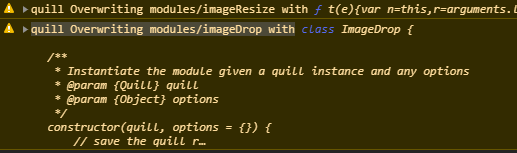
That is why I use a service with Quill.register() since it only loads once. A template will be loaded every time the template is loaded. We could get rid of the problem if you added customModules to the QuillModule.forRoot() options. We would never need to import Quill module directly, the app.module only loads once, there would be no need for a service, and it would be less code. Note: This is a problem that does not effect just SSR.
jdgamble555
on 2 May 2020
I thought about it. Maybe IT could be an improvement for the customModules
and customOptions.
So you can confirgure it globally If you want.
Jonathan Gamble notifications@github.com schrieb am Sa., 2. Mai 2020,
07:31:
@KillerCodeMonkey https://github.com/KillerCodeMonkey Yup yup, a lot
simpler since you don't have to import all the platform variables...Note: You still need to use quill-image-resize without brackets... a
quick search will show you the plethora of problems with
quill-image-resize-module.quill.service.ts
import { Injectable } from '@angular/core';
import Quill from 'quill';
import { ImageDrop } from 'quill-image-drop-module';
import ImageResize from 'quill-image-resize';@Injectable({
providedIn: 'root'
})
export class QuillService {editorModules = {
imageResize: true,
imageDrop: true,
//syntax: true
};editorStyle = {
resize: 'vertical',
'overflow-y': 'auto'
};constructor() {
Quill.register('modules/imageResize', ImageResize);
Quill.register('modules/imageDrop', ImageDrop);
}
}However, you cannot use [customModules] unless you are only using it
once and it is not ever being loaded again in the same component or you
will get this error / warning in the console:[image: quill]
https://user-images.githubusercontent.com/8333090/80855187-996c7080-8c04-11ea-9ad3-695d84fb7329.pngThat is why I use a service with Quill.register() since it only loads
once. A template will be loaded every time the template is loaded. We could
get rid of the problem if you added customModules to the
QuillModule.forRoot() options. We would never need to import Quill
module directly, the app.module only loads once, there would be no need
for a service, and it would be less code.—
You are receiving this because you were mentioned.
Reply to this email directly, view it on GitHub
https://github.com/KillerCodeMonkey/ngx-quill/issues/91#issuecomment-622672249,
or unsubscribe
https://github.com/notifications/unsubscribe-auth/AARI4YDSHA3ZABDSKAN3JWDRPOVZRANCNFSM4EKN4ZHA
.
KillerCodeMonkey
on 2 May 2020
@jdgamble555 landet in 9.1.0
KillerCodeMonkey
on 2 May 2020
@KillerCodeMonkey Hmm, not getting it to work. Did you test it?
app.module.ts
import { BrowserModule } from '@angular/platform-browser';
import { NgModule } from '@angular/core';

import { AppRoutingModule } from './app-routing.module';
import { AppComponent } from './app.component';
import { QuillModule } from 'ngx-quill';
import { ImageDrop } from 'quill-image-drop-module';
import ImageResize from 'quill-image-resize';

@NgModule({
  declarations: [
    AppComponent
  ],
  imports: [
    BrowserModule.withServerTransition({ appId: 'serverApp' }),
    AppRoutingModule,
    QuillModule.forRoot({
      customModules: [{
        path: 'modules/ImageResize',
        implementation: ImageResize
      },
      {
        path: 'modules/ImageDrop',
        implementation: ImageDrop
      }],
      modules: {
        imageResize: true,
        imageDrop: true
      }
    })
  ],
  providers: [],
  bootstrap: [AppComponent]
})
export class AppModule { }
I get these errors:
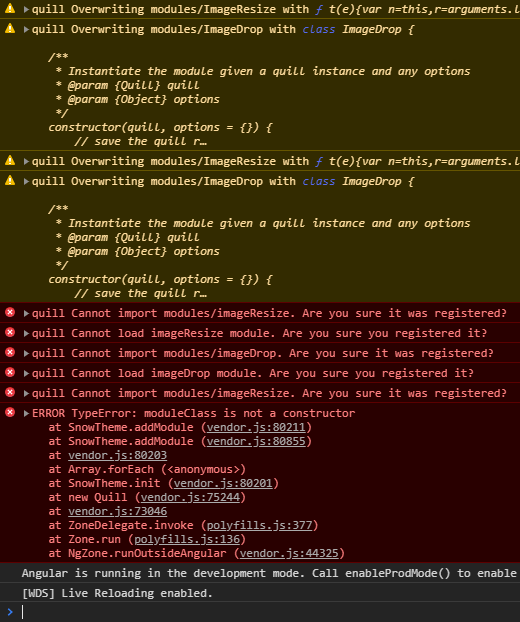
jdgamble555
on 2 May 2020
@jdgamble555 sure:
https://github.com/KillerCodeMonkey/ngx-quill-example/blob/master/src/app/app.module.ts#L60
the custom modules is used here:
https://github.com/KillerCodeMonkey/ngx-quill-example/blob/4f0972b894841d59802f77385384a69636f005bd/src/app/custom-toolbar/custom-toolbar.component.html#L6
and it is working:
https://killercodemonkey.github.io/ngx-quill-example/
check the "Custom Toolbar (position: bottom) with toolbar title-attributes + Word counter" editor
but it depends a little bit of the external modules. some of them are trying to use quilljs from the window object. Then there are two different quill instances in your project. Once on the window and once ngx-quill is using :)
KillerCodeMonkey
on 2 May 2020
@KillerCodeMonkey Okay, so I had my ImageResize the wrong case, funny the bugs you don't see in front of you. However, we still get the warning, even on your example page:
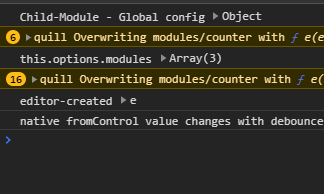
This means that QuillModule.forRoot() is being run every time a quill-editor is invoked, instead of once, overwriting itself. If you could somehow insure that the register part is only run once, maybe that would fix it?
jdgamble555
on 3 May 2020
I need to check this. I thought those forRoot things are being only
instantiated once like an ordinary injectable.
Jonathan Gamble notifications@github.com schrieb am So., 3. Mai 2020,
00:32:
@KillerCodeMonkey https://github.com/KillerCodeMonkey Okay, so I had my
ImageResize the wrong case, funny the bugs you don't see in front of
you. However, we still get the warning, even on your example page:[image: warn]
https://user-images.githubusercontent.com/8333090/80893721-8310f400-8c9a-11ea-907f-b2358bcd989e.pngThis means that QuillModule.forRoot() is being run every time a
quill-editor is invoked, instead of once, overwriting itself. If you
could somehow insure it is only run once, maybe that would fix it?—
You are receiving this because you were mentioned.
Reply to this email directly, view it on GitHub
https://github.com/KillerCodeMonkey/ngx-quill/issues/91#issuecomment-623024170,
or unsubscribe
https://github.com/notifications/unsubscribe-auth/AARI4YFIIPGWJNBTYQRDGJ3RPSNQPANCNFSM4EKN4ZHA
.
KillerCodeMonkey
on 3 May 2020
@jdgamble555 my fault i just to forgot to revert the logic in the view and editor components.
will be fixed with 9.1.1
KillerCodeMonkey
on 3 May 2020
it is released
KillerCodeMonkey
on 3 May 2020
Ok, so that fixed the problem in the editor components (the way they kept reloading the register), and it fixed the problem with the client-side builds, but it did not fix the problem with the server-side builds. Basically QuillModule.forRoot() is run 2x since it is invoked from app.module and app.server.module (calling app.module). This means I still get the error on the server builds from the second invocation. Is it possible to fix it there to?
@KillerCodeMonkey Thanks for all your hard work btw. I think we are almost there with the last SSR error.... (Hopefully!)
jdgamble555
on 3 May 2020
@jdgamble555 but isn't it how it should work? because window, document and everything is mocked on server side?
So if it is run on client side it needs to initialise again?
And i do no know if i get the information in a static method of a NgModule if it is rendered on serverside, so i can just skip the registering of those modules
KillerCodeMonkey
on 3 May 2020
@KillerCodeMonkey Okay, I found the solution after a bit of research. Pass in a third argument of "true" will supress the warning in the first place... so you can change your code to this:
quill.register(path, implementation, true);
I believe you should not suppress warnings that are important, but in this case it is the expected behavior that won't cause the app to break.
jdgamble555
on 3 May 2020
Nice. Thanks! I will check this :)
Jonathan Gamble notifications@github.com schrieb am So., 3. Mai 2020,
20:12:
@KillerCodeMonkey https://github.com/KillerCodeMonkey Okay, I found the
solution https://github.com/davidroyer/vue2-editor/pull/100 after a bit
of research. Pass in a third argument of "true" will supress the warning in
the first place... so you can change your code to this:quill.register(path, implementation, true);
I believe you should not suppress warnings that are important, but in this
case it is the expected behavior that won't cause the app to break.—
You are receiving this because you were mentioned.
Reply to this email directly, view it on GitHub
https://github.com/KillerCodeMonkey/ngx-quill/issues/91#issuecomment-623155288,
or unsubscribe
https://github.com/notifications/unsubscribe-auth/AARI4YD6OE27BOHFTJAMTUDRPWXX5ANCNFSM4EKN4ZHA
.
KillerCodeMonkey
on 3 May 2020
@jdgamble555 with 9.2.0 you can pass a new config field to forRoot
it is called suppressGlobalRegisterWarnings and just set it to true.
https://github.com/KillerCodeMonkey/ngx-quill#suppress-global-register-warnings
https://github.com/KillerCodeMonkey/ngx-quill/blob/master/src/quill.module.ts#L29
This should do it?
KillerCodeMonkey
on 3 May 2020
@KillerCodeMonkey Yup yup... hopefully all of the problems are fixed now! Thank you sir! Here is my code for anyone who finds this later:
import { BrowserModule } from '@angular/platform-browser';
import { NgModule } from '@angular/core';

import { AppRoutingModule } from './app-routing.module';
import { AppComponent } from './app.component';
import { QuillModule } from 'ngx-quill';
import { ImageDrop } from 'quill-image-drop-module';
import ImageResize from 'quill-image-resize';

@NgModule({
  declarations: [
    AppComponent
  ],
  imports: [
    BrowserModule.withServerTransition({ appId: 'serverApp' }),
    AppRoutingModule,
    QuillModule.forRoot({
      customModules: [{
        implementation: ImageDrop,
        path: 'modules/ImageDrop'
      },
      {
        implementation: ImageResize,
        path: 'modules/ImageResize',
      }],
      modules: {
        ImageResize: true,
        ImageDrop: true
      },
      suppressGlobalRegisterWarning: true
    }),
  ],
  providers: [],
  bootstrap: [AppComponent]
})
export class AppModule { }
@jdgamble555 could you try v10.0.0-0 without mocking stuff in your main.server.ts?
KillerCodeMonkey
on 8 May 2020
@KillerCodeMonkey - v10.0.0.1 - ReferenceError: document is not defined
jdgamble555
on 9 May 2020
I do Not get it with my angular Universal project repo.
Could you please Check IT If i missed Something there?
Jonathan Gamble notifications@github.com schrieb am Sa., 9. Mai 2020,
04:42:
@KillerCodeMonkey https://github.com/KillerCodeMonkey - v10.0.0.1 - ReferenceError:
document is not defined—
You are receiving this because you were mentioned.
Reply to this email directly, view it on GitHub
https://github.com/KillerCodeMonkey/ngx-quill/issues/91#issuecomment-626092871,
or unsubscribe
https://github.com/notifications/unsubscribe-auth/AARI4YCNVW6GI76RN25SM43RQS7KVANCNFSM4EKN4ZHA
.
KillerCodeMonkey
on 9 May 2020
Or do you use Something else needing The document in your project?
Bengt Weiße bengtler@googlemail.com schrieb am Sa., 9. Mai 2020, 07:41:
I do Not get it with my angular Universal project repo.
Could you please Check IT If i missed Something there?
Jonathan Gamble notifications@github.com schrieb am Sa., 9. Mai 2020,
04:42:@KillerCodeMonkey https://github.com/KillerCodeMonkey - v10.0.0.1 - ReferenceError:
document is not defined—
You are receiving this because you were mentioned.
Reply to this email directly, view it on GitHub
https://github.com/KillerCodeMonkey/ngx-quill/issues/91#issuecomment-626092871,
or unsubscribe
https://github.com/notifications/unsubscribe-auth/AARI4YCNVW6GI76RN25SM43RQS7KVANCNFSM4EKN4ZHA
.
KillerCodeMonkey
on 9 May 2020
main.server.ts
import { enableProdMode } from '@angular/core';

import { environment } from './environments/environment';

if (environment.production) {
  enableProdMode();
}

/*global['window'] = {};
global['document'] = {
  createElement: () => ({
    classList: {
      toggle: () => {},
      contains: () => {}
    }
  }),
  addEventListener: () => {}
};
global['Node'] = {};
global['navigator'] = {};*/

export { AppServerModule } from './app/app.server.module';
export { renderModule, renderModuleFactory } from '@angular/platform-server';
If you run ng serve in angular universal, it does not test angular universal. Make sure you are testing it with npm run dev:ssr. Here is the error I get:
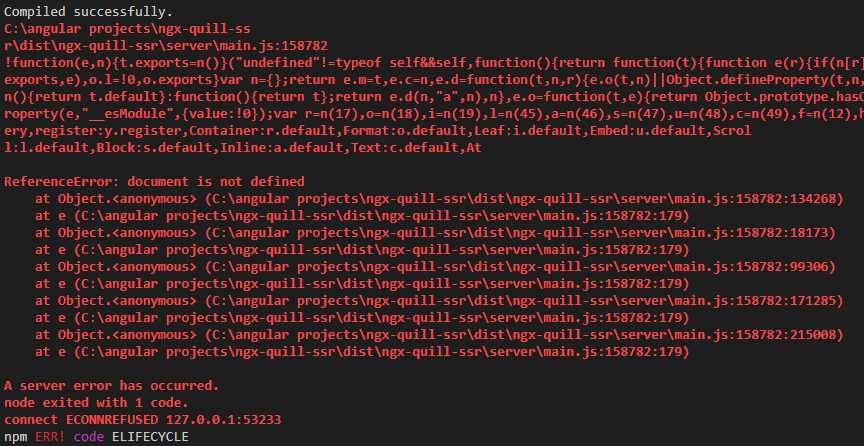
When I un-comment the globals above, it works fine. Feel free to pull my repository to test it.
jdgamble555
on 9 May 2020
i will check your repo but my ngx-quill-universal-example repo is working :)

KillerCodeMonkey
on 9 May 2020
@jdgamble555 i think your problem occurs because if some quill modules you are using. not ngx-quill at all ;-).
The problem in your case comes from image-resize :)
KillerCodeMonkey
on 9 May 2020
@KillerCodeMonkey While you're right it is a problem with image-resize, it also is a problem with several other plugins. quill-image-resize-module has been forked so many times, and non of the changes seem to work well. Anyway, I went back to the nifty webpack, as I found messing with the globals creates new different errors in one of my other projects. So, I had to replace just the quill-image-resize plugin instead of quill in general, since you fixed that. (see my above webpack implementation for reference)
custom-webpack.config.js
const webpack = require('webpack');
const path = require('path');

module.exports = {
    plugins: [
        new webpack.NormalModuleReplacementPlugin(/^quill-image-resize$/, path.join(__dirname, './src/app/mocks/quill.mock.server.ts'))
    ]
};
quill.mock.server.ts
export default class ImageResize {
    constructor() {}
}
@KillerCodeMonkey Could you add styles to the Quill.forRoot() declaration so that I don't have to keep defining it in my code like so:
<quill-editor [styles]="{ resize: 'vertical', 'overflow-y': 'auto' }"></quill-editor>
Thanks!
jdgamble555
on 9 May 2020
For the Styling, i think you can Just add The css. To your CSS or scss File
because i die Not use View encapsulation for the component (If i Remember
it correctly)
Jonathan Gamble notifications@github.com schrieb am Sa., 9. Mai 2020,
21:19:
@KillerCodeMonkey https://github.com/KillerCodeMonkey While you're
right it is a problem with image-resize, it also is a problem with
several other plugins. quill-image-resize-module has been forked so
many times, and non of the changes seem to work well. Anyway, I went back
to the nifty webpack, as I found messing with the globals creates new
different errors in one of my other projects. So, I had to replace just the
quill-image-resize plugin instead of quill in general, since you
fixed that. (see my above webpack implementation
https://github.com/KillerCodeMonkey/ngx-quill/issues/91#issuecomment-620019584
for reference)custom-webpack.config.js
const webpack = require('webpack');const path = require('path');
module.exports = {
plugins: [
new webpack.NormalModuleReplacementPlugin(/^quill-image-resize$/, path.join(__dirname, './src/app/mocks/quill.mock.server.ts'))
]
};quill.mock.server.ts
export default class ImageResize {
constructor() {}
}See Updated Repository https://github.com/jdgamble555/ngx-quill-ssr
@KillerCodeMonkey https://github.com/KillerCodeMonkey Could you add
styles to the Quill.forRoot() declaration so that I don't have to
keep defining it in my code like so:
Thanks!
—
You are receiving this because you were mentioned.
Reply to this email directly, view it on GitHub
https://github.com/KillerCodeMonkey/ngx-quill/issues/91#issuecomment-626223366,
or unsubscribe
https://github.com/notifications/unsubscribe-auth/AARI4YHGBSMDOKFAOW657CLRQWUC7ANCNFSM4EKN4ZHA
.
KillerCodeMonkey
on 9 May 2020
Doesn't work:
quill-editor {
    resize: vertical !important;
    overflow-y: auto !important;
}
Just check Code of the quill-editor my Styles Attribute adds those inline
stylings Not to The component element.
Its an element with The quill-editor-element Attribute -
[quill-editor-element]
Jonathan Gamble notifications@github.com schrieb am Sa., 9. Mai 2020,
21:29:
Doesn't work:
quill-editor {
resize: vertical !important;
overflow-y: auto !important;
}—
You are receiving this because you were mentioned.
Reply to this email directly, view it on GitHub
https://github.com/KillerCodeMonkey/ngx-quill/issues/91#issuecomment-626224598,
or unsubscribe
https://github.com/notifications/unsubscribe-auth/AARI4YAWB4HB2FQZN6VGI4DRQWVLLANCNFSM4EKN4ZHA
.
KillerCodeMonkey
on 9 May 2020
Got it:
[quill-editor-element] {
  resize: vertical;
  overflow-y: auto;
}
I am running an Angular 9 app which I just added universal support for. The app uses ngx-quill without any external modules. The build still breaks because of this error. I upgraded to ngx-quill 12 and still receive this error.
I read the whole thread, but I am still confused about the solution. What do I need to do to use ngx-quill with Angular Universal in Angular 9? Thanks for clarification!
 tommueller
on 5 Aug 2020
tommueller
on 5 Aug 2020
There is even an example Link in the readme to a Universal project + live
Demo.
Tom Müller notifications@github.com schrieb am Mi., 5. Aug. 2020, 20:20:
I am running an Angular 9 app which I just added universal support for.
The build still breaks because of this error. I upgraded to ngx-quill 12
and still receive this error.
I read the whole thread, but I am still confused about the solution. What
do I need to do to use ngx-quill with Angular Universal in Angular 9?
Thanks for clarification!—
You are receiving this because you were mentioned.
Reply to this email directly, view it on GitHub
https://github.com/KillerCodeMonkey/ngx-quill/issues/91#issuecomment-669357959,
or unsubscribe
https://github.com/notifications/unsubscribe-auth/AARI4YEEUNXH3UK3DNYJK33R7GPHPANCNFSM4EKN4ZHA
.
KillerCodeMonkey
on 5 Aug 2020
Ouch. Sorry, I came here through google and did not realize that. Thanks for the hint :+1:
tommueller
on 5 Aug 2020
Ok, my assumption was wrong, I do use an additional module, which is breaking the Universal support: Quill.import('formats/link');
Is there any known workaround for this?
tommueller
on 5 Aug 2020
depends how you are using it ;-).
in any other case you need to mock the document on ssr or use dynamic imports of Quill when on ssr.
QuillJS is using document directly, which breaks your app.
KillerCodeMonkey
on 6 Aug 2020
Sorry for misusing this as a support thread, but I don't really know where else to ask.
So I am using this code to prepend http to urls entered by users (taken from https://stackoverflow.com/a/53981449/1423259):
export function InitQuillModules() {
  return () => {
    const Quill: any = QuillNamespace;
    const Link = Quill.import('formats/link');
    class CustomLink extends Link {
      static sanitize(url) {
        const value = super.sanitize(url);
        if (value) {
          for (let i = 0; i < CustomLink.PROTOCOL_WHITELIST.length; i++)
            if (value.startsWith(CustomLink.PROTOCOL_WHITELIST[i])) return value;
          return `http://${value}`;
        }
        return value;
      }
    }

    Quill.debug('error');
    Quill.register(CustomLink);
  };
}
without this it compiles fine within universal, with it I cannot get it to work. Any ideas what I can do?
tommueller
on 11 Aug 2020
Hi @KillerCodeMonkey
I am trying to use the quill-mention module but i am getting error .
/node_modules/quill/dist/quill.js:7450
var elem = document.createElement('div');
           ^
ReferenceError: document is not defined
My html -
<quill-editor [modules]="modules"></quill-editor>
ts file
import Quill from 'quill';
import {Mention} from 'quill-mention';
Quill.register('modules/mention', Mention);
@Component({
  selector: 'app-root',
  templateUrl: './app.component.html',
  styleUrls: ['./app.component.css']
})
export class AppComponent {
  modules = {}
  constructor() {
    const values = [
      { id: 1, value: 'Fredrik Sundqvist' },
      { id: 2, value: 'Patrik Sjölin' }
    ];
    this.modules = {
      // formula: true,
      // toolbar: [['formula'], ['image']], imageResize: {}
      mention: {
        allowedChars: /^[A-Za-z]*$/,
        source: function (searchTerm) {
          if (searchTerm.length === 0) {
            this.renderList(values, searchTerm);
          } else {
            const matches = [];
            for (i = 0; i < values.length; i++)
              if (~values[i].value.toLowerCase().indexOf(searchTerm)) matches.push(values[i]);
            this.renderList(matches, searchTerm);
          }
        }
      }
  }
}
then i tried to mock it as above solutions provided.
export default class Quill {
    constructor() { }
}
webpack
const NormalModuleReplacementPlugin = require('webpack/lib/NormalModuleReplacementPlugin');
const path = require("path");

module.exports = {
    plugins: [
        new NormalModuleReplacementPlugin(/^quill$/, path.join(__dirname, './src/app/mocks/quill.mock.server.ts'))
    ]
};
but solution is not working i am getting same issue as above stated
i am using versions
"ngx-quill": "^7.3.12",
"quill": "^1.3.7",
 "quill-mention": "^2.2.7",
"@angular/cli": "^8.3.20",
so if i remove these lines before the declaration of class
import Quill from 'quill';
import {Mention} from 'quill-mention';
Quill.register('modules/mention', Mention);
and move to constructor of a class
  constructor(@Inject(PLATFORM_ID) protected platformId: any,
  ) {

    if (isPlatformBrowser(this.platformId)) {
const Quill = require('quill');
const mention = require('quill-mention');
Quill.register('modules/mention', mention, true);
    }
  }
then my ssr script will run fine but then my mention functionality will not work , please help if you have any workaround to this problem
 ajindal96
on 2 Sep 2020
ajindal96
on 2 Sep 2020
it is not working in such an old ngx-quill version out of the box. you need to mock the document in your server code.
for latest ngx-quill version here you have an example repo:
https://github.com/KillerCodeMonkey/ngx-quill-universal-example
So in your case you need to check if you are in serverside context and do not require quill at all. ;-)
- you can use https://github.com/KillerCodeMonkey/ngx-quill#suppress-global-register-warnings customModules to pass modules like the mention module and it will be registered for you.
KillerCodeMonkey
on 2 Sep 2020
it is not working in such an old ngx-quill version out of the box. you need to mock the document in your server code.
for latest ngx-quill version here you have an example repo:
https://github.com/KillerCodeMonkey/ngx-quill-universal-exampleSo in your case you need to check if you are in serverside context and do not require quill at all. ;-)
- you can use https://github.com/KillerCodeMonkey/ngx-quill#suppress-global-register-warnings customModules to pass modules like the mention module and it will be registered for you.
Hi @KillerCodeMonkey Thanks for reply but i can't change the version of quill as it is version dependent(my code is totally dependent on that)
and i tried to mock the document also in server side if you see in my problem.
also i am not allowed to pass the custom modules in ngx-version - 7.3.12
quill is needed to run ngx-quill (dependency), i tried removing quill then everything breaks.
and i also tried to check the condition for serverside check but it is not working.?
ajindal96
on 2 Sep 2020
so in general i have no workaround then in my mind when using third party quill modules :S.
You could create a custom module with an own editor component -> on ssr mock the whole component.
KillerCodeMonkey
on 2 Sep 2020
Related issues
 junimohano
·
20Comments
junimohano
·
20Comments
 unnamed666
·
16Comments
unnamed666
·
16Comments
 ShaneJohnsonCC
·
18Comments
ShaneJohnsonCC
·
18Comments
 tokaika
·
23Comments
tokaika
·
23Comments
 bMil21
·
16Comments
bMil21
·
16Comments
Most helpful comment
You could work around this by creating an empty mock of ngx-quill module - and during compilation replace the the real module with the empty mock for the server build.
ngx-quill empty mock could be:
I use Webpack - and during my server build, I replace the real module with the mock using _NormalModeReplaceMentPlugin_. I have a separate config for the server build:
It works well - and I've done it with a few other libraries too.