Hi,
I would like to set my ngx-quill editor to inline styles instead of classes
I am aware of this: http://quilljs.com/playground/#class-vs-inline-style
I have attempted to do this within the constraints of the ngx-quill editor but it always saves as classes instead of inline style
Could you please help
Thanks
 zrilo
zrilo
All 21 comments
you can do it like in the example, but instead of accessing "Quill" directly you can import it.
Look in the ngx-quill-example repo:
https://github.com/KillerCodeMonkey/ngx-quill-example/blob/master/src/app.component.ts
Example to use div blocks instead of p-tags:
// override p with div tag
import * as Quill from 'quill';
const Parchment = Quill.import('parchment');
let Block = Parchment.query('block');

Block.tagName = 'DIV';
// or class NewBlock extends Block {}; NewBlock.tagName = 'DIV';
Quill.register(Block /* or NewBlock */, true);
There you see the import of Quill an the usage of Quill.register. So everything you need :).
You can do this for example in your base-component so that all uses of quill editor behave the same.
 KillerCodeMonkey
on 14 Mar 2017
KillerCodeMonkey
on 14 Mar 2017
Cheers, worked perfectly.
As a suggestion for possible improvement, it would be nice to specify whether you wanted style or classes via an input on the editor component.
Thanks
From: Bengt Weiße notifications@github.com
Sent: Tuesday, 14 March 2017 6:11:07 PM
To: KillerCodeMonkey/ngx-quill
Cc: Marcus Diamond; Author
Subject: Re: [KillerCodeMonkey/ngx-quill] Inline vs class (#18)
you can do it like in the example, but instead of accessing "Quill" directly you can import it.
Look in the ngx-quill-example repo:
https://github.com/KillerCodeMonkey/ngx-quill-example/blob/master/src/app.component.ts
Example to use div blocks instead of p-tags:
// override p with div tag
import * as Quill from 'quill';
const Parchment = Quill.import('parchment');
let Block = Parchment.query('block');
Block.tagName = 'DIV';
// or class NewBlock extends Block {}; NewBlock.tagName = 'DIV';
Quill.register(Block /* or NewBlock */, true);
There you see the import of Quill an the usage of Quill.register. So everything you need :).
You can do this for example in your base-component so that all uses of quill editor behave the same.
—
You are receiving this because you authored the thread.
Reply to this email directly, view it on GitHubhttps://github.com/KillerCodeMonkey/ngx-quill/issues/18#issuecomment-286339979, or mute the threadhttps://github.com/notifications/unsubscribe-auth/AP58mzRWfn8im7B54pf_H5z_P0a7A2UCks5rlj2LgaJpZM4McCNi.
zrilo
on 15 Mar 2017
yeah the problem is that another developer asks if i could implement a better way to add custom fonts, and so on.
So everything you have to directly configure through Quill will do not make it in ngx-quill ;)
KillerCodeMonkey
on 15 Mar 2017
Thanks. Was following your example and it does work.
Any idea where to get the list of attributors that we can import. I was looking at the indent function but couldn't figure out how to make the styling inline. Thanks.
 andlcool
on 4 Jun 2017
andlcool
on 4 Jun 2017
I do not know this exactly. But you can take a look in the quilljs repository:
all the parchment stuff lives here: https://github.com/quilljs/quill/tree/develop/blots
KillerCodeMonkey
on 4 Jun 2017
Hello,
I am a bit confused. In case of adding a new font or use inline styling instead class, we need to change HTML (in case of adding a font, we need to access the <select> tag where fonts are listed as options and CSS code as well to add a new font) code of the quill. I don't know how do I access and change the original HTML.
It is not enough to do only:
import * as Quill from 'quill';

let FontAttributor = Quill.import( 'formats/font' );
FontAttributor.whitelist = [
  'sans serif', 'serif', 'monospace', 'roboto'
];

let SizeStyle = Quill.import( 'attributors/style/size' );

Quill.register( FontAttributor, true );
Quill.register( SizeStyle, true );
Could somebody share a code snippet?
I'm trying not to build the complete custom toolbar, rather modify the original.
 dzena
on 18 Jul 2017
dzena
on 18 Jul 2017
i think you have to build up your toolbar on your own :( :
http://quilljs.com/playground/#custom-fonts
KillerCodeMonkey
on 18 Jul 2017
I was afraid also. That is potentially a lot of code. e.g. In the API I don't see how can I get all of the available colours. So that means i need to write all of them manually. And I am afraid that there are some other similar cases as this one (where i need to specify a lot of options manually).
Thanks for the quick feedback. :)
dzena
on 18 Jul 2017
in any other case: please ask such question in the quilljs repository.
I only build this wrapper angular stuff and i do not know very much about how to configure or how to get quill specific stuff. Sounds strange, but so it is :D
KillerCodeMonkey
on 18 Jul 2017
Understand. Thanks again.
Cheers :)
dzena
on 18 Jul 2017
@KillerCodeMonkey I'm trying to use the style inline. As suggested I tried to do:
import * as Quill from 'quill';
let SizeStyle = Quill.import( 'attributors/style/size' );
Quill.register( SizeStyle, true );
but Quill.import return me an error (Quill is undefined). Then I tried use this code
const Quill = require('quill');
let SizeStyle = Quill.import( 'attributors/style/size' );
Quill.register( SizeStyle, true );
But now the change of the font size is broken.
Do you have any idea about what is going on?
 neural22
on 23 Apr 2018
neural22
on 23 Apr 2018
@neural22 are you using @types/quill?
if not simply import Quill from 'quill'
if so:
import * as QuillNamespace from 'quill';
let Quill: any = QuillNamespace;
types are broken since.. i do not know
require should be avoided :)
KillerCodeMonkey
on 23 Apr 2018
@KillerCodeMonkey I know require is to be avoided.. it was just a shot.
import * as Quill from 'quill'; does not work for me... so I don't know what to do
neural22
on 23 Apr 2018
are you using @types for quill? check my last comment ;)
KillerCodeMonkey
on 23 Apr 2018
Thanks for your comment @KillerCodeMonkey , I inserted "@types/quill": "1.3.3" in my dependencies but nothing is changed.
with
import Quill from 'quill';
let SizeStyle = Quill.import( 'attributors/style/size' );
Quill.register( SizeStyle, true );
I receive that error:
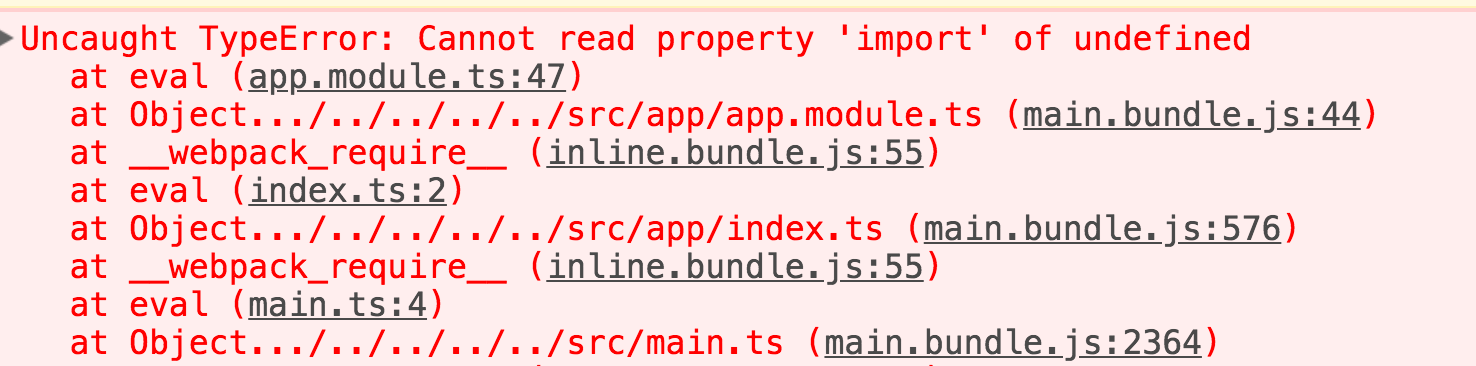
neural22
on 23 Apr 2018
you need to read my comment carefully --> import Quill from 'quill' without types.
and if you are using them, then:
import * as QuillNamespace from 'quill';
let Quill: any = QuillNamespace;
it is important to override the namespace with any type :)
Check out the quilleditorcomponent here in the repo (with typings) or the appcomponent of my demo repo (without typings)
KillerCodeMonkey
on 23 Apr 2018
Ok now I don't receive any error.. but if I try to change the font size it's not working, Normal style continue to be selected.
Trying to debugging.
This is my StyleSize variable, is it normal?

neural22
on 23 Apr 2018
this should be asked in quilljs repo. never tried it.
but my be you need to change the existing sizes like i did with the fonts:
// Add fonts to whitelist
var Font = Quill.import('formats/font');
// We do not add Aref Ruqaa since it is the default
Font.whitelist = ['mirza', 'aref', 'sans-serif', 'monospace', 'serif'];
Quill.register(Font, true);
Hey, I got the same problem as @neural22. I've checked out the https://github.com/KillerCodeMonkey/ngx-quill-example project to see if it works (it does). I then compared the example project with the one I'm working on and it seems that i have finally got it to work. I have added the @types as a dependency (not as dev!) and then used
import * as QuillNamespace from 'quill';
let Quill: any = QuillNamespace;
So I ended up with something like this:
"dependencies": {
   ...
    "@types/quill": "^1.3.3",
    "ngx-quill": "^2.2.0",
    "quill": "^1.3.6",
   ...
},
Using inline style for alignment seems to also be working as expected:
let AlignStyle = Quill.import('attributors/style/align');
Quill.register(AlignStyle, true);
Maybe this helps someone out there ;)
 fortysixcode
on 23 Apr 2018
fortysixcode
on 23 Apr 2018
many thanks @forty6and2 it worked for the alignment, still not working for the font size... probably there's a bug somewhere. At least now I know I'm doing the right thing.
neural22
on 23 Apr 2018
@neural22
I think Port for TypeScript is having some king of Bug! Anyway I was able to find a work around. If you still looking for the solution, Following worked for me -
In Component File, I defined the default Modules (defaultModules) for Toolbar but with replaced 'size' values.
export class AppComponent {

  quillValue;
  emptyArray = [];
  defaultModules = {
    toolbar: [
      ['bold', 'italic', 'underline', 'strike'],
      ['blockquote', 'code-block'],
      [{ 'header': 1 }, { 'header': 2 }],
      [{ 'list': 'ordered'}, { 'list': 'bullet' }],
      [{ 'script': 'sub'}, { 'script': 'super' }],
      [{ 'indent': '-1'}, { 'indent': '+1' }],
      [{ 'direction': 'rtl' }],
      [{ 'size': ['10px', false, '18px', '32px'] }],
      [{ 'header': [1, 2, 3, 4, 5, 6, false] }],
      [{ color: this.emptyArray.slice() },{ background: this.emptyArray.slice() }],
      [{ 'font': [' sans-serif', 'monospace', 'serif']}],
      [{ 'align': '' }],
      ['clean'],
      ['link', 'image', 'video']
    ]
  };
New Values ==>
'size' = ['10px', false, '18px', '32px']
Then in the Constructor while registering new Size Style, add Pixel Values here as well in the whitelist array.
let SizeStyle = quill.import( 'attributors/style/size' );
SizeStyle.whitelist =  ['10px', false, '18px', '32px'];
quill.register( SizeStyle, false );
Now we need to tell quill editor to use our defined modules. In Html File, add [modules] property to quill-editor in the following way -
<quill-editor [(ngModel)]="quillValue" [modules]="defaultModules"></quill-editor>
Almost Done ! Just one last thing. In global style.css file or any component css file ( your wish), add the following -
.ql-picker.ql-size .ql-picker-label[data-value="10px"]::before,
.ql-picker.ql-size .ql-picker-item[data-value="10px"]::before {
    content: 'Small' !important;
}
.ql-picker.ql-size .ql-picker-label[data-value='']::before,
.ql-picker.ql-size .ql-picker-item[data-value='']::before {
    content: 'Normal';
}
.ql-picker.ql-size .ql-picker-label[data-value="18px"]::before,
.ql-snow .ql-picker.ql-size .ql-picker-item[data-value="18px"]::before {
    content: 'Large' !important;
}
.ql-snow .ql-picker.ql-size .ql-picker-label[data-value="32px"]::before,
.ql-snow .ql-picker.ql-size .ql-picker-item[data-value="32px"]::before {
    content: 'Huge' !important;
}
This CSS will Add the Small,Normal,Large,Huge values in the Dropdown of Size Select in the toolbar.
You can check out the working of the same at the following repo -
https://github.com/maniwadhwa26/angular-test-project
 maniwadhwa26
on 10 Jun 2018
maniwadhwa26
on 10 Jun 2018
Related issues
 tonychangcheng
·
29Comments
tonychangcheng
·
29Comments
 Yexan
·
22Comments
Yexan
·
22Comments
 bMil21
·
16Comments
bMil21
·
16Comments
 m41n
·
18Comments
m41n
·
18Comments
 manandkumaar
·
26Comments
manandkumaar
·
26Comments