The input doesn't show the mask, but the console doesn't show any error.
input:
<input type="text" class="form-control col-md-9" mask="00.000.000/0000-99" formControlName="cnpj" name="cnpj">
app.module.ts
import { NgxMaskModule } from 'ngx-mask';
@NgModule({
imports: [
...
NgxMaskModule.forRoot(),
]
})
 RodrigoPauletti
All 10 comments
@RodrigoPauletti Hi could you provide your environment ?
 NepipenkoIgor
on 15 Jun 2018
NepipenkoIgor
on 15 Jun 2018
Shouldn't be the mask "00.000.000/0000-00" or "99.999.999/9999-99"?
Is it possible to mix 0 and 9?
 sandrocsimas
on 28 Jun 2018
sandrocsimas
on 28 Jun 2018
I have got the same error.
Ngx-mast doesn't work. but the console doesn't show any error.
how to solve this?
 master0615
on 28 Jun 2018
master0615
on 28 Jun 2018
@master0615 Hi could you provide your package.json ?
NepipenkoIgor
on 11 Jul 2018
Hi
My package.json is like following.
{
"name": "SportTools",
"version": "1.0.0",
"license": "MIT",
"scripts": {
"ng": "ng",
"start": "ng serve",
"build": "ng build",
"test": "ng test",
"lint": "ng lint",
"e2e": "ng e2e"
},
"private": true,
"dependencies": {
"@angular/animations": "6.0.6",
"@angular/common": "6.0.6",
"@angular/compiler": "6.0.6",
"@angular/core": "6.0.6",
"@angular/forms": "6.0.6",
"@angular/http": "6.0.6",
"@angular/platform-browser": "6.0.6",
"@angular/platform-browser-dynamic": "6.0.6",
"@angular/platform-server": "6.0.6",
"@angular/router": "6.0.6",
"@ng-bootstrap/ng-bootstrap": "^2.1.2",
"@ng-select/ng-select": "^2.3.1",
"ag-grid": "^18.1.0",
"ag-grid-angular": "^18.1.0",
"ag-grid-enterprise": "^18.1.0",
"ajv": "6.2.1",
"ajv-keywords": "3.1.0",
"angularfire2": "^5.0.0-rc.11",
"bootstrap": "4.1.0",
"chart.js": "2.7.2",
"chartist": "0.11.0",
"classlist.js": "1.1.20150312",
"copy-webpack-plugin": "4.3.0",
"core-js": "2.4.1",
"firebase": "^5.2.0",
"font-awesome": "4.7.0",
"hammerjs": "2.0.8",
"jquery": "3.2.1",
"jw-bootstrap-switch-ng2": "1.0.10",
"lodash": "^4.17.10",
"moment": "^2.22.2",
"ng2-charts": "1.6.0",
"ngx-barcode": "^0.2.4",
"ngx-color-picker": "^6.4.0",
"ngx-mask": "^2.9.6",
"ngx-perfect-scrollbar": "^6.2.0",
"ngx-qrcode2": "0.0.9",
"ngx-spinner": "^6.0.0",
"ngx-toastr": "^8.8.0",
"ngx-webcam": "^0.1.6",
"nouislider": "10.0.0",
"popper.js": "1.14.3",
"rellax": "1.4.0",
"rxjs": "^6.2.1",
"rxjs-compat": "6.1.0",
"web-animations-js": "2.3.1",
"zone.js": "^0.8.26"
},
"devDependencies": {
"@angular/cli": "6.0.8",
"@angular/compiler-cli": "6.0.6",
"@angular/language-service": "6.0.6",
"@types/bootstrap": "3.3.32",
"@types/chartist": "0.9.34",
"@types/googlemaps": "3.30.8",
"@types/jasmine": "2.5.38",
"@types/jquery": "1.10.31",
"@types/node": "6.0.73",
"codelyzer": "4.2.1",
"jasmine-core": "3.1.0",
"jasmine-spec-reporter": "4.2.1",
"karma": "2.0.0",
"karma-chrome-launcher": "2.2.0",
"karma-cli": "1.0.1",
"karma-coverage-istanbul-reporter": "1.4.2",
"karma-jasmine": "1.1.1",
"protractor": "5.3.1",
"ts-node": "5.0.1",
"tslint": "5.9.1",
"typescript": "2.7.2",
"@angular-devkit/build-angular": "~0.6.8"
}
}
master0615
on 11 Jul 2018
@RodrigoPauletti @master0615 I have just tested and mask works correct . Maybe you could provide live example or show public repo with this situation? @sandrocsimas Yes is possible.
NepipenkoIgor
on 16 Jul 2018
Do not forget where you want to use it (not in app.module.ts):
@NgModule({
imports: [ NgxMaskModule.forChild() ]
})
 zoli887
on 26 Oct 2018
zoli887
on 26 Oct 2018
zoli887 solved
 dombakargy
on 23 Jan 2019
dombakargy
on 23 Jan 2019
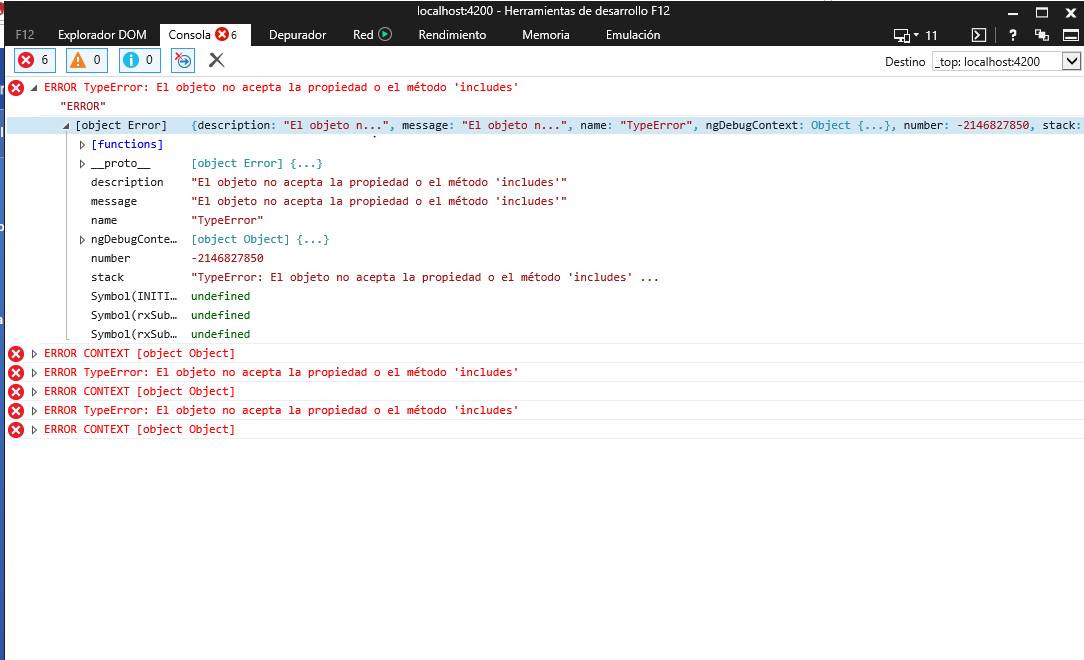
Error in explorer 11
 NestorLopz94
on 29 May 2019
NestorLopz94
on 29 May 2019
@NestorLopz94 Use this import on your polyfill
import 'core-js/es7/array';
And enable another imports for IE
Worked for me! (IE 11)
 thiagocoppi
on 17 Feb 2020
thiagocoppi
on 17 Feb 2020
Related issues
 sbeka
·
3Comments
sbeka
·
3Comments
 humpedli
·
3Comments
humpedli
·
3Comments
 salazarr-js
·
3Comments
salazarr-js
·
3Comments
 Et3rnal
·
4Comments
Et3rnal
·
4Comments
 dimmal
·
3Comments
dimmal
·
3Comments
Most helpful comment
Do not forget where you want to use it (not in app.module.ts):
@NgModule({
imports: [ NgxMaskModule.forChild() ]
})