Ngx-mask: Unable to pass data to input: shows up empty
lets say
sellingPrice = 2.22
data in the input field shows up empty
 naren7229
All 8 comments
Same here. I am using a reactive form and can see a value was patched to the form, but the value does not display in the input field. Validated the data matches the mask.
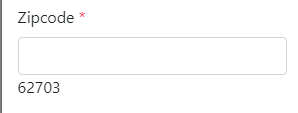

 gotshoo
on 1 Mar 2018
gotshoo
on 1 Mar 2018
I have the same issue in angular reactive forms. The value exist but its not visible due to the mask. Also, the same thing works perfectly fine on another form.
UI:
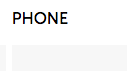
Source:

@gotshoo Zip masking works perfectly fine for me.
 sagarp2901
on 4 Apr 2018
sagarp2901
on 4 Apr 2018
@gotshoo Here's my zip code mask:
sagarp2901
on 4 Apr 2018
@sagarpdev6 Thanks. I'll try changing my mask from '00000' to '99999' and see if that works.
gotshoo
on 4 Apr 2018
I have the same problem
 natan88
on 20 Apr 2018
natan88
on 20 Apr 2018
I did some work on it this week to see if I could figure out the issue. Checking out the Develop branch, it looks like @NepipenkoIgor possibly tried fixing this by adding an async task to pull the maskExpression.
https://github.com/JsDaddy/ngx-mask/commit/f83223332b9a462ce9b4863bf185952a5a8f21c3
The problem is that the maskExpress still comes back as null. I hacked it a little bit and was able to prevent it from deleting the value. It would only show the mask if you modified the value of the input. I don't have any code to include because it's at work right now.
Would love to see this get fixed. I will try to dig in a little more next week.
gotshoo
on 20 Apr 2018
@gotshoo Thanks for the effort to solve the problem.
NOTE: Changing the mask from 0 to 9 does not work.
natan88
on 20 Apr 2018
@gotshoo @natan88 @n7229 Please try latest version
 NepipenkoIgor
on 20 Apr 2018
NepipenkoIgor
on 20 Apr 2018
Related issues
 prosto-artem
·
4Comments
prosto-artem
·
4Comments
 Et3rnal
·
4Comments
Et3rnal
·
4Comments
 tanjuyayak
·
3Comments
tanjuyayak
·
3Comments
 TimWarp
·
4Comments
TimWarp
·
4Comments
 edujjalvarez
·
3Comments
edujjalvarez
·
3Comments
Most helpful comment
@gotshoo @natan88 @n7229 Please try latest version