Ngx-formly: jit_nodeValue_3(...).$any is not a function
FormlyFieldInput.html:2 ERROR TypeError: jit_nodeValue_3(...).$any is not a function
at Object.eval [as handleEvent] (FormlyFieldInput.html:2)
at handleEvent (core.js:13581)
at callWithDebugContext (core.js:15090)
at Object.debugHandleEvent [as handleEvent] (core.js:14677)
at dispatchEvent (core.js:9990)
at eval (core.js:10611)
at HTMLInputElement.eval (platform-browser.js:2628)
at ZoneDelegate.invokeTask (zone.js:425)
at Object.onInvokeTask (core.js:4744)
at ZoneDelegate.invokeTask (zone.js:424)
 smile2014
All 19 comments
Hi, can you please provide a reproduction repo/example.
 aitboudad
on 15 Jan 2018
aitboudad
on 15 Jan 2018
thank you ,The problem has been solved, caused by carelessness
smile2014
on 16 Jan 2018
please let me know what changes you did to resolve the issue.
 Venkat5357
on 18 Jan 2018
Venkat5357
on 18 Jan 2018
Hi @smile2014 , what was the carelessness? How did you fix this issue? I have the exact same error, have updated Angular and Material and I still get that error on the console for every keystroke. My model does not populate.
Everything worked fine until I moved my project to another system and reinstalled packages.
 snoop244
on 4 Feb 2018
snoop244
on 4 Feb 2018
I had the same issue.
Found that I had some mismatched dependencies. Some of my angular components were ~5.0 and some were ~5.2
Upgraded then all to ~5.2 and it works fine now.
 jdbranham
on 11 Feb 2018
jdbranham
on 11 Feb 2018
Hi,
I am getting the same error.
Can anyone help?
Thanks
 Ubaid-ur-Rehman
on 30 Jun 2018
Ubaid-ur-Rehman
on 30 Jun 2018
@aitboudad can you kindly help? Its urgent.
thanks
Ubaid-ur-Rehman
on 30 Jun 2018
@Ubaid-ur-Rehman based on the above comment:
I had the same issue.
Found that I had some mismatched dependencies. Some of my angular components were ~5.0 and some were ~5.2
Upgraded then all to ~5.2 and it works fine now.
just ensure all @ngx-formly packages match the same version and follow supported angular version.
| Angular version | Formly version |
| --------------- | ---------------------- |
| Angular >= 6 | @ngx-formly/[email protected] |
| Angular >= 5 | @ngx-formly/[email protected] |
| Angular >= 4 | @ngx-formly/[email protected] |
| Angular >= 2 | [email protected] |
aitboudad
on 30 Jun 2018
@aitboudad thanks it was resolved.
Although i've another problem.
I am uploading a JSON file and trying to bind it to the model property of the formly form but it's not showing the data in the form.
Can you kindly help me in this?
Thanks
Ubaid-ur-Rehman
on 8 Jul 2018
Check the click function properly, you might give the function name and some variable name same. So, change the function name and weather solve or not.
 sandeep2701kumar
on 19 Jul 2018
sandeep2701kumar
on 19 Jul 2018
@sandeep2701kumar your answer resolve my issue, thanks :)
 krawieeeec
on 1 Aug 2018
krawieeeec
on 1 Aug 2018
@sandeep2701kumar had same name of my function as the template name, thanks 👍
 GeoffMahugu
on 22 Aug 2018
GeoffMahugu
on 22 Aug 2018
or maybe if you are using forms, just check whether the form control name matches in both the html and typescript files
 shanurrahman
on 30 Oct 2018
shanurrahman
on 30 Oct 2018
same with me, your name function same with your variable or model name. Just change one of it, it's work now.
 ashsepra
on 18 Nov 2018
ashsepra
on 18 Nov 2018
@sandeep2701kumar thanks for the fix, even if a portion of the function name matches with a variable name present in the same form, causes this issue. The strange thing is when I tried reverting to the same function name the error is gone :confused:
 vipulDessai
on 21 Nov 2018
vipulDessai
on 21 Nov 2018
@sandeep2701kumar had same name of my function as the template name, thanks 👍
Thanks for your comment. i too made this mistake
 Booshna-Arthy
on 5 Apr 2019
Booshna-Arthy
on 5 Apr 2019
Same happened to me.
My backend uses _login_ field as e-mail, changing declaration name on form page solved the issue.
 renanaribeiro
on 23 Apr 2019
renanaribeiro
on 23 Apr 2019
that was my reason:
        <mat-menu #delete="matMenu">
            <button mat-menu-item *ngFor="let item of items" (click)="delete(param)">{{param.title}}</button>
        </mat-menu>
 dm-grinko
on 25 Jul 2019
dm-grinko
on 25 Jul 2019
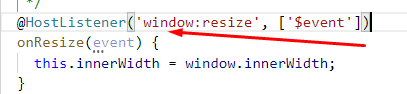
i got this issue here is some image clear my issue and this is how i fixed.


 devxkuldeepchopra
on 6 Sep 2020
devxkuldeepchopra
on 6 Sep 2020
Related issues
 johannesjo
·
17Comments
johannesjo
·
17Comments
 bhaidar
·
24Comments
bhaidar
·
24Comments
 enricooliva
·
16Comments
enricooliva
·
16Comments
 fschell
·
23Comments
fschell
·
23Comments
 danielmhair
·
16Comments
danielmhair
·
16Comments
Most helpful comment
Check the click function properly, you might give the function name and some variable name same. So, change the function name and weather solve or not.