Ngx-datatable: Is it possible to Get Current page Data in ngx data table?
Hi All,
is there a way to get all the visible rows in current page.
say for example i have 10 pages with 10 rows in each page.
on click of a button i need to see all rows visible in the current page
Thanks in advance!
Vivek
 vivek-ealumalai
All 10 comments
Hi, you can get the data on current page by table.bodyComponent.rowIndexes. It will return a map with data on current page.
@ViewChild(DatatableComponent) table: DatatableComponent;
Array.from(this.table.bodyComponent.rowIndexes.keys()) will return the data as array.
Hope it will help you.
 TangTing528
on 26 Jul 2018
TangTing528
on 26 Jul 2018
Yeah it worked thanks
vivek-ealumalai
on 21 Aug 2018
Yes it works Thank you @TangTing528
 dp1127
on 3 Jan 2020
dp1127
on 3 Jan 2020
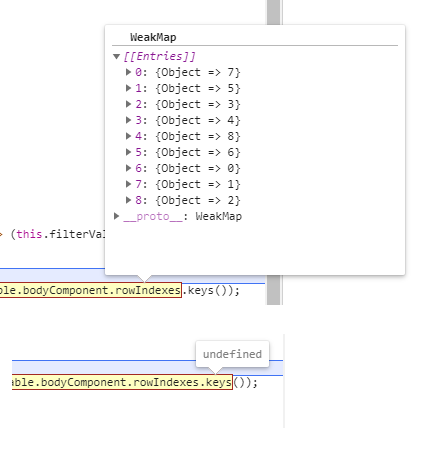
This is not working for me with version 17.0.0. The following code returns a WeakMap:
this.table.bodyComponent.rowIndexes.keys()
And when trying to convert it into an array it throws an exception, any idea how solve this problem?
I need to display the sum of the visible rows of a column, but that code does not seem to work for me.
As you can see in the attached screenshot, it returns a WeakMap and keys() is undefined.
Thanks!
EDIT. 06/01/2020.
Just found out the visible row data is available in array format easy to manipulate at:
this.table.bodyComponent.temp
Cheers.
 LuisMoralesMx
on 29 May 2020
LuisMoralesMx
on 29 May 2020
have any way to get the sorted data from the entire table?
 giovannidias1
on 30 Jun 2020
giovannidias1
on 30 Jun 2020
have any way to get the sorted data from the entire table?
this.table.bodyComponent.rows
TangTing528
on 30 Jun 2020
@TangTing528 my viewChild just return undefined @ViewChild('table') table: DatatableComponent;
      <ngx-datatable
        class="bootstrap"
        [rows]="usersFiltered"
        [headerHeight]="40"
        [footerHeight]="40"
        [limit]="50"
        [columnMode]="ColumnMode.flex"
        rowHeight="auto"
        #table <--- this
      >
            [...]
Could you mock up the component in StackBlitz?
@TangTing528 my viewChild just return undefined
@ViewChild('table') table: DatatableComponent;<ngx-datatable class="bootstrap" [rows]="usersFiltered" [headerHeight]="40" [footerHeight]="40" [limit]="50" [columnMode]="ColumnMode.flex" rowHeight="auto" #table <--- this > [...]
TangTing528
on 30 Jun 2020
Could you mock up the component in StackBlitz?
@TangTing528 my viewChild just return undefined
@ViewChild('table') table: DatatableComponent;<ngx-datatable class="bootstrap" [rows]="usersFiltered" [headerHeight]="40" [footerHeight]="40" [limit]="50" [columnMode]="ColumnMode.flex" rowHeight="auto" #table <--- this > [...]
@TangTing528 here: https://stackblitz.com/edit/angular-ivy-toqxlq
giovannidias1
on 30 Jun 2020
Could you mock up the component in StackBlitz?
@TangTing528 my viewChild just return undefined
@ViewChild('table') table: DatatableComponent;<ngx-datatable class="bootstrap" [rows]="usersFiltered" [headerHeight]="40" [footerHeight]="40" [limit]="50" [columnMode]="ColumnMode.flex" rowHeight="auto" #table <--- this > [...]@TangTing528 here: https://stackblitz.com/edit/angular-ivy-toqxlq
Table was not ready in ngOnInit. Need to wait view ready.
Try:
ngAfterViewInit(): void {
console.log(this.table.bodyComponent.rows);
}
TangTing528
on 30 Jun 2020
Related issues
 ChanBen
·
3Comments
ChanBen
·
3Comments
 DethAriel
·
3Comments
DethAriel
·
3Comments
 ExTheSea
·
3Comments
ExTheSea
·
3Comments
 IngoManthey
·
3Comments
IngoManthey
·
3Comments
 Csirme
·
3Comments
Csirme
·
3Comments
Most helpful comment
Hi, you can get the data on current page by table.bodyComponent.rowIndexes. It will return a map with data on current page.
@ViewChild(DatatableComponent) table: DatatableComponent;
Array.from(this.table.bodyComponent.rowIndexes.keys()) will return the data as array.
Hope it will help you.