Ngx-datatable: TypeError: Cannot read property 'length' of undefined ( allRowsSelected )
I'm submitting a ... (check one with "x")
[X] bug report => search github for a similar issue or PR before submitting
[ ] feature request
[ ] support request => Please do not submit support request here, post on Stackoverflow or Gitter
Current behavior
since version 11.1.x I have the following error in console
DatatableComponent.html:5 ERROR TypeError: Cannot read property 'length' of undefined
    at DatatableComponent.get [as allRowsSelected] (index.js:4867)
    at Object.eval [as updateDirectives] (DatatableComponent.html:18)
    at Object.debugUpdateDirectives [as updateDirectives] (core.js:14339)
    at checkAndUpdateView (core.js:13508)
    at callViewAction (core.js:13858)
    at execEmbeddedViewsAction (core.js:13816)
    at checkAndUpdateView (core.js:13509)
    at callViewAction (core.js:13858)
    at execComponentViewsAction (core.js:13790)
    at checkAndUpdateView (core.js:13514)
It seems to be a new feature, so maybe some issues there ? I haven't changed my code since 11.0.4 which is as follow :
<ngx-datatable
    class="material fullscreen"
    [columnMode]="'force'"
    [rowClass]="getRowClass"
    [headerHeight]="50"
    [footerHeight]="50"
    [rowHeight]="50"
    [externalPaging]="true"
    [externalSorting]="true"
    [loadingIndicator]="loading"
    [limit]="pageSize"
    [offset]="pageOffset"
    [count]="totalCount"
    [rows]="items"
    [columns]="columns"

    [messages]="{emptyMessage: 'DataTable.EmptyMessage' | translate, totalMessage: 'DataTable.Total' | translate, selectedMessage: 'DataTable.SelectedMessage' | translate}"
    (page)="onPageChanged($event)"
    (sort)="onSortChanged($event)"
    (scroll)="onScroll($event.offsetY)"
    (reorder)="onColumnsReordered($event)">

    <!-- Header template -->
    <ng-template #headerTemplate let-column="column" let-sort="sortFn">
        <span class="datatable-header-cell-wrapper"><span class="datatable-header-cell-label draggable text-truncate" (click)="sort()">{{ column.name | translate }}</span></span>
    </ng-template>

    <!-- Cell template -->
    <ng-template #cellTemplate let-column="column" let-value="value">
        <div [innerHTML]="getCellHtml(value, column)"></div>
    </ng-template>

    <!-- Actions template -->
    <ng-template #actionTemplate let-row="row" let-value="value">
        <button mat-icon-button (click)="onDeleteClick(value)" [attr.disabled]="!canDelete" color="warn" matTooltip="{{'CRM.Delete' | translate}}" [matTooltipPosition]="'below'">
            <i class="material-icons">delete</i>
        </button>
        <button mat-icon-button (click)="onEditClick(value)" [attr.disabled]="!canEdit" matTooltip="{{'CRM.Edit' | translate}}" [matTooltipPosition]="'below'">
            <i class="material-icons">create</i>
        </button>
    </ng-template>

</ngx-datatable>
Please tell us about your environment:
win10 pro, vscode, npm, node
Table version: 0.8.x
11.1.2Angular version: 2.0.x
5.0.2Browser:
chrome 62.0.3202.94Language: [all | TypeScript X.X | ES6/7 | ES5]
typescript 2.6.1
 darkurse
All 39 comments
@darkurse use release 11.1.2 I was getting the same error
 202chaz
on 20 Nov 2017
202chaz
on 20 Nov 2017
fixed in latest :)
 amcdnl
on 20 Nov 2017
amcdnl
on 20 Nov 2017
which PR fixes this? i can still reproduce on 11.1.2
 markwaddle
on 21 Nov 2017
markwaddle
on 21 Nov 2017
@markwaddle , ensure you do have the latest version installed with npm list @swimlane/ngx-datatable ?
@202chaz, @amcdnl, thank you :)
darkurse
on 22 Nov 2017
Is anyuone else still getting this?
amcdnl
on 22 Nov 2017
I'm good now. Thanks
darkurse
on 22 Nov 2017
I am definitely running 11.1.2. My issue may be another bug with a similar symptom. I have s in the header cells. When editing text in the inputs it was triggering the select event on the table 3 times in succession, every time I changed the text selection in the box. Once with every item as selected, once with no items, and once with the selected as undefined. The last one was causing errors in the data table code. I realized yesterday that has a select event, and the listeners in datatable aren’t discrete enough to exclude the event coming from the inputs. I added handlers to swallow the select event from the inputs as a workaround for now.
markwaddle
on 22 Nov 2017
GitHub removed the tags from my comment above.
Corrected: I am definitely running 11.1.2. My issue may be another bug with a similar symptom. I have input elements in the header cells. When editing text in the inputs it was triggering the select event on the table 3 times in succession, every time I changed the text selection in an input. Once with every item as selected, once with no items, and once with the selected as undefined. The last one was causing errors in the data table code. I realized yesterday that input has a select event, and the listeners in datatable aren’t discrete enough to exclude the event coming from the inputs. I added handlers to swallow the select event from the inputs as a workaround for now.
markwaddle
on 22 Nov 2017
@amcdnl I can still reproduce this issue in a test if I set rows to undefined.
 BrummbQ
on 27 Nov 2017
BrummbQ
on 27 Nov 2017
@amcdnl Hi Austin. I still get the error with 11.1.4. It works with 11.0.4 though.
 MarcusCalidus
on 28 Nov 2017
MarcusCalidus
on 28 Nov 2017
me too - Version 11.1.4 receiving the same error.
 adskiremote
on 30 Nov 2017
adskiremote
on 30 Nov 2017
11.1.5 still has this issue. Reverted to 11.0.4 and all good there.
 bobsov
on 1 Dec 2017
bobsov
on 1 Dec 2017
Actually I still have issues with the latest versions .. I've reverted back to 11.0.4 for a while too.
darkurse
on 1 Dec 2017
Me too - Version 11.1.4 receiving the same error.
The problem in my case is because an uninitialized object is assigned to the [row] property or it is not an array type.
In my html:
[loadingIndicator] = "loadingIndicator">
.....
In my component.ts:
public customers: any; // <- here's the problem
....
The solution, assign an object of type initialized array:
In my component.ts:
public customers: Array <any> = new Array <any> (); // <- solution
....
The best solution is to initialize the array of the customer type in my case
public customers: Array <customer> = new Array <customer> (); // <- best solution
I hope you seriva for help, I have solved the problem.
 aog1971
on 1 Dec 2017
aog1971
on 1 Dec 2017
@aog1971 Thank you for the hint. That helped a lot.
There is also the same kind of problem when using async input for the rows. If the Observable returns undefined instead of an empty array the exception is thrown.
MarcusCalidus
on 1 Dec 2017
I'm still seeing this issue with 11.1.5. Any update on when a build with this fix will be pushed to NPM?
 brandon-applied
on 8 Dec 2017
brandon-applied
on 8 Dec 2017
Me too having the same error with 11.1.5
 sheldonyss
on 11 Dec 2017
sheldonyss
on 11 Dec 2017
I'm having the same issue with 11.1.5, probably because the rows: Observable
 rubenheymans
on 11 Dec 2017
rubenheymans
on 11 Dec 2017
@amcdnl. I'm having the same issue with 11.1.5
 nauxliu
on 12 Dec 2017
nauxliu
on 12 Dec 2017
Same with 11.1.5 - reverting to 11.0.4 resolved.
 fergalmoran
on 12 Dec 2017
fergalmoran
on 12 Dec 2017
Same with 11.1.5 too - reverting to 11.0.4 also resolved the problem
 MeForThis
on 15 Dec 2017
MeForThis
on 15 Dec 2017
Make sure the array is initialized with empty array, that way, you don't have to go back to 11.0.4.
bobsov
on 15 Dec 2017
@bobsov That won't work for me as I'm consuming an Observable
fergalmoran
on 15 Dec 2017
As aog1971 said initialize your "rows" array in the component constructor, then it works. Generally, we cannot assign undefined array to control.
 adamlepkowski
on 17 Dec 2017
adamlepkowski
on 17 Dec 2017
can you provide a working example please? this.rows = this.usersCollection.valueChanges(); is not working, same error, I'm using firestore
rows: Observable
this.rows = new Observable
rubenheymans
on 17 Dec 2017
Gave it another try this morning. Installed 11.15 again and everything works, without changing one line of code ...
I was also able to narrow it down, how to still reproduce it. If you reference to an array, lower in the source JSON, like [rows]="m_ServerResult?.Suggestions". It will create the error, even with the array created like this: m_ServerResult: Array
Only works when the array is created like this:
m_ServerResult: any = {
"Suggestions": [
{}]
}
MeForThis
on 18 Dec 2017
I can't get rid of this issue
I just followed the getting started page and the very first example keeps showing this error :
TypeError: Cannot read property 'length' of undefined
at DatatableComponent.get [as allRowsSelected] (vendor.bundle.js:sourcemap:17581)
any real solution for this ?
 khalilof
on 21 Dec 2017
khalilof
on 21 Dec 2017
Try 11.1.7 plz
amcdnl
on 22 Dec 2017
it's working, thanks!
rubenheymans
on 23 Dec 2017
Me too now after update its all good. Thank you 😁
On 23 Dec 2017 11:29 pm, "Ruben" notifications@github.com wrote:
it's working, thanks!
—
You are receiving this because you commented.
Reply to this email directly, view it on GitHub
https://github.com/swimlane/ngx-datatable/issues/1141#issuecomment-353735319,
or mute the thread
https://github.com/notifications/unsubscribe-auth/ACU_-63tk2sQNLFeq5YHu-lRpjo9m9lsks5tDSp7gaJpZM4Qknra
.
adskiremote
on 23 Dec 2017
I had the same problem, update to v 11.1.7 the problem was resolved
 hlpupo
on 11 Jan 2018
hlpupo
on 11 Jan 2018
I am using "@swimlane/ngx-datatable": "^11.2.0",
I still see the same error ---- "Cannot read property 'length' of undefined ..."
Any suggestions please?

 infact
on 8 May 2018
infact
on 8 May 2018
tried with "@swimlane/ngx-datatable": "^12.0.0",
still see the same error
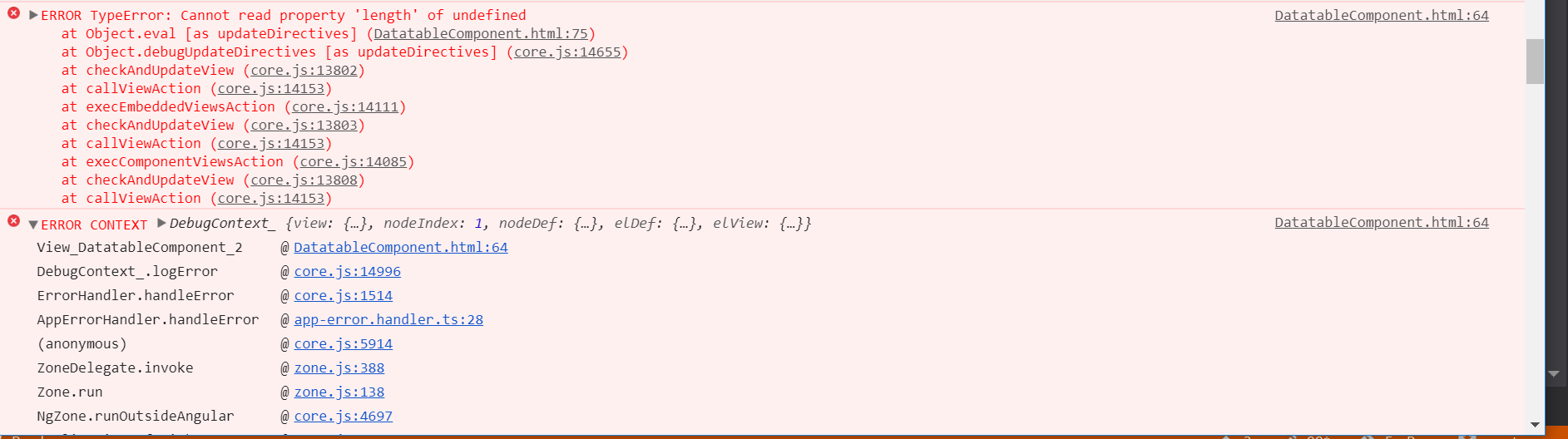
infact
on 8 May 2018
I even tried with version 11.1.7 "@swimlane/ngx-datatable": "^11.1.7", and still see the same error
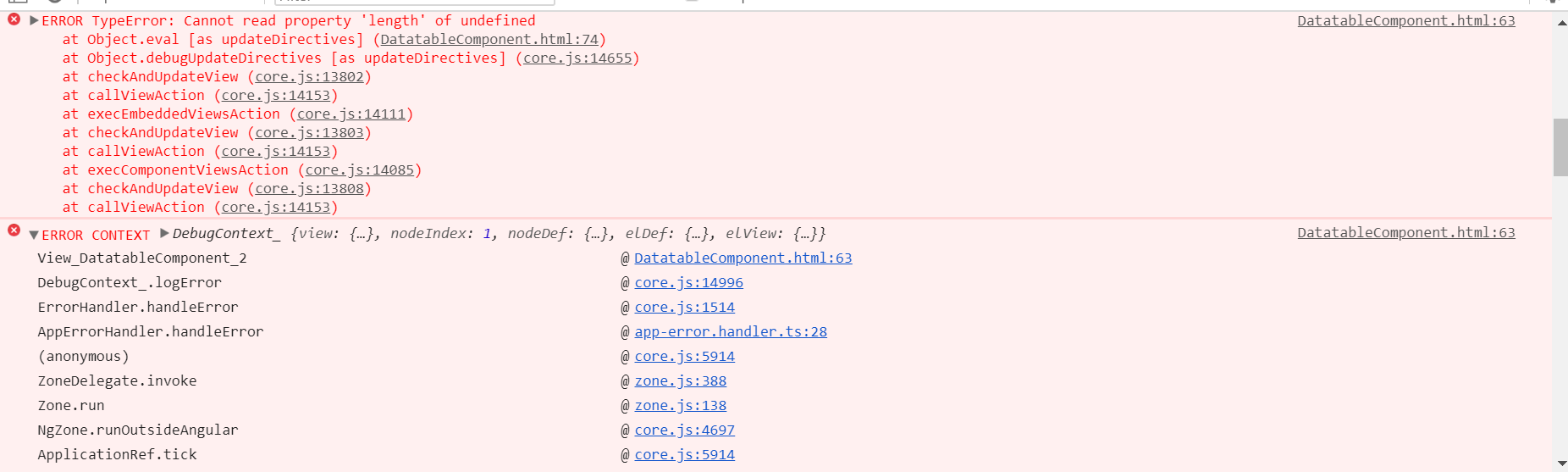
wondering what to try next ?
infact
on 8 May 2018
I'm seeing this error on version 13.1.0, it's triggered when selecting some text in a text field input placed inside a detail row.
DatatableComponent.html:5 ERROR TypeError: Cannot read property 'length' of undefined
    at DatatableComponent.get [as allRowsSelected] (index.js:3246)
    at Object.eval [as updateDirectives] (DatatableComponent.html:19)
    at Object.debugUpdateDirectives [as updateDirectives] (core.js:11054)
    at checkAndUpdateView (core.js:10451)
    at callViewAction (core.js:10692)
    at execEmbeddedViewsAction (core.js:10655)
    at checkAndUpdateView (core.js:10452)
    at callViewAction (core.js:10692)
    at execComponentViewsAction (core.js:10634)
    at checkAndUpdateView (core.js:10457)
@markwaddle it seems I'm facing the same problem, can you please post your workaround here?
edit:
Ok, I've a component with some
    @HostListener('select', ['$event']) handleSelect(event: Event) {
        event.stopPropagation();
    }
 htrex
on 10 Oct 2018
htrex
on 10 Oct 2018
Hi. I was experiencing the length is null issue as well, eventually I realized that I was missing the following :
selected = [];
I was using selected in my HTML, but I did not initialize the selected variable, after I added the initialize it worked, no further length undefined issues, on V14.0.0 of ngxdatatables.
 SuganNaickerf
on 15 Nov 2018
SuganNaickerf
on 15 Nov 2018
initialize the variable that you are trying to send.
it could be one of the values expected by ngx-data table ;
Selected = [];
 RamkiPannerselvam
on 20 Mar 2019
RamkiPannerselvam
on 20 Mar 2019
Experienced this myself. As @RamkiPannerselvam said - make sure you declare your variables with a starting empty array = [].
If you still are can you better describe or show your code how you're constructing your table please.
adskiremote
on 12 Apr 2019
I have found the issue. The issue is I am using rowDetail and select event in the table, so if I try to select the text in row detail. Then select event of row selection gets fired which was making selected undefined.
 sachin5590
on 15 Apr 2019
sachin5590
on 15 Apr 2019
Related issues
 eddy-geek
·
3Comments
eddy-geek
·
3Comments
 TakhirMamirov
·
3Comments
TakhirMamirov
·
3Comments
 jguttman94
·
3Comments
jguttman94
·
3Comments
 paritosh64ce
·
3Comments
paritosh64ce
·
3Comments
 ChanBen
·
3Comments
ChanBen
·
3Comments
Most helpful comment
Me too - Version 11.1.4 receiving the same error.
The problem in my case is because an uninitialized object is assigned to the [row] property or it is not an array type.
In my html:
[loadingIndicator] = "loadingIndicator">
.....
In my component.ts:
public customers: any; // <- here's the problem
....
The solution, assign an object of type initialized array:
In my component.ts:
public customers: Array
<any>= new Array<any>(); // <- solution....
The best solution is to initialize the array of the customer type in my case
public customers: Array
<customer>= new Array<customer>(); // <- best solutionI hope you seriva for help, I have solved the problem.