Ngx-datatable: In ambient enum declarations member initializer must be constant expression
When I import NgxDatatableModule it gives me below list of errors
ERROR in /Users/manishsharma/My Projects/AngularJS/Prateek/magnitudinis/node_modules/@swimlane/ngx-datatable/release/types/column-mode.type.d.ts (2,16): In ambient enum declarations member initializer must be constant expression.
ERROR in /Users/manishsharma/My Projects/AngularJS/Prateek/magnitudinis/node_modules/@swimlane/ngx-datatable/release/types/column-mode.type.d.ts (3,12): In ambient enum declarations member initializer must be constant expression.
ERROR in /Users/manishsharma/My Projects/AngularJS/Prateek/magnitudinis/node_modules/@swimlane/ngx-datatable/release/types/column-mode.type.d.ts (4,13): In ambient enum declarations member initializer must be constant expression.
ERROR in /Users/manishsharma/My Projects/AngularJS/Prateek/magnitudinis/node_modules/@swimlane/ngx-datatable/release/types/sort.type.d.ts (2,14):In ambient enum declarations member initializer must be constant expression.
ERROR in /Users/manishsharma/My Projects/AngularJS/Prateek/magnitudinis/node_modules/@swimlane/ngx-datatable/release/types/sort.type.d.ts (3,13):In ambient enum declarations member initializer must be constant expression.
ERROR in /Users/manishsharma/My Projects/AngularJS/Prateek/magnitudinis/node_modules/@swimlane/ngx-datatable/release/types/sort-direction.type.d.ts (2,11): In ambient enum declarations member initializer must be constant expression.
ERROR in /Users/manishsharma/My Projects/AngularJS/Prateek/magnitudinis/node_modules/@swimlane/ngx-datatable/release/types/sort-direction.type.d.ts (3,12): In ambient enum declarations member initializer must be constant expression.
ERROR in /Users/manishsharma/My Projects/AngularJS/Prateek/magnitudinis/node_modules/@swimlane/ngx-datatable/release/types/selection.type.d.ts (2,14): In ambient enum declarations member initializer must be constant expression.
ERROR in /Users/manishsharma/My Projects/AngularJS/Prateek/magnitudinis/node_modules/@swimlane/ngx-datatable/release/types/selection.type.d.ts (3,13): In ambient enum declarations member initializer must be constant expression.
ERROR in /Users/manishsharma/My Projects/AngularJS/Prateek/magnitudinis/node_modules/@swimlane/ngx-datatable/release/types/selection.type.d.ts (4,18): In ambient enum declarations member initializer must be constant expression.
ERROR in /Users/manishsharma/My Projects/AngularJS/Prateek/magnitudinis/node_modules/@swimlane/ngx-datatable/release/types/selection.type.d.ts (5,12): In ambient enum declarations member initializer must be constant expression.
ERROR in /Users/manishsharma/My Projects/AngularJS/Prateek/magnitudinis/node_modules/@swimlane/ngx-datatable/release/types/selection.type.d.ts (6,16): In ambient enum declarations member initializer must be constant expression.
ERROR in /Users/manishsharma/My Projects/AngularJS/Prateek/magnitudinis/node_modules/@swimlane/ngx-datatable/release/types/click.type.d.ts (2,14): In ambient enum declarations member initializer must be constant expression.
ERROR in /Users/manishsharma/My Projects/AngularJS/Prateek/magnitudinis/node_modules/@swimlane/ngx-datatable/release/types/click.type.d.ts (3,14): In ambient enum declarations member initializer must be constant expression.
ERROR in /Users/manishsharma/My Projects/AngularJS/Prateek/magnitudinis/node_modules/@swimlane/ngx-datatable/release/types/contextmenu.type.d.ts (2,14): In ambient enum declarations member initializer must be constant expression.
ERROR in /Users/manishsharma/My Projects/AngularJS/Prateek/magnitudinis/node_modules/@swimlane/ngx-datatable/release/types/contextmenu.type.d.ts (3,12): In ambient enum declarations member initializer must be constant expression.
 manishsharma1992
All 39 comments
@manishsharma1992 someone got the same issue from another repo.
https://github.com/swimlane/ngx-ui/issues/95
https://github.com/swimlane/ngx-ui/issues/95#issuecomment-317411663
You need typescript 2.4
https://github.com/swimlane/ngx-ui/issues/95#issuecomment-320930688
I installed latest typescript version inside project. Not globally.
npm install typescript@next --save
And it's working now
 wizarrc
on 21 Sep 2017
wizarrc
on 21 Sep 2017
While upgrading to TypeScript 2.4 fixes these errors, it causes the Angular CLI to print out a warning, and according to this comment Angular isn't compatible with TypeScript 2.4 or 2.5 yet.
 cwalcott
on 22 Sep 2017
cwalcott
on 22 Sep 2017
@cwalcott let's see what Angular works with:
https://github.com/angular/angular/blob/master/CHANGELOG.md
5.0.0-beta.7: update angular to support TypeScript 2.4
4.3.4: compiler: cleanly compile with TypeScript 2.4
Are you on at least version 4.3.4? If you are, I think it's safe to ignore that message.
wizarrc
on 22 Sep 2017
@cwalcott Thanks for the link to the comment. I wasn't aware of the edge cases with Angular 4 not working correctly with TypeScript 2.4. If it becomes a problem, I'm sure you can use an older version of the ngx-datatable library or wait till Angular 5 becomes stable.
wizarrc
on 22 Sep 2017
Anyone knows which version that isn't effected with this issue?
 angun33
on 23 Sep 2017
angun33
on 23 Sep 2017
@cwalcott Thanks for the quick response, but the fix didn't help much, instead it gave me below list of errors from angular-cli
Manishs-MacBook-Air% npm install typescript@next --save
[email protected] /Users/manishsharma/My Projects/AngularJS/Prateek/magnitudinis
├─┬ @angular/[email protected]
│ ├─┬ @angular-devkit/[email protected]
│ │ └── [email protected]
│ └── UNMET PEER DEPENDENCY [email protected]
└── UNMET PEER DEPENDENCY [email protected] invalid

npm WARN @angular/[email protected] requires a peer of typescript@^2.0.2 but none was installed.
npm WARN @angular/[email protected] requires a peer of typescript@^2.1.5 but none was installed.
npm WARN @ngtools/[email protected] requires a peer of typescript@^2.0.2 but none was installed.
npm WARN [email protected] requires a peer of typescript@^2.1.0 but none was installed.
npm WARN [email protected] requires a peer of typescript@>=2.1.0 || >=2.1.0-dev || >=2.2.0-dev || >=2.3.0-dev || >=2.4.0-dev but none was installed.
I reverted back to my original typescript version
[email protected] /Users/manishsharma/My Projects/AngularJS/Prateek/magnitudinis
└── [email protected]
It would be great help if, we have any other quick fix for it...
manishsharma1992
on 24 Sep 2017
@angun33 Looks like version >= 10.0.0 only work with Angular 5. If you want to use Angular 4 with no warning from Angular cli, then you must use ngx-datatable 9.3.0 or less.
wizarrc
on 24 Sep 2017
Hi @wizarrc, thanks for the quick response, really appreciated with your help, installing 9.3.0 version helped me...no errors as of now. But after loading the grid the data doesn't appears. Below is the code which I am using to get the data
This is my component file
// import statements

// declaring global variables

@Component({
  selector: 'mg-historic',
  templateUrl: './historic.component.html',
  styleUrls: ['./historic.component.css']
})
export class HistoricComponent implements OnInit {

// list of variables
...

  private tradeGridData = [];
  private tradeGridCols = [];

constructor(// dependency injection for service) {
this.tradeGridCols = [
     { name: 'Symbol' },
     { name: 'Trade' },
     { name: 'Price #1' },
     { name: 'Date #1' },
     { name: 'Price #2'},
     { name: 'Date #2' },
     { name: 'Cash Futures'},
     { name: 'Exchange'}
    ];
}

onSumbit() {
...
// here on based on certain criteria I am bring up my data from database and re-initialising my data variable
 this.hs.fetchHistoricTradeData(values).subscribe(data => {
      this.tradeGridData = data.data
    });
}

}
This is my markup file
<ngx-datatable
        class="material"
        [rows]="tradeGridData"
        [columns]="tradeGridCols"
        [columnMode]="'force'"
        [headerHeight]="50"
        [footerHeight]="50"
        [rowHeight]="'auto'"
        [limit]="10">
      </ngx-datatable>
Below is my data which I am getting as response from server
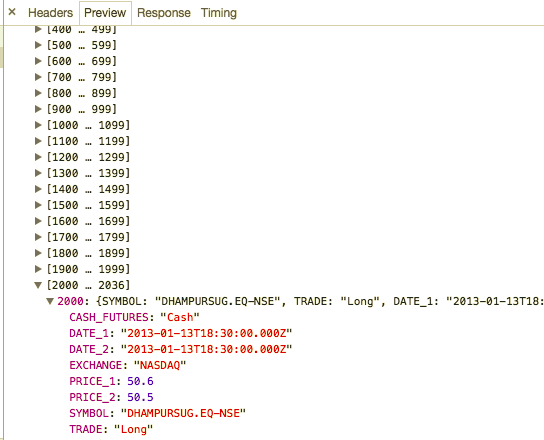
And now my grid looks something like this

I can see that the data is loaded into the grid, but I cant see the rows in it, can you please help what I am doing wrong here
manishsharma1992
on 25 Sep 2017
@manishsharma1992 I'm not sure looking at your code from here. Perhaps if you can make a plunker demo reproducing the issue, I could help.
wizarrc
on 25 Sep 2017
@manishsharma1992 I'm not sure, but this may be the issue:
this.tradeGridCols = [
     { name: 'Symbol' },
     { name: 'Trade' },
     { name: 'Price #1' },
     { name: 'Date #1' },
     { name: 'Price #2'},
     { name: 'Date #2' },
     { name: 'Cash Futures'},
     { name: 'Exchange'}
    ];
}
Try using prop in addition to name in the TableColumn assignments.
wizarrc
on 25 Sep 2017
So what's a resolution here? We can't upgrade Typescript to >=2.4 because Angular 4 doesn't support it. Should we stick to ngx-datatable <=10.0.x?
 dinvlad
on 25 Sep 2017
dinvlad
on 25 Sep 2017
@dinvlad According to the Angular version schedule, Angular 5 should come out in less than a month. I'm currently using Angular 4 and Typescript 2.4 with no issues. I have not personally found any incompatibilities between the two. If you either absolutely can't have a warning in Angular cli and/or are one of the unlucky select few that actually have an issue with Typescript 2.4 and Angular 4, then you have two options:
- Downgrade to ngx-datatable version < 10
- Upgrade to TypeScript 2.4 and Angular 5. Like I said above, Angular 5 will be fully released next month.
FYI, this repo has done this in the past, refer here, when Angular 4 was released and people didn't want to update but wanted to use the latest version of this library. Maybe a separate conversation should be to maintain multiple branches and/or have a beta release so people know it's targeting the latest and greatest versions and not ready for widespread usage just yet.
wizarrc
on 25 Sep 2017
@dinvlad Oh, I forgot one nice open source option, and that is fork the library, and fix it to compile with any version of TypeScript you desire. It shouldn't actually be that hard given that the code hasn't changed that much where it absolutely requires the new features just yet. That way you can get all the new features and have it work with whatever old framework you want. It also teaches you a little bit how open software works. It's just my opinion but I'd recommend that anyways cause working with a nicely wrapped package is boring! 😁
wizarrc
on 25 Sep 2017
@wizarrc, I already contributed here so you're preaching to the converted :) My preference for this issue though is to wait till the newer versions of TS are officially supported, rather than risk incompatibilities (Angular's own issue tracker recommends against using even 2.4, as there are still known unresolved ones).
dinvlad
on 25 Sep 2017
@dinvlad It's probably a good idea for future releases to keep dependencies to what you mentioned, but I don't think it's a big enough issue to try to revert changes. Are you aware of these unresolved issues with 2.4? I haven't seen any examples yet.
wizarrc
on 25 Sep 2017
To quote @IgorMinar 4 days ago (https://github.com/angular/angular/issues/19287#issuecomment-331250655)
Angular v4 is not compatible with Typescript 2.4 or 2.5. It might work in some cases, but we know for sure that there are cases, when using typescript 2.4+ will result in problems and there is no easy way to work around this in Angular v4.
Not sure if it's worth resolving this in Ngx now given that v5 is coming out soon, I would just put a warning for people who want to use the latest version of Ngx that it requires typescript 2.4 at least. Personally, I've rolled back to 10.0.x and will upgrade with v5..
dinvlad
on 25 Sep 2017
@dinvlad Thanks, I've seen that comment myself, also it is noted above. I was referring to actual projects or examples where there is an actual problem in real world code. I do feel that version 10.0.x should state in the changelog that this is targeted for Angular 5+.
wizarrc
on 25 Sep 2017
Yes, not sure myself (it has actually worked just fine), but I don't want to risk putting that into production just yet. Also, it may be possible to put a warning into the NPM package for any incompatible upgrades going forward. I can take a look at that in spare time if you'd like.
dinvlad
on 25 Sep 2017
@dinvlad knowing what you are dealing with is good before any important decisions are made, thus why I said that. Without knowing what the incompatibilities are, I would speculate that it either compiles or it doesn't with your project. If it compiles, then you are not re-compiling the angular project, you are using the minified JavaScript code and just importing and linking to it. I don't even see this as a "I can't go into production because" problem. I see this as a "I can't compile my code against Angular 4 because" problem. Even if you do go into production with Angualr 4/typescript 2.4 and there is an unrelated bug that needs to be fixed that somehow causes this "I can't compile" problem after fixing a bug, there is always an <any> escape hole that seems to work every time.
wizarrc
on 25 Sep 2017
@wizarrc, good point. Right now everything compiles correctly, and if any potential incompatibilities are only associated with that stage, then I agree it should be ok to use as is.
dinvlad
on 25 Sep 2017
So, if i'm reading the comment conversation correctly, this will not be fixed here? I'm having a project where I can only upgrade my TypeScript version as Angular updates it's supported version. I require the use of the new grouping feature, so I'm running into a major problem here as the feature i'm needing it for has to be released in a couple of weeks :(
 MaxMaes
on 26 Sep 2017
MaxMaes
on 26 Sep 2017
Just my $0.02, but I'd expect it to compile regardless of typescript or angular version.
 jasonhjohnson
on 26 Sep 2017
jasonhjohnson
on 26 Sep 2017
@MaxMaes this won't be a problem in a month once Angular 5 is released. You can always clone the repo and see if you can compile with TypeScript < 2.4. If I got some free time this weekend, I can take a look at what breaks by cloning the repo and recompiling the library with Typescript < 2.4 if it's not too much of a change to make it compile, I'll make a PR, and request the change is rolled back in a future release.
wizarrc
on 26 Sep 2017
FWIW, Angular 5 seems to be targeting TS 2.4*, not 2.5. So it may be better not to _require_ upwards of 2.5 at this point, if at all possible to rollback. Otherwise, a lot of people may continue being confused by this issue ;)
dinvlad
on 27 Sep 2017
@dinvlad didn't notice that, good point!
wizarrc
on 27 Sep 2017
So I understand, what's the current process for using ngx-datable with the aurelia-cli?
jasonhjohnson
on 27 Sep 2017
@wizarrc I tried renaming the property value from name to prop as you suggested, but no luck :(
manishsharma1992
on 28 Sep 2017
Any resolutions on this?
jasonhjohnson
on 29 Sep 2017
Hi @wizarrc / @jasonhjohnson / @dinvlad
I update the typescript version and using angular 4, and its working like magic for me...
Below is the tweaks I did
npm install typescript@latest --save-dev
...
├─┬ @angular/[email protected]
│ └── [email protected]
└── [email protected]
└── @swimlane/[email protected]
And I added both name and prop attributes in column configuration, below is the snippet
{ name: 'Symbol', prop: 'SYMBOL' },
{ name: 'Trade', prop: 'TRADE' },
{ name: 'Price #1', prop: 'PRICE_1'},
{ name: 'Date #1', prop: 'DATE_1' },
{ name: 'Price #2', prop: 'PRICE_2'},
{ name: 'Date #2', prop: 'DATE_2' },
{ name: 'Cash Futures', prop: 'CASH_FUTURES' },
{ name: 'Exchange', prop: 'EXCHANGE' }
@manishsharma1992 TypeScript >= 2.4 is needed for the library. As for: { name: 'Symbol', prop: 'SYMBOL' }, the reason why you need prop in addition to name is because without an explicit prop, there must be an actual property equals to symbol and not SYMBOL in this example.
wizarrc
on 30 Sep 2017
@wizarrc agreed
But for me, data I am retrieving is in the form SYMBOL snap shot attached in my previous comment
manishsharma1992
on 30 Sep 2017
@manishsharma1992 Here is the prop documentation for your reference and when you can leave it undefined. Unfortunately it's still case sensitive.
prop: string
The property to bind the row values to. If undefined, it will camelcase the name value.
wizarrc
on 30 Sep 2017
@wizarrc yes you are correct, this part got skipped by me, I again had a look at the documentation and that clicked me on the prop, thanks @wizarrc you were the great help :)
manishsharma1992
on 30 Sep 2017
Hi @manishsharma1992
I'm newbie to Typescript and Angular. Is it really necessary to declare these types as enum?
Instead of waiting for Angular 5 or downgrading ngx-datatable version or using Angular 4 with incompatible version of Typescript, can't we just change the enum declarations of ngx-datatable to combination of namespace and const variables as shown in this stackoverflow comment?
For example: @swimlane/ngx-datatable/release/types/sort.type.d.ts
// export declare enum SortType {
//     single = "single",
//     multi = "multi",
// }
export namespace SortType {
    export const single = "single";
    export const multi = "multi";
}
 halilibrahim
on 4 Oct 2017
halilibrahim
on 4 Oct 2017
Hi @halilibrahim,
I would be not the right guy to comment on that as I am not a contributor to this repo, @wizarrc would be able to help you out with your query.
But yeah, right now in my project I am using Angular ^4.2.4 and my typescript version is ~2.5.3, with this combination I am able to get my desired output what I am expecting and also other third party components are also working fine for me...
manishsharma1992
on 5 Oct 2017
@halilibrahim It might be possible to easily revert TypeScript to prior versions if the enums are reverted to their prior hack as shown in this commit for version 10.1.0.
export enum SortType {
single = 'single' as any,
multi = 'multi' as any
}
wizarrc
on 5 Oct 2017
Hi @wizarrc,
Can you apply the hack to repo? So everybody can use ngx-datatable with compatible Typescript version of Angular 4.
halilibrahim
on 9 Oct 2017
@manishsharma1992 npm install typescript@latest --save-dev
is working. I updated typescript from 2.3.4 to 2.5.3
 onlytopsun
on 9 Oct 2017
onlytopsun
on 9 Oct 2017
I still have this error.
1>....\node_modules\@swimlane\ngx-datatable\release\types\click.type.d.ts(2,14): error TS1066: Build:In ambient enum declarations member initializer must be constant expression.
1>....\node_modules\@swimlane\ngx-datatable\release\types\click.type.d.ts(3,14): error TS1066: Build:In ambient enum declarations member initializer must be constant expression.
1>....\node_modules\@swimlane\ngx-datatable\release\types\column-mode.type.d.ts(2,16): error TS1066: Build:In ambient enum declarations member initializer must be constant expression.
1>....\node_modules\@swimlane\ngx-datatable\release\types\column-mode.type.d.ts(3,12): error TS1066: Build:In ambient enum declarations member initializer must be constant expression.
1>....\node_modules\@swimlane\ngx-datatable\release\types\column-mode.type.d.ts(4,13): error TS1066: Build:In ambient enum declarations member initializer must be constant expression.
1>....\node_modules\@swimlane\ngx-datatable\release\types\contextmenu.type.d.ts(2,14): error TS1066: Build:In ambient enum declarations member initializer must be constant expression.
1>....\node_modules\@swimlane\ngx-datatable\release\types\contextmenu.type.d.ts(3,12): error TS1066: Build:In ambient enum declarations member initializer must be constant expression.
1>....\node_modules\@swimlane\ngx-datatable\release\types\selection.type.d.ts(2,14): error TS1066: Build:In ambient enum declarations member initializer must be constant expression.
1>....\node_modules\@swimlane\ngx-datatable\release\types\selection.type.d.ts(3,13): error TS1066: Build:In ambient enum declarations member initializer must be constant expression.
1>....\node_modules\@swimlane\ngx-datatable\release\types\selection.type.d.ts(4,18): error TS1066: Build:In ambient enum declarations member initializer must be constant expression.
1>....\node_modules\@swimlane\ngx-datatable\release\types\selection.type.d.ts(5,12): error TS1066: Build:In ambient enum declarations member initializer must be constant expression.
1>....\node_modules\@swimlane\ngx-datatable\release\types\selection.type.d.ts(6,16): error TS1066: Build:In ambient enum declarations member initializer must be constant expression.
1>....\node_modules\@swimlane\ngx-datatable\release\types\sort-direction.type.d.ts(2,11): error TS1066: Build:In ambient enum declarations member initializer must be constant expression.
1>....\node_modules\@swimlane\ngx-datatable\release\types\sort-direction.type.d.ts(3,12): error TS1066: Build:In ambient enum declarations member initializer must be constant expression.
1>....\node_modules\@swimlane\ngx-datatable\release\types\sort.type.d.ts(2,14): error TS1066: Build:In ambient enum declarations member initializer must be constant expression.
1>....\node_modules\@swimlane\ngx-datatable\release\types\sort.type.d.ts(3,13): error TS1066: Build:In ambient enum declarations member initializer must be constant expression.
This are the dependencies
"dependencies": {
    "@angular/common": "^5.0.3",
    "@angular/compiler": "^5.0.3",
    "@angular/core": "^5.0.3",
    "@angular/forms": "^5.0.3",
    "@angular/http": "^5.0.3",
    "@angular/platform-browser": "^5.0.3",
    "@angular/platform-browser-dynamic": "^5.0.3",
    "@angular/router": "^5.0.3",
    "@angular/upgrade": "^5.0.3",
    "@swimlane/ngx-datatable": "^11.1.4",
    "bootstrap": "^3.3.7",
    "chart.js": "^2.7.0",
    "chart.piecelabel.js": "^0.9.0",
    "core-js": "^2.5.1",
    "jquery": "^3.2.1",
    "ng2-charts": "^1.6.0",
    "reflect-metadata": "^0.1.10",
    "rxjs": "^5.4.3",
    "systemjs": "^0.20.19",
    "zone.js": "^0.8.17"
  },
  "devDependencies": {
    "concurrently": "^3.5.0",
    "del": "^3.0.0",
    "gulp": "^3.9.1",
    "gulp-watch": "^4.3.11",
    "lite-server": "^2.3.0",
    "typescript": "^2.6.1",
    "typings": "^2.1.1"
  },
 Josvds
on 26 Nov 2017
Josvds
on 26 Nov 2017
Related issues
 rotemx
·
3Comments
rotemx
·
3Comments
 lautarobock
·
3Comments
lautarobock
·
3Comments
 mmrath
·
3Comments
mmrath
·
3Comments
 IngoManthey
·
3Comments
IngoManthey
·
3Comments
 eddy-geek
·
3Comments
eddy-geek
·
3Comments
Most helpful comment
@angun33 Looks like version >= 10.0.0 only work with Angular 5. If you want to use Angular 4 with no warning from Angular cli, then you must use ngx-datatable 9.3.0 or less.