Ngx-datatable: Sorting with custom template - click handler doesn't seem to work
I'm submitting a ... (check one with "x")
[X] bug report => search github for a similar issue or PR before submitting
[ ] feature request
[ ] support request => Please do not submit support request here, post on Stackoverflow or Gitter
Current behavior
Looks a lot like https://github.com/swimlane/ngx-datatable/issues/431
custom column template with server side pagination
on sort function is
(sort)="onPageSorted($event)"
and column is defined as
 <ngx-datatable-column  name="ID" [resizeable]="false" [sortable]="true" [flexGrow]="1">
        <ng-template let-column="column" ngx-datatable-header-template>
        {{column.name}}
        </ng-template>
        <ng-template let-value="value" ngx-datatable-cell-template>
           <strong>{{value}}</strong>
        </ng-template>
    </ngx-datatable-column>
Expected behavior
on click on the column header will trigger the event
Reproduction of the problem
What is the motivation / use case for changing the behavior?
Please tell us about your environment:
- Table version: 0.8.x
9.3.0 - Angular version: 2.0.x
4.1.3 - Browser: [all | Chrome XX | Firefox XX | IE XX | Safari XX | Mobile Chrome XX | Android X.X Web Browser | iOS XX Safari | iOS XX UIWebView | iOS XX WKWebView ]
all - Language: [all | TypeScript X.X | ES6/7 | ES5]
TypeScript 2.3.4
 yonimoses
All 18 comments
True...but if you do this, it will work: https://github.com/swimlane/ngx-datatable/issues/681#issuecomment-297386597
In your case
<ngx-datatable-column  name="ID" [resizeable]="false" [sortable]="true" [flexGrow]="1">
        <ng-template let-column="column" ngx-datatable-header-template let-sort="sortFn">
 <span (click)="sort()">
        {{column.name}}
</span>
        </ng-template>
        <ng-template let-value="value" ngx-datatable-cell-template>
           <strong>{{value}}</strong>
        </ng-template>
    </ngx-datatable-column>
 gyulauszkai
on 20 Jun 2017
gyulauszkai
on 20 Jun 2017
But how do you define the sortFn in ts code? This way, the built-in sorting function runs. I need to call a custom function to call server-side sorting.
 Sleeper9
on 27 Jun 2017
Sleeper9
on 27 Jun 2017
I also did server side sorting. You need to set the function on the ngx-datatable like (sort)="onSort($event)"
To extend the above example from my code it looks like this:
<ngx-datatable
    class="material"
    [messages]="customMessages"
    [rows]="objectsToDisplay"
    [columnMode]="'fixed'"
    [headerHeight]="50"
    [footerHeight]="50"
    [rowHeight]="50"
    [externalPaging]="true"
    [count]="page.totalElements"
    [offset]="page.pageNumber"
    [limit]="page.size"
    (page)='setPage($event)'
    [selectionType]="'checkbox'"
    (select)="onSelect($event)"
    [selected]="selected"
    [loadingIndicator]="isLoading"
    (activate)="onActivate($event)"
    [scrollbarH]="true"
    [externalSorting]="true"
    (sort)="onSort($event)"
    [sorts]="[defaultSort]"
    #myTable
  >
    <ngx-datatable-column
      [width]="30"
      [sortable]="false"
      [canAutoResize]="false"
      [draggable]="false"
      [resizeable]="false"
      [headerCheckboxable]="true"
      [checkboxable]="true">
    </ngx-datatable-column>
    <ngx-datatable-column prop="transactionNumber">
      <ng-template ngx-datatable-header-template>
        Transaction_Number_Header
      </ng-template>
    </ngx-datatable-column>
<ngx-datatable-column prop="orderStatus" [sortable]="true">
      <ng-template ngx-datatable-header-template let-sort="sortFn">
        <span (click)="sort()">
         Order Status Header
        </span>
      </ng-template>
    </ngx-datatable-column>
<ngx-datatable-footer>
      <ng-template
        ngx-datatable-footer-template
        let-rowCount="rowCount"
        let-pageSize="pageSize"
        let-selectedCount="selectedCount"
        let-curPage="curPage"
        let-offset="offset"
      >
        <div style="padding: 5px 10px">
          <div>
            'Total Results': {{rowCount}} |
            'Page Size':
            <select [ngModel]="page.size" (ngModelChange)="onPageSizeChange($event)" class="page-size-combo">
              <option *ngFor="let size of sizeList" [value]="size"> {{size}}</option>
            </select>
            <span [hidden]="selectedCount<=0"> | Selected: {{selectedCount}}</span>
          </div>
        </div>
        <datatable-pager
          [pagerLeftArrowIcon]="'datatable-icon-left'"
          [pagerRightArrowIcon]="'datatable-icon-right'"
          [pagerPreviousIcon]="'datatable-icon-prev'"
          [pagerNextIcon]="'datatable-icon-skip'"
          [page]="curPage"
          [size]="pageSize"
          [count]="rowCount"
          [hidden]="!((rowCount / pageSize) > 1)"
          (change)="myTable.onFooterPage($event)">
        </datatable-pager>
      </ng-template>
    </ngx-datatable-footer>
  </ngx-datatable>
This icludes server side sorting, server side pagination, selection boxes, custom header and column templates with custom footer that allows the user to change the page size.
Hope that it helps you.
gyulauszkai
on 27 Jun 2017
Ah, so I don't need to set the let-sort="sortFn" in the column header template if I want server-side sorting, and the (sort)="onSort($event)" gets called with the appropriate column and ordering on every column header click?
Sleeper9
on 27 Jun 2017
Because I have many columns, I deleted most of them to keep the code small, and by accident also removed the column that does the sorting. I fixed the example. Now you have the first column that will not sort and the second column that will sort properly. Sorry for the confusion.
gyulauszkai
on 27 Jun 2017
Cool, I got the idea now, thanks! :smile:
Sleeper9
on 27 Jun 2017
How do I write my own sort function? I want a column which sorts based on 'date' in an object. The 'onSort($event)' calls an onSort() that I defined in the component but when I manipulate the list based on the 'prop' in the column the table doesn't change.
 MuhammadIrtazaSafi
on 11 Jul 2017
MuhammadIrtazaSafi
on 11 Jul 2017
Have you tried reassigning your data source that you set in the [rows] binding for the table? I've created my custom sorting function as @gyulauszkai described, and everything works well. My sorting function completely replaces all data in the dataset.
Sleeper9
on 12 Jul 2017
I don't see the sort direction indicator, is there a way to get this back when using custom header templates?
 CaffGeek
on 19 Jul 2017
CaffGeek
on 19 Jul 2017
I am also not able to see direction indicator with custom header.
 Pranayku
on 21 Jul 2017
Pranayku
on 21 Jul 2017
I am also experiencing this issue when using a custom header template. It seems as though the sort button is added dynamically which causes the icon to be below the header and under the datatable body.
In my component.html file I have this:
<ng-container *ngFor="let col of cols">
    <ngx-datatable-column [cellClass]="getCellClass" [name]="col.header" [prop]="col.prop" [sortable]="col.sortable" [draggable]="col.draggable" [resizeable]="col.resizable">
    <ng-template let-column="column" let-sort="sortFn" ngx-datatable-header-template>
        <span class="column-header" (click)="sort()">{{col.header}}</span>
        <wf-table-filter (onFilter)="filterColumn($event, column)"></wf-table-filter>
    </ng-template>
</ng-container>
In the browser you can see that the sort icon is added below my template in the datatable-header-cell element:
<div>
  <span class="column-header">ID</span>
  <wf-table-filter _nghost-c4=""><div _ngcontent-c4=""></wf-table-filter>
  <span class="sort-btn"></span>
</div>
which gives this functionality:
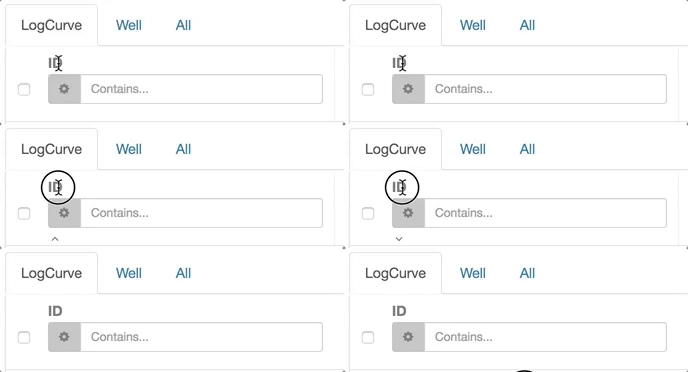
 zachrussell
on 3 Aug 2017
zachrussell
on 3 Aug 2017
Shortly after posting my comment above I was able to find a workaround using let-sortDir="sortDir":
<ng-template let-column="column" let-sort="sortFn" let-sortDir="sortDir" ngx-datatable-header-template>
  <span class="column-header" (click)="sort()">{{col.header}} - {{ sortDir }}</span>
  <wf-table-filter (onFilter)="filterColumn($event, column)"></wf-table-filter>
</ng-template>
Produces:
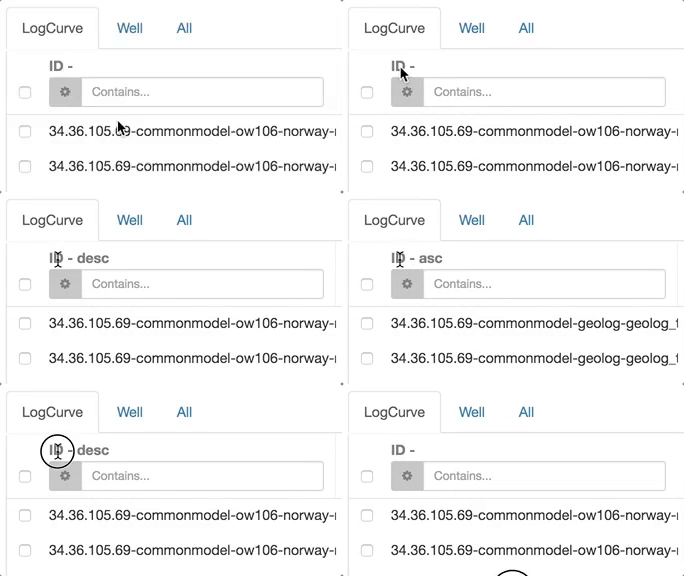
If I wanted icons specifically I could do something like this:
<ng-template let-column="column" let-sort="sortFn" let-sortDir="sortDir" ngx-datatable-header-template>
  <span class="column-header" (click)="sort()">{{col.header}}</span>
  <span class="sort-btn"
    [class.sort-asc]="sortDir === 'asc'"
    [class.datatable-icon-up]="sortDir === 'asc'"
    [class.sort-desc]="sortDir === 'desc'"
    [class.datatable-icon-down]="sortDir === 'desc'"
  ></span>
  <wf-table-filter (onFilter)="filterColumn($event, column)"></wf-table-filter>
</ng-template>
@zachrussell I recently updated ngx datatable and your solution stopped working. I no longer see the sorting icon. Did similar happen to you?
it appears that let-sortDir is undefined now.
 justin1291
on 16 Aug 2017
justin1291
on 16 Aug 2017
I haven't tried with any new version. My sample above was with version 1.8.0. My project recently went a different direction and we are using a different library.
zachrussell
on 16 Aug 2017
Yeah, I noticed let-sortDir is undefined now as well...this is not good :(
CaffGeek
on 18 Sep 2017
Use this
<ng-template let-column="column" let-sort="sortFn" let-sortDir="sortDir" ngx-datatable-header-template>
<span class="mobile-hidden" (click)="sort($event, sortDir, sortFn)">{{column.name}}</span>
</ng-template>
this works now. even if you do not provide the implementation for the sort function.
 kedar700
on 20 Apr 2018
kedar700
on 20 Apr 2018
@kedar700 Thank you your suggestion works for my scenario. Looking through the docs I didn't see any examples of how to setup sorting when using custom templates like this. Or did I miss it?
 emirhosseini
on 28 Sep 2018
emirhosseini
on 28 Sep 2018
@kedar700 i am trying to sort using onSort(event) but I want to call this on ngInit(). Is there any way using which I i call onSort(event) on ngInit() of component.
 ahsanahmad22
on 10 Dec 2018
ahsanahmad22
on 10 Dec 2018
Related issues
 Csirme
·
3Comments
Csirme
·
3Comments
 Matthi0uw
·
3Comments
Matthi0uw
·
3Comments
 alceucardoso
·
3Comments
alceucardoso
·
3Comments
 WA-WilliamKrieg
·
3Comments
WA-WilliamKrieg
·
3Comments
 mmrath
·
3Comments
mmrath
·
3Comments
Most helpful comment
True...but if you do this, it will work: https://github.com/swimlane/ngx-datatable/issues/681#issuecomment-297386597
In your case