Ngx-datatable: Why I can't see the pagination on my grid, what I'm missing
Please help?, Why I can't see the pagination client side, I have this template and the fetch method in my page like the demo example, I can see the loaded grid, but without pagination
template:
    <div>
      <ngx-datatable
        class="material"
        [rows]="rows"
        [columns]="columns">
        [columnMode]="'force'"
        [headerHeight]="50"
        [footerHeight]="50"
        [rowHeight]="'auto'"
        [limit]="10">
      </ngx-datatable>
    </div>
export class CmpGrid {
rows: Array
columns = [
{ name: 'Date & Time' },
{ name: 'Unit' },
{ name: 'Name' },
{ name: 'Tag' },
{ name: 'Expiration' },
{ name: 'Location' }
];
constructor() {
this.fetch( data => {
//I got my array data with other stuff inside data object
this.rows = data.data;
});
}
fetch(cb) {
const req = new XMLHttpRequest();
req.open('GET', '../../assets/data/entries.json');

req.onload = () => {
  cb(JSON.parse(req.response));
};

req.send();
}
///entries.json
{
"message": "Success",
"valid": true,
"data": [{
"unit": "C05",
"expiration": "03/04/2017",
"tag": "",
"dateTime": "03/04/2017 08:35",
"name": "A1 ALUMINUM CHRIS"
}, {
"unit": "D11",
"expiration": "12/31/9999",
"tag": "",
"dateTime": "03/04/2017 08:31",
"name": "3 AMIGOS LAWN"
}, {
"unit": "AA07",
"expiration": "12/31/9999",
"tag": "",
"dateTime": "03/04/2017 08:29",
"name": "AA GOLF"
},.......]
}
 lsaballo
All 20 comments
How many rows do you have total? Client side paging won't display the pager if all of your rows are already visible. So if you have fewer than 10 rows (10 being your page size) it won't appear.
 adammedford
on 29 Mar 2017
adammedford
on 29 Mar 2017
I got more than 7000, I made and example with 69 items but still not working
lsaballo
on 29 Mar 2017
I don't know if this was a typo when you were copying it but it is worth verifying before testing any further.
Are you aware you have a closing bracket after [columns]="columns"?
<div> <ngx-datatable class="material" [rows]="rows" [columns]="columns">[columnMode]="'force'" [headerHeight]="50" [footerHeight]="50" [rowHeight]="'auto'" [limit]="10"> </ngx-datatable> </div>
adammedford
on 29 Mar 2017


lsaballo
on 29 Mar 2017
This example is the same code reading a json file with 69 rows
lsaballo
on 29 Mar 2017
It doesn't look like you have footerHeight set on your grid, not necessarily because you haven't provided it. Just emphasizing that testing should focus on that. I would expect to see ng-reflect-footer-height on the ngx-datatable element like the other inputs if you aren't specifying them programmatically using View/ContentChildren.
adammedford
on 29 Mar 2017
yes thank you adam, the bracket after [columns]="columns" was a mistake, the pagination is showing now, but litle bit diferent I expected like the example

lsaballo
on 29 Mar 2017
You're missing the material theme used in the demo.
@import '/node_modules/@swimlane/ngx-datatable/release/themes/material.css';
Your footer is missing the below style (should appear in the panel on the right)
.ngx-datatable.material .datatable-footer {
border-top: 1px solid rgba(0, 0, 0, 0.12);
font-size: 16px;
}
Perfect adam, are you right , thank you for your help
lsaballo
on 29 Mar 2017
Why I see r , p , q instead icons , there is something missing?


lsaballo
on 29 Mar 2017
Oversight on my part. Sorry.
You also need to import the icon font that the demos use.
@import '/node_modules/@swimlane/ngx-datatable/release/assets/icons.css';
adammedford
on 29 Mar 2017
I did

lsaballo
on 29 Mar 2017
Not sure. If you've imported the font then it isn't loading correctly. Check your console for relevant warnings/errors because that is exactly what the icons appear as when the font is missing. I don't use any of Swimlane's assets in my own work so I have limited experience troubleshooting them.
adammedford
on 29 Mar 2017
No there is no errors in the console

lsaballo
on 29 Mar 2017
Done It's working now. I hope that threat will be helpful to someone, Thanx Adam.
I placed this in app/app.scss
@charset "UTF-8";
@font-face {
font-family: "data-table";
src:url("../../assets/fonts/data-table.eot");
src:url("../../assets/fonts/data-table.eot?#iefix") format("embedded-opentype"),
url("../../assets/fonts/data-table.woff") format("woff"),
url("../../assets/fonts/data-table.ttf") format("truetype"),
url("../../assets/fonts/data-table.svg#data-table") format("svg");
font-weight: normal;
font-style: normal;
}
lsaballo
on 30 Mar 2017
Hi Adams , I finished the test for ngx-data-table , now I moving forward to
ngx-chart, do you are using this lib as well ?
On Wed, Mar 29, 2017 at 4:56 PM, Adam Medford notifications@github.com
wrote:
Not sure. If you've imported the font then it isn't loading correctly.
Check your console for relevant warnings/errors because that is exactly
what the icons appear as when the font is missing. I don't use any of
Swimlane's assets in my own work so I have limited experience
troubleshooting them.—
You are receiving this because you authored the thread.
Reply to this email directly, view it on GitHub
https://github.com/swimlane/ngx-datatable/issues/649#issuecomment-290223161,
or mute the thread
https://github.com/notifications/unsubscribe-auth/AG0wuhqLm6ILEVsfr-xF8DWxzkFHgj5rks5rqsVzgaJpZM4MtPBZ
.
--
Saludos Luis E.
lsaballo
on 30 Mar 2017
Not currently. My project will in the future but it currently has no use for charts.
adammedford
on 30 Mar 2017
Hi @adammedford ,By any chance can we make the footer visible even though the rowCount < pageSize. We have a need to show the footer with disabled footer buttons in this scenario rowCount < pageSize. But ngx-datatable hides the footer completely if this is true rowCount < pageSize. Is there any way to override that ?
 kondareddyyaramala
on 10 Jul 2017
kondareddyyaramala
on 10 Jul 2017
@kondareddyyaramala I don't want you to get the wrong idea, I'm not affiliated with this library.
With that said, I believe the footer is always visible as long as you provide a footer height. The pager is hidden when rowCount < pageSize; I believe the way around this is going to be providing a footerTemplate that includes your own custom pager with the behavior you need.
adammedford
on 25 Jul 2017
Done It's working now. I hope that threat will be helpful to someone, Thanx Adam.
I placed this in app/app.scss@charset "UTF-8";
@font-face {
font-family: "data-table";
src:url("../../assets/fonts/data-table.eot");
src:url("../../assets/fonts/data-table.eot?#iefix") format("embedded-opentype"),
url("../../assets/fonts/data-table.woff") format("woff"),
url("../../assets/fonts/data-table.ttf") format("truetype"),
url("../../assets/fonts/data-table.svg#data-table") format("svg");
font-weight: normal;
font-style: normal;}
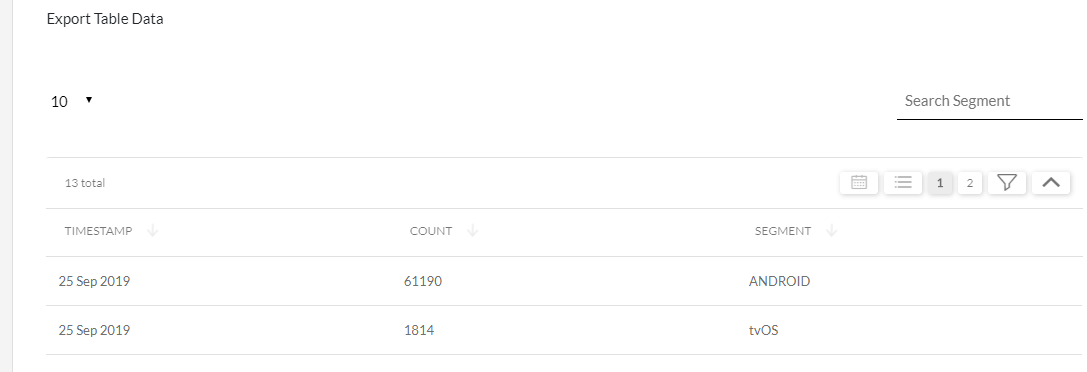
Incorrect icon is Loaded for me how to fix this one?
 NivethaMuthukumar
on 1 Oct 2019
NivethaMuthukumar
on 1 Oct 2019
Related issues
 rotemx
·
3Comments
rotemx
·
3Comments
 iget-esoares
·
3Comments
iget-esoares
·
3Comments
 IngoManthey
·
3Comments
IngoManthey
·
3Comments
 JanStock
·
3Comments
JanStock
·
3Comments
 jguttman94
·
3Comments
jguttman94
·
3Comments
Most helpful comment
It doesn't look like you have footerHeight set on your grid, not necessarily because you haven't provided it. Just emphasizing that testing should focus on that. I would expect to see ng-reflect-footer-height on the ngx-datatable element like the other inputs if you aren't specifying them programmatically using View/ContentChildren.