Ngx-datatable: Document rowHeight 'auto' value of DatatableRowDetailDirective
I'm submitting a ... (check one with "x")
[ ] bug report => search github for a similar issue or PR before submitting
[x] feature request
[ ] support request => Please do not submit support request here
Current behavior
In the documentation, the rowHeight input is specified to be of type number indicating the height of the detail component DatatableRowDetailDirective
Expected behavior
Expected the type to be number | 'auto' with information on the auto height option.
Reproduction of the problem
Set rowHeight to auto and it adjusts to the content height.
<ngx-datatable [rowHeight]="'auto'">
  <ngx-datatable-row-detail [rowHeight]="'auto'">
    <template let-row="row" ngx-datatable-row-detail-template>
      {{row.detail}}
    </template>
  </ngx-datatable-row-detail>
  <ngx-datatable-column name="ColumnName">
    <template let-row="row" ngx-datatable-cell-template>
      {{row.title}}
    </template>
  </ngx-datatable-column>
</ngx-datatable>
What is the motivation / use case for changing the behaviour?
Makes the possibility clear and the library more accessible.
Please tell us about your environment:
- OS: Mac OS X 10.12
- Editor: VS Code 1.9.1
- Package manager: npm
- Table version: 6.1.2
- Angular version: 2.4.7
- Browser: Chrome 56
- Language: TypeScript 2.1.6
 Crevil
All 10 comments
Auto row height is not possible due to the ahead of time calculations for virtualization of dom. Sorry :(
 amcdnl
on 22 Feb 2017
amcdnl
on 22 Feb 2017
@amcdnl What is the purpose of this then???? 😕
 QuentinFchx
on 31 Mar 2017
QuentinFchx
on 31 Mar 2017
Very sad..
Does anyone have a "manual" calculate (even with the DOM itself) for dynamic row details height that we can use for the method on "rowHeight" property?
 eladcandroid
on 12 Dec 2017
eladcandroid
on 12 Dec 2017
@eladcandroid were you able to find a solution? I'm trying to solve this exact problem.
 roberthelmick08
on 20 Mar 2018
roberthelmick08
on 20 Mar 2018
Put this into your scss
:host {
    /deep/ .datatable-row-detail {
        height: 100% !important;
        background-color: red !important;
    }
}
 h6784rfg6
on 21 Mar 2018
h6784rfg6
on 21 Mar 2018
I am not sure if this is still an issue, but we solved it this way:
<ngx-datatable-row-detail [rowHeight]="'100%'">
A little similar to the scss workaround @h6784rfg6 mentioned, but we were trying to avoid /deep/ because it is deprecated and going to be removed.
 Schmaga
on 17 Apr 2018
Schmaga
on 17 Apr 2018
Thanks @h6784rfg6 and @Schmaga
Another solution that worked for me was to emit an event to the parent component which recalculates the rowHeight property, however the user notices a slight delay when the event is emitted, so I will look into implementing one of the above solutions.
roberthelmick08
on 17 Apr 2018
h6784rfg6's and Schmaga's answers are both partially right. there is more you need to do to make responsive height work:
On the button that expands the
Mine looks like this:
<ng-template let-row="row" ngx-datatable-cell-template>
    <a href="javascript:void(0);"
        class="color-black fa"
        [ngClass]="{'fa-minus-square-o':row.$$expanded,
                           'fa-plus-square-o':!row.$$expanded}"
        title="View Details"
        (click)="toggleExpandRow(row,$event)">
     </a>
</ng-template>
If you got lost just notice the (click)="toggleExpandRow(row,$event)"
Then in your component.ts add the following:
toggleExpandRow(row,$event) {
   if(row.$$expanded){
     this.expandRow($event);
   }else{
     this.collapseRow($event);
   }
   this.table.rowDetail.toggleExpandRow(row);
}
And this:
expandRow($event){
 $event.toElement.closest('datatable-row-wrapper').className = "";
}
collapseRow($event){
 $event.toElement.closest('datatable-row-wrapper').className ="expanded";
}
Now
 stas4000
on 2 May 2018
stas4000
on 2 May 2018
Thanks @h6784rfg6 and @Schmaga
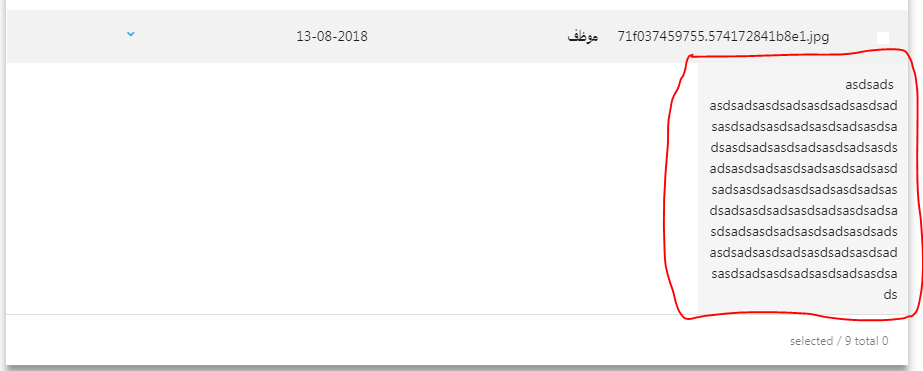
I removed [scrollbarV]="true", the width of this row is inherited from 'datatable-scroller' element, and if overwrite the width of this element, it destroys all the screen.
 mu7amed-abdelfata7
on 13 Aug 2018
mu7amed-abdelfata7
on 13 Aug 2018
I'm submitting a ... (check one with "x")
[ ] bug report => search github for a similar issue or PR before submitting
[x] feature request
[ ] support request => Please do not submit support request here
Current behavior
In the documentation, therowHeightinput is specified to be of typenumberindicating the height of the detail componentDatatableRowDetailDirectiveExpected behavior
Expected the type to benumber | 'auto'with information on the auto height option.Reproduction of the problem
SetrowHeighttoautoand it adjusts to the content height.<ngx-datatable [rowHeight]="'auto'"> <ngx-datatable-row-detail [rowHeight]="'auto'"> <template let-row="row" ngx-datatable-row-detail-template> {{row.detail}} </template> </ngx-datatable-row-detail> <ngx-datatable-column name="ColumnName"> <template let-row="row" ngx-datatable-cell-template> {{row.title}} </template> </ngx-datatable-column> </ngx-datatable>What is the motivation / use case for changing the behaviour?
Makes the possibility clear and the library more accessible.Please tell us about your environment:
- OS: Mac OS X 10.12
- Editor: VS Code 1.9.1
- Package manager: npm
- Table version: 6.1.2
- Angular version: 2.4.7
- Browser: Chrome 56
- Language: TypeScript 2.1.6
This was helpful, thankyou.
 mp-dasglobtech
on 7 Jan 2020
mp-dasglobtech
on 7 Jan 2020
Related issues
 WA-WilliamKrieg
·
3Comments
WA-WilliamKrieg
·
3Comments
 Matthi0uw
·
3Comments
Matthi0uw
·
3Comments
 eddy-geek
·
3Comments
eddy-geek
·
3Comments
 Csirme
·
3Comments
Csirme
·
3Comments
 dinvlad
·
3Comments
dinvlad
·
3Comments
Most helpful comment
I am not sure if this is still an issue, but we solved it this way:
<ngx-datatable-row-detail [rowHeight]="'100%'">A little similar to the scss workaround @h6784rfg6 mentioned, but we were trying to avoid /deep/ because it is deprecated and going to be removed.