Ngx-chips: Custom theme not possible in 1.6.1 (missing .scss file)
PLEASE MAKE SURE THAT:
- you searched similar issues online (9/10 issues in this repo are solved by googling, so please...do it)
- you provide an online demo I can see without having to replicate your environment
- you help me by debugging your issue, and if you can't, do go on filling out this form
I'm submitting a ... (check one with "x")
[X] bug report => search github for a similar issue or PR before submitting
[ ] support request/question

Notice: feature requests will be ignored, submit a PR if you'd like
Current behavior
As the documentation says, in order to make a custom theme we have to import ngx-chips/dist/modules/core/styles/core/_core.scss
In version 1.6.1 this file no longer exists, so trying to import it gives an error.
Expected behavior
To be able to import the .scss file to make a custom theme.
Minimal reproduction of the problem with instructions (if applicable)
Use @import "~node_modules/ngx-chips/dist/modules/core/styles/core/_core.scss";
What do you use to build your app?. Please specify the version
angular-cli 1.6.0
Angular version:
5.1.0
ngx-chips version:
1.6.1
Browser: [all | Chrome XX | Firefox XX | IE XX | Safari XX | Mobile Chrome XX | Android X.X Web Browser | iOS XX Safari | iOS XX UIWebView | iOS XX WKWebView ]
all
 WanderG
All 26 comments
use ~node_modules/ngx-chips/core/styles/core/_core.scss
 Gbuomprisco
on 9 Dec 2017
Gbuomprisco
on 9 Dec 2017
That also doesn't exist.
In node_modules/ngx-chips/core are 4 folders: constants, helpers, pipes and providers
There is no directory called styles
When I do a clean npm project, install ngx-chips 1.6.1, there is not a single .scss file anywhere in node_modules/ngx-chips
WanderG
on 9 Dec 2017
It appears scss files are not being moved with the new build process, stick to the version 1.5.11 while this gets fixed
Gbuomprisco
on 9 Dec 2017
+1
 adrianromanko
on 3 Jan 2018
adrianromanko
on 3 Jan 2018
+1
 jagogordonne
on 10 Jan 2018
jagogordonne
on 10 Jan 2018
+1
 Pavel-Dolinski-Technosoft
on 20 Jan 2018
Pavel-Dolinski-Technosoft
on 20 Jan 2018
Is there any development on this? Would love to update to the latest version. Many thanks.
 superkick
on 29 Jan 2018
superkick
on 29 Jan 2018
Has anyone tried using angular v5?
Gbuomprisco
on 29 Jan 2018
Hi Gbuomprisco,
Yes I've tried it using the following:
Angular CLI: 1.6.6
Node: 6.11.3
OS: darwin x64
Angular: 5.2.2
... animations, common, compiler, compiler-cli, core, forms
... http, language-service, platform-browser
... platform-browser-dynamic, platform-server, router
angular/cli: 1.6.6
angular-devkit/build-optimizer: 0.0.42
angular-devkit/core: 0.0.25
angular-devkit/schematics: 0.0.46
ngtools/json-schema: 1.1.0
ngtools/webpack: 1.9.6
schematics/angular: 0.1.17
schematics/schematics: 0.0.13
typescript: 2.6.2
webpack: 3.10.0
And I have the same error as above - there are no SASS files available.
We are currently using ngx-chips 1.5.11 without any issue.
superkick
on 30 Jan 2018
+1
 vitkoczi
on 31 Jan 2018
vitkoczi
on 31 Jan 2018
Something interesting is happening on version 1.5.11,
Custom theme only works in development mode, when using ng serve.
When build for production, the custom theme is ignored.
I really don't know what is happening, does someone have a clue?
 guidosreis
on 2 Feb 2018
guidosreis
on 2 Feb 2018
I can confirm that in 1.5.11 on standard prod builds ngx-chips doesn't pull in the custom css for us. However, ngx-chips works in prod builds with AOT turned off:
ng build --prod --aot false
superkick
on 2 Feb 2018
Can anyone try the latest version?
Gbuomprisco
on 3 Feb 2018
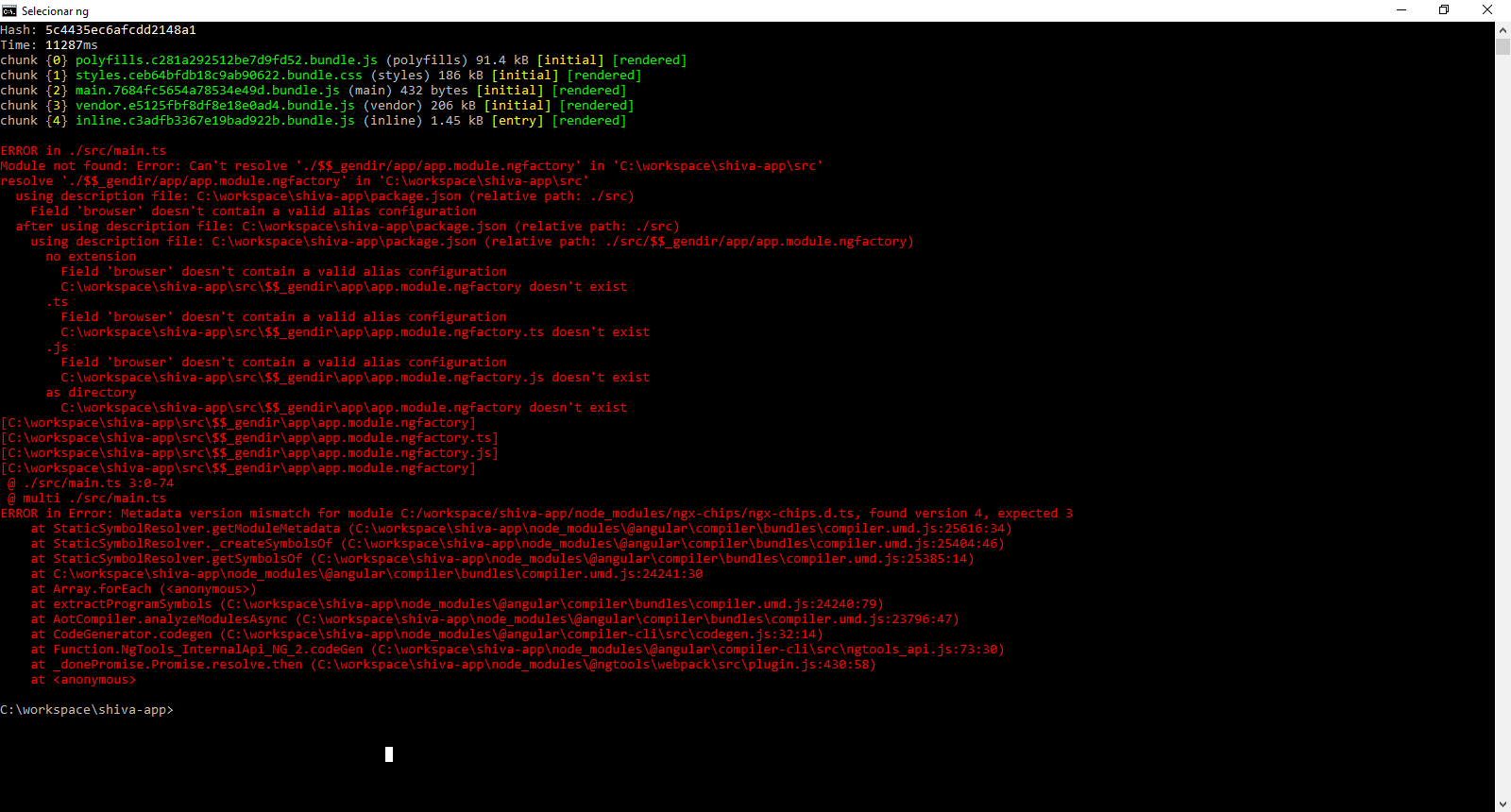
@Gbuomprisco , I tried, but it doesn't work when building to production, even with AOT turned off.
I took a printscreen of console window.
guidosreis
on 3 Feb 2018
Hey @Gbuomprisco, can confirm that 1.6.3-rc.3 is working for us.
The location of the core stylesheet has moved so needed updating in our SASS code:
Old:
@import "~ngx-chips/dist/modules/core/styles/core/_core.scss";
New:
@import "~ngx-chips/core/styles/core/_core.scss";
Also compiled correct usingng build --prod --aot false
Thanks very much
superkick
on 6 Feb 2018
@superkick , did you succefully do a production build?
guidosreis
on 6 Feb 2018
@guidosreis i would try deleting your node modules ngx chips folder and reinstalling
Gbuomprisco
on 6 Feb 2018
@guidosreis , successfully had a prod build using the following:
ng build --prod --aot false
ng v:
Angular CLI: 1.6.0
Node: 6.11.3
OS: darwin x64
Angular: 5.2.3
... animations, common, compiler, compiler-cli, core, forms
... http, language-service, platform-browser
... platform-browser-dynamic, platform-server, router
angular/cli: 1.6.0
angular-devkit/build-optimizer: 0.0.42
angular-devkit/core: 0.0.22
angular-devkit/schematics: 0.0.42
ngtools/json-schema: 1.1.0
ngtools/webpack: 1.9.0
schematics/angular: 0.1.17
schematics/schematics: 0.0.11
typescript: 2.4.2
webpack: 3.10.0
superkick
on 6 Feb 2018
Have you disabled AOT?
Gbuomprisco
on 6 Feb 2018
@Gbuomprisco , at the moment our very large project (many developers) doesn't compile with AOT so am compiling without AOT support.
superkick
on 6 Feb 2018
That might be why you are able and he's not maybe
Gbuomprisco
on 6 Feb 2018
But I've tried run the production build command setting AOT to false.
I'll try to delete my node_modules folder and then install all dependencies again.
guidosreis
on 6 Feb 2018
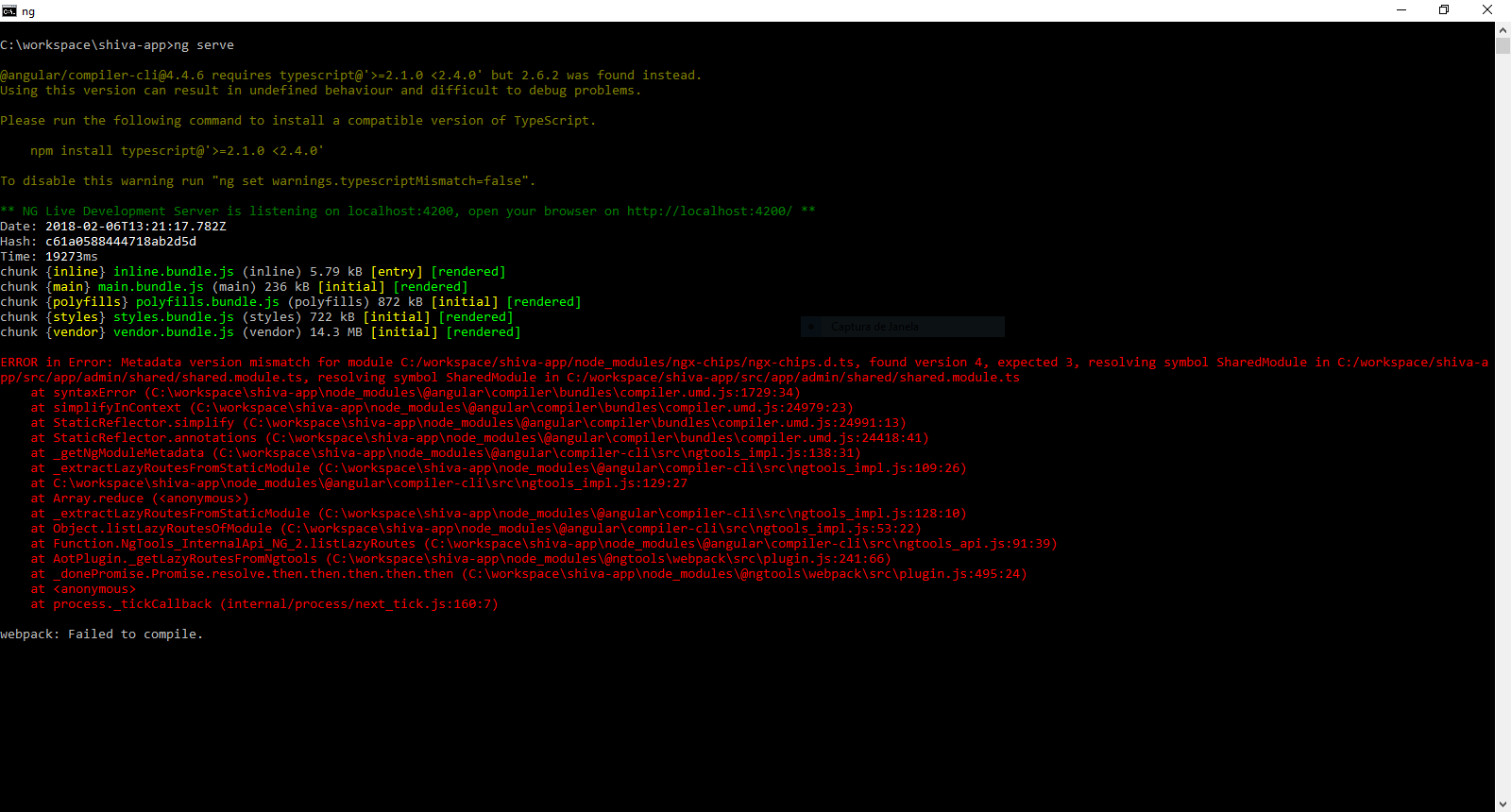
Now, ng serve command isn't working too.
Angular CLI: 1.6.5
Node: 9.4.0
OS: win32 x64
Angular: 4.4.6
... animations, common, compiler, compiler-cli, core, forms
... http, language-service, platform-browser
... platform-browser-dynamic, platform-server, router
angular/cli: 1.6.6
angular-devkit/build-optimizer: 0.0.42
angular-devkit/core: 0.0.29
angular-devkit/schematics: 0.0.52
ngtools/json-schema: 1.1.0
ngtools/webpack: 1.9.6
schematics/angular: 0.1.17
typescript: 2.6.2
webpack: 3.10.0
guidosreis
on 6 Feb 2018
I'm updating angular cli globally and locally to check if it works.
What is the best way to update any project angular dependencies version to 5+?
guidosreis
on 6 Feb 2018
1.6.3-rc.3 works with @import "~ngx-chips/core/styles/core/_core.scss" on AOT builds
 PsyGik
on 16 Feb 2018
PsyGik
on 16 Feb 2018
With [email protected] and both [email protected] + [email protected] and I was able to load the custom themes like before:
@import '~ng2-tag-input/dist/modules/components/styles/core/core';
 mebibou
on 2 Mar 2018
mebibou
on 2 Mar 2018
Related issues
 HDaghash
·
4Comments
HDaghash
·
4Comments
 Ignasimg
·
4Comments
Ignasimg
·
4Comments
 anikets43
·
4Comments
anikets43
·
4Comments
 jfknoepfli
·
3Comments
jfknoepfli
·
3Comments
 admix
·
5Comments
admix
·
5Comments
Most helpful comment
It appears scss files are not being moved with the new build process, stick to the version 1.5.11 while this gets fixed