Ngx-chips: Dropdown menu appears behind bootstrap 4 modal
I'm submitting a ...
[x ] bug report
Current behavior
I am using Bootstrap 4. My use case is putting a tag-input (with a tag-input-dropdown) within a bootsrap modal window.
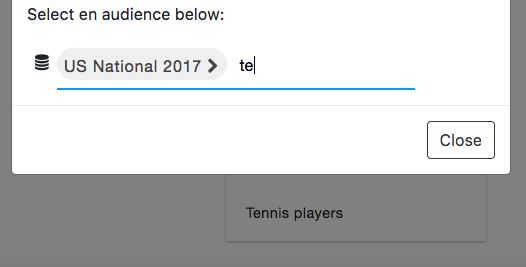
Since the DropdownMenu z-index is set as 100 and the bootstrap's modal z-index is set to more than 1000, the dropdown menu actually appears behing the modal (see screenshot below)
Expected behavior
The dropdownmenu should appear in front of the modal.
I am new to angular, but I guess there are two ways to solve this:
1) Simply set the z-index to a much higher value (2000?)
2) Allow to configure the dropdown menu z-index if needed (I believe not everyone wants to add a tag-input into a modal)
Minimal reproduction of the problem with instructions (if applicable)
Put a tag-input containing a dropdown menu withing a bootstrap 4 modal
What do you use to build your app?. Please specify the version
Webback
Angular version:
Angular 5
ngx-chips version:
Latest (1.5.10)
Browser:
I am using chrome 62, but I guess this affects all browsers...
 vincentpazeller
All 6 comments
im having the same issue,
 thilankascentic
on 27 Nov 2017
thilankascentic
on 27 Nov 2017
I fixed it in styles.scss file added
ng2-dropdown-menu {
    z-index: 9999!important;
    .ng2-dropdown-menu {
        z-index: 9999!important;
        ng2-menu-item {
            z-index: 9999!important;
        }
    }
}
 molot1989
on 2 Dec 2017
molot1989
on 2 Dec 2017
Im not sure if im the only one facing this but... when applying those styles, something seems to be missing and when clicking outside of the boundaries of the dropdown, the control doesnt seem to close.
 juanc5ibanez
on 27 Feb 2018
juanc5ibanez
on 27 Feb 2018
Has anyone found a fix for this issue? Z-index settings make no difference at all. I'm using ngx-bootstrap angular-universal ssr. I even tried setting the style on the element manually, no joy...
Edit: I was having webpack issues. I can confirm adding a high z-index to .ng2-dropdown-menu in my root style, done the trick.
 CybrZr00
on 14 Mar 2018
CybrZr00
on 14 Mar 2018
Check out the option [zIndex] in version 1.7.5
 Gbuomprisco
on 3 Apr 2018
Gbuomprisco
on 3 Apr 2018
@Gbuomprisco thanks it fixed
[zIndex]="99999"
 macpatel
on 30 Jun 2018
macpatel
on 30 Jun 2018
Related issues
 Shinzah
·
3Comments
Shinzah
·
3Comments
 anikets43
·
4Comments
anikets43
·
4Comments
 matthewerwin
·
5Comments
matthewerwin
·
5Comments
 jfknoepfli
·
3Comments
jfknoepfli
·
3Comments
 MrBra1nwash
·
4Comments
MrBra1nwash
·
4Comments
Most helpful comment
Check out the option [zIndex] in version 1.7.5