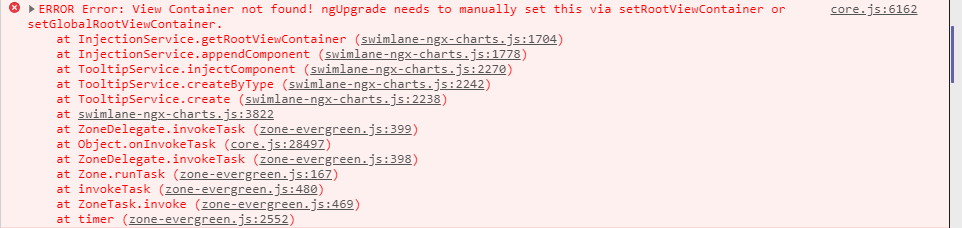
Ngx-charts: Error: View Container not found! ngUpgrade needs to manually set this via setRootViewContainer or setGlobalRootViewContainer.
Describe the bug
If have an angular 9 app running with ngUpgrade in usage. Since the upgrade from angular 8.2.14 to 9.1.2 and ngx-charts 12.0.1 to 14.0.0 the error
Error: View Container not found! ngUpgrade needs to manually set this via setRootViewContainer or setGlobalRootViewContainer.
is thrown, when hovering over a line chart.
Expected behavior
The chart shall not throw an exception.
Screenshots

ngx-charts version
14.0.0
Additional context
If this is not a bug a description of how to fix this would be really helpful.
 Franziskus1988
All 9 comments
Having same error on a Angular 9.1.3 app, but not using ngUpgrade.
But the app is exported and used as a Web Component.
 tamsrud
on 11 May 2020
tamsrud
on 11 May 2020
I have the same issue as above when exporting as a web component
 SeanCarlinST
on 26 May 2020
SeanCarlinST
on 26 May 2020
i'm also trying to export an application to web component and i get the same error, have you been able to find a solution?
 jcaroyanez
on 5 Jun 2020
jcaroyanez
on 5 Jun 2020
Any solution to this issue ? I have same issue when exporting as web component
 naveenpatilST
on 26 Jun 2020
naveenpatilST
on 26 Jun 2020
Hi, after spending a little time on it, I've got a solution.
1/ inject TooltipService in your component
import {TooltipService} from '@swimlane/ngx-charts';
2/ In component's constructor add :
private chartToolTipService : TooltipService,
private viewContainerRef: ViewContainerRef
3/ set the ViewContainerRef in ngOnInit. You can use the ViewContainerRef of your component, but It's better to use your root ViewContainerRef because of superpositions errors. In my case (ngUpgrade) It's a little more complicated :
this.chartToolTipService.injectionService.setRootViewContainer(this.parentContainer||this.coreServicesProvider.mainViewService.mainViewContainer||this.viewContainerRef);
And it works.
 medi6
on 15 Jul 2020
medi6
on 15 Jul 2020
Thanks @medi6 , this removes the error indeed. Working with a base component, it was enough to only pass the viewContainerRef.
import { TooltipService } from '@swimlane/ngx-charts';

export class BaseComponent implements OnChanges, OnInit {
...
  private chartToolTipService : TooltipService;
  readonly viewContainerRef: ViewContainerRef;

  constructor(
    private injectorObj: Injector,
  ) {
    this.chartToolTipService = this.injectorObj.get(TooltipService);
    this.viewContainerRef = this.injectorObj.get(ViewContainerRef);
  }

  ngOnInit(): void {
    this.chartToolTipService.injectionService.setRootViewContainer(this.viewContainerRef);
    ...
  }

  ...
}

export class MyChartComponent extends BaseComponent {
  constructor(
    public injector: Injector,
  ) {
    super(injector);
  }
}
 mvandenbrink
on 16 Jul 2020
mvandenbrink
on 16 Jul 2020
Why was this issue closed @Franziskus1988? Was the issue fixed?
 ChristianKohler
on 20 Oct 2020
ChristianKohler
on 20 Oct 2020
I still have this issue. Would appreciate a thorough fix.
 sechel
on 29 Dec 2020
sechel
on 29 Dec 2020
I'm still facing the issue.
 abijithjohn
on 20 May 2021
abijithjohn
on 20 May 2021
Related issues
 merinshaji
·
3Comments
merinshaji
·
3Comments
 NashIlli
·
3Comments
NashIlli
·
3Comments
 ronybarbosa
·
3Comments
ronybarbosa
·
3Comments
 lokeshdaiya
·
3Comments
lokeshdaiya
·
3Comments
 tobigit
·
4Comments
tobigit
·
4Comments
Most helpful comment
Thanks @medi6 , this removes the error indeed. Working with a base component, it was enough to only pass the viewContainerRef.