Ngx-charts: Persistent hover gradient in line chart
I'm submitting a ... (check one with "x")
- [ ] bug report - search github for a similar issue or PR before submitting
- [ ] feature request
- [x] support request - use StackOverflow (add the
ngx-chartstag) or the gitter chat for support questions
Current behavior
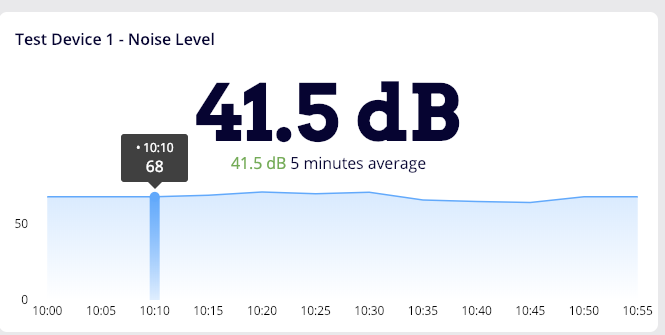
On highlighting a point in the graph, a nice gradient background is added to the series. Is there a way to make it persistent?
Please tell us about your environment:
Mac OSX 10.14.2
ngx-charts version:
10.0.0Angular version: x.x.x
7.2.2Browser: [all | Chrome XX | Firefox XX | IE XX | Safari XX | Mobile Chrome XX | Android X.X Web Browser | iOS XX Safari | iOS XX UIWebView | iOS XX WKWebView ]
, Chrome 71.0.3578.98Language: [all | TypeScript X.X | ES6/7 | ES5]
Typescript
 pablosproject
All 2 comments
On your scss/css file, place this code:
.ngx-charts .line-highlight {
    display: block;
}
I highly recommend placing the chart inside a _.chart-container_ class to increase the selector specificity to override the default display: none property.
Cheers!
 KingDarBoja
on 10 Apr 2019
KingDarBoja
on 10 Apr 2019
Had to use !important to get it taken into account:
.ngx-charts .line-highlight {
    display: block !important;
}
 qortex
on 23 Jul 2019
qortex
on 23 Jul 2019
Related issues
 kakalos12
·
4Comments
kakalos12
·
4Comments
 lokeshdaiya
·
3Comments
lokeshdaiya
·
3Comments
 DZDomi
·
4Comments
DZDomi
·
4Comments
 achimha
·
3Comments
achimha
·
3Comments
 faisalnet5
·
3Comments
faisalnet5
·
3Comments
Most helpful comment
On your scss/css file, place this code:
I highly recommend placing the chart inside a _.chart-container_ class to increase the selector specificity to override the default
display: noneproperty.Cheers!