Ngx-charts: bindWindowResizeEvent not a function error
I'm submitting a ... (check one with "x")
- [x] bug report - search github for a similar issue or PR before submitting
- [ ] feature request
- [ ] support request - use StackOverflow (add the
ngx-chartstag) or the gitter chat for support questions
I'm using line charts and it throws the following error in the console. The chart works fine but is unable to resize and also flows out of the container even when I have left [view] undefined.
ERROR TypeError: Object(...) is not a function
at LineChartComponent../src/common/base-chart.component.ts.BaseChartComponent.bindWindowResizeEvent (index.js:7818)
at LineChartComponent../src/common/base-chart.component.ts.BaseChartComponent.ngAfterViewInit (index.js:7730)
at callProviderLifecycles (core.js:12748)
at callElementProvidersLifecycles (core.js:12715)
at callLifecycleHooksChildrenFirst (core.js:12698)
at checkAndUpdateView (core.js:13853)
at callViewAction (core.js:14195)
at execComponentViewsAction (core.js:14127)
at checkAndUpdateView (core.js:13850)
at callViewAction (core.js:14195)
Please tell us about your environment:
Ubuntu 17.10
- ngx-charts version: x.x.x
Latest - Angular version: x.x.x
5.2.10 - Browser: [all | Chrome XX | Firefox XX | IE XX | Safari XX | Mobile Chrome XX | Android X.X Web Browser | iOS XX Safari | iOS XX UIWebView | iOS XX WKWebView ]
Chrome - Language: [all | TypeScript X.X | ES6/7 | ES5]
TS
 ubarsaiyan
All 5 comments
have same problem
creat new empty project and install:
- npm install @swimlane/ngx-charts --save
- npm install d3 --save
into app.module:
import { NgxChartsModule } from '@swimlane/ngx-charts/release/index.js';

  imports: [
    BrowserModule,
    BrowserAnimationsModule,
    NgxChartsModule
  ],
and add chart like this:
<ngx-charts-pie-chart [view]="[500, 300]" [results]="data">
</ngx-charts-pie-chart>
what I'm doing wrong?
"@angular/animations": "^5.2.0",
"@angular/platform-browser-dynamic": "^5.2.0",
"@swimlane/ngx-charts": "^8.0.0",
"@angular/cli": "~1.7.3",

 alexbrtsv
on 14 May 2018
alexbrtsv
on 14 May 2018
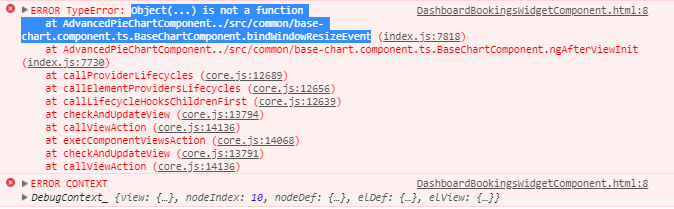
Got the same issue
 dulanjaya13
on 15 May 2018
dulanjaya13
on 15 May 2018
I think it's a problem with version 8.0.0.
In version 7.3.0 It works just fine, without any errors.
 AlexanderKozhevin
on 15 May 2018
AlexanderKozhevin
on 15 May 2018
Upgrading to Angular 6 solved the issue. Follow the steps here to upgrade from v5 to v6 https://stackoverflow.com/a/49474334
And as far as chart not resizing according to the container, make sure that the container is in the same component and has some height and width.
ubarsaiyan
on 15 May 2018
Please use ngx-charts 7 with angular 5. ngx-charts 8.0.0 is only compatible with angular 6+.
 marjan-georgiev
on 15 May 2018
marjan-georgiev
on 15 May 2018
Related issues
 amcdnl
·
4Comments
amcdnl
·
4Comments
 ronybarbosa
·
3Comments
ronybarbosa
·
3Comments
 tobigit
·
4Comments
tobigit
·
4Comments
 workfel
·
3Comments
workfel
·
3Comments
 edyrkaj
·
3Comments
edyrkaj
·
3Comments
Most helpful comment
I think it's a problem with version 8.0.0.
In version 7.3.0 It works just fine, without any errors.