Ngx-charts: Word-cut off in Horizontal Bar Chart Y-Axis
I'm submitting a ...
- [x] bug report
- [ ] feature request
- [x] support request
Current behavior
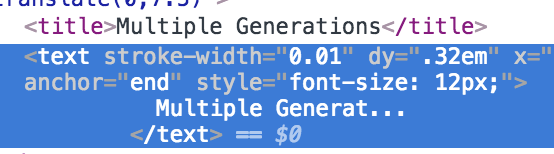
I am using ngx-charts on a project and it's amazing! My client however does have some really long dynamic titles that need to be shown in the y-axis of the charts, and these titles can get cut off. I've tried to style the y-axis, but I've also determined that the text elements it's generating has the '...' ellipses, so the titles are being trimmed; it's not overflow.

Expected behavior
Is there a way to adjust this so the y-axis could be wider? My bars are really long and don't need to be so long, I could sacrifice some bar width to make the y-axis wider. If I manage to do that, what about the stripped text? Is there a way I can control the logic for stripping the text?
Reproduction of the problem
Make a horizontal bar chart and feed it with names that are long (max: 96 chars in my case)
What is the motivation / use case for changing the behavior?
More flexibility in styling charts.
Please tell us about your environment:
MacOS, VSCode, npm, angular-cli
ngx-charts version: 7.3.0
Angular version: 5.2.0
Browser: all
Language: TS
Thanks! this is a wonderful library!
 kriscoleman
All 9 comments
I did some diving in the source and found some good news about the y-axis width, but not so much the y-axis text trimming. I think I have a solution though!
This is on the bar-horizontal.component and might help with the y-axis width:
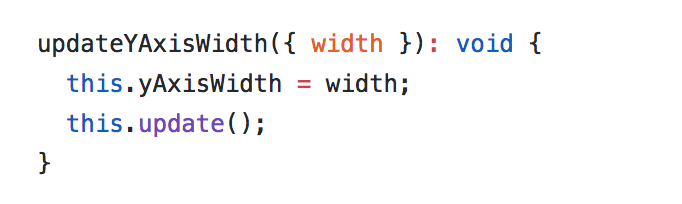
As for the text trimming, it looks like there isn't a way (that I see currently) to change the behavior of the text trimming up at declaration.
I traced it down to the y-axis-ticks.component. When generating the y-axis labels, it uses the full tick text for the title (which is shown on hover) but only a trimmed tick for the text block. When it calls the trim-helper to trim the label, it doesn't pass in a max value and instead uses the default of 16 chars:
https://github.com/swimlane/ngx-charts/blob/master/src/common/axes/y-axis-ticks.component.ts
https://github.com/swimlane/ngx-charts/blob/master/src/common/trim-label.helper.ts
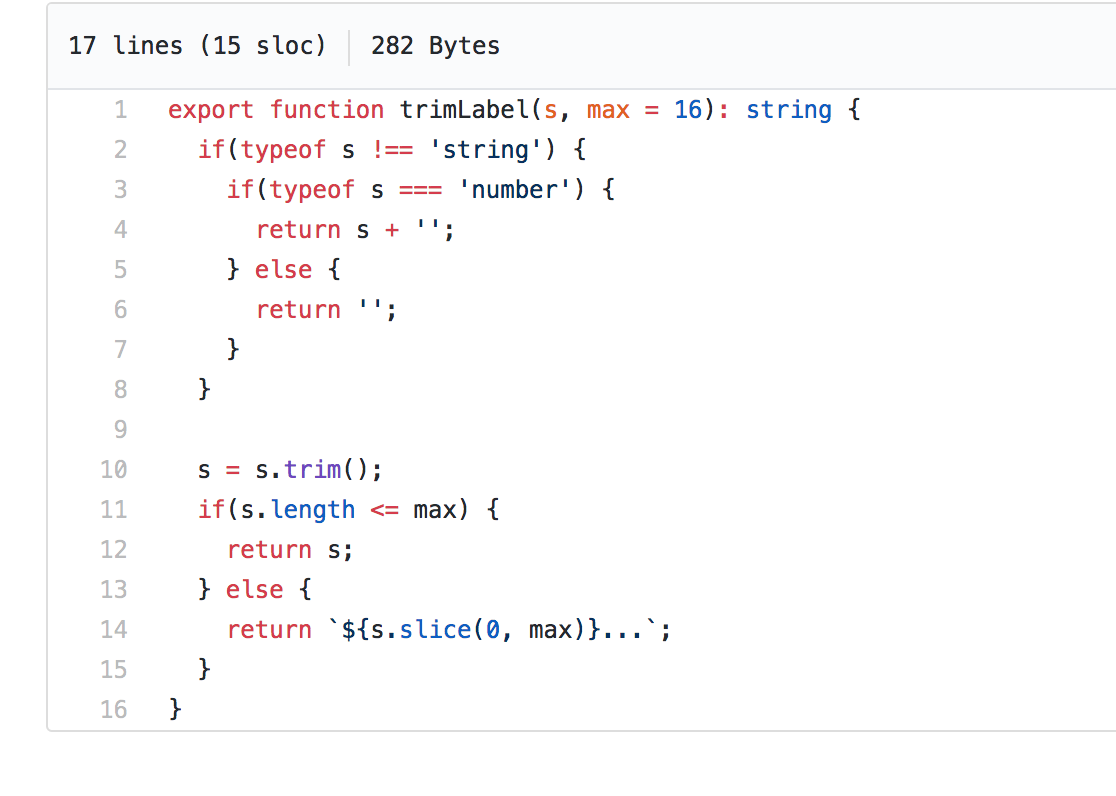
The max-length param in the trim-helper might be leveraged if we could introduce a maxTickLength input to the y-axis-tick.component. Then expose that up into the charts that use y-axis.component to wire it all up (the time consuming part). Expose it as y-label-max-length attribute in the charts or something. Could maybe have that behave with a default of 16 too. Then if no max is defined, it'll default to trim-helper's 16, else we can increase it as needed.
Am I missing something innocuous, or do you think this is the right track? If so, I might be able to contribute on this if necessary. Thanks!
kriscoleman
on 26 Apr 2018
Any interest in fixing this?
I can volunteer to take a stab at it myself even, I just don't want to spend the time on a PR if I don't know it'll be reviewed/completed. I'd also like to speak with the team to make sure the approach I take jives with the way the team likes to do things.
Let me know! Thanks
kriscoleman
on 30 Apr 2018
@marjan-georgiev Heya, any interest in this?
kriscoleman
on 31 May 2018
Hi @kriscoleman, yes, we can solve this by adding two inputs to all of the charts that use the y-axis component:
maxYAxisTickLength: number = 16;
trimYAxisTicks: boolean = true;
The rest of the implementation is what you suggested - pass those down to the y-axis-ticks component and add the length as an option to the trimLabel function in ticks.helper.ts.
If you're willing to create a PR for this, I'd be happy to review and accept it.
 marjan-georgiev
on 31 May 2018
marjan-georgiev
on 31 May 2018
@marjan-georgiev thanks for the response and feedback!
I'd be happy to contribute. I'll get a pr ready as soon as I find time. Thanks!
kriscoleman
on 31 May 2018
Hi @kriscoleman, I was in need of the same feature, so I went ahead and created a PR for this. Hope you hadn't started on it. :)
 clapis
on 7 Jun 2018
clapis
on 7 Jun 2018
I admittedly got too busy and needed it again today, so went to start it, and saw this!
Thanks! Hope that PR is complete soon! I might just have to install your branch's version in the meantime.
kriscoleman
on 20 Oct 2018
Hi, I'm suffering the same problem. I'd appreciate that the PR is accepted asap. Thanks
 diego-fustes
on 5 Dec 2018
diego-fustes
on 5 Dec 2018
Merged the PR, will be in the next release. Thanks all!
marjan-georgiev
on 29 Jan 2019
Related issues
 merinshaji
·
3Comments
merinshaji
·
3Comments
 stephanrauh
·
4Comments
stephanrauh
·
4Comments
 tobigit
·
4Comments
tobigit
·
4Comments
 kakalos12
·
4Comments
kakalos12
·
4Comments
 edyrkaj
·
3Comments
edyrkaj
·
3Comments
Most helpful comment
Hi @kriscoleman, I was in need of the same feature, so I went ahead and created a PR for this. Hope you hadn't started on it. :)
https://github.com/swimlane/ngx-charts/pull/870