Ngx-charts: font / label text color is being ignored
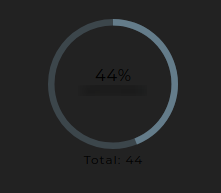
Unable to change font color, no matter what colorscheme i use.
For several different chart types, i am unable to change the font color of labels and the likes.
I have read through the existing issues but i have not been able to find a solution.
Using a dark theme on the surrounding html/css, and having chart types ignore any attempts to change font color makes it hard to work with. Any tips would be greatly appreciated.

 null4bl3
All 10 comments
This piece of scss seems to have solved the issue for me.
::ng-deep .ngx-charts {
  text {
    fill: #fff !important;
   }
}
I would however recommend that any and all elements of the charts should be customizable. Having a chart like the Pie Grid Chart without any options to modify a simple thing like font color without a css hack could cause some issues. I consider this issue closed in the sense that i have fixed the problem in my case, but the overall problem of not being able to set the font color in the Pie Grid Charts still remains as an open issue. I do however acknowledge the fact that there are more important and vital issues to address before this one, and i will end with a thank you for releasing and maintaining this awesome and well written charts library.
null4bl3
on 26 Feb 2018
thanks, problem solving the best
 rizkyhello
on 5 Mar 2019
rizkyhello
on 5 Mar 2019
Hi there!
Sure. ::ng-deep currently works. But ::ng-deep is deprecated and best practice would be not to use it.
Is there any way to programmatically change the text color (and other styles)?
Thanks for the answer and keep up the good work!
 burner-account
on 24 Mar 2019
burner-account
on 24 Mar 2019
This issue is still present. I cannot change the color of the text for the x or y axis as it just stays black.... my background is black.... so the above statement does not change the font color as expected
 bwssytems
on 4 Apr 2019
bwssytems
on 4 Apr 2019
@null4bl3 your ng deep works good for text in general on all the charts -- but it seems to have no effect on the legend label text.
I've also added an opacity: 1!important; there to be 100% sure its not just the color, but on that scss snippet you're literally targeting everything inside .ngx-charts itself so it should technically work.
 sebastiangug
on 7 May 2019
sebastiangug
on 7 May 2019
For what it's worth, I got around this issue by adding this to my .scss file.
.ngx-charts, text {
fill: #e0e0e0;
}
I, for one, would love to see this function like material theming, as specified here.
 Sharealikelicence
on 12 Jun 2019
Sharealikelicence
on 12 Jun 2019
I solved it using the way used in the official website. You can also change the color code in sccss variables and things will work as you need. In you application SCSS file for styles, add the following styles:
.dark {
/**
* Backgrounds
*/
$color-bg-darkest: #13141b;
$color-bg-darker: #1b1e27;
$color-bg-dark: #232837;
$color-bg-med: #2f3646;
$color-bg-light: #455066;
$color-bg-lighter: #5b6882;
/**
* Text
*/
$color-text-dark: #72809b;
$color-text-med-dark: #919db5;
$color-text-med: #A0AABE;
$color-text-med-light: #d9dce1;
$color-text-light: #f0f1f6;
$color-text-lighter: #fff;
background: $color-bg-darker;
.ngx-charts {
text {
fill: $color-text-med;
}
.tooltip-anchor {
fill: rgb(255, 255, 255);
}
.gridline-path {
stroke: $color-bg-med;
}
.refline-path {
stroke: $color-bg-light;
}
.reference-area {
fill: #fff;
}
.grid-panel {
&.odd {
rect {
fill: rgba(255, 255, 255, 0.05);
}
}
}
.force-directed-graph {
.edge {
stroke: $color-bg-light;
}
}
.number-card {
p {
color: $color-text-light;
}
}
.gauge {
.background-arc {
path {
fill: $color-bg-med;
}
}
.gauge-tick {
path {
stroke: $color-text-med;
}
text {
fill: $color-text-med;
}
}
}
.linear-gauge {
.background-bar {
path {
fill: $color-bg-med;
}
}
.units {
fill: $color-text-dark;
}
}
.timeline {
.brush-background {
fill: rgba(255, 255, 255, 0.05);
}
.brush {
.selection {
fill: rgba(255, 255, 255, 0.1);
stroke: #aaa;
}
}
}
.polar-chart .polar-chart-background {
fill: rgb(30, 34, 46);
}
}
.chart-legend {
.legend-labels {
background: rgba(255, 255, 255, 0.05) !important;
}
.legend-item {
&:hover {
color: #fff;
}
}
.legend-label {
&:hover {
color: #fff !important;
}
.active {
.legend-label-text {
color: #fff !important;
}
}
}
.scale-legend-label {
color: $color-text-med;
}
}
.advanced-pie-legend {
color: $color-text-med;
.legend-item {
&:hover {
color: #fff !important;
}
}
}
.number-card .number-card-label {
font-size: 0.8em;
color: $color-text-med;
}
}
Once this has been added make sure you have this scss file linked in your angular.json file. After that you just have to add class dark in the first wrapping component of your ngx chart like this for example:
<div class="areachart-wrapper dark">
<ngx-charts-area-chart
[view]="view"
[scheme]="colorScheme"
[results]="data"
[gradient]="gradient"
[xAxis]="showXAxis"
[yAxis]="showYAxis"
[legend]="showLegend"
[showXAxisLabel]="showXAxisLabel"
[showYAxisLabel]="showYAxisLabel"
[xAxisLabel]="xAxisLabel"
[yAxisLabel]="yAxisLabel"
[autoScale]="autoScale"
[curve]="curve"
(select)="onSelect($event)">
</ngx-charts-area-chart>
</div>
This will make your charts look exactly as shown on the official website with dark theme for the charts: https://swimlane.github.io/ngx-charts/#/ngx-charts/bar-vertical

 tofiqquadri
on 27 Aug 2019
tofiqquadri
on 27 Aug 2019
Easy Fix
ngx-charts-bar-vertical {
text {
fill: #fff !important;
}
}
 LiranRouzentur
on 30 Apr 2020
LiranRouzentur
on 30 Apr 2020
None of this workarounds follows Theming Angular Material Guides or the Material Design spec.
 blogcraft
on 2 Jun 2020
blogcraft
on 2 Jun 2020
A more in spec way: (this is still a work around, a fix still must be done to ngx-charts)
@media (prefers-color-scheme: dark) {
.app-auto-dark-theme {
@include angular-material-theme($app-dark-theme);
.ngx-charts {
text {
fill: mat-color(map-get($app-dark-theme, foreground), text) !important;
}
}
}
}
And a large example (supports theme change and @media (prefers-color-scheme))
App-variables.scss
@import '~@angular/material/theming';
$md-primary: (
50 : #e4e4e4,
100 : #bcbcbc,
200 : #909090,
300 : #646464,
400 : #424242,
500 : #212121,
600 : #1d1d1d,
700 : #181818,
800 : #141414,
900 : #0b0b0b,
A100 : #bfbfbf,
A200 : #7a7a7a,
A400 : #414141,
A700 : #202020,
contrast: (
50 : #000000,
100 : #000000,
200 : #000000,
300 : #ffffff,
400 : #ffffff,
500 : #ffffff,
600 : #ffffff,
700 : #ffffff,
800 : #ffffff,
900 : #ffffff,
A100 : #000000,
A200 : #000000,
A400 : #ffffff,
A700 : #ffffff,
)
);
$app-theme-primary: mat-palette($md-primary, A700, 300, 900);
$app-theme-accent: mat-palette($mat-orange, A700);
$app-theme-warn: mat-palette($mat-red);
$foreground: map-get($app-theme-primary, foreground);
$primary: mat-color($app-theme-primary);
$accent: mat-color($app-theme-accent);
$warn: mat-color($app-theme-warn);
app-theme.scss
@import '~@angular/material/theming';
@include mat-core();
@import '~src/app-variables';
// create theme (use mat-dark-theme for themes with dark backgrounds)
$app-light-theme: mat-light-theme( $app-theme-primary, $app-theme-accent, $app-theme-warn);
// create theme (use mat-dark-theme for themes with dark backgrounds)
$app-dark-theme: mat-dark-theme( $app-theme-primary, $app-theme-accent, $app-theme-warn);
::-webkit-scrollbar {
width: 4px;
height: 4px;
}
@mixin color($primary) {
color: $primary !important;
}
@mixin background-color($primary){
background-color: $primary !important;
}
@mixin border-left($primary){
border-left: 7px solid $primary !important;
}
// specify theme class eg: <body class="my-theme"> ... </body>
.app-light-theme {
@include angular-material-theme($app-light-theme);
.ngx-charts {
text {
fill: mat-color(map-get($app-light-theme, foreground), text) !important;
}
}
::-webkit-scrollbar-thumb {
background: rgba(0, 0, 0, 0.3);
border-radius: 2px;
}
::-webkit-scrollbar-thumb:hover {
background: rgba(0, 0, 0, 0.5);
}
$primary: mat-color($app-theme-primary);
.active {
@include color($accent);
}
.warn {
@include color($warn);
}
.accent {
@include color($accent);
}
.fondo{
@include background-color($primary);
}
.mat-card-title{
@include border-left($accent);
}
}
.app-dark-theme {
@include angular-material-theme($app-dark-theme);
.ngx-charts {
text {
fill: mat-color(map-get($app-dark-theme, foreground), text) !important;
}
}
::-webkit-scrollbar-thumb {
background: rgba(255, 255, 255, 0.3);
border-radius: 2px;
}
::-webkit-scrollbar-thumb:hover {
background: rgba(255, 255, 255, 0.5);
}
$primary: mat-color($app-theme-primary);
.active {
@include color($accent);
}
.warn {
@include color($warn);
}
.accent {
@include color($accent);
}
.fondo{
@include background-color($primary);
}
.mat-card-title{
@include border-left($accent);
}
}
@media (prefers-color-scheme: light) {
.app-auto-light-theme {
@include angular-material-theme($app-light-theme);
.ngx-charts {
text {
fill: mat-color(map-get($app-light-theme, foreground), text) !important;
}
}
::-webkit-scrollbar-thumb {
background: rgba(0, 0, 0, 0.3);
border-radius: 2px;
}
::-webkit-scrollbar-thumb:hover {
background: rgba(0, 0, 0, 0.5);
}
$primary: mat-color($app-theme-primary);
.active {
@include color($accent);
}
.warn {
@include color($warn);
}
.accent {
@include color($accent);
}
.fondo {
@include background-color($primary);
}
.mat-card-title {
@include border-left($accent);
}
.img-logo {
content: url(assets/img/logo-normal.svg);
}
}
}
@media (prefers-color-scheme: dark) {
.app-auto-dark-theme {
@include angular-material-theme($app-dark-theme);
.ngx-charts {
text {
fill: mat-color(map-get($app-dark-theme, foreground), text) !important;
}
}
::-webkit-scrollbar-thumb {
background: rgba(255, 255, 255, 0.3);
border-radius: 2px;
}
::-webkit-scrollbar-thumb:hover {
background: rgba(255, 255, 255, 0.5);
}
$primary: mat-color($app-theme-primary);
.active {
@include color($accent);
}
.warn {
@include color($warn);
}
.accent {
@include color($accent);
}
.fondo {
@include background-color($primary);
}
.mat-card-title {
@include border-left($accent);
}
.img-logo {
content: url(assets/img/logo-negativo.svg);
}
}
}
styles.scss
@import '~src/app-theme';
* {
font-family: 'Roboto', sans-serif !important;
}
Related issues
 faisalnet5
·
3Comments
faisalnet5
·
3Comments
 kakalos12
·
4Comments
kakalos12
·
4Comments
 emeric0101
·
3Comments
emeric0101
·
3Comments
 achimha
·
3Comments
achimha
·
3Comments
 amcdnl
·
4Comments
amcdnl
·
4Comments
Most helpful comment
This piece of scss seems to have solved the issue for me.
::ng-deep .ngx-charts {
  text {
    fill: #fff !important;
   }
}
I would however recommend that any and all elements of the charts should be customizable. Having a chart like the Pie Grid Chart without any options to modify a simple thing like font color without a css hack could cause some issues. I consider this issue closed in the sense that i have fixed the problem in my case, but the overall problem of not being able to set the font color in the Pie Grid Charts still remains as an open issue. I do however acknowledge the fact that there are more important and vital issues to address before this one, and i will end with a thank you for releasing and maintaining this awesome and well written charts library.