Ngx-charts: How to make width responsive (100%)
view Option doesn't accept pourcentages. I need to calculate the width manually to define view parameter. Any cleaner solutions ?
 chaouiy
All 15 comments
If you remove the view parameter then the chart resizes to fit it's parent container.
So you can add a div around the chart with a width and height of 100%, and the chart will resize to fit it.
 marjan-georgiev
on 27 Oct 2017
marjan-georgiev
on 27 Oct 2017
Closing this. Please let me know if you still have other questions.
marjan-georgiev
on 1 Nov 2017
This doesn't work for me. The chart only becomes full width when I resize the window. Initially it remains at 600px width, even though I don't have the view parameter passed to it.
 imolorhe
on 19 May 2018
imolorhe
on 19 May 2018
Same here (version 7.3.0) on init it is 600x400.. until I resize the window, it wont adjust
 Rezi
on 21 May 2018
Rezi
on 21 May 2018
I solved it by putting it inside a div with css --> display: grid;
// html
<div id="pie-chart-parent">

    <ngx-charts-pie-chart></ngx-charts-pie-chart>

</div>
// css
#pie-chart-parent {
display: grid;
}
 noeldelgadom
on 24 May 2018
noeldelgadom
on 24 May 2018
can you help me with this
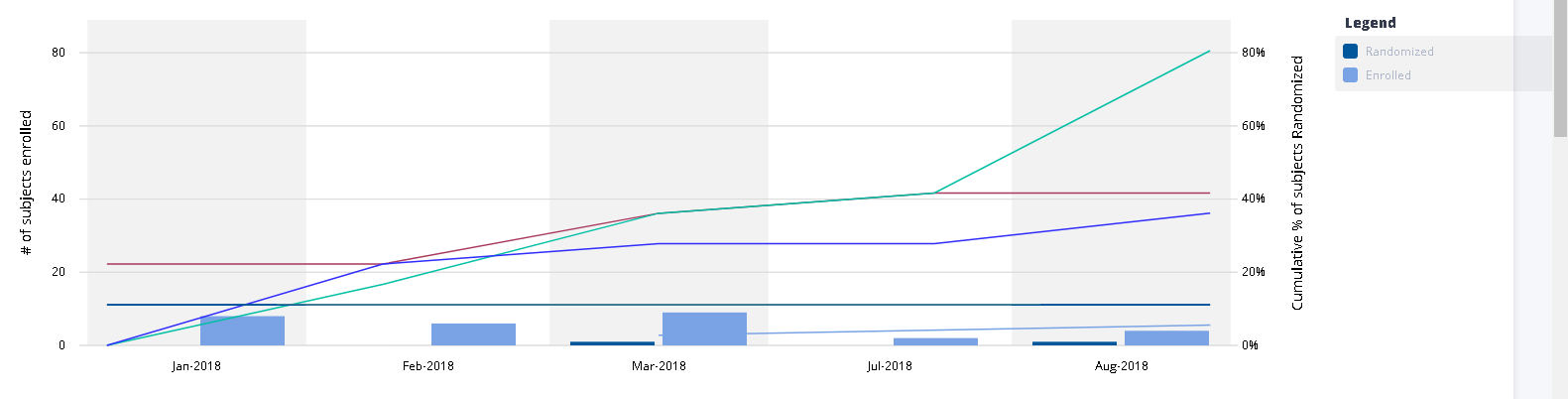
the legends are out of the parent
 kwes01
on 21 Aug 2018
kwes01
on 21 Aug 2018
Hi all,
@kwes01, I fixed the issue you have removing the [view] attribute for the chart and also I wrapped the chart component in a div with the next css properties:
// css
.chart-wrapper { display: flex; overflow: hidden; }
 cristian87dev
on 6 Sep 2018
cristian87dev
on 6 Sep 2018
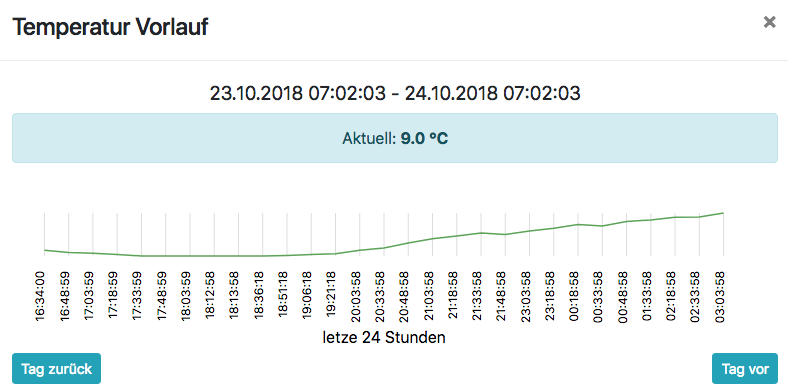
If i set view=undefined i have no values in the Y-Axis Label..
Has anyone an Idea?
Thanks very much
 delike
on 24 Oct 2018
delike
on 24 Oct 2018
Closing this. Please let me know if you still have other questions.
If not too late, I have an issue I'd like to address. Let's say I have a mat-tab-group of which each mat-tab has a ngx-chart line chart. I want the chart to resize itself to fit the size of the tab content container. However when I switch tabs, the active tab's chart remains some arbitrary default size and does not resize. How would you go about 'forcing' the chart to resize?
Thank you
 FullSiliconAlchemist
on 6 Jan 2020
FullSiliconAlchemist
on 6 Jan 2020
Closing this. Please let me know if you still have other questions.
If not too late, I have an issue I'd like to address. Let's say I have a mat-tab-group of which each mat-tab has a ngx-chart line chart. I want the chart to resize itself to fit the size of the tab content container. However when I switch tabs, the active tab's chart remains some arbitrary default size and does not resize. How would you go about 'forcing' the chart to resize?
Thank you
I also seem to be having this issue. It works outside of mat-tab, like in a div container... but experiencing issue with using ngx-charts-tree-map inside of mat-tab... even without defining view. It still uses default width.
 shinkhouse
on 22 Jan 2020
shinkhouse
on 22 Jan 2020
@FullSiliconAlchemist Actually, I figured out a solution... at least for my case. If you wrap the chart in <ng-template matTabContent></ng-template>, seems to work now.
<mat-tab label="label">
<ng-template matTabContent>
<div class="charts-container">
<ngx-charts-tree-map [view]="" [scheme]="colorScheme" [results]="results" [gradient]="gradient"
[animations]="animations" [labelFormatting]="labelFormatting" (select)="onSelect($event)">
</ngx-charts-tree-map>
</div>
</ng-template>
</mat-tab>
if anybody is still facing similar issue, please try fxLayout
<mat-card fxLayout="row" fxLayoutAlign="space-around center" >
<ngx-charts-bar-vertical
. . .
</ngx-charts-bar-vertical>
</mat-card>
 p4309027
on 11 Aug 2020
p4309027
on 11 Aug 2020
What I had to do was take out the definition for _view_ entirely.
<ngx-charts-advanced-pie-chart
[scheme]="colorScheme"
[results]="single"
[gradient]="gradient"
(select)="onSelect($event)"
(activate)="onActivate($event)"
(deactivate)="onDeactivate($event)">
</ngx-charts-advanced-pie-chart>
Before, I still had [view] = [] but that would default to 600px by 400px. Without defining it at all I think that's what it means by "If left undefined" rather than not defining the dimensions but still having an array.
 phil-trinh
on 1 Sep 2020
phil-trinh
on 1 Sep 2020
if anybody is still facing similar issue, please try fxLayout
<mat-card fxLayout="row" fxLayoutAlign="space-around center" > <ngx-charts-bar-vertical . . . </ngx-charts-bar-vertical> </mat-card>
If you have bootstrap (4) installed ., one can do as below also
- Remove the view attribute from ngx chart elements
- Add d-flex align-content-around justify-content-center (3 classes) to the container
your widget would be now responsive with respect to the window resize and aligns at center
 SamaraSsr
on 29 Sep 2020
SamaraSsr
on 29 Sep 2020
As I have struggled to get a full width chart within a grid or flexbox with Angular Material here some additional information:
You have to check if all possible workarounds are made:
- Check for the [view] property. If it is set, remove it in HTML or just don't initialize the view variable in your code
- If you use flexbox or grid (e.g. from Angular Material) make sure that you have a div with position absolute, top/bottom/right/left all set to 0. Then wrap the chart itself in another container with position: relative, height and width 100%
- If you use the chart in a wrapped component (to re-use it multiple times) then you have to wrap the component selector and the chart itself in a relative container
view!: [number, number];
..=> don't use view!: [number, number] = [] here or in ngOnInit/Ctor
In HTML
<div class="chart-wrapper">
<app-chart [id]="machine.id" [size]="" [diameter]="false"></app-chart>
</div>
.chart-wrapper {
position: relative // try with and without this
height: 100%;
width: 100%;
}
in chart component HTML
<div class="chart-wrapper">
<ngx-charts-line-chart *ngIf="view" [view]="view" [scheme]="colorScheme" [legend]="legend"
[showXAxisLabel]="showXAxisLabel" [showYAxisLabel]="showYAxisLabel" [xAxis]="xAxis" [yAxis]="yAxis"
[xAxisLabel]="xAxisLabel" [yAxisLabel]="yAxisLabel" [timeline]="timeline" [results]="data"
(select)="onSelect($event)" (activate)="onActivate($event)" [referenceLines]="referenceLines"
[showRefLines]="showRefLines" (deactivate)="onDeactivate($event)">
</ngx-charts-line-chart></div>
 Skuriles
on 23 Apr 2021
Skuriles
on 23 Apr 2021
Related issues
 faisalnet5
·
3Comments
faisalnet5
·
3Comments
 emeric0101
·
3Comments
emeric0101
·
3Comments
 DZDomi
·
4Comments
DZDomi
·
4Comments
 jvbianchi
·
4Comments
jvbianchi
·
4Comments
 sjdemoor
·
3Comments
sjdemoor
·
3Comments
Most helpful comment
I solved it by putting it inside a div with css --> display: grid;
// html
// css
#pie-chart-parent {
display: grid;
}