Ngx-charts: Pie chart chart show incorrect percentage
I'm submitting a ... (check one with "x")
[x] bug report => search github for a similar issue or PR before submitting
[ ] feature request
[ ] support request => Please do not submit support request here
Current behavior
Don't round values in Pie grid chart so much, sample: data = [
{
name: ‘first’,
value: 1546
},
{
name: ‘second’,
value: 381
},
{
name: ‘next’,
value: 38
}
];
it will show 80%, 20%, 2% that in summarize => 102%
Expected behavior
Must be "78.7%", "19.4%", "1.9%"
Reproduction of the problem
Use sample data above
What is the motivation / use case for changing the behavior?
It's weird for user to see values that in total will be more than 100 percent
Please tell us about your environment:
ngx-charts version: 4.0.3
Angular version: 2.4.5
Browser: [ Chrome ]
Language: [TypeScript 2.0.3]
 ssleptsov
All 35 comments
Mind opening this again? here's what happens to me when using the Advanced Pie Chart component with version 6.0.1:

After testing different values seems to me that it's rounding the numbers with 2 digit units?

If that's the case, when 1 value gives 1 digit unit percentage, the sum would be wrong, in the first case it would sum 100.26 %.
 luchillo17
on 31 Jul 2017
luchillo17
on 31 Jul 2017
Hi, please solve on 6.0.1 version.
Thanks
 bemonio
on 10 Aug 2017
bemonio
on 10 Aug 2017
Also there's another thing i notice, when the app loads but data still not yet loaded, i can see 0 in all entries, but the percentage shows NAN%, which again makes sense if you calculate like 0/0, maybe i shouldn't initialize on 0?
luchillo17
on 11 Aug 2017
I'm on 6.0.1 version and still getting this issue.
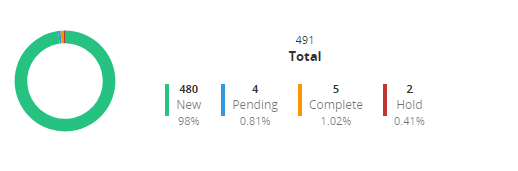
--> Total percentage : 100.24%

--> Total percentage : 99.56%
So when can I expect it will be fixed?
 hieuiris1994
on 21 Aug 2017
hieuiris1994
on 21 Aug 2017
I think 2 things should happen:
- If fields are not yet initialized, it should show percentage at 0% or not show at all, maybe just don't show when percentage is
NaN. - Allow us to choose the precision shown in the percentage, that means rounding the percentage but parametrizing the precision to round with default 0, so it should show only
intvalues, unless we tell it to show 2 decimal points.
Any thoughts on this?
luchillo17
on 21 Aug 2017
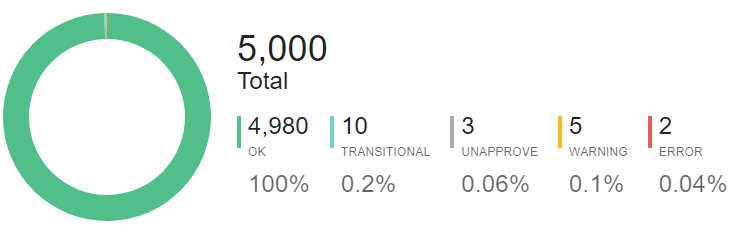
Same issue in the official demo in Plunker.
 jingjlii
on 30 Aug 2017
jingjlii
on 30 Aug 2017
using ngx-charts v7.0.1 still got the same issue, sum up is 100.5. How to fix!!

 khaukheng
on 20 Dec 2017
khaukheng
on 20 Dec 2017
Seems to round off some and leave others. Total percentage does not add up to 100%.

In the first chart, it adds up to 99.76%. The second one adds up to 100.35%.
 mmahmad
on 17 Jan 2018
mmahmad
on 17 Jan 2018
As said above, it only rounds any number with 2 digit units (above 10%).
luchillo17
on 17 Jan 2018
When is the fix expected? If it is a feature it should be configurable.
Generally this conditional rounding off is not required.
 arsyed04
on 19 Jan 2018
arsyed04
on 19 Jan 2018
Will there be? i've seen none said they will take care of it, i'm not using the library right now so...
luchillo17
on 19 Jan 2018
We will add valueFormatting inputs for this, like we do on the other charts, so you can override the rounding and formatting of the numbers yourself. Aiming to add it in the next few releases. If someone is willing to go ahead and create a PR before that, please do.
 marjan-georgiev
on 19 Jan 2018
marjan-georgiev
on 19 Jan 2018
Having a similar issue

[email protected] percent: Object(__WEBPACK_IMPORTED_MODULE_2_d3_format__["format"])('.2%')(d.data.percent),
is working correctly but the output inside the chart is like above 100% not 99,90%
 neuralprocessing
on 22 Jan 2018
neuralprocessing
on 22 Jan 2018
This will be fixed in 6.0.x to be compatible with Angular 4.x apps ?
 rduarte
on 14 May 2018
rduarte
on 14 May 2018
You mean Angular 4.x & up?
luchillo17
on 15 May 2018
Sorry if I misunderstood, but what is the last version of ngx-charts compatible with Angular apps 4.x? In my tests, the last compatible was 6.0.2.
We are planning to upgrade version of Angular , but for now I would like to fix a percentage minor bug in my app.
rduarte
on 15 May 2018
I'm using 7.4.0 / 8.1 and also have the same issue
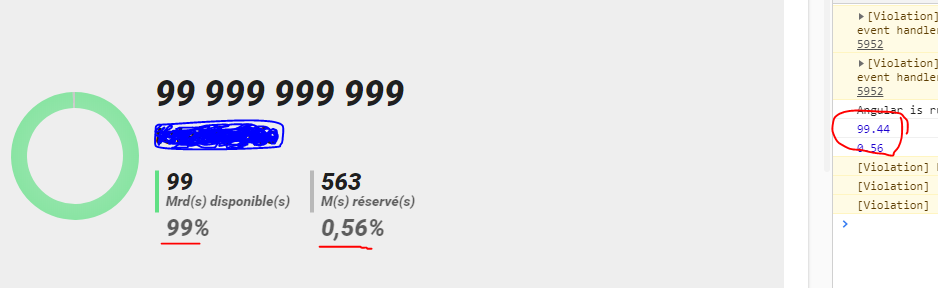
Advanced piechart
What does percentageFormatting stand for? Because i'm formating values (as you can see in console) but at the end it's still parsed and reformated by ngx-chart source code
 SaydChada
on 9 Jul 2018
SaydChada
on 9 Jul 2018
decimalChecker method in count.helper.js
Seems to be that line that do the wrong check and return 0 for 99.44 (in my previous example )
endVal % 1 !== 0 && Math.abs(endVal) <= 10
SaydChada
on 3 Aug 2018
with animations=true not working decimal in percent
 fchiumeo
on 4 Oct 2018
fchiumeo
on 4 Oct 2018
@fchiumeo Do you know if there is anything that I can do to make the animations show as well as the rounded numbers? Thank you very much for your reply!
 mokhz
on 8 Oct 2018
mokhz
on 8 Oct 2018
I know, this is not good solution, but it works properly.
public checkPercentage:boolean = true;
ngDoCheck(){
if(this.checkPercentage){
let elems = document.querySelectorAll('.item-percent');
if(elems.length > 0){
elems.forEach(elem=>{
let perc = elem.getAttribute("ng-reflect-count-to").toString();
let val = perc.substr(0, perc.indexOf('.'));
if(Number(val) > 9){
setTimeout(() => {
elem.innerHTML = perc.replace(".", ",") + '%';
this.checkPercentage = false;
}, 800);
}
})
}
}
}
P.S. but this don't work on production.
Finally, I found solution:
public disableAnimations(){
this.animations = true;
setTimeout(() => {
this.animations = false;
}, 1000);
}
.html
<ngx-charts-advanced-pie-chart
[scheme]="'picnic'"
[label]="'Total'"
[results]="results"
[gradient]="true"
[animations]="animations"
[percentageFormatting]="percentageFormatting">
</ngx-charts-advanced-pie-chart>
Call this.disableAnimations() after your http.get success.
 yuveliremil
on 14 Dec 2018
yuveliremil
on 14 Dec 2018
@yuveliremil Definitely not a good solution, but it's a Workaround.
luchillo17
on 14 Dec 2018
@yuveliremil This issue solves the problem of percentageFormatting not working; it can be done now, and for now, it works.
.html
 <ngx-charts-advanced-pie-chart
                    [results]="dashboardData"
                    [label]="label"
                    [percentageFormatting]="percentageFormatting"
                   >
 </ngx-charts-advanced-pie-chart>
.ts
 percentageFormatting(c) {
    return Math.round(c);
  }
 wzc570738205
on 27 Dec 2018
wzc570738205
on 27 Dec 2018
@wzc570738205 I know about percentageFormatting , but it not work properly when animation is true. percentage big than 9 ( > 9) not show decimals.
yuveliremil
on 27 Dec 2018
Sometimes the component provide percentages whose all values sum less than 100 %:
634 76% - 44 5.3% - 95 11% - 57 6.87%
with @wzc570738205 solution the sum of all options only sum 99%:
634 76% - 44 5% - 95 11% - 57 7%
 ealtuna
on 6 Mar 2019
ealtuna
on 6 Mar 2019
I have the same issue
 BobaFett58
on 16 Sep 2019
BobaFett58
on 16 Sep 2019
using ngx-charts v7.0.1 still got the same issue, sum up is 100.5. How to fix!!
How can I do that? put some description inside of doughnut circle? please!
 oversio
on 6 Feb 2020
oversio
on 6 Feb 2020
using ngx-charts v7.0.1 still got the same issue, sum up is 100.5. How to fix!!
How can I do that? put some description inside of doughnut circle? please!
You're asking how to do Pie Grid? https://swimlane.github.io/ngx-charts/#/ngx-charts/pie-grid
khaukheng
on 12 Feb 2020
percentageFormatting is apparently not working in pie grid, so no workaround this issue?
 renemadsen
on 29 Jun 2020
renemadsen
on 29 Jun 2020
percentageFormatting is apparently not working in pie grid, so no workaround this issue?
Version 16.0.0 and this issue is still happening. The only workaround that works for Pie Grid is disabling the animations, like this:
<ngx-charts-pie-grid
        [animations]="false"
        [results]="chartValues">
</ngx-charts-pie-grid>
Still definitely not a good solution.
 VictorCavalcante
on 2 Oct 2020
VictorCavalcante
on 2 Oct 2020
Right @VictorCavalcante , indeed the source code is taking valueFormattingonly *ngIf="!animations"if not animations!
It should be easy to fork and "fix" and see what happen...
  <div
    *ngIf="animations"
    class="total-value"
    ngx-charts-count-up
    [countTo]="roundedTotal"
    [valueFormatting]="valueFormatting"
  ></div>
  <div class="total-value" *ngIf="!animations">
    {{ valueFormatting ? valueFormatting(roundedTotal) : defaultValueFormatting(roundedTotal) }}
  </div>
 giuliohome
on 27 Apr 2021
giuliohome
on 27 Apr 2021
I think to [countTo] should be valueFormatting(roundedTotal) and not roundedTotal.
Something like that
giuliohome
on 27 Apr 2021
export function decimalChecker(countTo) {
  const endVal = Number(countTo);

  if (endVal % 1 !== 0 && Math.abs(endVal) <= 10) {
    return 2;
  }

  return 0;
}
The decimal checker says 2 decimal places if number is less or equal to 10 or otherwise 0.
It looks stupid, doesn't it?
At least they should overwrite the final formatted value no matter how the animation is implemented
giuliohome
on 28 Apr 2021
This is the fix in the count.directive.ts
I'm going to post a pull request
    const callback = ({ value, progress, finished }) => {
      if (finished) {
        this.value = valueFormatting(this.countTo);
      } else {
        this.value = valueFormatting(value);
      }
      this.cd.markForCheck();
      if (!finished) this.countChange.emit({ value: this.value, progress });
      if (finished) this.countFinish.emit({ value: this.value, progress });
    };
In the same PR I've added another commit to fix the valueFormatting for the advanced legend.
The point is that if the animations respect the value's decimal places, then a specific valueFormatting must be applied to render the value as integer.
So, maybe there could be a few other impacts (like this one for the advanced legend, that is already resolved now).
giuliohome
on 28 Apr 2021
Related issues
 ronybarbosa
·
3Comments
ronybarbosa
·
3Comments
 kakalos12
·
4Comments
kakalos12
·
4Comments
 Hypercubed
·
3Comments
Hypercubed
·
3Comments
 emeric0101
·
3Comments
emeric0101
·
3Comments
 achimha
·
3Comments
achimha
·
3Comments
Most helpful comment
@yuveliremil This issue solves the problem of
percentageFormattingnot working; it can be done now, and for now, it works.