Add ability to position the legend top|right|bottom|left.
 amcdnl
All 27 comments
Lets just do bottom for now. See this for example: https://www.screencast.com/t/5RzCSE8KjsjN
amcdnl
on 1 Feb 2017
Is there a branch open with this feature being implemented yet?
 janbro
on 22 May 2017
janbro
on 22 May 2017
There is a branch, but is behind master a lot https://github.com/swimlane/ngx-charts/tree/legend-position
 marjan-georgiev
on 22 May 2017
marjan-georgiev
on 22 May 2017
Is there an issue with the implementation other than being behind so far? I'd be interested in looking into the getting the feature into the main project.
janbro
on 22 May 2017
Yes, in that branch we tried to prototype an approach using flexbox for the layout and positioning of the legend, but we ran into a synchronization issue in the dimensions, so we postponed it for a future release. Feel free to take a look into it though. Ideas for another approach would also be appreciated.
marjan-georgiev
on 22 May 2017
Do we have an ETA on when this is going to be released? I am spending a lot of hours trying to force the legend on top or bottom!! :(
 kittycatbytes
on 19 Jun 2017
kittycatbytes
on 19 Jun 2017
+1 we would also love this feature.
 huysamen
on 20 Jun 2017
huysamen
on 20 Jun 2017
Hi All,
I have been looking for this solution also, for all day.
But when i come up here, and finding that this future is not available, so i decided to use any hack
way to get legends at bottom.
<ngx-charts-pie-chart
                    [scheme]="colorScheme"
                    [results]="single"
                    [legend]="showLegend"
                    [explodeSlices]="explodeSlices"
                    [labels]="showLabels"
                    [doughnut]="doughnut"
                    [gradient]="gradient"
                    (select)="onSelect($event)">
                </ngx-charts-pie-chart>
and bellow i added span with label class:
<div>
<span class="label label-danger label-xs"> </span>
<span class="legend-label-text">
Outstanding Amount</span>
<span class="label label-success"> </span>
<span class="legend-label-text">
Received Amount
</span></div>
and inside component.css i added this css
.label {
    border-radius: 50%;
    font-size: 9px;
    font-weight: 500;
    padding: 3px 8px;
    text-transform: uppercase;
}
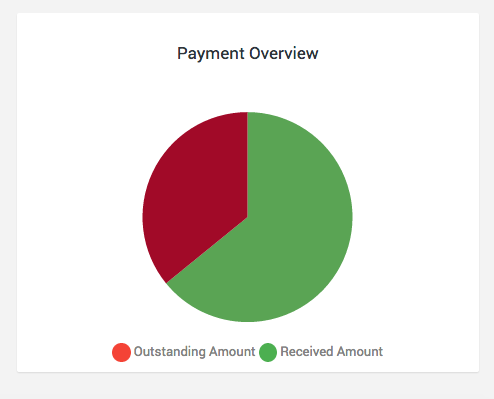
this solution look really nice on my side, and if someone is looking to get legends at bottom while
using pie charts, i think this can be good trick to get legends at bottom, while from defaults legends are on right side of the pie
 jjoao07
on 26 Jun 2017
jjoao07
on 26 Jun 2017
I am trying similarly using heavy-handed CSS, the only thing I can't do is get the advanced pie to grow larger. It is constrained in a col-3 in BootStrap4 and inheriting that width. :/
 CodePosse
on 28 Aug 2017
CodePosse
on 28 Aug 2017
+1
 windmaomao
on 8 Jan 2018
windmaomao
on 8 Jan 2018
+1
 paolareyes
on 11 Jan 2018
paolareyes
on 11 Jan 2018
Just sharing our knowledge. we have a similar requirement to position the legend to the left. nk and i solved this via css. We realized that since there are two divs (for the chart, and one for the legend), we float right the chart.
For our requirement,
.ngx-charts {
float: right !important;
position: relative !important;
}
That's it. A quick work around. We have to set the width of the legend too namely these
- legend-wrap
- legend-title
Hope this is useful to others facing the same requirement.
 erickyi2006
on 17 Jan 2018
erickyi2006
on 17 Jan 2018
If you want it bellow -
ngx-charts-legend.chart-legend {
  width: auto;
  clear: both;
  display: block;
  margin:0 auto;

  & > div {
    display:block;
    width: auto !important;
  }
  .legend-wrap {
    min-width:200px;
    text-align:center;
    margin:0 auto;
    float:none;
  }
  .legend-title{
    display:none;
  }
  .legend-labels{
    width: auto;
    display:inline-block;
    text-align:center;
    margin:0 auto;
    background:none;
    float:none;
    padding:0;
    margin-left: -13%;
    margin-top: -13%;
  }
}
 artipixel
on 5 Feb 2018
artipixel
on 5 Feb 2018
I moved the legend to the bottom using bellow SCSS, then i resized the chart SVG to get the full width
.ngx-charts-outer {
      height: 100%;
      display: flex;
      flex-direction: column-reverse;
    }
    @include media-breakpoint-up(md) {
      .legend-labels {
        display: flex;
      }
      .f-18{
        font-size: 16px;
      }
     }
    .chart-legend {
      & div:first-child{
        position: absolute;
        bottom: 0px;
        width: 90% !important;
        padding-left: 5px;
        // padding-bottom: 10px;
      }
    }
 ihabsalem
on 6 Feb 2018
ihabsalem
on 6 Feb 2018
Hi,
I am using ngx-charts-pie-chart , legends are not coming properly. Can anyone help me please.
I am attaching screenshot also.I want legends width to be 100%

 Urvashi2707
on 19 Mar 2018
Urvashi2707
on 19 Mar 2018
I personally wanted the legend on top of a pie chart, and this is how I've achieved that based on this SO answer:
.ngx-charts-outer {
    display: table;
    .ngx-charts {
        float: left !important;
        position: relative !important;
        display: table-footer-group;
    }

    .chart-legend {
        width: 100% !important;
        display: table-header-group;
    }
}
After that, there is a div that will cut off inside of the .chart-legend class, so you need to use JS to change that inline style width. We can do that after the view has rendered by wrapping the chart in a parent and accessing the DOM with the ElementRef type.
  ngAfterViewInit() {
    this.chartparent.nativeElement.getElementsByClassName('chart-legend')[0].children[0].style.width = '100%';
  }
Hacky for sure, but got me on my way to the next feature.
 drewmcdonald1337
on 17 Apr 2018
drewmcdonald1337
on 17 Apr 2018
We have had success getting the legend to the top of the chart, but have not had any luck getting the chart to expand to fill the columns where the legend used to be. Any help is greatly appreciated, thanks!!!
 bobbyg603
on 29 Jun 2018
bobbyg603
on 29 Jun 2018
FWIW, you can achieve the desired effect by using ngClass and adding CSS for top, left, bottom, right positions by over riding .ngx-charts-outer to display: flex and then modifying either flex-flow: column-reverse (top), flex-direction: row-reverse (left), and flex-flow: column (bottom). It's then a matter of a little javascript calculating to adjust white spacing in DIVs.
 emaggini
on 18 Sep 2018
emaggini
on 18 Sep 2018
Is it possible to set the legend position to top?
:/
 rudifernandes
on 18 Feb 2019
rudifernandes
on 18 Feb 2019
I have two diagrams in two separate angular components and I need to visualize the diagrams as in the image
How could I do it ...

 tamueka
on 27 Jul 2019
tamueka
on 27 Jul 2019
@tamueka I do recommend posting such question on StackOverflow, please use the issues to address any bug on the library.
For you question, you can easily set each pie-chart using any kind of grid by wrappping them on col class.
I do recommend creating a parent component with the grid stuff and then place inside each col div, the pie-chart component with custom configuration per chart. The left one should have disabled legends while the right one could handle the legend data.
 KingDarBoja
on 27 Jul 2019
KingDarBoja
on 27 Jul 2019
I have two diagrams in two separate angular components and I need to visualize the diagrams as in the image
How could I do it ...
Have you finished the implementation?
 yuezhizizhang
on 26 Sep 2019
yuezhizizhang
on 26 Sep 2019
How can i show legend in the bottom of pie chart?
 Naresh4847
on 18 Oct 2019
Naresh4847
on 18 Oct 2019
How can i show legend in the bottom of pie chart?
legendPosition = "'bottom'";
Please refer to my example and explanations in http://yuezhizizhang.github.io/swimlane/ngx-charts/2019/10/01/donut-chart-with-ngx-charts.html
yuezhizizhang
on 18 Oct 2019
No way to position the legend on top of a pie chart? :(
 Diegovictorbr
on 13 Feb 2020
Diegovictorbr
on 13 Feb 2020
+1! A solution to this would be much appreciated!
 matthiasbrix
on 14 Apr 2020
matthiasbrix
on 14 Apr 2020
+1!
 JMuhire
on 1 Apr 2021
JMuhire
on 1 Apr 2021
Related issues
 jvbianchi
·
4Comments
amcdnl
·
4Comments
jvbianchi
·
4Comments
amcdnl
·
4Comments
 kakalos12
·
4Comments
kakalos12
·
4Comments
 sjdemoor
·
3Comments
sjdemoor
·
3Comments
 emeric0101
·
3Comments
emeric0101
·
3Comments
Most helpful comment
+1 we would also love this feature.