Ngx-bootstrap: Lose height of <ul> with ngFor in Dropdown component
Simple dropdown component ->
<div class="btn-group mt-2 float-right" dropdown>
    <button id="button-animated" dropdownToggle type="button" class="btn btn-alternate dropdown-toggle"
            aria-controls="dropdown-animated" >{{buttonCategoryTitle}} <span class="caret"></span>
    </button>
    <ul id="dropdown-animated" *dropdownMenu class="dropdown-menu dropdown-menu-right" role="menu" (click)="onDropdownCategory($event)" aria-labelledby="button-animated">
      <li role="menuitem"><a class="dropdown-item">test</a></li>
    </ul>
  </div>
which looks like
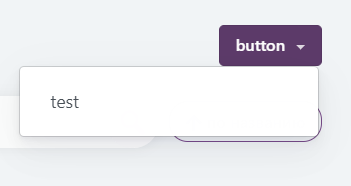
And after adding *ngFor ->
<div class="btn-group mt-2 float-right" dropdown>
    <button id="button-animated" dropdownToggle type="button" class="btn btn-alternate dropdown-toggle"
            aria-controls="dropdown-animated" >button <span class="caret"></span>
    </button>
    <ul id="dropdown-animated" *dropdownMenu class="dropdown-menu dropdown-menu-right" role="menu" (click)="onDropdownCategory($event)" aria-labelledby="button-animated">
      <li role="menuitem" *ngFor="let category of this.categories"><a class="dropdown-item" [id]="category.id">{{category.title}}</a></li>
    </ul>
  </div>
and it looks ->
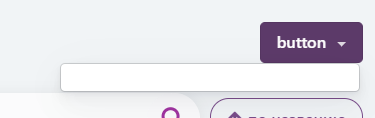
If we inspect element.. we see that there are 8 elements in list
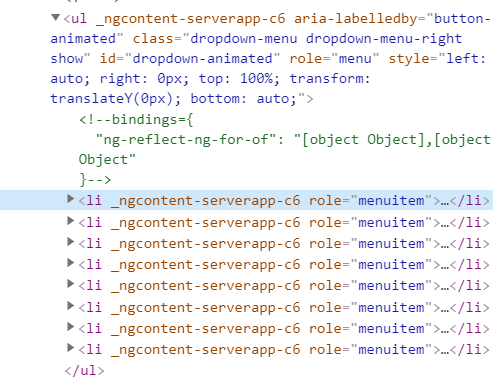
and looks like ->

Version ngx-bootstrap^5.5.0
 Daniyar111
All 8 comments
Confirmed
I have the same using version 5.5.0
Angular CLI: 9.1.0
Node: 12.14.0
OS: linux x64

Angular: 9.1.0
... animations, cli, common, compiler, compiler-cli, core, forms
... platform-browser, platform-browser-dynamic, router
Ivy Workspace: Yes

Package                         Version
---------------------------------------------------------
@angular-devkit/architect       0.901.0
@angular-devkit/build-angular   0.901.0
@angular-devkit/core            9.1.0
@angular-devkit/schematics      9.1.0
@schematics/angular             9.1.0
@schematics/update              0.901.0
rxjs                            6.5.5
typescript                      3.8.3
 FrancescoBorzi
on 5 Apr 2020
FrancescoBorzi
on 5 Apr 2020
Also tested in 5.6.1, same bug
FrancescoBorzi
on 6 Apr 2020
@FrancescoBorzi @Daniyar111 I'm not sure, maybe, I did something wrong, but, I've just pasted this code above , and can see dropdown items in both cases
https://stackblitz.com/edit/angular-dtt5x3
Perhaps, that's something, related to your styles?
 daniloff200
on 7 Apr 2020
daniloff200
on 7 Apr 2020
@daniloff200 I just found out that it only happens if you use animation:
{ isAnimated: true }
FrancescoBorzi
on 7 Apr 2020
@daniloff200 @FrancescoBorzi yeah I forgot I used providers in component:
providers: [{ provide: BsDropdownConfig, useValue: { isAnimated: true, autoClose: true } }]
Daniyar111
on 8 Apr 2020
It seems, that when we use ngFor, animation was created before the data was rendered.
When we use hardcoded data, without ngFor, there's no such delay.
Hope to create a fix today
daniloff200
on 8 Apr 2020
This fix makes the animation a bit choppy, it flashes to the incorrect height for a moment.
To see the behavior update @FrancescoBorzi 's stackblitz to the new minor version 5.6.2.
 johanosventer
on 10 Jun 2020
johanosventer
on 10 Jun 2020
I am still facing this issue
 sidjai09
on 31 Mar 2021
sidjai09
on 31 Mar 2021
Related issues
 haisaco
·
3Comments
haisaco
·
3Comments
 tuoitrexuquang
·
3Comments
tuoitrexuquang
·
3Comments
 PascalHonegger
·
3Comments
PascalHonegger
·
3Comments
 tpiros
·
3Comments
tpiros
·
3Comments
 pgeyman
·
3Comments
pgeyman
·
3Comments
Most helpful comment
It seems, that when we use ngFor, animation was created before the data was rendered.
When we use hardcoded data, without ngFor, there's no such delay.
Hope to create a fix today