Ngx-bootstrap: Tooltip/popover placement with `container="body"` is wrong when using templates
Bug description or feature request:
When using a tooltip or popover inside a bootstrap responsive table (class="table-responsive"), placement is wrong for elements that don't fit into the container. container="body" has NO EFFECT although it should. When overflow is set to hidden or visible on the (table-responsive) container, it works as expected...
Plunker/StackBlitz that reproduces the issue:
StackBlitz: https://stackblitz.com/edit/ngx-bootstrap-bdexcy
Versions of ngx-bootstrap, Angular, and Bootstrap:
ngx-bootstrap: 4.3.0/5.0.0
Angular: 8.0.1
Bootstrap: 3.4.0
Build system: Angular CLI, System.js, webpack, starter seed:
Angular CLI 8.0.2
 thecp
thecp
All 16 comments
It's much easier than that. The following code is already broken:
<div style="height: 100px"></div>
<div style="overflow-x: auto">
  <button class="btn btn-primary" type="button"
        placement="top"
        triggers="focus"
        popover="Some content"
        container="body">Click me</button>
</div>
I think the container attribute is broken for a few versions since it shouldn't have any effect of how the container looks like.
thecp
on 26 Jun 2019
use [adaptivePosition]="false" and it will work
 Neill83
on 27 Jun 2019
Neill83
on 27 Jun 2019
use [adaptivePosition]="false" and it will work
That was a bit too euphoric as it works with bottom placement for us but since we have some dynamically generated content in the popover template the calculation is wrong because this isn't taken into account...
FYI it was working perfectly for ngx-bootstrap < v4
thecp
on 27 Jun 2019
i have also dynamic text / content in the tooltip, as well as dynamic positioning.
Both are working fine with this "fix" and i'm using ngx-bootstrap 4.3.0
Neill83
on 27 Jun 2019
@Neill83 I don't doubt that it's working for you...
I've changed my reproduction scenario to show that it's not working properly no matter if [adaptivePosition]="false" is set or not: https://stackblitz.com/edit/ngx-bootstrap-bdexcy
Maybe I am doing something wrong!?
thecp
on 1 Jul 2019
it's your template what is causing the wrong placement
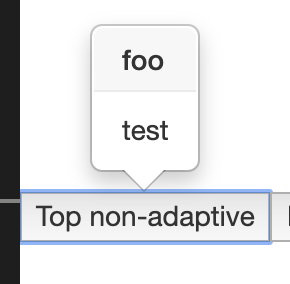
i just "removed" it and it worked fine
Neill83
on 1 Jul 2019
i just "removed" it and it worked fine
Well. That can't be the proper fix...
thecp
on 1 Jul 2019
i know, just saying... so it's not a problem of the container=body thing imo
Neill83
on 1 Jul 2019
It looks like that this is somehow related to dynamic templates.
You have the issue with *ngFor and I have it with *ngIf
I updated your example https://stackblitz.com/edit/ngx-bootstrap-mshlrn
 SteffenKoehler
on 5 Jul 2019
SteffenKoehler
on 5 Jul 2019
I'm with this error alredy 3 month (mayby more), and yes, this is dynamic content in template related.
Not find work around for this bug, but with 3.2.0 version ngx-bootstrap, popover work. Working with 3.2.0 version bootstrap, and regulary try solve this...
 nXsan
on 18 Jul 2019
nXsan
on 18 Jul 2019
Similar issue here. I have a list where every item gets its own popover. I have set placement="auto" and triggers="mouseenter:mouseleave" as well as container="body". The popover uses a template and all works well and as expected until v3.2.0. But in later versions the popover appears in the wrong location and also flickers constantly between visible/invisible even if I leave the mouse completely quiet.
[adaptivePosition]="false" improves the location issues but still the popover flickers. Interestingly, if I remove all Angular bindings as well as *ngIf's and *ngFor's from the template so it is completely static, the flickering goes away. As soon as I (re-) add just a single binding with just some plain text, the flickering comes back immediately. Btw, exact same behavior with dynamic HTML (innerHtml).
Sorry, that I can't provide an example right now...
 Peppermint138
on 25 Jul 2019
Peppermint138
on 25 Jul 2019
I rechecked the first StackBlitz (https://stackblitz.com/edit/ngx-bootstrap-bdexcy) and it seems that it's not only related to the dynamic template, it seems also be related to the overflow: auto container style.
With overflow

Without
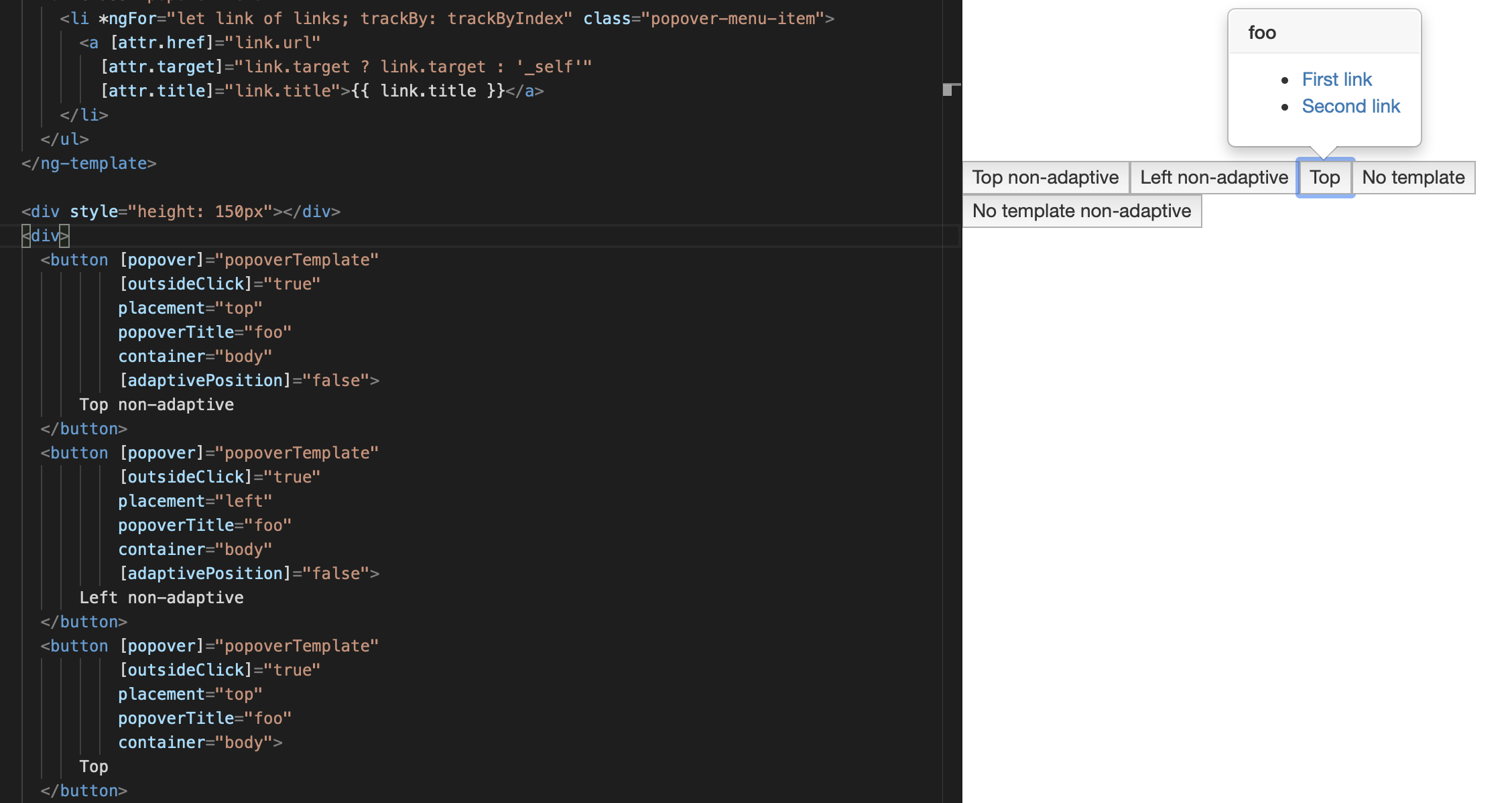
Note: This only works if [adaptivePosition] is true.
To reproduce simply open the StackBlitz and remove overflow:auto. The first two buttons will not work, because there is [adaptivePosition]="false", the third will show the popover at the right place.
Note2: I think this could be a "workaround" for some of you, but I don't think that is really the issue. If you check the updated StackBlitz (https://stackblitz.com/edit/ngx-bootstrap-mshlrn) it is working with the overflow and no-dynamic-template (third button).
(Hopefully this will work in our project 😄)
SteffenKoehler
on 4 Sep 2019
We are upgrading from Angular 5 to Angular 8 and it seems that now all of our popovers are broken with ngx-bootstrap 5.2. All popovers are at wrong places. One of the cases is:
<a  tabindex="0" type="button"
              #dPopover="bs-popover"
             [popover]="template" [containerClass]="'popover-flex'"
             placement="right" container="body" triggers=""
             [outsideClick]="true">
            <ng-template #templatee>
            </ng-template>
</a>
The popover-flex class just adds max-width: none. So the template can expand. But when the template is wider than default value like without max-width: none it starts shifting to the left. Workaround is to remove the class. My bigger problem is:
<ngx-datatable-column name="" prop="" [resizeable]="false" [maxWidth]="120">
      <ng-template let-row="row" ngx-datatable-cell-template>
            <button class="btn btn-link" [popover]="removePopover" [outsideClick]="true" #pop="bs-popover" container="body"
                    (click)="activeTemplate = row" *ngxPermissionsOnly="deletePermission">
              <i class="ven-icon ven-icon-trashcan"></i>
            </button>
          </ng-template>
        </ngx-datatable-column>
There is ngx-datatable and there is a delete button on every row. The popover appears on top of the next row.

With placement left(it is not wrong picture):

Placement right:

When the adaptivePosition is false, at least it is pointing the right row. If the placement is bottom, right or left, it is acceptable, but with placement top it is hiding the icon.

But it should look like like that:

When the button is outside of ngx-datatable-column, it works properly. I suppose the problem is related to the ng-template used in it.
This is extremely annoying bug and in some situations there is no workaround. I can not avoid ng-template. Changing the position can be a temporary solution.
 HorusEye
on 9 Oct 2019
HorusEye
on 9 Oct 2019
We have the same issue in a dropdown with overflow-x: auto and dynamic templates as popover content.
This basically forces us, to disable those popovers in certain situations. Downgrading to 3.2.0 is not an option (no angular 8 support there)
 Framus
on 21 Nov 2019
Framus
on 21 Nov 2019
An actual workaround in our situation, was to use tooltips instead of popovers with adaptivePosition=false
This will work with dynamic templates and with plain strings. Downside: you have to do some styling work + you don't have the popoverTitle parameter
Framus
on 22 Nov 2019
Setting [adaptivePosition]="false" works in some cases. The problem is now some other tooltips near the edge are not adjusted and the text is off screen.
I've gotten best results by setting an id on a container element (with position: relative) and passing that (prefixed with #) as the container. Also setting placement to "auto" helps.
 adamjhickey
on 10 Sep 2020
adamjhickey
on 10 Sep 2020
Related issues
 ghiscoding
·
3Comments
ghiscoding
·
3Comments
 tuoitrexuquang
·
3Comments
tuoitrexuquang
·
3Comments
 MihaiHoriaPopescu
·
3Comments
MihaiHoriaPopescu
·
3Comments
 haisaco
·
3Comments
haisaco
·
3Comments
 MrBlaise
·
3Comments
MrBlaise
·
3Comments
Most helpful comment
I rechecked the first StackBlitz (https://stackblitz.com/edit/ngx-bootstrap-bdexcy) and it seems that it's not only related to the dynamic template, it seems also be related to the
overflow: autocontainer style.With overflow

Without

Note: This only works if
[adaptivePosition]is true.To reproduce simply open the StackBlitz and remove
overflow:auto. The first two buttons will not work, because there is[adaptivePosition]="false", the third will show the popover at the right place.Note2: I think this could be a "workaround" for some of you, but I don't think that is really the issue. If you check the updated StackBlitz (https://stackblitz.com/edit/ngx-bootstrap-mshlrn) it is working with the overflow and no-dynamic-template (third button).
(Hopefully this will work in our project 😄)