datepicker should display current date:
and my component.ts
myDateValue: Date;
onDateChange(newDate: Date) {
console.log(newDate);
}
ngOnInit() {
this.myDateValue = new Date();
}
```
I have follow the instruction correctly but the style of border and colour is not showing, am I wrong or something missing ??
this is the pic of the date picker not showing the style :
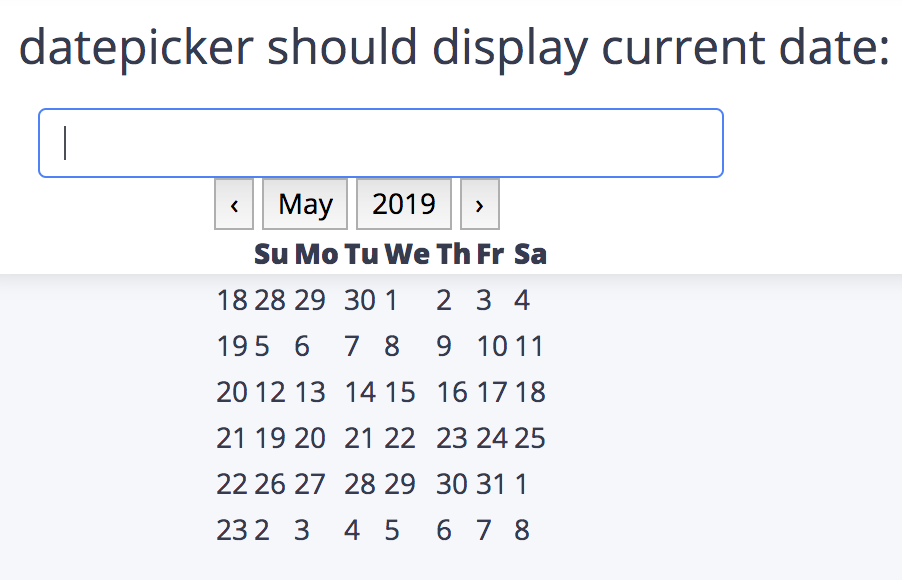
my NgModule import is using this
import { DatepickerModule, BsDatepickerModule } from "ngx-bootstrap/datepicker";
and in my html :
```
and my component.ts
myDateValue: Date;
onDateChange(newDate: Date) {
console.log(newDate);
}
ngOnInit() {
this.myDateValue = new Date();
}
```
 harmnot
Note: If you installed ngx-bootstrap not via ng add command, you will need to perform a several actions
Notable change is additional css for it "/datepicker/bs-datepicker.css"
There are two ways of adding css:
Load it from CDN. Add to your index.html
Load it from node_modules/ngx-bootstrap/datepicker/bs-datepicker.css via package bundler like Angular CLI, if you're using one.
 ludmilanesvitiy
on 23 May 2019
ludmilanesvitiy
on 23 May 2019
@harmnot Hi! See details: https://valor-software.com/ngx-bootstrap/#/datepicker
There's no need to open an issue here if you want to ask a general question.
Use StackOverflow instead or Slack
ludmilanesvitiy
on 23 May 2019
 mounthorse-slns
·
3Comments
mounthorse-slns
·
3Comments
 KimBum
·
3Comments
KimBum
·
3Comments
 YevheniiaMazur
·
3Comments
YevheniiaMazur
·
3Comments
 webdev48
·
3Comments
webdev48
·
3Comments
 juanitavollmering
·
3Comments
juanitavollmering
·
3Comments
Most helpful comment
Note: If you installed ngx-bootstrap not via ng add command, you will need to perform a several actions
Notable change is additional css for it "/datepicker/bs-datepicker.css"
There are two ways of adding css:
Load it from CDN. Add to your index.html
Load it from node_modules/ngx-bootstrap/datepicker/bs-datepicker.css via package bundler like Angular CLI, if you're using one.