Ngx-bootstrap: Timepicker no accept 12hour in 12/24 format
Bug description or feature request:
I use the Timepicker to work with 12/24h format. The problem occurs when I typing the hour to 12h. The component convert to zero hour.
Plunker/StackBlitz that reproduces the issue:
To reproduce this situation:
1 - Access the demo page https://valor-software.com/ngx-bootstrap/#/timepicker#meridian
2 - Click button "12H / 24H"

3 - In the hour field type 12

4 - Press "TAB"
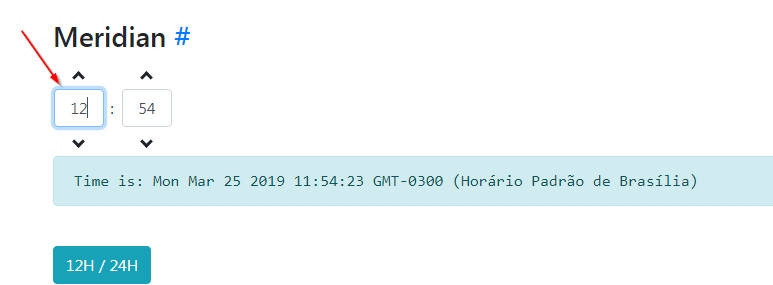
5 - The value o hour will change to "00"
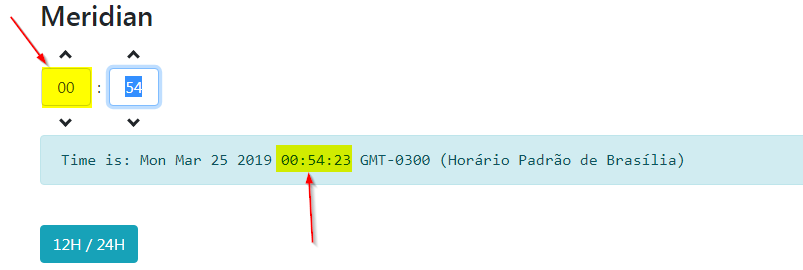
6 - The correct values should be 12:54

Versions of ngx-bootstrap, Angular, and Bootstrap:
ngx-bootstrap: 4.0.0
Angular: 7.2.9
Bootstrap: 4.3.1
 llutti
All 18 comments
Any solution to this issue?
 MatissJanis
on 12 Apr 2019
MatissJanis
on 12 Apr 2019
CONFIRMED.
Using ngx-bootstrap version: 4.3.0
Angular CLI: 7.3.9
Node: 10.15.3
OS: linux x64
Angular: 7.2.15
... animations, common, compiler, compiler-cli, core, forms
... http, language-service, platform-browser
... platform-browser-dynamic, router

Package                           Version
-----------------------------------------------------------
@angular-devkit/architect         0.13.9
@angular-devkit/build-angular     0.12.4
@angular-devkit/build-optimizer   0.12.4
@angular-devkit/build-webpack     0.12.4
@angular-devkit/core              7.3.9
@angular-devkit/schematics        7.3.9
@angular/cli                      7.3.9
@ngtools/webpack                  7.2.4
@schematics/angular               7.3.9
@schematics/update                0.13.9
rxjs                              6.5.2
typescript                        3.2.4
webpack                           4.28.4
 FrancescoBorzi
on 4 Jun 2019
FrancescoBorzi
on 4 Jun 2019
I having this issue too. It will change to 0 when hour=12. Hope the next release will fix this.
 skylee91
on 12 Jun 2019
skylee91
on 12 Jun 2019
The bug is present in 5.1.0 too, can PR be reviewed pliz ?
 RaphaelYan
on 11 Jul 2019
RaphaelYan
on 11 Jul 2019
is the bug already fixed ? Is there already a new release or what do I have to do to have the bug fixed, thanks
 stephanetcheua
on 11 Jul 2019
stephanetcheua
on 11 Jul 2019
Hi,
i am having the same issue. Is there any fix in sight?
Greez
 ChrisCherryfarmer
on 11 Jul 2019
ChrisCherryfarmer
on 11 Jul 2019
@stephanetcheua @ChrisCherryfarmer there is this PR : https://github.com/valor-software/ngx-bootstrap/pull/5248
It's fixing our project, still waiting it to be merged 🙏
RaphaelYan
on 11 Jul 2019
according to @ludmilanesvitiy , that PR of mine is breaking something else. That's why it hasn't been merged yet, I guess.
FrancescoBorzi
on 11 Jul 2019
@FrancescoBorzi That's true. @Domainv Please, take a look when you'll have time. Thanks.
 ludmilanesvitiy
on 11 Jul 2019
ludmilanesvitiy
on 11 Jul 2019
Same issue here, is there any updates?
 guiernew
on 23 Jul 2019
guiernew
on 23 Jul 2019
Hi everyone ;-) Same goes here o/
 brboi
on 24 Jul 2019
brboi
on 24 Jul 2019
I guess we could start a community out of this.
On Wed, Jul 24, 2019, 8:30 PM biddaputzese notifications@github.com wrote:
Hi everyone ;-) Same goes here o/
—
You are receiving this because you commented.
Reply to this email directly, view it on GitHub
https://github.com/valor-software/ngx-bootstrap/issues/5125?email_source=notifications&email_token=AHQZ2CWE473KZRHJGHI4Y7LQBBDPPA5CNFSM4HA4RYPKYY3PNVWWK3TUL52HS4DFVREXG43VMVBW63LNMVXHJKTDN5WW2ZLOORPWSZGOD2WFS4Q#issuecomment-514611570,
or mute the thread
https://github.com/notifications/unsubscribe-auth/AHQZ2CU4NYRNXLS6TUSR7STQBBDPPANCNFSM4HA4RYPA
.
 donnalmh
on 24 Jul 2019
donnalmh
on 24 Jul 2019
Any idea how to pull @FrancescoBorzi fix locally ?
I am a lone developer already full of stuffs to do ^^
If somebody just has the correct lead on how to do that, I can handle the rest ;-)
brboi
on 25 Jul 2019
@biddaputzese not sure if there is a way to fix it locally, if by locally you mean without modifying the library source code.
FrancescoBorzi
on 26 Jul 2019
@FrancescoBorzi nope I meant by modifying the library source code.
I am still at the beginning of my journey in the Angular/NodeJS world.
I won't say I am a newly born developer either.
If anyone can please just share the main steps (a few keywords would suffice, anyone here probably know how to find and read the docs) we should do in order to modify the library source code, it would be much appreciated 👍
brboi
on 29 Jul 2019
@biddaputzese welcome to the Angular/Node world!
there is a PR of mine which fixes this issue, however it cannot be merged since apparently it would break something else: https://github.com/valor-software/ngx-bootstrap/pull/5248
you can find the instructions about how to build the library in the main README.md file
FrancescoBorzi
on 29 Jul 2019
I found a working solution for this issue:
<timepicker [(ngModel)]="dateRange[0]" [showMeridian]="false" (ngModelChange)="setDurationFromDate()" (keyup)="adjustStartTime($event)" [showMinutes]="false"></timepicker>
My time picker now fires a keyup event whenever something is written inside the textfield of the picker (scrolling or using the arrows always worked so my only problem was the text).
This happens in the event handling of keyup:
adjustStartTime(event: any) {
    let me = this;

    setTimeout(() => {
      if (event.target.value == "12") {
        me.adjustStart = true;
      }
      else {
        me.adjustStart = false;
      }
    }, 50);
  }
So whenever my event method recognizes the input of '12' it saves the information that the time has to be manually reset later.
Now onto what happens in the (ngModelChange) method:
setDurationFromDate() {

      //prevent 00:00 <-> 12:00 confusions of start time
      if (this.dateRange[0].getHours() == 0 && this.adjustStart) {

        let me = this;
        this.adjustStart = false;
        this.dateRange[0].setHours(12);

        //prevent dispay of 00 -> set to 12
        setTimeout(() => {
            me.startPicker.nativeElement.children[0].children[0].children[0].children[1].children[0].children[0].value = "12";
        }, 50);
      }

      this.taskDuration = Math.abs((this.dateRange[1] as any) - (this.dateRange[0] as any)) / 36e5;
   }
When (ngModelChange) is fired the boolean 'adjustStart' was already set to true due to the keyup method. The hour of daterange[0] is set to 0 whereas it should be 12. This now gets done manually after the above IF statement.
Now the time is set to 12 correctly but we still have a problem. The picker now shows 00:00 instead of 12:00 although internally the correct hour is set to 12.
To fix this I added a ViewChild variable for the picker (actually a div container around it because picker itself didn't work) and set the value of the textfield manually after a timeout. This won't change anything of the now correctly set time since this is only a GUI update.
This is probably one of the ugliest fixes I had to go through and It's quite a shame that this hasn't been officially fixed by now.
Anyway hope this helps.
 bennybenedek
on 22 Jan 2020
bennybenedek
on 22 Jan 2020
bug still exist on 4.4.1
 lemoncodes91
on 18 Jul 2020
lemoncodes91
on 18 Jul 2020
Related issues
 tpiros
·
3Comments
tpiros
·
3Comments
 PascalHonegger
·
3Comments
PascalHonegger
·
3Comments
 hugonne
·
3Comments
hugonne
·
3Comments
 juanitavollmering
·
3Comments
juanitavollmering
·
3Comments
 srjkrl20011991
·
3Comments
srjkrl20011991
·
3Comments
Most helpful comment
@FrancescoBorzi That's true. @Domainv Please, take a look when you'll have time. Thanks.