Ngx-bootstrap: Popover close from within the element itself
I want to create a popover with a template and within that template a button "close" wich closes this popover.
I have the following code:
html:
<button *ngFor="let lists of listsInfo" [popover]="options" #pop="bs-popover" [outsideClick]="true" [popoverContext]="{'context':lists}" placement="right">
</button>
<template #options let-obj="context">
<table>
<tr>
<td>姓名</td>
<td>
<strong>{{obj.name}}</strong>
</td>
<button type="button" (click)="pop.hide()">
×
</button>
</tr>
</table>
</template>
ts:
import { Component } from '@angular/core';

@Component({
  selector: 'demo-popover-context',
  templateUrl: './popover-context.html'
})
export class DemoPopoverContextComponent {
  listsInfo=[
    {
      "id":1,
      "name":"vicky1"
    },
    {
      "id":2,
      "name":"xiaoyu3"
    },
    {
      "id":3,
      "name":"shanyao3"
    }
  ]
}
 vicky-rain
All 6 comments
error message:
ERROR TypeError: Cannot read property 'hide' of undefined
vicky-rain
on 29 May 2018
Any updates on this?, i am also getting this issue, if i add condition using *ngIf, if i remove *ngIf="!isPreview it is working fine
Here is my html,
<div *ngIf="!isPreview">
<button type="button" #pop="bs-popover" [outsideClick]="true" [popover]="addSectionTemplate"
popoverTitle="Add section name" placement="top" (click)="add()" title="Add Section" class="btn btn-default padding-top-bottom-7">
Add Section</button></div>
<ng-template #addSectionTemplate>
<form (ngSubmit)="updateSection(sectionForm.value,pop);" class="form-inline" [formGroup]="sectionForm">
<div [class]="sectionForm.controls.name.touched && !sectionForm.controls.name.valid ? 'form-group has-error' : 'form-group' ">
<input type="text" class="form-control" name="name" formControlName="name">
</div>
<button type="submit" class="btn btn-sm" [disabled]="!sectionForm.valid" style="background-color: transparent">
<i class="fa fa-check greenTick"></i>
</button>
<button type="button" class="btn btn-sm" (click)="onAddSectionCancel(pop)" style="background-color: transparent">
<i class="fa fa-times Customcancel"></i>
</button>
</form>
</ng-template>
in TS file,
```
Preview:Boolean =false; property
updateSection(section: QuestionSetSection,pop:any) {
this.store.dispatch(new UpdateSection(section));
pop.hide();
this.questionSet$.subscribe(result=>{
this.questionset = result;
});
this.saveQuestionSet(this.questionset);
}
onAddSectionCancel(popup:any){
popup.hide();
}
```
 vishranti5
on 8 Jun 2018
vishranti5
on 8 Jun 2018
@vishranti5 you could probably do something this way. Since pop is undefined because of ngIf.
<button type="button" #pop="bs-popover" [outsideClick]="true" [popover]="addSectionTemplate"
 popoverTitle="Add section name" placement="top" (click)="openPopover(pop)" title="Add Section" class="btn btn-default padding-top-bottom-7">

<ng-template #addSectionTemplate>
        <form (ngSubmit)="updateSection(sectionForm.value,pop);" class="form-inline" [formGroup]="sectionForm">
            <div [class]="sectionForm.controls.name.touched && !sectionForm.controls.name.valid ? 'form-group has-error' : 'form-group' ">
                <input type="text" class="form-control" name="name" formControlName="name">
            </div>
            <button type="submit" class="btn btn-sm" [disabled]="!sectionForm.valid" style="background-color: transparent">
                <i class="fa fa-check greenTick"></i>
            </button>
            <button type="button" class="btn btn-sm" (click)="closePopover()" style="background-color: transparent">
                <i class="fa fa-times Customcancel"></i>
            </button>
        </form>
</ng-template>
popover : any;
  openPopover(pop){
    this.popover = pop;
  }
  closePopover(){
    this.popover.hide();
  }
 Ronald-13
on 14 Jun 2018
Ronald-13
on 14 Jun 2018
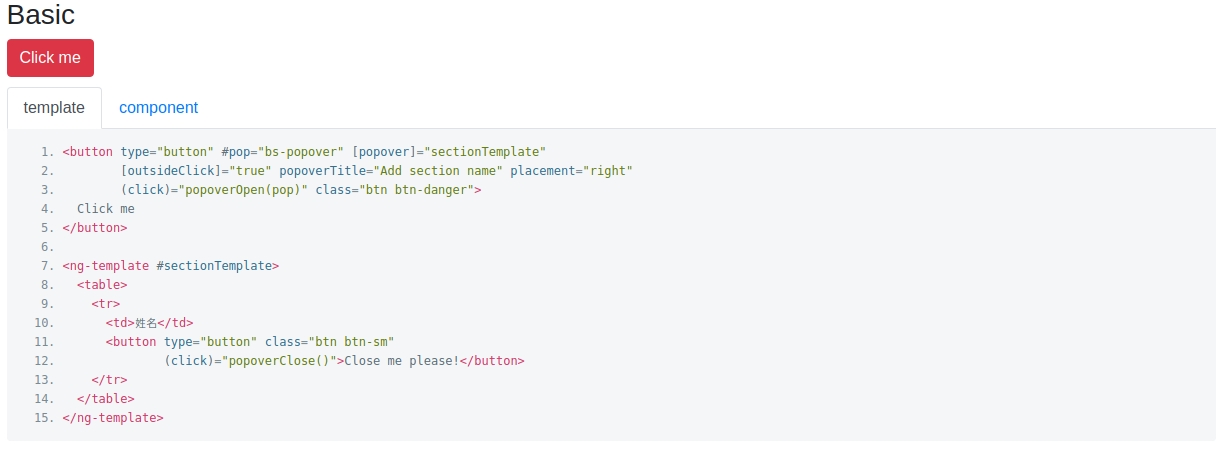
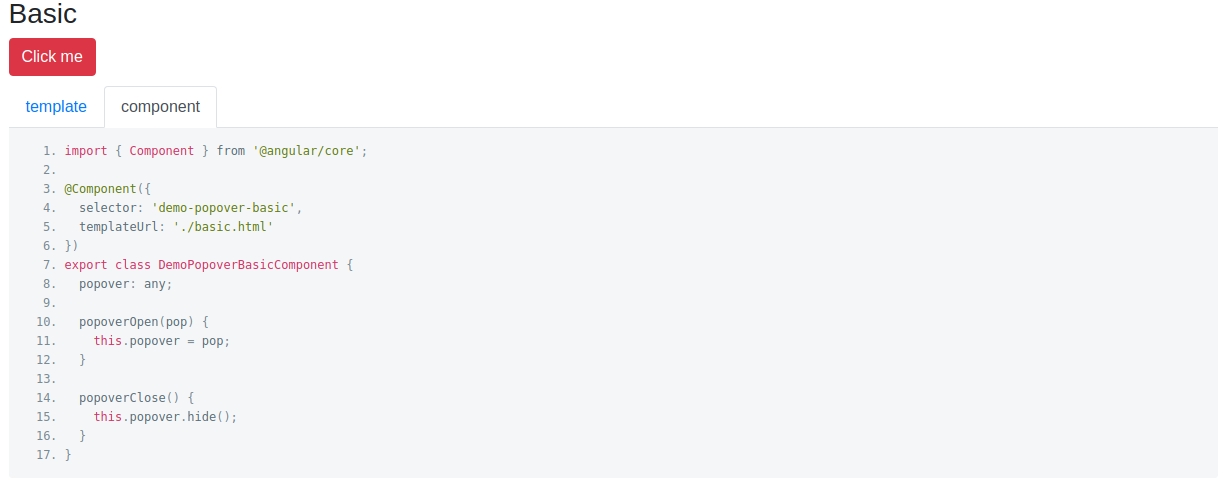
@vicky-rain
Please try to use this example:
html
ts
 tarusin
on 17 Oct 2018
tarusin
on 17 Oct 2018
One nice way without methods, variables:
<div [popover]="myTooltipTemplate" #popover="bs-popover" [popoverContext]="{popover: popover}"></div>
<ng-template #myTooltipTemplate let-node="node" let-popover="popover">
...
</ng-template>
 maleet
on 3 Nov 2018
maleet
on 3 Nov 2018
@vishranti5 you could probably do something this way. Since pop is undefined because of ngIf.
<button type="button" #pop="bs-popover" [outsideClick]="true" [popover]="addSectionTemplate"
 popoverTitle="Add section name" placement="top" (click)="openPopover(pop)" title="Add Section" class="btn btn-default padding-top-bottom-7">

<ng-template #addSectionTemplate>
        <form (ngSubmit)="updateSection(sectionForm.value,pop);" class="form-inline" [formGroup]="sectionForm">
            <div [class]="sectionForm.controls.name.touched && !sectionForm.controls.name.valid ? 'form-group has-error' : 'form-group' ">
                <input type="text" class="form-control" name="name" formControlName="name">
            </div>
            <button type="submit" class="btn btn-sm" [disabled]="!sectionForm.valid" style="background-color: transparent">
                <i class="fa fa-check greenTick"></i>
            </button>
            <button type="button" class="btn btn-sm" (click)="closePopover()" style="background-color: transparent">
                <i class="fa fa-times Customcancel"></i>
            </button>
        </form>
</ng-template>
popover : any; openPopover(pop){ this.popover = pop; } closePopover(){ this.popover.hide(); }
This is very helpful and working fine
 ajithanageswari
on 5 Jul 2019
ajithanageswari
on 5 Jul 2019
Related issues
 pgeyman
·
3Comments
pgeyman
·
3Comments
 RolfVeinoeSorensen
·
3Comments
RolfVeinoeSorensen
·
3Comments
 ravirajhalli
·
3Comments
ravirajhalli
·
3Comments
 ghiscoding
·
3Comments
ghiscoding
·
3Comments
 PascalHonegger
·
3Comments
PascalHonegger
·
3Comments
Most helpful comment
@vishranti5 you could probably do something this way. Since pop is undefined because of ngIf.