Ngx-bootstrap: UMD ES5 bundle does not contain constructor type info (regression of v3.0.0)
Bug description or feature request:
The file ngx-bootstrap.umd.js in version 3.0.0 does not contain type information for constructor parameters, leading to angular dependency injection failure:
Unhandled Promise rejection: Can't resolve all parameters for ... (depending on which service is being imported).
In version 2, UMD contains something like
    ComponentLoaderFactory = __decorate([
        Object(__WEBPACK_IMPORTED_MODULE_0__angular_core__["Injectable"])(),
        __metadata("design:paramtypes", [typeof (_a = typeof __WEBPACK_IMPORTED_MODULE_0__angular_core__["ComponentFactoryResolver"] !== "undefined" && __WEBPACK_IMPORTED_MODULE_0__angular_core__["ComponentFactoryResolver"]) === "function" && _a || Object, typeof (_b = typeof __WEBPACK_IMPORTED_MODULE_0__angular_core__["NgZone"] !== "undefined" && __WEBPACK_IMPORTED_MODULE_0__angular_core__["NgZone"]) === "function" && _b || Object, typeof (_c = typeof __WEBPACK_IMPORTED_MODULE_0__angular_core__["Injector"] !== "undefined" && __WEBPACK_IMPORTED_MODULE_0__angular_core__["Injector"]) === "function" && _c || Object, typeof (_d = typeof __WEBPACK_IMPORTED_MODULE_2__positioning_index__["c" /* PositioningService */] !== "undefined" && __WEBPACK_IMPORTED_MODULE_2__positioning_index__["c" /* PositioningService */]) === "function" && _d || Object, typeof (_e = typeof __WEBPACK_IMPORTED_MODULE_0__angular_core__["ApplicationRef"] !== "undefined" && __WEBPACK_IMPORTED_MODULE_0__angular_core__["ApplicationRef"]) === "function" && _e || Object])
    ], ComponentLoaderFactory);
whereas in version 3, there is
    ComponentLoaderFactory = component_loader_factory_decorate([
        Object(core_["Injectable"])()
    ], ComponentLoaderFactory);
(no type information at all). Interestingly, ES2015 bundle contains type info.
Plunker/StackBlitz that reproduces the issue:
Plunkr: https://plnkr.co/edit/RZGIYxl0ASPJ6wIiHVtv
Versions of ngx-bootstrap, Angular, and Bootstrap:
ngx-bootstrap: 3.0.0
Angular: 6
Bootstrap: *
Build system: Angular CLI, System.js, webpack, starter seed:
System.js (umd module)
 sebek64
All 31 comments
Same kind of error:
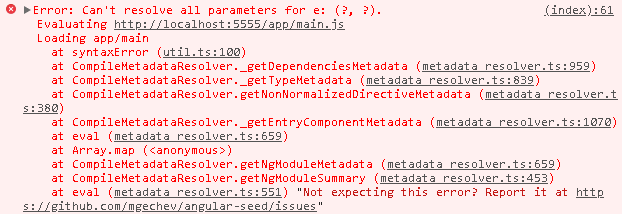
angular-seed
angular: 6.0.1
rxjs: 6.1.0
systemjs: 0.21.3
ngx-bootstrap: 3.0.0
bootstrap: 4.1.1
Regards
 jfmolina
on 25 May 2018
jfmolina
on 25 May 2018
It seems to be a problem with systemjs (as always happens between ngx-bootstrap and systemjs).
With Angular CLI it works perfectly:
StackBlitz: https://stackblitz.com/edit/angular-gfvmmq
angular: 6.0.0
rxjs: 6.1.0
ngx-bootstrap: 3.0.0
bootstrap: 4.1.1
jfmolina
on 29 May 2018
Yes, because angular-cli doesn't use this particular UMD bundle. It is not a problem for me (I'm migrating the project to angular-cli anyway), but it may be problem for others who cannot do that for any reason.
sebek64
on 29 May 2018
Sure, it's a problem for me because I'm using angular-seed (mgechev) which is completely dependent on systemjs and I can not migrate to Angular CLI (webpack).
jfmolina
on 29 May 2018
Any help to build the ngx-bootstrap 3.0.0 project and generate a UMD bundle compatible with SystemJS ?
I think ngx-bootstrap is using ngm-cli (from valor-software too) to build the UMD bundle, and due to some bug, ngm-cli is not using any configuration files from the root of the project (neither ngx-bootstrap/angular.json, nor ngx-bootstrap/tsconfig.json) and therefore webpack (called by ngm-cli) is generating the bundle with its default configuration values, which in this case generates a bundle that SystemJS can not load.
Thanks in advance
jfmolina
on 30 May 2018
With angular-seed this makes ngx-bootstrap version 3 practically unusable. The last version working for me was 2.0.5. I'm pretty sure this is a problem for many people.
 vdest
on 30 May 2018
vdest
on 30 May 2018
The current version of ngx-bootstrap 3 can work with angular-seed (and SystemJS) if the bundle "ngx-bootstrap.es2015.js" is used instead of "ngx-bootstrap.umd.min.js".
The only problem is that you have to transpile that bundle in the browser.
With SysytemJS (0.21.3) the bundle can be transpiled in the browser using plugin-babel (0.0.25), but it is a solution for tests in development and is not valid for a production environment:
package.json
// ...
  "dependencies": {
    "@angular-devkit/build-optimizer": "^0.6.1",
    "@angular/animations": "^6.0.1",
    "@angular/common": "^6.0.1",
    // ...
    "bootstrap": "^4.1.1",
    "ngx-bootstrap": "3.0.0",
    "rxjs": "^6.1.0",
    "systemjs": "0.21.3",
    "zone.js": "~0.8.26",
    "systemjs-plugin-babel": "0.0.25"
// ...
seed.config.ts
  // ...
  /**
   * The configuration of SystemJS for the `dev` environment.
   * @type {any}
   */
  SYSTEM_CONFIG_DEV: any = {
    transpiler: 'plugin-babel',
    bundles: {
      'node_modules/.tmp/Rx.min.js': [
        'rxjs',
        'rxjs/*'
      ]
    },
    paths: {
  // ...
project.config.ts
  // ...
    // Add `NPM` third-party libraries to be injected/bundled.
    this.NPM_DEPENDENCIES = [
      ...this.NPM_DEPENDENCIES,
      //{src: 'bootstrap/dist/js/bootstrap.min.js', inject: 'libs' },
      {src: 'bootstrap/dist/css/bootstrap.min.css', inject: true } // inject into css section
      // {src: 'jquery/dist/jquery.min.js', inject: 'libs'},
      // {src: 'lodash/lodash.min.js', inject: 'libs'},
      // {src: 'bootstrap/dist/js/bootstrap.min.js', inject: 'libs'}
    ];
  // ...
  const additionalPackages: ExtendPackages[] = [
    // required for dev build
    {
        name: 'ngx-bootstrap',
        path: 'node_modules/ngx-bootstrap',
        packageMeta: {
            main: 'bundles/ngx-bootstrap.es2015.js',
            defaultExtension: 'js'
        }
    },
    // required for prod build
    {
        name: 'ngx-bootstrap/',
        path: 'node_modules/ngx-bootstrap/',
        packageMeta: {
            main: 'bundles/ngx-bootstrap.es2015.js',
            defaultExtension: 'js'
        }
    },
    {
        name: 'plugin-babel',
        path: 'node_modules/systemjs-plugin-babel/plugin-babel.js'
    },
    {
        name: 'systemjs-babel-build',
        path: 'node_modules/systemjs-plugin-babel/systemjs-babel-browser.js'
    }
  ];
  this.addPackagesBundles(additionalPackages);
  // ...
A plunker example (in this case with SystemJS 0.19.47 and transpiler plugin "typescript" because plugin-babel does not work in plunker):
https://plnkr.co/edit/CV8T8ZXdwhmPRyJ7O8JZ?p=preview
EDITED:
Using the bundle "ngx-bootstrap.es2015.js" instead of "ngx-bootstrap.umd.min.js" with browser transpilation, some components work but not all. For example, asynchronous calls with Observables in the Typeahead component do not work, the call is made and the observable data is retrieved but the typeahead does not display the data: https://plnkr.co/edit/CV8T8ZXdwhmPRyJ7O8JZ?p=preview
It can be solved by configuring the components individually in SystemJS:
project.config.ts
  // ...
    const additionalPackages: ExtendPackages[] = [
      {name: 'ngx-bootstrap/alert', path: 'node_modules/ngx-bootstrap/alert',
          packageMeta: { main: 'index.js', defaultExtension: 'js'}},
      {name: 'ngx-bootstrap/typeahead', path: 'node_modules/ngx-bootstrap/typeahead',
          packageMeta: { main: 'index.js', defaultExtension: 'js'}},
      {name: 'ngx-bootstrap/utils', path: 'node_modules/ngx-bootstrap/utils',
          packageMeta: { main: 'index.js', defaultExtension: 'js'}},
      // To load ES6 code with in-browser transpilation (ngx-bootstrap 3.0.0 new bundles are incompatible with SystemJS)
      {name: 'plugin-babel', path: 'node_modules/systemjs-plugin-babel/plugin-babel.js'},
      {name: 'systemjs-babel-build', path: 'node_modules/systemjs-plugin-babel/systemjs-babel-browser.js'},
    ];
  // ...
And updating imports:
main.ts
  // ...
import {AlertModule} from 'ngx-bootstrap/alert'
import { TypeaheadModule } from 'ngx-bootstrap/typeahead';
import { TypeaheadMatch } from 'ngx-bootstrap/typeahead';
  // ...
Same issue. +1
 eliezerreis
on 1 Jun 2018
eliezerreis
on 1 Jun 2018
+1
 mirkara
on 4 Jun 2018
mirkara
on 4 Jun 2018
With Angular CLI it works perfectly:
StackBlitz: https://stackblitz.com/edit/angular-gfvmmq
@jfmolina Stackblitz uses systemjs too.
The reason why it's working there is that dependencies are imported from subfolders and code is transpiled:
import { AlertModule } from 'ngx-bootstrap/alert';
Try changing it to import { AlertModule } from 'ngx-bootstrap'; and see how it's not working https://stackblitz.com/edit/angular-dzdpbq?file=src/app/app.module.ts
 alexzuza
on 16 Jun 2018
alexzuza
on 16 Jun 2018
+1
I cannot use this with the latest mgechev Angular seed due to this issue and my project is too complex to move to cli at this point.
Please fix!
 jt3po
on 22 Jun 2018
jt3po
on 22 Jun 2018
Is there any update on this? It is affecting me as well.
Can this please be fixed?
 cbysterv
on 2 Jul 2018
cbysterv
on 2 Jul 2018
simple repro on angular/cli project using JEST testing : https://github.com/ronlawrence3/ngx-bootstrap-example
 ronlawrence-dg
on 10 Jul 2018
ronlawrence-dg
on 10 Jul 2018
+1
This is affecting our project as well, we are using systemjs and can't upgrade from 2.0.4 version to 3.0.1
We are blocked, fix will be appreciated !!
 pgarge
on 11 Jul 2018
pgarge
on 11 Jul 2018
The same issue with when using dropdown, modal and datepicker.
@angular/cli 6.0.8
ngx-bootstrap 3.0.1
 dev1lmini
on 13 Jul 2018
dev1lmini
on 13 Jul 2018
+1
 grotup
on 16 Jul 2018
grotup
on 16 Jul 2018
Anyone found a workaround? We are dead in the water on this one.
 ronlawrence3
on 23 Jul 2018
ronlawrence3
on 23 Jul 2018
We are trying to use ng packagr
 valorkin
on 23 Jul 2018
valorkin
on 23 Jul 2018
+1
 Ssuri013
on 2 Aug 2018
Ssuri013
on 2 Aug 2018
+1
 errolgr
on 4 Aug 2018
errolgr
on 4 Aug 2018
For anyone looking for a temporary workaround I used rollup to generate a new UMD file that I then had my systemjs config point to. It seems to work. I figured I would just keep this file in my repo until the one in ngx-bootstap is fixed.
Here's the rollup config file I used. You'll need to install the rollup and rollup-plugin-local-resolve packages.
import rollup      from 'rollup';
import localResolve from 'rollup-plugin-local-resolve';

export default {
    entry: 'node_modules/ngx-bootstrap/index.js',
    dest:'ngx-bootstrap.umd.js',
    format: 'umd',
    plugins: [localResolve()],
    moduleName: 'ngx-bootstrap'
}
 PMahern
on 6 Aug 2018
PMahern
on 6 Aug 2018
@PMahern I have tried to use your workaround. When I run rollup -c using your config file as an example it generates a new ngx-boostrap.umg.js file. So far so good, however when I replace the ngx-bootstrap original file, the application starts to show up lots of different errors. How do you point systemjs to this new file umd file? I have noticed that .umd.min.js and umd.map still continuing on original ngx-bootstrap folder.
This is one example of an error that starts after replace the new umd.js file.
Error: (SystemJS) undefined is not an object (evaluating 'host.base64encode')
eliezerreis
on 6 Sep 2018
@eliezerreis I don't remember having to do much to the systemjs config I already had aside from changing where it located the umd file since I included it in my repo for the time being.
I put the .umd.js file in a folder in my project named "bundle/ngx-bootstrap". Here's the relevant parts of the systemjs config I have:
System.config({
    packages: {
        "ngx-bootstrap": {
            "main": "ngx-bootstrap.umd.min.js",
            "defaultExtension": "js",
            "format": "amd"
        }
    }
     map: {
        "ngx-bootstrap": "bundle/ngx-bootstrap",
        }
    }
}
Are you replacing the file in the original npm package folder? You could try placing it elsewhere if that is the case.
PMahern
on 6 Sep 2018
soon be fixed in new release
 Domainv
on 16 Oct 2018
Domainv
on 16 Oct 2018
I'm stuck with 3.0.1 and I have this issue with jest.
Could anyone provide an exemple of the workaround ?
 samIntegrateur
on 25 Mar 2019
samIntegrateur
on 25 Mar 2019
@samIntegrateur Did you tried 3.1.2 version?
Domainv
on 25 Mar 2019
@Domainv I have tried several next versions, but it breaks legacy code in my app, especially a directive based on datepicker-inner.component, which apparently I can't import anymore
samIntegrateur
on 25 Mar 2019
@samIntegrateur 3.1.2 didn't have any breaking changes.
Please create a small repo with reproduction, maybe I can help you.
Domainv
on 25 Mar 2019
@Domainv thanks for your help, I will try to share something.
You were right, with 3.1.2 it works with standard usage.
But in my custom directive I have
@ViewChild(DatePickerInnerComponent)
  public _datePicker: DatePickerInnerComponent;
and it breaks app compilation with
Module not found: Error: Can't resolve 'ngx-bootstrap/datepicker/datepicker-inner.component'
samIntegrateur
on 25 Mar 2019
Use just ‘ngx-bootstrap/datepicker’
Domainv
on 25 Mar 2019
@Domainv error TS2305: Module '"node_modules/ngx-bootstrap/datepicker/ngx-bootstrap-datepicker"' has no exported member 'DatePickerInnerComponent'.
edit: I think that's because, it's not in the public_api file, when I add it, compilation works.
I have now Error: Can't construct a query for the property "_datePicker" of "DatePickerInputComponent" since the query selector wasn't defined.
Sorry it's not related to the topic anymore.
samIntegrateur
on 25 Mar 2019
Related issues
 tuoitrexuquang
·
3Comments
tuoitrexuquang
·
3Comments
 mounthorse-slns
·
3Comments
mounthorse-slns
·
3Comments
 MihaiHoriaPopescu
·
3Comments
MihaiHoriaPopescu
·
3Comments
 haisaco
·
3Comments
haisaco
·
3Comments
 webdev48
·
3Comments
webdev48
·
3Comments
Most helpful comment
With angular-seed this makes ngx-bootstrap version 3 practically unusable. The last version working for me was 2.0.5. I'm pretty sure this is a problem for many people.