Ngx-bootstrap: data-picker problem:The first default time format error
The first time is
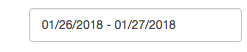
But after I chose the time, it is:

My configuration is
this.bsConfig = Object.assign({}, { locale: 'zh-cn', rangeInputFormat: 'YYYY/MM/DD' });
 ningkexin
All 21 comments
Ngx bs version?
 valorkin
on 28 Jan 2018
valorkin
on 28 Jan 2018
@valorkin 1.9.3
ningkexin
on 6 Feb 2018
I have the same issue with dateInputFormat, it is ignored for the initial [(bsValue)], but it works afterward.
Version: 2.0.2
 gaborszokoly
on 26 Feb 2018
gaborszokoly
on 26 Feb 2018
Same issue for me. Any updates on this, @valorkin ?
 colinturner
on 27 Mar 2018
colinturner
on 27 Mar 2018
Same issue here.
Version 2.0.2
 ianfdk
on 4 Apr 2018
ianfdk
on 4 Apr 2018
In which lifecycle event do you set bsconfig value?
valorkin
on 5 Apr 2018
@valorkin I personally just copy-pasted the example so it's hardcoded in the template.
<input type="text" class="form-control" placeholder="{{ 'DATE_PLACEHOLDER' | translate }}" [isDisabled]="disabled" [bsConfig]="{ dateInputFormat: 'YYYY-MM-DD' }" (onHidden)="change($event)" [(bsValue)]="value" bsDatepicker/>
ianfdk
on 5 Apr 2018
Seeing the same with 2.0.5 both when providing value in template as @ianfdk suggested and when initializing a bound property during ngInit.
 shayangz
on 16 Jun 2018
shayangz
on 16 Jun 2018
This might help: seems to occur only when bsValue is set as part of ngOnInit event.
shayangz
on 20 Jun 2018
Please see this simple repro https://stackblitz.com/edit/angular-xaknok?file=app/app.component.html (using 3.0.1)
import { Component } from '@angular/core';

@Component({
  selector: 'my-app',
  templateUrl: './app.component.html',
  styleUrls: [ './app.component.css' ]
})
export class AppComponent  {
   bsValue = new Date();
}
<input type="text"
       bsDatepicker
      [bsValue]="bsValue"
      [bsConfig]="{dateInputFormat: 'YYYY/MM/DD'}">
The date is initially displayed in MM/DD/YYYY format.
After selecting date on the picker, it becomes YYYY/MM/DD.
 kimamula
on 11 Jul 2018
kimamula
on 11 Jul 2018
What is the status? I also have this issue :(
 hajdun
on 12 Mar 2019
hajdun
on 12 Mar 2019
same here with version 4.2.0
 mrjohnr
on 3 May 2019
mrjohnr
on 3 May 2019
same issue, version 4.2.0
 simoncas
on 7 May 2019
simoncas
on 7 May 2019
This might help: seems to occur only when
bsValueis set as part ofngOnInitevent.
I agree. When bsValue is set into ngOnInit, there is a problem. A use the version 3.3.0.
But there is more. I can make it work on the ngOnInit when i set bsValue into a subcribe of asynchronous treatment of RXjs.
My workaround, and it's very dirty, is to encapsulate my code (which is into the ngOnInit) in a setTimeout ...
 Khanaash
on 27 Jun 2019
Khanaash
on 27 Jun 2019
Also having this issue. The Above mentiioned setTimeout(() => { /* set the config here */}) is not working for me though. Ugly workaround :(
 JAspeling
on 30 Aug 2019
JAspeling
on 30 Aug 2019
Component:
<input bsDatepicker
    [value]="getDate() | date:dateFormat"
    [bsConfig]="dpConfig" />
config:
public dateFormat: string = 'DD-MMMM-YYYY';
public dpConfig: Partial<BsDatepickerConfig> = {
    containerClass: 'theme-default',
    dateInputFormat: this.dateFormat
};
also works. Its also not an ideal workaround. It's a normal date pipe from @angular/core
JAspeling
on 30 Aug 2019
Component:
<input bsDatepicker
    [value]="getDate() | date:dateFormat"
    [bsConfig]="dpConfig" />
config:
public dateFormat: string = 'DD-MMMM-YYYY';
public dpConfig: Partial<BsDatepickerConfig> = {
    containerClass: 'theme-default',
    dateInputFormat: this.dateFormat
};
also works. Its also not an ideal workaround. It's a normal date pipe from
@angular/core
It only works with single dates, OP needs dateRange, it can be done with two datepickers but why use them if you have dateRange picker, also custom pipe would do the trick I suppose. Also sad that there's no fix for this long lasting issue
 exitlol
on 30 Oct 2019
exitlol
on 30 Oct 2019
Possible solution for DateRanges with custom Pipe:
pipe.ts:
@Pipe({
  name: 'dateRangeFormat'
})
export class DateRangeFormatPipe implements PipeTransform {

  transform(valueRange: Date[], format: string, locale: string): any {
    let formattedDate = '';
    if (valueRange && valueRange.length && format && locale) {
      for (let i = 0; i < valueRange.length; i++) {
        let separator = ' - ';
        valueRange[i + 1] ? separator = ' - ' : separator = '';
        formattedDate += formatDate(valueRange[i], format, locale) + separator;
      }
    } else {
      return null;
    }
    return formattedDate;
  }

}

in component:
<input class="form-control"
                   #drp="bsDaterangepicker"
                   placeholder="your placeholder"
                   bsDaterangepicker
                   [value]="yourDateRangeVar | dateRangeFormat: 'yyyy.MM.dd': 'hu'"
                   [bsConfig]="yourBsConfig"
                   (bsValueChange)="dateChangeHandlingEvent($event)">
Not the change in component from [bsValue] to [value]! otherwise your input will be empty.
exitlol
on 30 Oct 2019
Dudes, the bug is still there. Any movement on this?
A workaround for people waiting for 2 years is to set the value inside a timeout of 0 sec, inside your ng-Init. That way the set value after ng-init is called, but fast enough that nothing else from the user can happen.
setTimeout(() => {
    // Set your time value here
}, 0)
 jchatel
on 15 May 2020
jchatel
on 15 May 2020
Please see this simple repro https://stackblitz.com/edit/angular-xaknok?file=app/app.component.html (using 3.0.1)
import { Component } from '@angular/core';

@Component({
  selector: 'my-app',
  templateUrl: './app.component.html',
  styleUrls: [ './app.component.css' ]
})
export class AppComponent  {
   bsValue = new Date();
}
<input type="text" bsDatepicker [bsValue]="bsValue" [bsConfig]="{dateInputFormat: 'YYYY/MM/DD'}">The date is initially displayed in
MM/DD/YYYYformat.
After selecting date on the picker, it becomesYYYY/MM/DD.
Two years past, and there is still no fix? I still have the same problem with version 5.6.1 and 5.6.2!
 MahdiSaber
on 3 Jun 2020
MahdiSaber
on 3 Jun 2020
Also having this problem here.
"ngx-bootstrap": "^5.6.1",
 rjborba
on 29 Jun 2020
rjborba
on 29 Jun 2020
Related issues
 Scooviese
·
3Comments
Scooviese
·
3Comments
 PascalHonegger
·
3Comments
PascalHonegger
·
3Comments
 juanitavollmering
·
3Comments
juanitavollmering
·
3Comments
 ctrl-brk
·
3Comments
ctrl-brk
·
3Comments
 mounthorse-slns
·
3Comments
mounthorse-slns
·
3Comments